1. Introduction
The ELECDER D19 True Wireless Earbuds are designed to provide a superior audio experience with advanced features such as Bluetooth 5.0 connectivity, noise cancellation, and IPX7 waterproofing. This manual provides comprehensive instructions for setting up, operating, and maintaining your earbuds to ensure optimal performance and longevity.
Caractéristiques principales :
- Bluetooth 5.0: Fast and stable wireless transmission with CVC8.0 noise cancellation for clear calls.
- Premium Hi-Fi Stereo Audio: APTX audio for lossless transmission, delivering immersive sound with crystal clarity and deep bass.
- IPX7 imperméable à l'eau: Resistant to sweat, water, and rain, ideal for workouts and outdoor activities.
- Conception ergonomique : Lightweight (5g per earbud) with flexible silicone ear-fins and S/M/L ear caps for a secure and comfortable fit.
- Quick Pairing Technology: Automatic power-on and pairing upon removal from the charging case.
- USB Quick Charge & Wireless Charging: Up to 4.5 hours of music on a single charge, with an additional 18 hours from the charging case, supporting both USB and wireless charging.
2. Produit terminéview

Figure 2.1: ELECDER D19 True Wireless Earbuds in their charging case. The earbuds are black, sleek, and designed for in-ear use, while the compact charging case is also black with a smooth finish.
Contenu de la boîte :
- ELECDER D19 True Wireless Earbuds (Left and Right)
- Étui de chargement
- Câble de chargement USB
- Embouts d'oreille (tailles S/M/L)
- Manuel de l'utilisateur (ce document)
3. Guide de configuration
3.1 Chargement des écouteurs et de l'étui
Before first use, fully charge the earbuds and the charging case. The charging case supports both USB cable charging and wireless charging.
- Chargement USB : Connect the provided USB cable to the charging port on the case and plug the other end into a USB power source (e.g., computer, wall adapter). The indicator light on the case will show charging status.
- Chargement sans fil : Place the charging case on a compatible wireless charging pad. The indicator light will flash to confirm charging.

Figure 3.1: The ELECDER D19 charging case being charged wirelessly on a charging pad, also showing the Micro USB port for wired charging. This image highlights the dual charging capabilities of the case.
A full charge for the earbuds provides approximately 4.5 hours of music playback, and the charging case provides an additional 18 hours of battery life.
3.2 Appairage avec votre appareil
The ELECDER D19 earbuds feature quick pairing technology for seamless connection.
- Étape 1 : Open the charging case and take out both earbuds. They will automatically power on and pair with each other.
- Étape 2 : Sur votre smartphone ou appareil compatible Bluetooth, accédez aux paramètres Bluetooth.
- Étape 3 : Rechercher available devices and select "Elecder D19" from the list to connect.
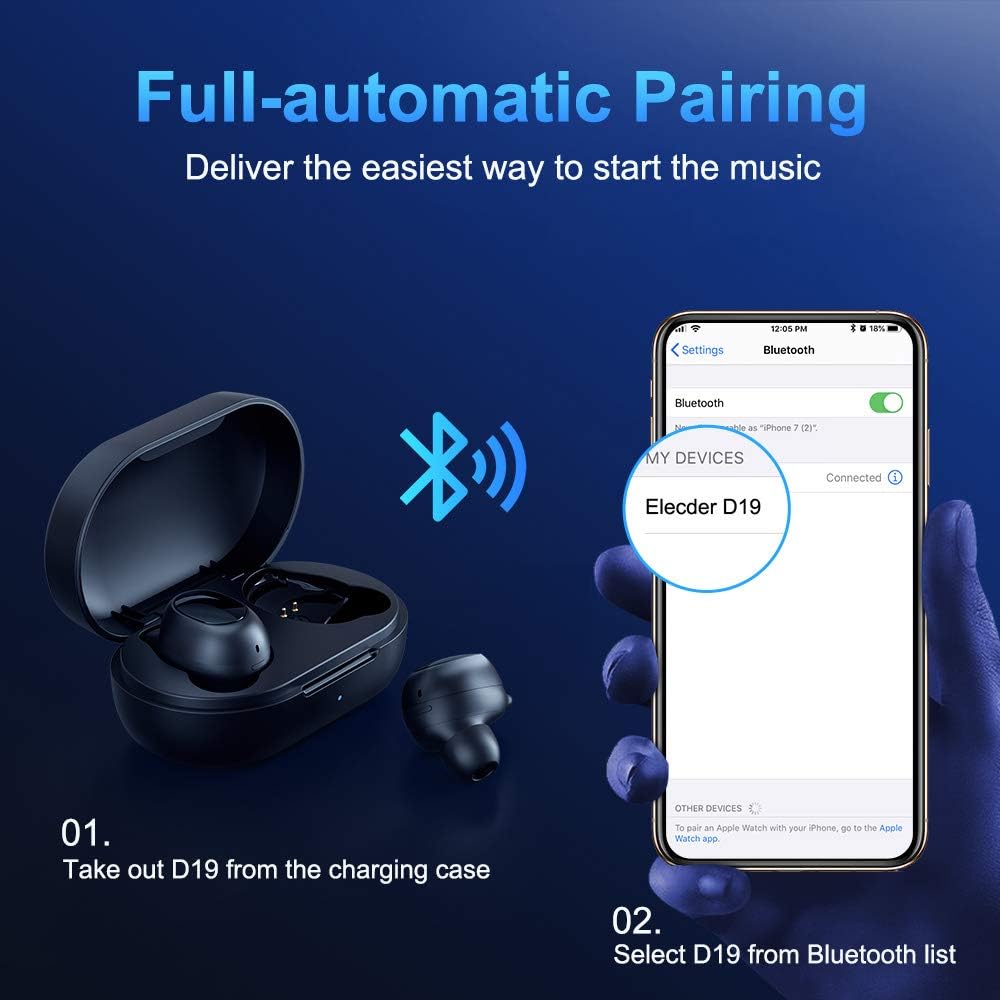
Figure 3.2: A visual guide demonstrating the automatic pairing process. The image shows the earbuds being taken out of the case and then the "Elecder D19" option appearing in a smartphone's Bluetooth settings for connection.
Après le premier appairage, les écouteurs se connecteront automatiquement au dernier appareil apparié lorsqu'ils seront retirés de l'étui de chargement.

Figure 3.3: An illustration showing the stable Bluetooth connection between the ELECDER D19 earbuds and various smart devices, including smartphones and tablets.
4. Mode d'emploi
4.1 Port des écouteurs
For optimal sound quality and comfort, choose the ear tips that best fit your ears. The earbuds come with S, M, and L sizes. Insert the earbuds into your ears and gently rotate them to find a secure and comfortable fit. The ergonomic ear-fin design helps ensure stability during movement.
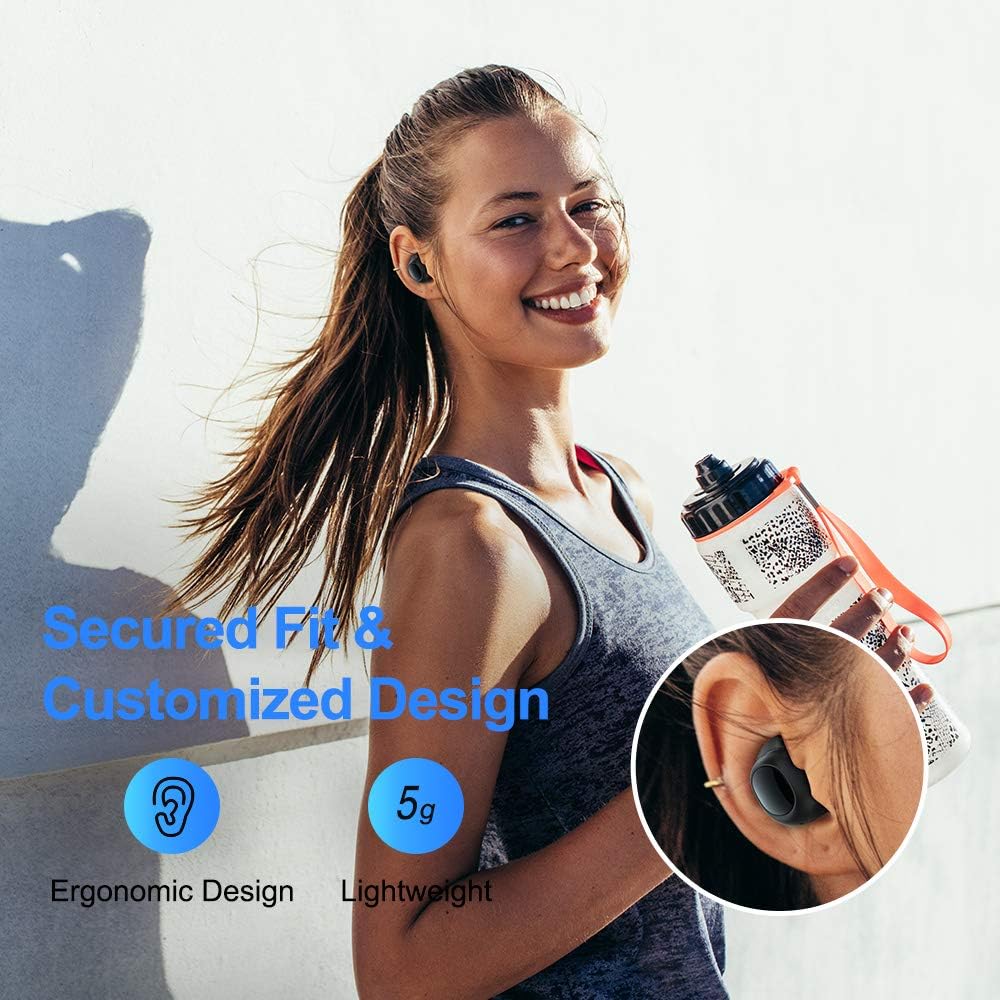
Figure 4.1: A person wearing the ELECDER D19 earbuds during a workout, demonstrating the secure and comfortable fit provided by the ergonomic design and customizable ear tips.
4.2 Contrôle des médias
The ELECDER D19 earbuds feature physical buttons for media control. Specific button functions may vary slightly based on the device and operating system, but common controls include:
- Lecture/Pause : Une simple pression sur l'un ou l'autre écouteur.
- Piste suivante : Appuyez deux fois sur l'écouteur droit.
- Piste précédente: Appuyez deux fois sur l'écouteur gauche.
- Monter le son: Appuyez trois fois sur l'écouteur droit.
- Baisser le volume: Triple press on the left earbud.
4.3 Gestion des appels
Manage your calls directly from the earbuds:
- Répondre/Terminer l'appel : Une simple pression sur l'un ou l'autre écouteur.
- Rejeter l'appel : Appuyez et maintenez l'un ou l'autre des écouteurs pendant 2 secondes.
- Activer l'assistant vocal: Appuyez sur l'un ou l'autre écouteur et maintenez-le enfoncé pendant 3 secondes (par exemple, Siri, Google Assistant).
5. Maintenance et entretien
Proper maintenance ensures the longevity and optimal performance of your ELECDER D19 earbuds.
5.1 Nettoyage
- Nettoyez régulièrement les écouteurs et l'étui de chargement avec un chiffon doux, sec et non pelucheux.
- Retirez les embouts auriculaires et nettoyez-les avec de l'eau et du savon doux, puis séchez-les soigneusement avant de les remettre en place.
- Use a cotton swab or small brush to gently clean the charging contacts on both the earbuds and the case.
- Évitez d'utiliser des matériaux abrasifs, de l'alcool ou des produits de nettoyage chimiques.
5.2 Résistance à l'eau (IPX7)
The ELECDER D19 earbuds are IPX7 waterproof, meaning they can withstand submersion in up to 1 meter of water for 30 minutes. This makes them suitable for protection against sweat, rain, and accidental splashes.

Figure 5.1: The ELECDER D19 earbuds shown with water droplets, illustrating their IPX7 waterproof rating, which protects them from sweat, rain, and splashes.
Note: The charging case is not waterproof. Ensure earbuds are dry before placing them back into the charging case.
5.3 Stockage
Lorsqu'ils ne sont pas utilisés, rangez les écouteurs dans leur étui de chargement pour les protéger et maintenir leur charge. Conservez l'étui dans un endroit frais et sec, à l'abri des températures extrêmes et de la lumière directe du soleil.
6. Dépannage
If you encounter issues with your ELECDER D19 earbuds, refer to the following common solutions:
| Problème | Cause possible | Solution |
|---|---|---|
| Les écouteurs ne se connectent pas à l'appareil. | Le Bluetooth est désactivé sur l'appareil ; les écouteurs ne sont pas en mode de couplage ; un appareil précédemment couplé interfère. | Ensure Bluetooth is enabled. Place earbuds back in case, then take them out to re-enter pairing mode. Forget "Elecder D19" from your device's Bluetooth list and re-pair. |
| Un seul écouteur fonctionne. | Earbuds not paired with each other; low battery on one earbud. | Place both earbuds back into the charging case, close the lid, wait a few seconds, then open and take them out again. Ensure both earbuds are charged. |
| Aucun son ou volume faible. | Device volume too low; ear tips not properly sealed; debris in earbud nozzle. | Increase volume on your device. Adjust earbud position or try different sized ear tips for a better seal. Clean earbud nozzles. |
| Le boîtier de charge ne charge pas. | Faulty cable/charger; improper placement on wireless charger. | Try a different USB cable and power adapter. Ensure the case is correctly aligned on the wireless charging pad. |
| Connexion Bluetooth instable. | Interference; distance from device; low earbud battery. | Reduce distance between earbuds and device. Avoid environments with strong Wi-Fi or other Bluetooth signals. Ensure earbuds are fully charged. |
7. Spécifications
Detailed technical specifications for the ELECDER D19 True Wireless Earbuds:
| Fonctionnalité | Détail |
|---|---|
| Nom du modèle | ELECDER D19 |
| Technologie de connectivité | Sans fil (Bluetooth 5.0) |
| Portée Bluetooth | 33 pieds |
| Placement des oreilles | Dans l'oreille |
| Facteur de forme | Dans l'oreille |
| Contrôle du bruit | Réduction active du bruit (CVC8.0) |
| Microphone | Compris |
| Niveau de résistance à l'eau | Étanchéité IPX7 |
| Autonomie de la batterie (écouteurs) | Up to 4.5 hours (music) / 4 hours (calling) |
| Charging Case Additional Playtime | 18 heures |
| Temps de charge | Environ 2 heures |
| Interface de chargement | Micro USB, Wireless Charging |
| Poids de l'article | 1.92 ounces (total) / 5g (each earbud) |
| Dimensions du produit | 3.89 x 3.89 x 1.65 pouces |
| Appareils compatibles | Smartphones iOS et Android |
| Matériel | Embouts d'oreilles en silicone |
| Couleur | Noir |

Figure 7.1: An infographic detailing the battery life of the ELECDER D19 earbuds and charging case, showing 4 hours for calls, 4.5 hours for music, and a total of 18 hours with the 500mAh charging case.
8. Garantie et assistance
ELECDER products are manufactured to high quality standards. For information regarding warranty coverage, technical support, or service inquiries, please refer to the contact information provided with your product packaging or visit the official ELECDER website.
Pour obtenir de l'aide supplémentaire, vous pouvez également contacter le détaillant auprès duquel vous avez acheté le produit.


