1. Produit terminéview
The INTRATONE HTEL2-00 - 09-0102 remote control is a sophisticated device featuring 4 bi-technology 868 MHz channels. It integrates both Mifare and HF 868 MHz technologies, allowing for straightforward programming via the official www.intratone.info website or with a dedicated programmer (model 12-0115). A key security feature is its unique ten-digit identification number, ensuring personalized and secure operation. This remote offers an operating range of up to 10 meters and is broadly compatible with various electronic devices, including televisions, smartphones, cameras, and projectors. Measuring 6.5 x 3.8 x 1 cm and weighing only 30 grams, it is designed for portability and ease of use, providing optimal control over your compatible devices.
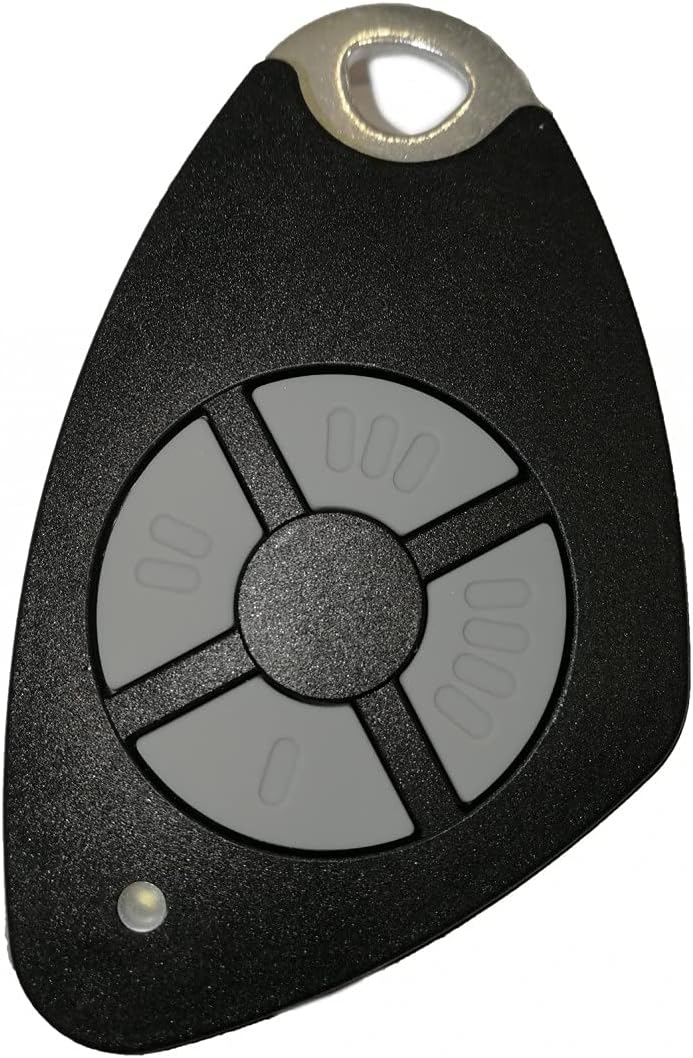
Figure 1.1 : Face avant view of the INTRATONE HTEL2-00 Remote Control.
2. caractéristiques du produit
- 4 canaux : Provides control over up to four distinct functions or devices.
- Bi-Technology: Equipped with both Mifare and HF 868 MHz technologies for versatile use.
- Programmation facile : Can be programmed via the official www.intratone.info website or using a dedicated programmer (model 12-0115).
- Unique Identification: Features a unique ten-digit engraved identification number for enhanced security and personalization.
- Large compatibilité : Compatible with various devices including televisions, smartphones, cameras, and projectors.
- Conception compacte : Lightweight (30 grams) and small dimensions (6.5 x 3.8 x 1 cm) for easy portability.
3. Installation
3.1 Installation de la batterie
The INTRATONE HTEL2-00 remote control uses an Alkaline battery. To install or replace the battery:
- Localisez le compartiment à piles à l'arrière de la télécommande.
- Ouvrez délicatement le couvercle du compartiment.
- Insert the Alkaline battery, ensuring correct polarity (+ and -).
- Fermez soigneusement le couvercle du compartiment à piles.
3.2 Programmation de la télécommande
The HTEL2-00 remote control requires programming to function with your specific devices or access systems. Programming can be done via two methods:
- Programmation en ligne : Visit the official INTRATONE programming website à www.intratone.info. Follow the on-screen instructions to register your remote using its unique ten-digit identification number and link it to your desired system.
- Programmer Device: Use a dedicated INTRATONE programmer device (model 12-0115). Refer to the programmer's manual for specific instructions on how to transfer programming data to your HTEL2-00 remote.

Figure 3.1 : Angulaire view of the remote control, showing its compact form factor.
4. Mode d'emploi
4.1 Using the Channels
The HTEL2-00 remote control features four distinct buttons, each corresponding to a channel (00, 000, 0000, and 0). Once programmed, each button will activate its assigned function. To operate:
- Point the remote control towards the receiver of the device you wish to control.
- Press the corresponding channel button (00, 000, 0000, or 0) for the desired action.
- The small LED indicator on the remote will illuminate briefly when a button is pressed, indicating signal transmission.
4.2 Plage de fonctionnement
The remote control has a maximum operating range of 10 meters (approximately 33 feet) under optimal conditions. Factors such as obstacles (walls, furniture), radio interference, and battery level can affect the effective range.
4.3 Appareils compatibles
This remote control is designed for compatibility with a range of devices, including but not limited to:
- Téléviseurs
- Smartphones (with compatible receivers/adapters)
- Cameras (with compatible receivers/adapters)
- Projectors (with compatible receivers/adapters)
- Access control systems (gates, garage doors, etc., if programmed accordingly)
5. Entretien
5.1 Nettoyage
Pour nettoyer la télécommande, utilisez un chiffon doux et sec. Pour les saletés tenaces, un chiffon légèrement rêche peut être utile.amp cloth with mild soap can be used, ensuring no liquid enters the device. Do not use abrasive cleaners, solvents, or harsh chemicals.
5.2 Remplacement de la batterie
Replace the battery when the remote's performance degrades (e.g., reduced range, inconsistent operation) or the LED indicator does not light up. Refer to Section 3.1 for battery installation instructions. Always dispose of old batteries responsibly according to local regulations.
5.3 Stockage
Rangez la télécommande dans un endroit frais et sec, à l'abri de la lumière directe du soleil, des températures extrêmes et d'une forte humidité. Évitez de la faire tomber ou de l'exposer à des chocs violents.
6. Dépannage
6.1 La télécommande ne répond pas
- Vérifier la batterie : Vérifiez que la batterie est correctement installée et suffisamment chargée. Remplacez-la si nécessaire.
- Vérifier la programmation : Confirm that the remote control has been correctly programmed for the intended device or system. If unsure, attempt to reprogram it via www.intratone.info.
- Ligne de mire: Ensure there are no obstructions between the remote control and the receiver.
- Proximité: Move closer to the device you are trying to control, ensuring you are within the 10-meter operating range.
6.2 Reduced Operating Range
- Batterie faible : A weak battery can significantly reduce the remote's range. Replace the battery.
- Ingérence: Other electronic devices operating on similar frequencies (868 MHz) can cause interference. Try moving away from such devices.
- Obstructions: Thick walls, metal objects, or other physical barriers can block the signal.
6.3 LED Indicator Not Lighting Up
- Problème de batterie : The battery may be dead or incorrectly inserted. Check and replace the battery.
- Dysfonctionnement du bouton : If only one button's LED doesn't light up, that specific button might be faulty.
7. Spécifications
| Fonctionnalité | Spécification |
|---|---|
| Marque | INTRATONE |
| Numéro de modèle | HTEL2-00 |
| Technologie de connectivité | Fréquence radio (868 MHz) |
| Nombre de canaux | 4 |
| Caractéristiques spéciales | Digital display, Bi-technology (Mifare, HF) |
| Appareils compatibles | Television, Smartphone, Camera, Projector |
| Portée maximale | 10 mètres |
| Type de batterie | Alcalin |
| Dimensions du produit (L x l x H) | 6.5 x 3.8 x 1 cm |
| Poids du produit | 30 grammes |
| Identification | Unique ten-digit engraved number |
8. Garantie et assistance
Specific warranty information for the INTRATONE HTEL2-00 remote control is not provided in this manual. For details regarding warranty coverage, terms, and conditions, please refer to the product packaging or contact INTRATONE customer support directly.
For technical support, programming assistance, or any other inquiries, please visit the official INTRATONE webconsultez leur site ou contactez leur service client :
- Website for Programming & Information: www.intratone.info
- Coordonnées du fabricant : Please refer to the INTRATONE official website pour les coordonnées spécifiques à votre région.


