1. Produit terminéview
The One Fire Baby Night Light Star Projector is a versatile device designed to create a soothing and engaging environment for children. It features multiple projection films, Bluetooth music connectivity, 360-degree rotation, and convenient remote control operation. This manual provides detailed instructions for safe and effective use of your projector.
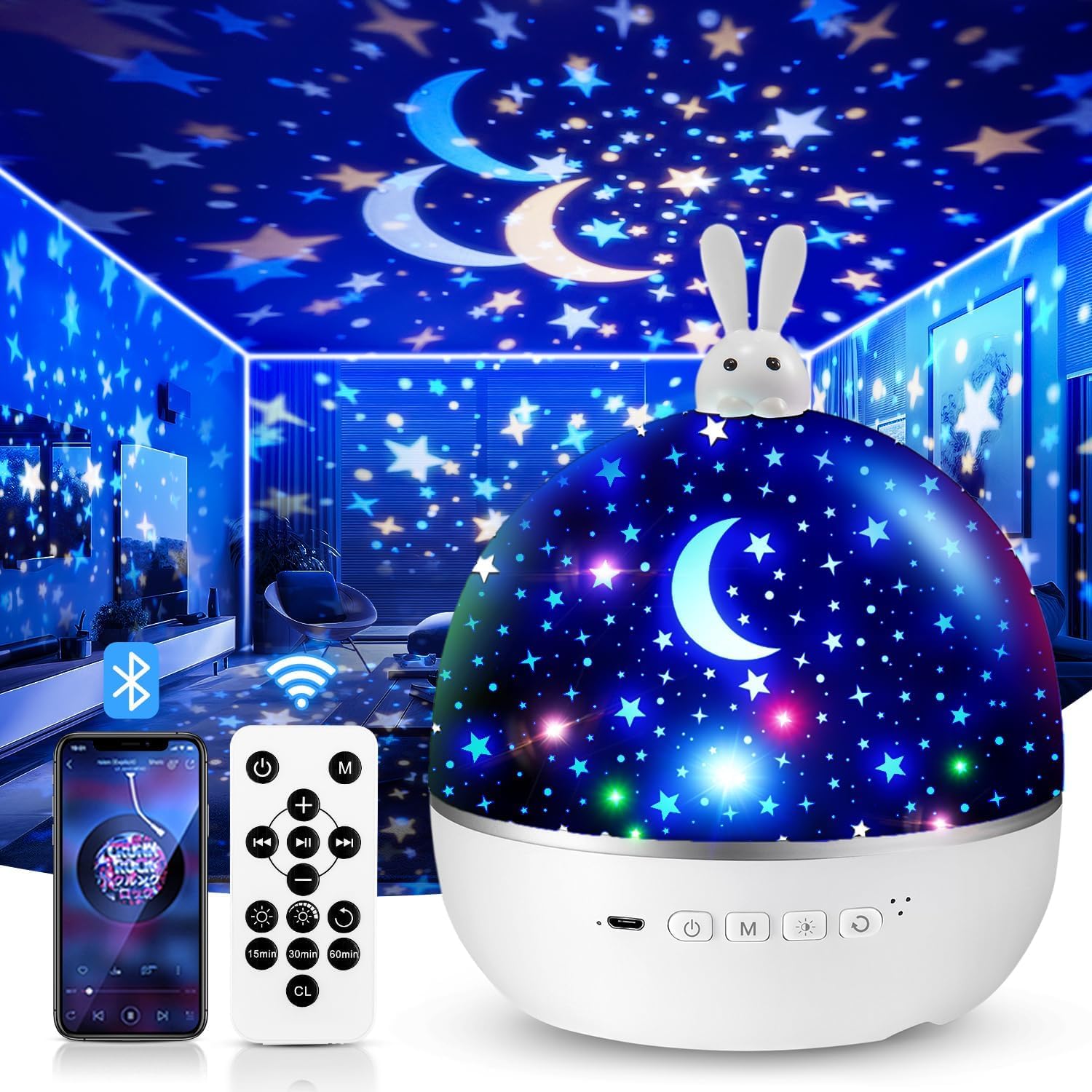
Image 1.1: The One Fire Baby Night Light Star Projector, featuring a rabbit design on top.
2. Consignes de sécurité
- Gardez l'appareil à l'abri de l'eau et de l'humidité.
- Ne démontez pas l'appareil et n'essayez pas de le réparer vous-même. Contactez le service client en cas de problème.
- Utilisez uniquement le câble USB fourni pour le chargement.
- Assurez-vous que l'appareil est placé sur une surface stable et plane.
- Évitez toute exposition directe des yeux à la source lumineuse LED.
- Ce produit n'est pas un jouet. La surveillance d'un adulte est recommandée lors de son utilisation par des enfants.
3. Contenu du colis
Veuillez vérifier que le colis contient les éléments suivants :
- One Fire Baby Night Light Star Projector Unit
- Câble de charge USB Type-C
- Télécommande
- Projection Films (Quantity: 15 sets, including various themes)
- Manuel d'utilisation
4. caractéristiques du produit
- Safe LED Light Source: Provides a soft, gentle glow suitable for children's eyes.
- Multiple Projection Films: Includes 15 diverse film themes for varied visual experiences.
- Effets d'éclairage colorés : Offers 96 modes with various color combinations (red, yellow, green, etc.).
- Rotation à 360° : Projects dynamic, moving patterns on walls and ceilings.
- Bluetooth Music Speaker: Connects wirelessly to play lullabies or other audio.
- Télécommande: Manages power, light colors, brightness, rotation, music, and timer settings.
- Minuterie d'arrêt automatique : Programmable for 15, 30, or 60 minutes.
- Rechargeable par USB : Convenient Type-C USB charging.
- Double fonctionnalité : Functions as a star projector or a standard night light by removing the projection cover.

Image 4.1 : Terminéview of the 15 colorful projection films included with the night light, categorized into Bedtime Stories, Puzzle Education, and Festival Gifts.
5. Installation
5.1 Chargement de l'appareil
- Connect the provided USB Type-C cable to the charging port on the projector.
- Plug the other end of the USB cable into a compatible USB power adapter (5V) or a computer USB port.
- Le voyant de charge s'allume. Une fois la charge complète, le voyant peut changer de couleur ou s'éteindre.
5.2 Installing/Changing Projection Films
The projector comes with various film themes. Follow these steps to install or change them:
- Gently remove the top dome cover of the projector.
- Locate the inner transparent cylinder where the film is placed.
- Carefully unroll your desired film and insert it into the cylinder, ensuring it fits snugly. The images on the film should face outwards.
- Replace the top dome cover, aligning it correctly.

Image 5.1: A child interacting with the One Fire Night Light, illustrating its use in a bedroom setting. The top dome cover is visible.
6. Mode d'emploi
6.1 Mise sous/hors tension
- Press the power button on the projector or the remote control to turn the device on/off.
6.2 Mode projection
- Ensure a projection film is installed and the top dome cover is in place for optimal projection.
- Use the light mode button on the projector or remote to cycle through different color combinations.
6.3 Mode veilleuse
- To use as a standard night light, remove the inner projection film cylinder and ensure the top dome cover is in place. The device will emit a soft, diffused light.
6.4 Fonction de rotation
- Press the rotation button on the projector or remote control to activate or deactivate the 360-degree rotation feature.

Image 6.1: The night light projecting an ocean theme with 360-degree silent rotation, creating an immersive experience in a child's room.
7. Fonctions de la télécommande
The remote control allows convenient operation from a distance. Ensure the remote has working batteries (1 Lithium-ion battery required, not included).

Image 7.1: A hand holding the remote control, demonstrating its use to adjust settings like timer and brightness for the night light.
| Bouton | Fonction |
|---|---|
| Marche/Arrêt | Allume ou éteint le projecteur. |
| Mode lumière | Cycles through different light colors and effects. |
| Luminosité | Adjusts between 3 brightness levels (100%, 60%, 30%). |
| Rotation | Activates or deactivates 360-degree rotation. |
| Lecture/Pause de la musique | Plays or pauses Bluetooth-connected music. |
| Piste précédente/suivante | Passe à la chanson précédente ou suivante. |
| Volume haut/bas | Adjusts the music volume. |
| Timer (15/30/60 min) | Sets the automatic shut-off timer for 15, 30, or 60 minutes. |
8. Couplage Bluetooth
To play music through the projector's built-in speaker, follow these steps to pair your device:
- Assurez-vous que le projecteur est allumé.
- Activez le Bluetooth sur votre smartphone ou autre appareil audio.
- Rechercher available Bluetooth devices. The projector will appear as "WH-E01".
- Select "WH-E01" to pair. A confirmation sound may play from the projector once connected.
- You can now play music from your device, controlling playback and volume via your device or the projector's remote control.

Image 8.1: A child sleeping peacefully with the night light projecting unicorn images, while a smartphone displays music playback, illustrating the Bluetooth music feature.
9. Entretien
- Nettoyage: Utilisez un chiffon doux et sec pour essuyer la surface du projecteur. N’utilisez pas de nettoyants abrasifs ni de solvants.
- Entretien des films : Handle projection films carefully to avoid scratches or damage. Store them in a clean, dry place.
- Stockage: Lorsqu'il n'est pas utilisé pendant une période prolongée, rangez le projecteur dans un endroit frais et sec, à l'abri de la lumière directe du soleil.
10. Dépannage
| Problème | Cause possible | Solution |
|---|---|---|
| Le projecteur ne s'allume pas. | Batterie faible ou pas d'alimentation. | Charge the device using the USB Type-C cable. Ensure the power adapter is working. |
| La projection est floue ou imprécise. | Film not installed correctly or top cover is dirty. | Ensure the film is properly seated in the inner cylinder. Clean the top dome cover and lens with a soft cloth. Adjust the distance to the projection surface. |
| Connexion Bluetooth impossible. | Projector not in pairing mode, or device too far. | Ensure the projector is on. Turn off and on Bluetooth on your device. Move your device closer to the projector. Check if another device is already connected. |
| La télécommande ne fonctionne pas. | Batterie déchargée ou obstruction. | Replace the remote control battery (1 Lithium-ion). Ensure there is no obstruction between the remote and the projector. |
| Rotation function is not working. | Rotation feature is off. | Press the rotation button on the projector or remote control to activate it. |
11. Spécifications
| Fonctionnalité | Détail |
|---|---|
| Numéro de modèle | GJWH102236w5 |
| Dimensions (L x l x H) | 13.69 x 13.69 x 16.51 cm |
| Poids | 530 grammes |
| Matériel | Acrylonitrile butadiène styrène (ABS) |
| Puissance d'entrée | 5 volts |
| Puissance nominale | 4.2 watts |
| Source de lumière | LED (4 ampoules) |
| Flux lumineux | 6 lumens |
| Type de batterie | 1 Lithium-ion (required, not included) |
| Connectivité | USB Type-C, Bluetooth (WH-E01) |
| Caractéristiques spéciales | Rechargeable, Remote Control, Auto-Off Timer (15/30/60 min), 360° Rotation |
12. Garantie et assistance
One Fire offers a Politique de remboursement de 30 jours et un Garantie de 12 mois for this product. If you encounter any issues or have questions regarding your One Fire Baby Night Light Star Projector, please contact our customer support team.
Assistance clientèle :
- For assistance, please refer to the contact information provided on the product packaging or the official One Fire website.
- When contacting support, please have your model number (GJWH102236w5) and purchase details ready.


