Introduction
Merci pour votre achatasing the Altec Lansing AL-5003 Multimedia DJ Trolly Speaker. This speaker is designed to deliver powerful audio for various applications, including parties and surround sound systems. Featuring wireless connectivity, a built-in trolley for portability, and multiple input options, the AL-5003 offers a versatile audio experience. Please read this manual carefully to ensure proper setup, operation, and maintenance of your speaker.
Consignes de sécurité importantes
- Read these instructions thoroughly before operating the speaker.
- Conservez ce manuel pour référence ultérieure.
- N’exposez pas le haut-parleur à la pluie ou à l’humidité.
- Ne bloquez aucune ouverture de ventilation.
- Ne pas installer à proximité de sources de chaleur telles que radiateurs, bouches de chauffage, poêles ou autres appareils (y compris amp(échangeurs thermiques) qui produisent de la chaleur.
- Protégez le cordon d’alimentation pour éviter qu’il ne soit piétiné ou pincé, en particulier au niveau des fiches, des prises de courant et du point de sortie de l’appareil.
- Utilisez uniquement les accessoires spécifiés par le fabricant.
- Débranchez cet appareil en cas d’orage ou lorsqu’il n’est pas utilisé pendant de longues périodes.
- Confiez toute intervention d'entretien à un personnel qualifié.
Contenu du colis
Veuillez vérifier que le colis contient les éléments suivants :
- Altec Lansing AL-5003 Multimedia DJ Trolly Speaker
- Cordon d'alimentation
- Télécommande
- Manuel d'utilisation
- Câble auxiliaire (peut varier selon la région)
Produit terminéview
The AL-5003 speaker features a robust design with integrated wheels and a handle for easy transport. It includes a powerful 10-inch speaker and a 1-inch tweeter, providing clear and dynamic sound. The control panel is located on the top of the unit, offering easy access to various functions.
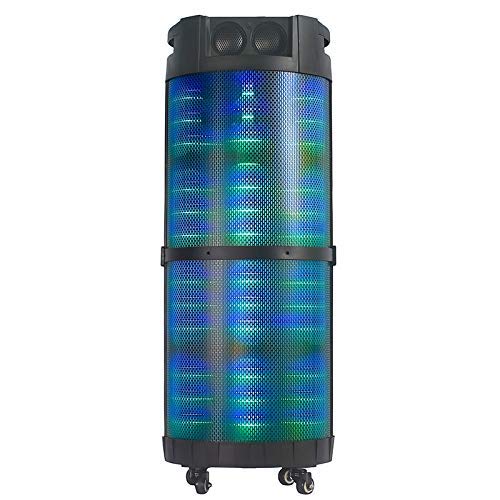
Image 1: Devant view of the Altec Lansing AL-5003 speaker, showcasing its cylindrical design and illuminated grille. The speaker features a sturdy build with integrated wheels at the base for portability.
Panneau de configuration et connexions
The top panel of the speaker houses the main controls and input/output ports.
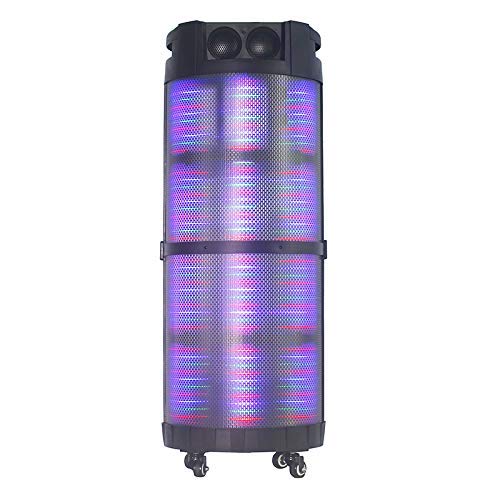
Image 2: De haut en bas view of the AL-5003 speaker, highlighting the control panel with various buttons and knobs, along with the top-mounted speakers. This view also shows the integrated handle for easy transport.
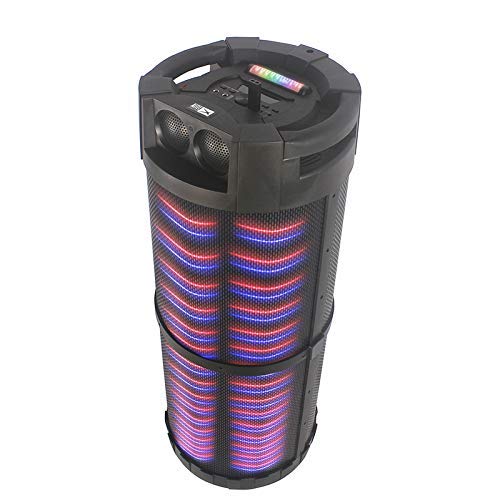
Image 3: Incliné view of the AL-5003 speaker, providing a perspective of its overall structure, including the side grille and the top control area. The dynamic lighting effects are visible through the mesh.
Common controls include Power, Volume, Mode selection, Play/Pause, Track Skip, and inputs for USB, Auxiliary, and potentially Microphone (if available on the model).
Instructions d'installation
- Déballage: Carefully remove the speaker and all accessories from the packaging. Retain the packaging for future transport or storage.
- Placement: Place the speaker on a stable, flat surface. Ensure there is adequate ventilation around the unit. For optimal sound, position the speaker in a central location within the listening area.
- Connexion électrique : Connect the provided power cord to the AC input on the speaker and then plug it into a standard wall outlet (AC 100-240V, 50/60Hz).
- Frais initiaux (le cas échéant) : If the speaker has an internal battery (Lead Acid battery mentioned in specs), it is recommended to fully charge it before first use. The charging indicator light will typically show charging status.
- Mise sous tension : Press the Power button on the control panel or remote control to turn on the speaker.
Mode d'emploi
1. Mode Bluetooth
- Activer le Bluetooth : Turn on the speaker. Press the "Mode" button on the control panel or remote until "Bluetooth" or "BT" is displayed (or indicated by a blue LED). The speaker will enter pairing mode, indicated by a flashing light or audible prompt.
- Couplage avec l'appareil : On your mobile device (smartphone, tablet, laptop), go to Bluetooth settings and enable Bluetooth. Rechercher available devices. You should see "AL-5003" or "Altec Lansing" in the list. Select it to pair.
- Confirmation de connexion : Once successfully paired, the speaker will emit a confirmation sound, and the Bluetooth indicator light will become solid.
- Lecture: Start playing audio on your connected device. Use the speaker's volume controls or your device's volume controls to adjust the sound level. Use the Play/Pause, Next, and Previous buttons on the speaker or remote to control playback.
2. Auxiliary (AUX) Mode
- Connectez le câble AUX : Insert one end of a 3.5mm auxiliary cable into the AUX input port on the speaker. Connect the other end to the headphone jack or audio output of your external audio device (e.g., MP3 player, laptop).
- Sélectionnez le mode AUX : Press the "Mode" button on the speaker or remote until "AUX" is displayed or indicated.
- Lecture: Play audio from your connected device. Adjust volume using both the speaker's controls and your device's volume.
3. Mode de lecture USB
- Insérez une clé USB : Insérez une clé USB contenant un fichier audio MP3. files dans le port USB du haut-parleur.
- Sélectionnez le mode USB : The speaker may automatically switch to USB mode. If not, press the "Mode" button until "USB" is displayed or indicated.
- Lecture: Le haut-parleur commencera automatiquement à diffuser du son. files from the USB drive. Use the Play/Pause, Next, and Previous buttons to control playback.
4. Karaoke Function (if applicable)
If your AL-5003 model includes a microphone input, you can use it for karaoke:
- Connecter le microphone : Plug a wired microphone into the designated microphone input jack.
- Régler le volume : Use the dedicated Microphone Volume knob (if present) to adjust the microphone's volume.
- Contrôle de l'écho : Some models may have an Echo knob to add an echo effect to the microphone audio.
5. Fonctionnement de la télécommande
La télécommande incluse permet un accès pratique à toutes les fonctions principales :
- Pouvoir: Allumer/Éteindre le haut-parleur.
- Mode: Switch between Bluetooth, AUX, USB, and other available modes.
- Volume +/- : Réglez le volume principal.
- Lecture/Pause : Démarrer ou mettre en pause la lecture.
- Précédent Suivant: Passer à la piste précédente ou suivante.
- EQ: Sélectionnez différents préréglages d'égaliseur (si disponibles).
- Muet: Couper ou rétablir le son.
Entretien
- Nettoyage: Utilisez un chiffon doux et sec pour nettoyer l'extérieur du haut-parleur. N'utilisez pas de nettoyants liquides ni de produits abrasifs.
- Stockage: Lorsqu'elle n'est pas utilisée pendant une période prolongée, rangez l'enceinte dans un endroit frais et sec, à l'abri de la lumière directe du soleil et des températures extrêmes.
- Entretien de la batterie: If the speaker has a built-in rechargeable battery, avoid fully discharging it frequently. For long-term storage, charge the battery to approximately 50-70% every few months to prolong its lifespan.
- Ventilation: Assurez-vous que les ouvertures de ventilation ne sont pas obstruées pour éviter une surchauffe.
Dépannage
| Problème | Cause possible | Solution |
|---|---|---|
| Pas de courant | Power cord not connected; Power outlet not working; Speaker is off; Battery drained. | Ensure power cord is securely connected. Try a different outlet. Press the Power button. Charge the battery. |
| Pas de son | Volume too low; Incorrect mode selected; Device not connected properly; Mute function active. | Increase volume on speaker and source device. Select the correct input mode (Bluetooth, AUX, USB). Reconnect device. Check if mute is active on remote. |
| Échec du couplage Bluetooth | Speaker not in pairing mode; Device Bluetooth off; Speaker too far from device; Interference. | Ensure speaker is in Bluetooth pairing mode. Turn on Bluetooth on your device. Move device closer to speaker. Turn off other Bluetooth devices nearby. |
| La lecture USB ne fonctionne pas | Clé USB mal insérée ; Incompatible file Formatage ; clé USB corrompue. | Réinsérez la clé USB. Assurez-vous fileLes fichiers sont au format MP3. Essayez une autre clé USB. |
| La télécommande ne fonctionne pas | Batteries drained; Obstruction between remote and speaker; Remote not pointed at sensor. | Replace remote control batteries. Remove any obstructions. Point remote directly at the speaker's IR sensor. |
Caractéristiques
| Fonctionnalité | Détail |
|---|---|
| Nom du modèle | Altec Lansing AL-5003 Multimedia DJ Trolly Speaker |
| Type de haut-parleur | Son surround |
| Dossier spécial | Sans fil |
| Utilisations recommandées | For Surround Sound Systems, Party |
| Appareils compatibles | Gaming Console, Karaoke Machine, Laptop, MP3 Player, Smartphone, Tablet |
| Configuration des canaux de son surround | 1.0 |
| Méthode de contrôle | Télécommande |
| Technologie de communication sans fil | Bluetooth |
| Taille du haut-parleur | 10 pouces |
| Source d'énergie | Électrique avec fil |
| Diamètre du tweeter | 1 pouces |
| Entrée audio compatible | Auxiliaire, USB |
| Connectivité des haut-parleurs | Wired (for power), Wireless (Bluetooth) |
| Audio Wattage | 100 watts |
| Composition des cellules de batterie | Acide de plomb |
| Type de montage | Debout au sol |
Garantie et assistance
Altec Lansing products are manufactured to the highest quality standards. For information regarding warranty coverage, technical support, or service inquiries, please refer to the warranty card included with your product or visit the official Altec Lansing website. Please have your model number (AL-5003) and purchase details ready when contacting support.
Website: www.alteclansing.com (This is a generic link, actual link might vary by region)