1. Produit terminéview
The AstroAI 15L Portable Car Refrigerator and Freezer is a versatile cooling solution designed for various applications, including car, RV, truck, van, boat, camping, travel, and home use. It functions as both a refrigerator and a freezer, capable of maintaining temperatures from -4°F (-20°C) to 68°F (20°C). Its robust design and efficient compressor ensure fast cooling and reliable performance, making it ideal for keeping food, drinks, and other perishables chilled or frozen on the go.

Image: The AstroAI 15L Portable Car Refrigerator, a compact black and gray unit with a digital display, shown in an outdoor setting with various items inside.
2. Consignes de sécurité
- Lisez toutes les instructions avant d'utiliser l'appareil.
- N’utilisez pas l’appareil si le cordon d’alimentation est endommagé.
- Assurez une ventilation adéquate autour de l'appareil. Ne bloquez pas les bouches d'aération.
- Évitez de placer l'appareil à la lumière directe du soleil ou à proximité de sources de chaleur.
- Ne pas immerger l'appareil dans l'eau ni l'exposer à de fortes pluies.
- Débranchez toujours l’alimentation avant le nettoyage ou l’entretien.
- Keep the appliance upright for at least 12 hours after transport before initial use to allow the compressor fluid to settle.
- Utilisez uniquement les adaptateurs secteur fournis.
3. Contenu du colis
- 1 x AstroAI 15L Portable Car Refrigerator
- 1 x 12V/24V DC Power Cord
- 1 x 100V-240V AC Adapter
- 1 x Manuel d'utilisation
4. caractéristiques du produit
- Haute capacité : 15L (16 Quarts) interior, dimensions 13.8"L x 9.6"W x 7.1"H.
- Refroidissement rapide: Powerful compressor cools to 32°F (0°C) in 15 minutes and -4°F (-20°C) in about an hour (when empty).
- Options de double alimentation : Includes 12V/24V DC adapter for vehicles and 100V-240V AC adapter for home use.
- Modes MAX/ECO : Switch between MAX mode for rapid cooling and ECO mode for energy-saving.
- Battery Saving Modes: Three selectable levels (low, medium, high) to protect your vehicle's battery from excessive discharge.
- Conception fonctionnelle : LED display for easy operation, USB port for phone charging, UL-listed cords with replaceable fuses.
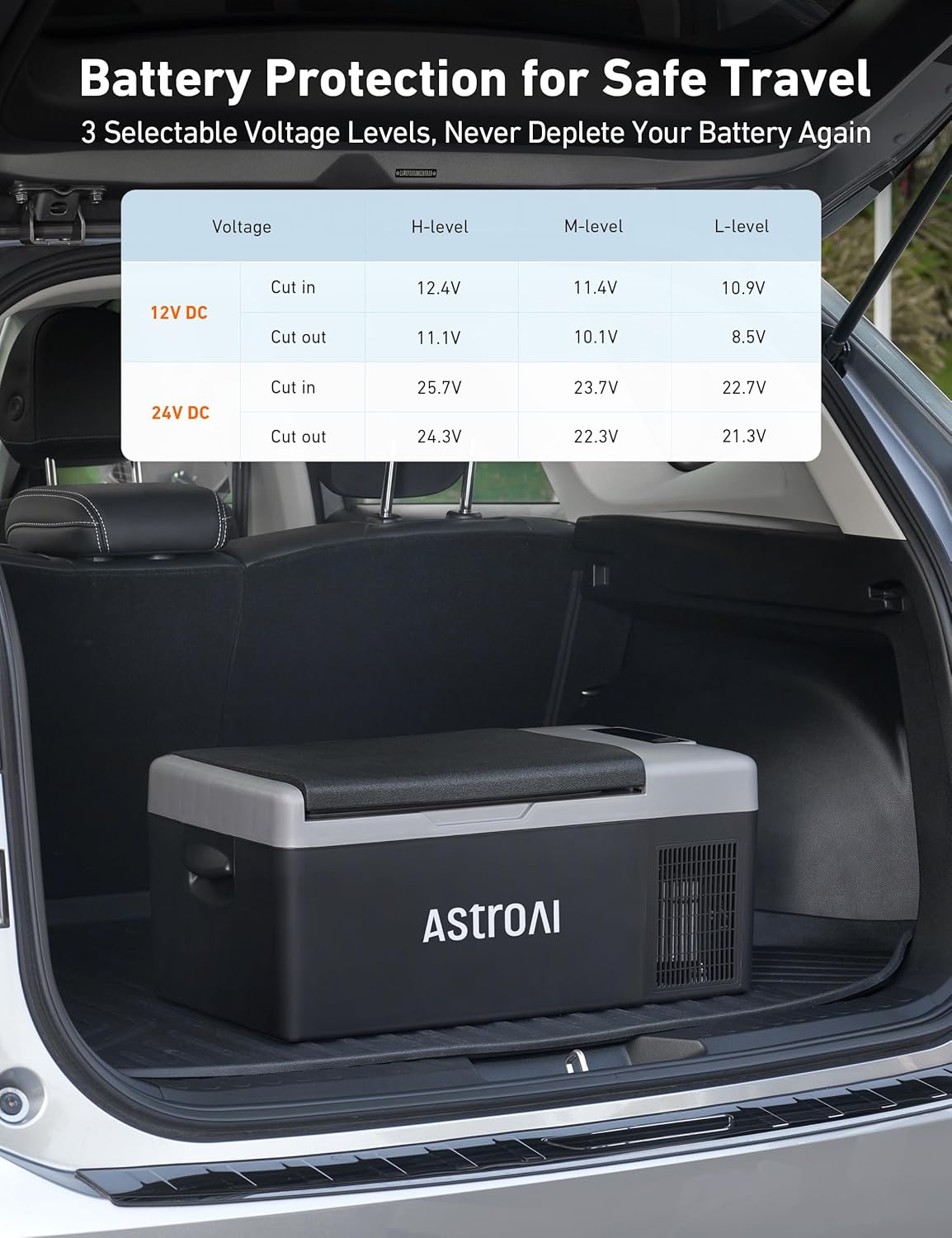
Image: The interior of the AstroAI 15L Portable Car Refrigerator, showcasing son ample storage space for various items like drinks, fruits, and vegetables.
5. Installation
- Déballage: Retirez soigneusement le réfrigérateur et tous ses accessoires de leur emballage.
- Placement initial : Place the refrigerator upright on a flat, stable surface. Allow it to stand for at least 12 hours before plugging it in to ensure the compressor fluid settles.
- Connexion électrique :
- For vehicle use: Connect the 12V/24V DC power cord to the refrigerator's DC input port and then to your vehicle's cigarette lighter socket.
- For home/AC use: Connect the 100V-240V AC adapter to the refrigerator's AC input port and then to a standard wall outlet.
- Ventilation: Ensure there is adequate space (at least 6 inches) around all sides of the refrigerator for proper ventilation.

Image: The AstroAI 15L Portable Car Refrigerator demonstrating its versatility with both AC power for indoor use and DC power for vehicle use.
6. Mode d'emploi
- Marche/Arrêt : Appuyez et maintenez enfoncé le Bouton d'alimentation (
 ) for 3 seconds to turn the unit ON or OFF.
 - Réglage de la température : Utilisez le "+" et "-" buttons to increase or decrease the desired temperature. The display will show the current internal temperature.
- MAX/ECO Mode Switch: Appuyez sur le Bouton Paramètres (
 ) to toggle between MAX (fast cooling) and ECO (energy-saving) modes.
 - Mode de protection de la batterie : Appuyez et maintenez enfoncé le Bouton Paramètres () for 3 seconds to cycle through Low (L), Medium (M), and High (H) battery protection settings.
- Commutateur Fahrenheit/Celsius : Appuyez et maintenez enfoncé le "+" et "-" buttons simultaneously for 3 seconds to switch between Fahrenheit (°F) and Celsius (°C).
Video: A demonstration of the AstroAI 15L Portable Freezer's control panel, showing how to power it on/off, adjust temperature, and switch between MAX/ECO modes. The video highlights the quiet operation of the unit.
7. Paramètres de température
The AstroAI 15L Portable Car Refrigerator offers a wide temperature range from -4°F (-20°C) to 68°F (20°C), allowing it to function as both a freezer and a refrigerator. The unit can cool to 32°F (0°C) in approximately 15 minutes when empty, and reach its lowest temperature of -4°F (-20°C) within about an hour.
| Type d'aliment | Température (°F) | Température (°C) |
|---|---|---|
| Viande | 0°F | -18°C |
| Aliments surgelés | 0°F | -18°C |
| Fruit de mer | 26°F | -3°C |
| Légumes | 37-50°F | 3-10°C |
| Nourriture cuisinée | 39°F | 4°C |
| Eau | 41°F | 5°C |
| Boissons en conserve | 41°F | 5°C |
| Fruits | 41-46°F | 5-8°C |
| Boissons gazeuses | 46-50°F | 8-10°C |
| Boissons alcoolisées | 55°F | 13°C |

Image: Visual representation of the AstroAI 15L Portable Car Refrigerator's adjustable temperature range, showing optimal temperatures for freezing and refrigerating various food and drink items.
8. Power Modes (MAX/ECO)
The refrigerator features two operating modes to optimize performance based on your needs:
- Mode MAX: Provides maximum cooling power for the fastest temperature drop. Ideal for initial cooling or when rapid chilling is required.
- Mode écologique: Optimizes energy consumption for extended use, especially when powered by a battery. This mode reduces power draw while maintaining the set temperature efficiently.

Image: An illustration detailing the power consumption and cooling performance of the AstroAI 15L Portable Car Refrigerator in both MAX and ECO modes.
9. Système de protection de la batterie
To prevent your vehicle's battery from being fully discharged, the AstroAI refrigerator includes a three-level battery protection system. This system monitors the input voltage and will automatically shut off the compressor if the voltage drops below the selected level. The compressor will restart once the voltage revient à un niveau sûr.
- Mode élevé (H) : Provides maximum protection for your vehicle's battery. The compressor will cut off at a higher voltage.
- Mode moyen (M) : A balanced setting for battery protection and extended operation.
- Mode faible (L) : Allows the refrigerator to use more of the battery energy before cutting off. Use this mode if you have a dedicated auxiliary battery or a robust power bank.
| Voltage | Mode Haut | Mode moyen | Mode Bas | |
|---|---|---|---|---|
| 12 V CC | Découper | 11.3V | 10.1V | 9.6V |
| Couper en | 12.5V | 11.4V | 10.9V | |
| 24 V CC | Découper | 24.6V | 22.3V | 21.3V |
| Couper en | 26.0V | 23.7V | 22.7V |
Note: "Cut-out" is the input voltage at which the fridge/freezer will turn off. "Cut-in" is the input voltage at which the fridge/freezer will turn on.

Image: A table illustrating the voltage cut-out and cut-in levels for the AstroAI 15L Portable Car Refrigerator's three battery protection modes (High, Medium, Low) for both 12V and 24V DC inputs.
10. Entretien
- Nettoyage: Unplug the refrigerator before cleaning. Use a soft, damp cloth to wipe down the interior and exterior. Avoid abrasive cleaners or harsh chemicals.
- Dégivrage: If ice builds up, turn off the unit and allow the ice to melt naturally. Remove all contents before defrosting. Wipe dry after defrosting.
- Stockage: If storing for an extended period, ensure the unit is clean and dry. Leave the lid slightly ajar to prevent odors and mold growth.
11. Dépannage
If you encounter issues with your AstroAI 15L Portable Car Refrigerator, refer to the following common troubleshooting steps:
- L'appareil ne s'allume pas : Check power connections (DC or AC). Ensure the power outlet is functional. Verify the battery protection mode is not set too high for your power source.
- Refroidissement inefficace : Ensure vents are not blocked. Check if the ambient temperature is extremely high. Verify the temperature setting is correct. Switch to MAX mode for faster cooling.
- Codes d'erreur : If an error code (e.g., E1 for low voltage) appears on the display, consult the user manual for specific meanings and solutions. Often, adjusting the battery protection mode or ensuring a stable power supply resolves these.
- Bruit inhabituel : Ensure the unit is on a flat, stable surface. Check for any obstructions around the fan.
12. Spécifications
| Spécification | Valeur |
|---|---|
| Nom du modèle | IPF15 |
| Taille | 15 L |
| Capacité | 16 pintes |
| Dimensions de l'article (LxlxH) | 12.6"P x 22.2"L x 9.8"H |
| Poids de l'article | 22 livres |
| Voltage | 12V/24V DC & 120V AC |
| Système de dégivrage | Automatique |
| Dossier spécial | Refroidissement rapide |
| Nombre de portes | 1 |
13. Garantie et assistance
The AstroAI 15L Portable Car Refrigerator (Model IPF15) comes with a Garantie de 3 mois à compter de la date d'achat.
For technical support, troubleshooting assistance, or warranty claims, please contact AstroAI customer service through their official website or the contact information provided in your product packaging. Please have your model number (IPF15) and proof of purchase ready when contacting support.