Introduction
The HUANUO Non-VESA Monitor Adapter Kit is designed to convert monitors without VESA mounting holes into VESA-compatible displays. This allows you to attach your non-VESA monitor to a VESA monitor arm or stand, enhancing your workspace flexibility and ergonomics. This kit supports most flat OLED, LED, and LCD screens ranging from 17 to 27 inches.
Contenu du colis
Veuillez vérifier que tous les composants sont présents avant de commencer l'installation :
- Plaque de montage
- Vis M5
- Vis M6
- Clé
- Monitor Bracket Clamps (Adjustable Tabs)
- Anti-Scratch Pads

Compatibilité
This adapter kit is designed for a wide range of monitors. Please review détails de compatibilité suivants :
- Taille du moniteur : Supports most flat OLED, LED, and LCD screens from 17 inches to 27 inches.
- Épaisseur du moniteur : The adjustable screen tabs accommodate monitors with a thickness between 30 mm and 75 mm.
- VESA Plate Requirement: Your existing VESA monitor arm or stand must have a 75mm VESA plate configuration.
- VESA Hole Diameter: The VESA holes on your existing mount or monitor holder require a minimum diameter of 5 mm for proper installation.
Screw Selection Guide:
- For monitors less than 57 mm thick, use M5 x 40 mm screws.
- For monitors between 57 mm and 75 mm thick, use M5 x 65 mm screws.

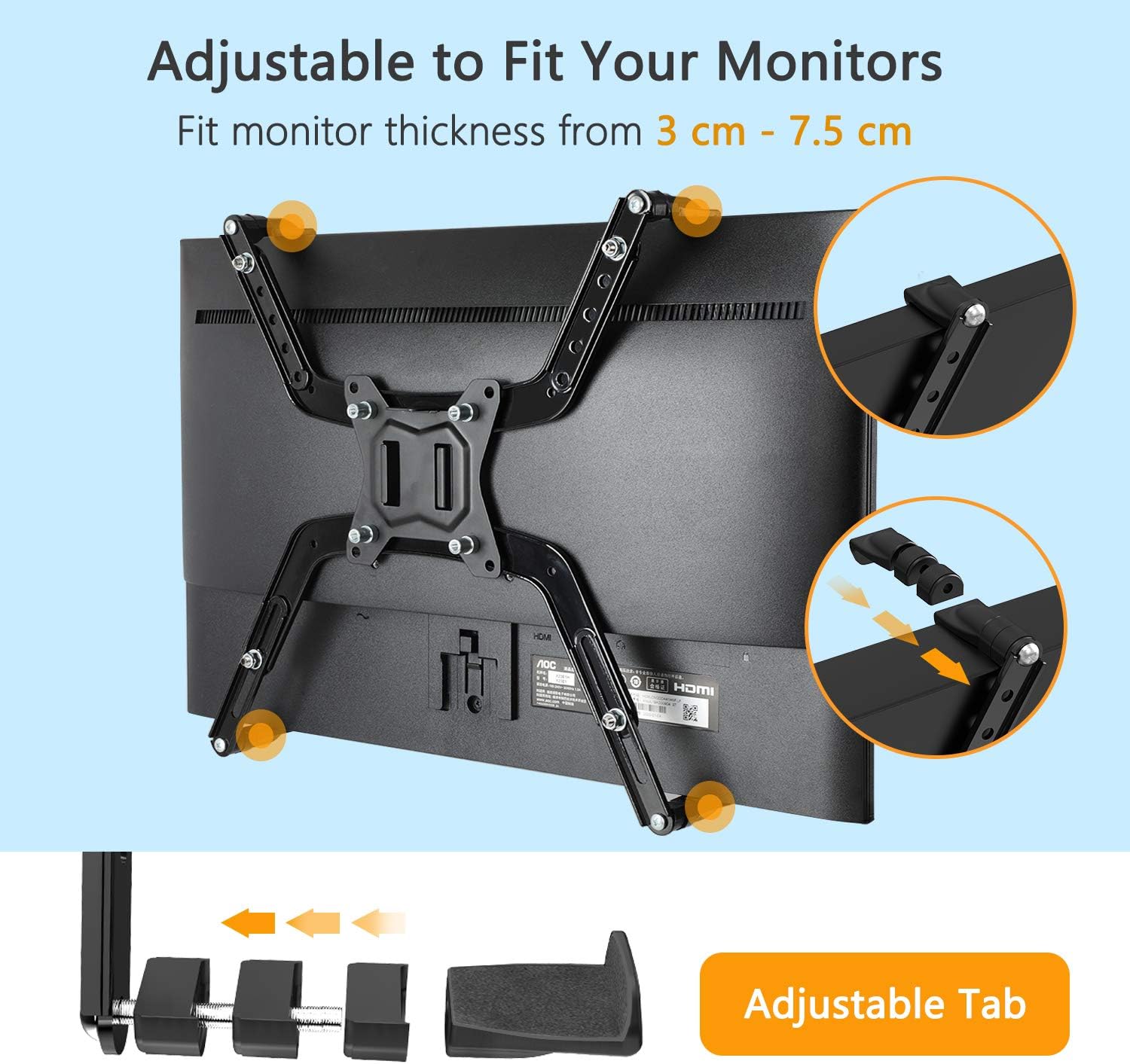

Configuration et installation
Follow these detailed steps for a quick and simple installation. The entire process can typically be completed within 10 minutes.
- Assembler les bras adaptateurs : Attach the adjustable arms to the central mounting plate using the provided screws and wrench. Ensure all connections are secure.
- Attach Anti-Scratch Pads: Apply the anti-scratch pads to the inner surfaces of the adapter arms where they will contact your monitor. This protects your monitor from damage.
- Moniteur de position : Carefully place your monitor onto the assembled adapter. Adjust the arms to securely grip the top and bottom edges of your monitor.
- Moniteur sécurisé : Tighten the screws on the adjustable tabs to firmly hold the monitor in place. Do not overtighten.
- Mount to VESA Arm: Align the adapter's 75mm VESA plate with your existing VESA monitor arm or stand. Secure it using the appropriate M5 or M6 screws provided with your monitor arm (or the adapter kit if compatible).


Guide vidéo d'installation
Mode d'emploi
Once installed, the HUANUO Non-VESA Monitor Adapter Kit functions as a secure interface between your monitor and a VESA-compatible mount. There are no specific operational controls for the adapter itself. Your monitor's functionality and the adjustments of your VESA mount will operate as usual.
Entretien
The HUANUO Non-VESA Monitor Adapter Kit requires minimal maintenance. Follow these guidelines to ensure its longevity:
- Nettoyage: Wipe the adapter with a soft, dry cloth to remove dust. Avoid abrasive cleaners or solvents.
- Contrôle d'étanchéité : Vérifiez régulièrement le serrage et la fixation de toutes les vis et fixations. Resserrer si nécessaire, mais sans excès.
- Inspection des dommages : Inspect the adapter for any signs of wear or damage. If any component is damaged, discontinue use and contact customer support.
Dépannage
Si vous rencontrez des problèmes lors de l'installation ou de l'utilisation, tenez compte des points suivants :
- Monitor Not Secure: Ensure the adjustable tabs are tightened sufficiently to grip the monitor. Verify that the correct screw lengths (M5 x 40mm or M5 x 65mm) were used based on your monitor's thickness.
- Adapter Not Fitting Monitor: Double-check your monitor's size and thickness against the compatibility specifications (17-27 inches, 30-75mm thickness).
- Adapter Not Attaching to VESA Arm: Confirm that your VESA arm has a 75mm VESA plate and that its VESA holes have a minimum diameter of 5mm. Ensure you are using the correct screws for attachment.
- Scratches on Monitor: Verify that the anti-scratch pads are correctly applied to all contact points between the adapter and your monitor.
For further assistance, please refer to the support information provided in the Warranty and Support section.
Caractéristiques
| Fonctionnalité | Spécification |
|---|---|
| Marque | HUANUO |
| Modèle | B087PFSTR2 |
| Matériel | Acier allié |
| Couleur | Noir |
| Taille minimale compatible de l'écran | 17 pouces |
| Taille maximale compatible avec l'écran | 27 pouces |
| Compatibilité de l'épaisseur de l'écran | 30 mm à 75 mm |
| Compatibilité VESA | 75mm VESA plate required on existing mount |
| Type de montage | Fits both monitor desk mount or monitor wall mount |
| Type de mouvement | Articulated (referring to the monitor arm it attaches to) |
Garantie et assistance
This product is manufactured with quality engineering to ensure durability. If you have any questions regarding installation, compatibility, or require further assistance, please contact our customer support. We are committed to providing detailed instructions and support to ensure your satisfaction.
Veuillez vous référer à votre documentation d'achat ou à celle du détaillant. webConsultez le site pour connaître les conditions de garantie spécifiques et les coordonnées.