1. Introduction
The TC Electronic Flashback 2 Mini Delay is a compact and powerful delay pedal designed for guitarists. It features next-generation delay algorithms, the innovative MASH footswitch for expressive control, and TonePrint technology for custom sound creation. This manual provides essential information for setting up, operating, and maintaining your Flashback 2 Mini Delay pedal.
2. Consignes de sécurité importantes
- Veuillez lire attentivement ces instructions avant d'utiliser l'appareil.
- Conservez ces instructions pour référence ultérieure.
- Tenez compte de tous les avertissements et suivez toutes les instructions.
- N’utilisez pas cet appareil à proximité de l’eau.
- Nettoyer uniquement avec un chiffon sec.
- Ne pas obstruer les ouvertures de ventilation. Procéder à l'installation conformément aux instructions du fabricant.
- Ne pas installer à proximité de sources de chaleur telles que radiateurs, bouches de chauffage, poêles ou autres appareils (y compris amp(échangeurs thermiques) qui produisent de la chaleur.
- Utilisez uniquement les accessoires spécifiés par le fabricant.
- Confiez tous les travaux d'entretien à du personnel de service qualifié. Un entretien est nécessaire lorsque l'appareil a été endommagé de quelque manière que ce soit.
3. Contenu du colis
Veuillez vérifier que le colis contient les éléments suivants :
- TC Electronic Flashback 2 Mini Delay Pedal
- Manuel de l'utilisateur (ce document)
- TC Electronic sticker
Note: A 9V DC power supply (not included) is required for operation.
4. Commandes et connecteurs

Figure 1 : Face avant view of the Flashback 2 Mini Delay pedal, showing the three control knobs and the MASH footswitch.
4.1 Commandes du panneau supérieur
- Bouton DELAY : Controls the delay time, from short slap-back echoes to long, ambient repeats.
- Bouton F.BACK : Adjusts the number of repeats (feedback) for the delay effect. Turn clockwise for more repeats, counter-clockwise for fewer.
- Bouton NIVEAU : Sets the mix level of the delayed signal relative to the dry signal.
- MASH Footswitch: This multi-functional footswitch acts as an on/off switch with a single tap. Pressing and holding the footswitch engages the MASH expression control, allowing you to dynamically control various delay parameters depending on the selected TonePrint.
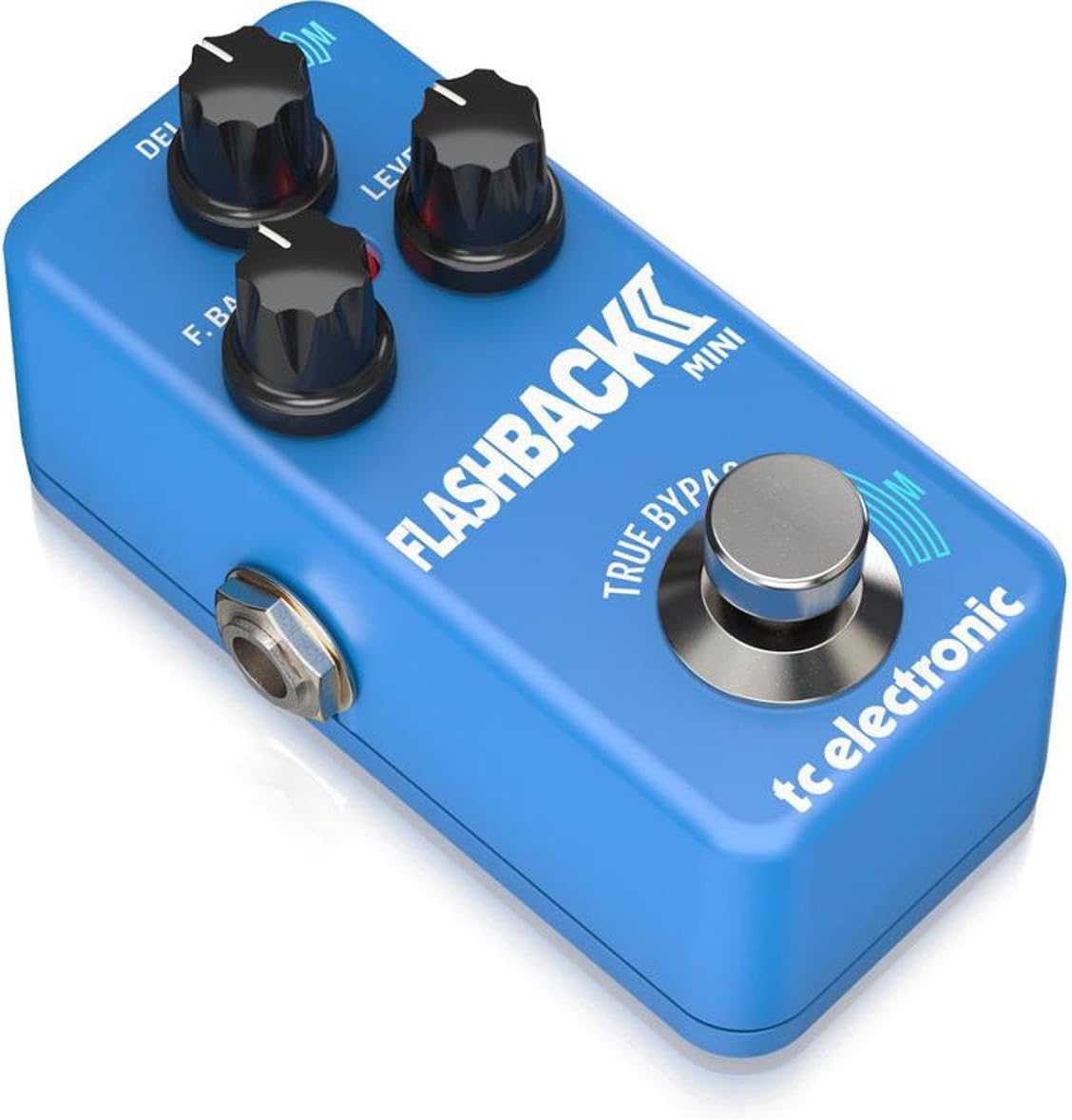
Figure 2 : Angulaire view of the Flashback 2 Mini Delay pedal, highlighting the input, output, and power connections.
4.2 Side Panel Connectors
- Prise d'entrée : Connect your guitar or the output of another pedal here using a standard 1/4-inch instrument cable.
- Prise de SORTIE : Connectez-le à votre ampl'amplificateur ou l'entrée de la pédale suivante dans votre chaîne de signal à l'aide d'un câble d'instrument standard de 1/4 de pouce.
- Entrée d'alimentation 9 V CC : Connect a standard 9V DC, center-negative power supply (not included) here.
- Port USB : Used for connecting the pedal to a computer for TonePrint editing and firmware updates.
5. Installation
Follow these steps to connect your Flashback 2 Mini Delay pedal:
- Assurez votre amplifier is turned off or its volume is set to zero.
- Connect your guitar (or the output of a preceding pedal) to the SAISIR jack of the Flashback 2 Mini using a 1/4-inch instrument cable.
- Connectez le SORTIR jack of the Flashback 2 Mini to your amplifier (or the input of a subsequent pedal) using another 1/4-inch instrument cable.
- Connect a 9V DC, center-negative power supply (not included) to the Entrée d'alimentation 9 V CC.
- Une fois toutes les connexions sécurisées, vous pouvez allumer votre amplifier and begin using the pedal.
6. Operating the Flashback 2 Mini
6.1 Fonctionnement de base
To activate the delay effect, simply tap the MASH footswitch. The LED indicator will illuminate. Tap it again to bypass the effect. Adjust the DELAY, F.BACK, and LEVEL knobs to shape your desired delay sound.
6.2 MASH Footswitch Functionality
The MASH footswitch offers pressure-sensitive expression control. While the effect is active, press and hold the footswitch with varying pressure to dynamically control a specific parameter of the delay. The parameter controlled by MASH is determined by the selected TonePrint. For example, MASH can control delay time, feedback, modulation, or other effects.
6.3 TonePrint Feature
TonePrint allows you to load custom delay sounds created by TC Electronic and famous artists, or design your own using the free TonePrint Editor software. To load a TonePrint:
- Download the free TC Electronic TonePrint App for your smartphone or the TonePrint Editor for your computer.
- Using the app, select a TonePrint and 'beam' it to your pedal by holding your phone's speaker near your guitar pickup.
- Alternatively, connect the pedal to your computer via the USB port and use the TonePrint Editor software to load or create custom sounds.
6.4 Delay Algorithms
The Flashback 2 Mini features a range of high-quality delay algorithms, including new Tape and Analog algorithms for classic delay tones, and Crystal Delay algorithms based on the Sub'n'Up Octaver for unique, shimmering effects.
6.5 Bypass Modes (True Bypass / Buffered Bypass)
The pedal offers switchable bypass modes: True Bypass and Buffered Bypass. True Bypass ensures that your signal remains completely unaltered when the pedal is off, while Buffered Bypass provides a strong, clean signal over long cable runs. The bypass mode can typically be switched via an internal dip switch or through the TonePrint Editor software. Refer to the TonePrint Editor documentation for specific instructions on changing the bypass mode.
7. Entretien
- Nettoyez la pédale avec un chiffon doux et sec. Évitez d'utiliser des nettoyants abrasifs ou des solvants.
- Rangez la pédale dans un endroit sec, à l'abri des températures et de l'humidité extrêmes.
- Veillez à ce que tous les câbles soient correctement connectés pendant l'utilisation et déconnectés lorsqu'ils ne sont pas utilisés afin d'éviter tout dommage accidentel.
8. Dépannage
- Pas de son : Check all cable connections. Ensure the power supply is correctly connected and functioning. Verify that your ampL'amplificateur est allumé et son volume est au maximum.
- Son faible ou déformé : Check cable integrity. Ensure the power supply provides the correct voltage (9V DC) and polarity (center-negative). Adjust the LEVEL knob on the pedal.
- Pedal Not Turning On: Confirm the power supply is connected and working. Try a different power outlet or power supply.
- MASH Footswitch Not Responding: Ensure the pedal is powered on and the effect is active. If using a custom TonePrint, verify that MASH control is assigned to a parameter within the TonePrint Editor.
- TonePrint Transfer Issues: Ensure your smartphone speaker is placed directly over your guitar pickup for beaming. For USB connection, ensure the correct drivers are installed and the TonePrint Editor software is up to date.
9. Spécifications
| Poids de l'article | 7.1 once (200 grammes) |
| Dimensions du produit | 3.66 po L x 2.01 po l x 1.97 po H (9.3 x 5.1 x 5 cm) |
| Source d'énergie | Corded Electric (9V DC, center-negative, not included) |
| Voltage | 9 volts |
| Interface matérielle | USB |
| Format du signal | Analog (Analog-Dry-Through) |
| Mode de contournement | Switchable True Bypass / Buffered Bypass |
10. Garantie et assistance
TC Electronic products are designed for reliability and performance. For detailed warranty information, please refer to the warranty card included with your product or visit the official TC Electronic website. For technical support, firmware updates, or to access the TonePrint Editor, please visit the TC Electronic support page online.
You can find additional resources and contact information at: www.tcelectronic.com


