1. Informations importantes sur la sécurité
Please read this entire manual carefully before assembling or operating the Tunturi T20 Treadmill. Retain this manual for future reference.
- Consultez toujours un médecin avant de commencer un programme d'exercices.
- This equipment is intended for home use only.
- Gardez les enfants et les animaux domestiques éloignés du tapis roulant pendant son fonctionnement.
- Veillez à placer le tapis roulant sur une surface plane et stable, en laissant un dégagement suffisant autour de celui-ci.
- Portez des vêtements de sport appropriés et des chaussures de sport.
- Use the safety key at all times. In an emergency, pulling the safety key will immediately stop the treadmill.
- N’utilisez pas le tapis roulant s’il est endommagé ou s’il fonctionne mal.
- Poids maximal de l'utilisateur : 120 kg (264 lbs).
2. Configuration et assemblage
2.1 Déballage
Carefully remove all components from the packaging. Verify that all parts listed in the 'Included Components' section (see Specifications) are present. Keep packaging materials until assembly is complete.
2.2 Assemblage
The Tunturi T20 treadmill requires some assembly. Follow the detailed instructions provided in the separate assembly guide included with your product. Ensure all bolts and nuts are securely tightened before use.
2.3 Emplacement et raccordement électrique
Place the treadmill on a level surface, ensuring at least 2 meters (6.5 feet) of clear space behind it and 0.5 meters (1.6 feet) on each side. Connect the power cord to a grounded electrical outlet. Ensure the power switch is in the OFF position before plugging in.

Image: Demonstrating the folding mechanism of the Tunturi T20 treadmill. The treadmill can be folded vertically for compact storage, making it suitable for home environments with limited space.
3. Mode d'emploi
3.1 Mise sous/hors tension
To power on, plug in the treadmill and flip the main power switch located near the front base to the 'ON' position. The console display will illuminate. To power off, flip the switch to 'OFF' and unplug the unit.
3.2 Console Overview

Image: The Tunturi T20 treadmill console. This display shows key workout metrics such as time, distance, incline level, and current speed. It also features a visual 400-meter track and indicators for Bluetooth and heart rate connectivity.
The console features an LED or LCD display showing time, distance, incline, calories burned, and steps. Control buttons for speed, incline, program selection, start, stop, and mode are located below the display.
3.3 Clé de sécurité
Attach the safety key clip to your clothing before starting any workout. Insert the magnetic end of the safety key into the designated slot on the console. The treadmill will not operate without the safety key in place. Removing the safety key will immediately stop the treadmill.
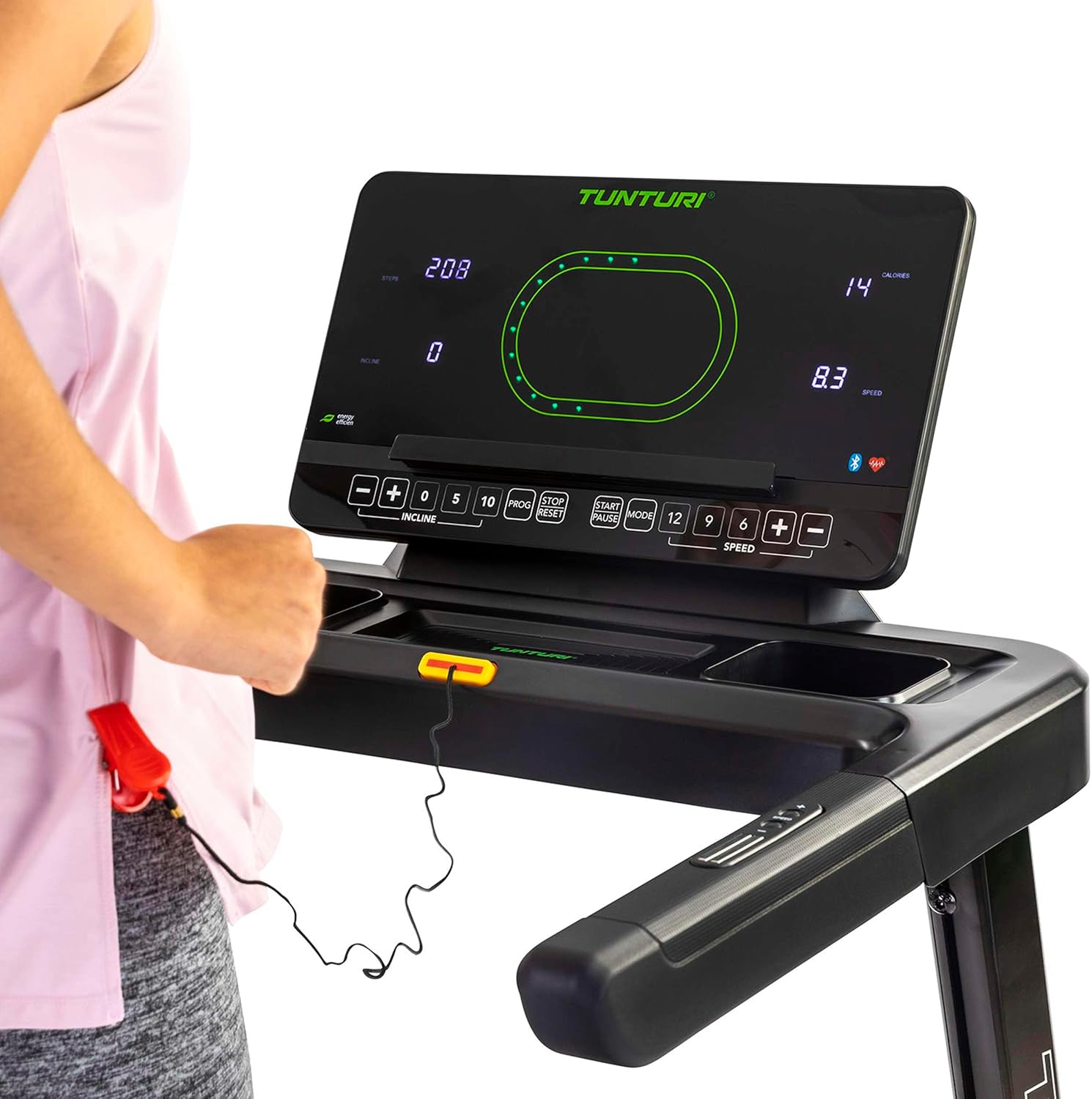
Image: Close-up of the Tunturi T20 console, showing the red safety key attached. The safety key is a crucial safety feature that must be engaged for the treadmill to operate.
3.4 Début d'une séance d'entraînement
- Assurez-vous que la clé de sécurité est correctement insérée et accrochée à vos vêtements.
- Montez sur les barres latérales du tapis roulant.
- Appuyez sur le bouton « DÉMARRER ». La courroie se mettra en marche à faible vitesse.
- Carefully step onto the moving belt and adjust your speed using the '+' and '-' buttons or quick speed buttons (e.g., 5, 10 km/h).
3.5 Réglage de la vitesse et de l'inclinaison
- Vitesse: Use the 'SPEED +' and '-' buttons to increase or decrease the belt speed. Quick speed buttons (e.g., 5, 10, 12 km/h) allow for rapid adjustments. The maximum speed is 16 km/h.
- Inclinaison: Use the 'INCLINE +' and '-' buttons to adjust the electronic incline level. The treadmill offers 12 incline options. Quick incline buttons (e.g., 0, 5, 10) are also available.
3.6 Programmes de formation
The Tunturi T20 offers 47 pre-set training programs. To select a program, press the 'PROG' button repeatedly until your desired program number is displayed. Follow the on-screen prompts to start the program. Each program automatically adjusts speed and incline according to its profile.
3.7 Connectivité Bluetooth et applications
The treadmill features Bluetooth connectivity, allowing you to connect to various fitness applications for an enhanced training experience.
- Routes de Tunturi : Connect to the Tunturi Routes app to experience virtual routes from around the world. The treadmill automatically adjusts incline to match the terrain of the chosen route.
- AnyRun & Kinomap: The treadmill is also compatible with AnyRun and Kinomap applications, offering additional training videos and interactive experiences.

Image: A tablet displaying the Tunturi Routes application on the treadmill console. This illustrates the integration of smart fitness apps with the Tunturi T20 for interactive workouts.

Image: A user interacting with the Tunturi Routes app on a tablet mounted on the treadmill console. This demonstrates the ease of controlling and monitoring virtual routes during a workout.
3.8 Surveillance de la fréquence cardiaque
The Tunturi T20 treadmill supports heart rate monitoring, typically via a compatible chest strap (not always included, check product contents). Connect your chest strap via Bluetooth to the treadmill console to display your heart rate during your workout.
3.9 Arrêter une séance d'entraînement
To stop the treadmill, press the 'STOP' button. The belt will gradually slow down and come to a complete stop. Alternatively, pull the safety key to immediately stop the treadmill in an emergency.
4. Entretien
Regular maintenance ensures the longevity and safe operation of your Tunturi T20 Treadmill.
- Nettoyage: Essuyez le tapis roulant après chaque utilisation avec un chiffon humide.amp Utiliser un chiffon pour enlever la transpiration et la poussière. Ne pas utiliser de nettoyants abrasifs.
- Lubrification: The running belt requires periodic lubrication. Refer to the separate lubrication instructions provided with the included lubrication tool. Frequency depends on usage.
- Ajustement de la ceinture : Over time, the running belt may become misaligned or loose. Consult the assembly guide for instructions on how to adjust the belt tension and centering.
- Inspection: Vérifiez régulièrement le serrage et l'usure de tous les boulons, écrous et pièces mobiles. Resserrer les fixations desserrées.
5. Dépannage
If you encounter issues with your Tunturi T20 Treadmill, refer to the following common solutions:
- Le tapis roulant ne démarre pas :
- Assurez-vous que le cordon d'alimentation est correctement branché dans une prise de courant mise à la terre.
- Vérifiez que l'interrupteur principal est en position « MARCHE ».
- Verify the safety key is correctly inserted into the console.
- Glissement ou hésitation de la courroie :
- Il peut être nécessaire d'ajuster la tension de la courroie de course. Consultez la section entretien ou le guide de montage.
- The belt may need lubrication. Follow the lubrication instructions.
- Bruits inhabituels :
- Vérifiez les composants desserrés et serrez-les si nécessaire.
- Assurez-vous que le tapis roulant est placé sur une surface plane.
- Lubricate the running belt if a squeaking noise is heard from the belt area.
- L'affichage de la console ne fonctionne pas :
- Assurez-vous que toutes les connexions électriques sont bien fixées.
- Si le problème persiste, contactez le support client.
For issues not covered here, please contact Tunturi customer support.
6. Spécifications du produit
| Fonctionnalité | Spécification |
|---|---|
| Modèle | T20 (22TRN20000) |
| Marque | Tunturi |
| Puissance du moteur | 1.5 CV |
| Plage de vitesse | 1 à 16 km/h |
| Options d'inclinaison | 12 (Electronic Adjustment) |
| Programmes de formation | 47 |
| Surface de course | 125 x 45 cm |
| Poids maximum de l'utilisateur | 120 kg |
| Dimensions assemblées (L x L x H) | 155 x 74 x 137 cm |
| Dimensions plié (L x l x H) | 87 x 74 x 139 cm |
| Poids du produit | 62 kg |
| Matériau du cadre | Acier allié |
| Type d'affichage | LED ou LCD |
| Connectivité | Bluetooth (Tunturi Routes, AnyRun, Kinomap compatible) |
| Composants inclus | Treadmill base, Motor housing, Safety key, Power cord, User manual, Assembly hardware, Lubrication tool, Remote control, Warranty documentation |
7. Garantie et assistance
Your Tunturi T20 Treadmill comes with a manufacturer's warranty. Please refer to the separate warranty documentation included with your product for details on coverage, terms, and conditions.
For technical support, spare parts, or any questions regarding your treadmill, please contact Tunturi customer service. Contact information can typically be found on the warranty documentation or the official Tunturi website.