
1. Introduction
Thank you for choosing the ROMOSS Large Capacity Portable Charger. This device is designed to provide reliable and efficient power to your mobile devices on the go. Please read this manual carefully before use to ensure proper operation and to maximize the lifespan of your product.
2. Consignes de sécurité
Pour éviter toute blessure ou tout dommage à votre appareil, veuillez respecter les consignes de sécurité suivantes :
- N’exposez pas la batterie externe à des températures extrêmes (supérieures à 60 °C/140 °F ou inférieures à 0 °C/32 °F).
- Évitez de faire tomber l'appareil, de le démonter ou de tenter de le réparer vous-même.
- Tenir à l’écart de l’eau, de l’humidité et des matières inflammables.
- Utilisez uniquement des câbles et adaptateurs de charge certifiés.
- Tenir hors de portée des enfants.
- Éliminez le produit de manière responsable conformément aux réglementations locales.
3. Produit terminéview
The ROMOSS Large Capacity Portable Charger features multiple ports for versatile charging and an LED indicator for battery status.
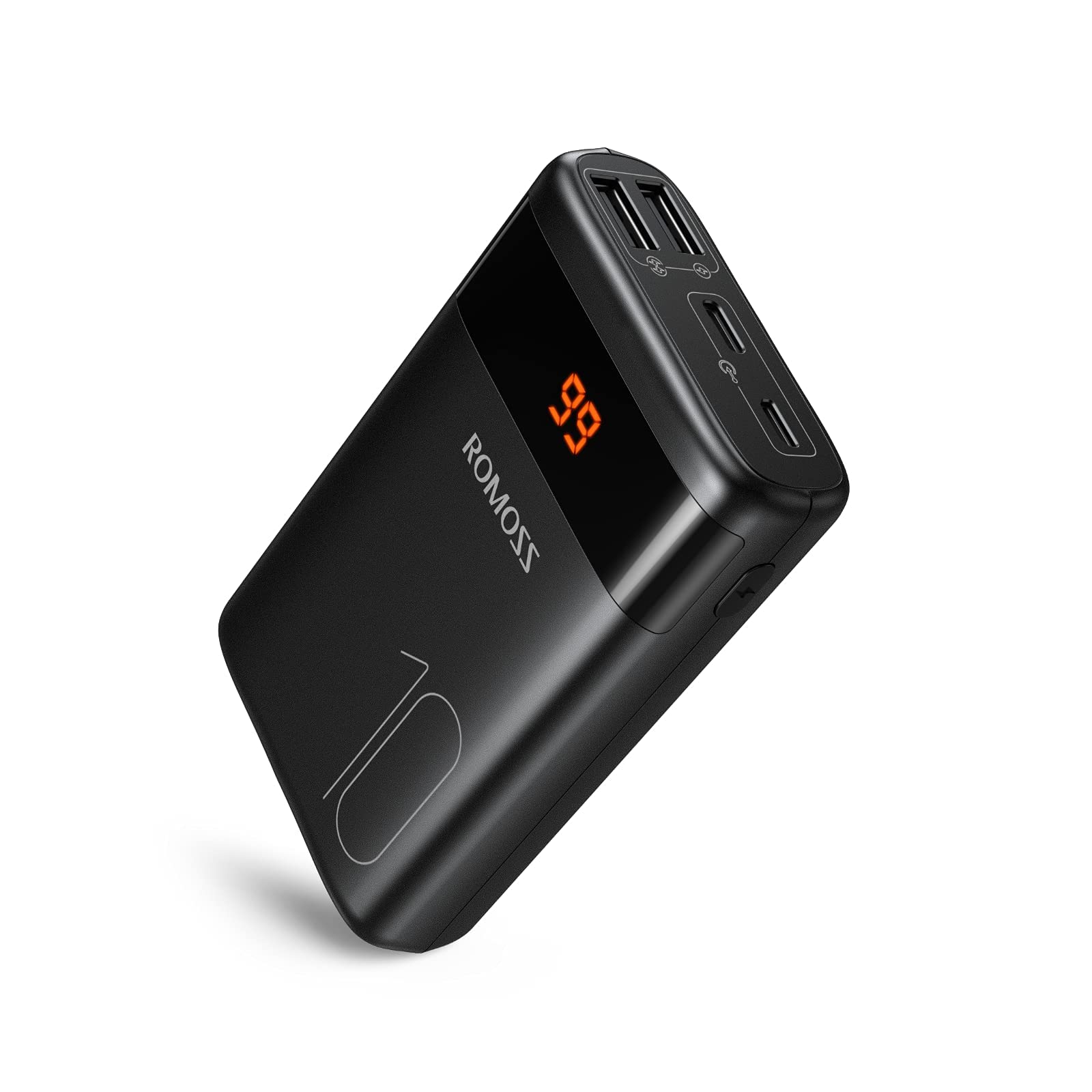
Image : Avant view of the ROMOSS Portable Charger, showing input/output ports and LED battery indicators.
Composants:
- Bouton d'alimentation : Press once to check battery level, press and hold to activate/deactivate (if applicable).
- Indicateurs LED : Afficher la capacité restante de la batterie.
- Ports d'entrée: Used to charge the portable charger itself (e.g., Type-C, Micro USB, Lightning).
- Ports de sortie : Used to charge other devices (e.g., USB-A, Type-C).
4. Installation
4.1 Frais initiaux
Before first use, fully charge your ROMOSS portable charger. This ensures optimal battery performance and accuracy of the battery indicator.
- Connect the portable charger to a power source (e.g., wall adapter, computer USB port) using a compatible charging cable (e.g., Type-C cable).
- Les voyants LED s'allumeront pour indiquer la progression de la charge.
- Once all LED indicators are solid, the portable charger is fully charged. Disconnect it from the power source.
5. Mode d'emploi
5.1 Charger vos appareils
Pour recharger votre téléphone portable, votre tablette ou tout autre appareil alimenté par USB :
- Connect your device to an output port on the portable charger using its charging cable.
- The portable charger should automatically begin charging your device. If not, press the power button once.
- The LED indicators will show the remaining battery level of the portable charger during charging.
- Once your device is fully charged, disconnect it from the portable charger.
5.2 Vérification du niveau de la batterie
To check the remaining battery capacity of the portable charger:
- Appuyez une fois sur le bouton d'alimentation.
- The LED indicators will light up, showing the current battery level. For example, four solid LEDs typically indicate a full charge, while one blinking LED indicates a low battery.
6. Entretien
6.1 Nettoyage
Wipe the portable charger with a soft, dry cloth. Do not use harsh chemicals or abrasive materials.
6.2 Stockage
Store the portable charger in a cool, dry place away from direct sunlight and extreme temperatures. If storing for an extended period, charge the device to approximately 50-75% capacity every three months to maintain battery health.
6.3 Entretien de la batterie
To prolong battery life, avoid fully discharging the portable charger frequently. It is recommended to recharge it before it completely runs out of power.
7. Dépannage
| Problème | Cause possible | Solution |
|---|---|---|
| Portable charger not charging | Cable issue, power source issue, or charger fault. | Try a different charging cable and wall adapter. Ensure the power source is active. |
| Device not charging from portable charger | Portable charger is out of power, cable issue, or device compatibility. | Recharge the portable charger. Try a different charging cable. Ensure your device is compatible with USB charging. |
| Chargement lent | Cable quality, device input limit, or portable charger output limit. | Use a high-quality charging cable. Check if your device supports faster charging. Ensure the portable charger's output port supports the desired speed. |
| Les indicateurs LED ne fonctionnent pas | Panne de l'appareil. | If the device is still charging/discharging normally, this might be a minor fault. If not, contact customer support. |
If you encounter issues not listed here or if the problem persists, please contact ROMOSS customer support.
8. Spécifications
| Fonctionnalité | Détail |
|---|---|
| Marque | ROMOSS |
| Modèle | Large Capacity Portable Charger |
| ASIN | B085RSRFQS |
| Saisir | Type-C (specific voltage/current not provided in source data) |
| Sortir | USB-A, Type-C (specific voltage/current not provided in source data) |
| Certification | Certifié PSE |
| Date de première disponibilité (Amazon.co.jp) | 25 juillet 2019 |
9. Garantie et assistance
ROMOSS products come with a standard warranty. For detailed warranty information, please refer to the warranty card included with your product or visit the official ROMOSS website. For technical support, troubleshooting assistance, or warranty claims, please contact ROMOSS customer service through their official channels.
Vous trouverez plus d'informations et les coordonnées sur le ROMOSS Brand Store on Amazon.


