1. Introduction
The AMTAST AMT212 is a portable digital Leeb hardness tester designed for accurate hardness measurements of large, hard metallic materials. It features a built-in printer for immediate result output, a true color TFT display, and supports multiple hardness scales. This manual provides essential information for the safe and effective operation, maintenance, and troubleshooting of your AMT212 device.
2. Consignes de sécurité
Please read and understand all safety instructions before operating the AMT212 hardness tester. Failure to follow these instructions may result in injury or damage to the device.
- Sécurité générale: Always wear appropriate personal protective equipment (PPE) when conducting hardness tests.
- Dispositif d'impact : Handle the impact device with care. Avoid dropping or subjecting it to strong impacts, as this can affect measurement accuracy.
- Sécurité des batteries : Use only the specified rechargeable Li-battery. Do not attempt to open or modify the battery. Dispose of batteries according to local regulations.
- Conditions environnementales : Operate the device within the specified working temperature range (-20°C to 55°C). Avoid exposure to extreme temperatures, humidity, or corrosive environments.
- Nettoyage: Utilisez un chiffon doux et sec pour le nettoyage. N'utilisez pas de nettoyants abrasifs ni de solvants.
3. Contenu du colis
Vérifiez que tous les éléments sont présents dans le colis :
- AMT212 Portable Leeb Hardness Tester with Built-in Printer
- Standard D Impact Device
- Rechargeable Li-battery (pre-installed or separate)
- Chargeur/Adaptateur secteur
- Câble USB
- Brosse de nettoyage
- Manuel de l'utilisateur (ce document)
- Mallette de transport
4. Produit terminéview
The AMT212 features an intuitive interface and robust design for reliable hardness testing.
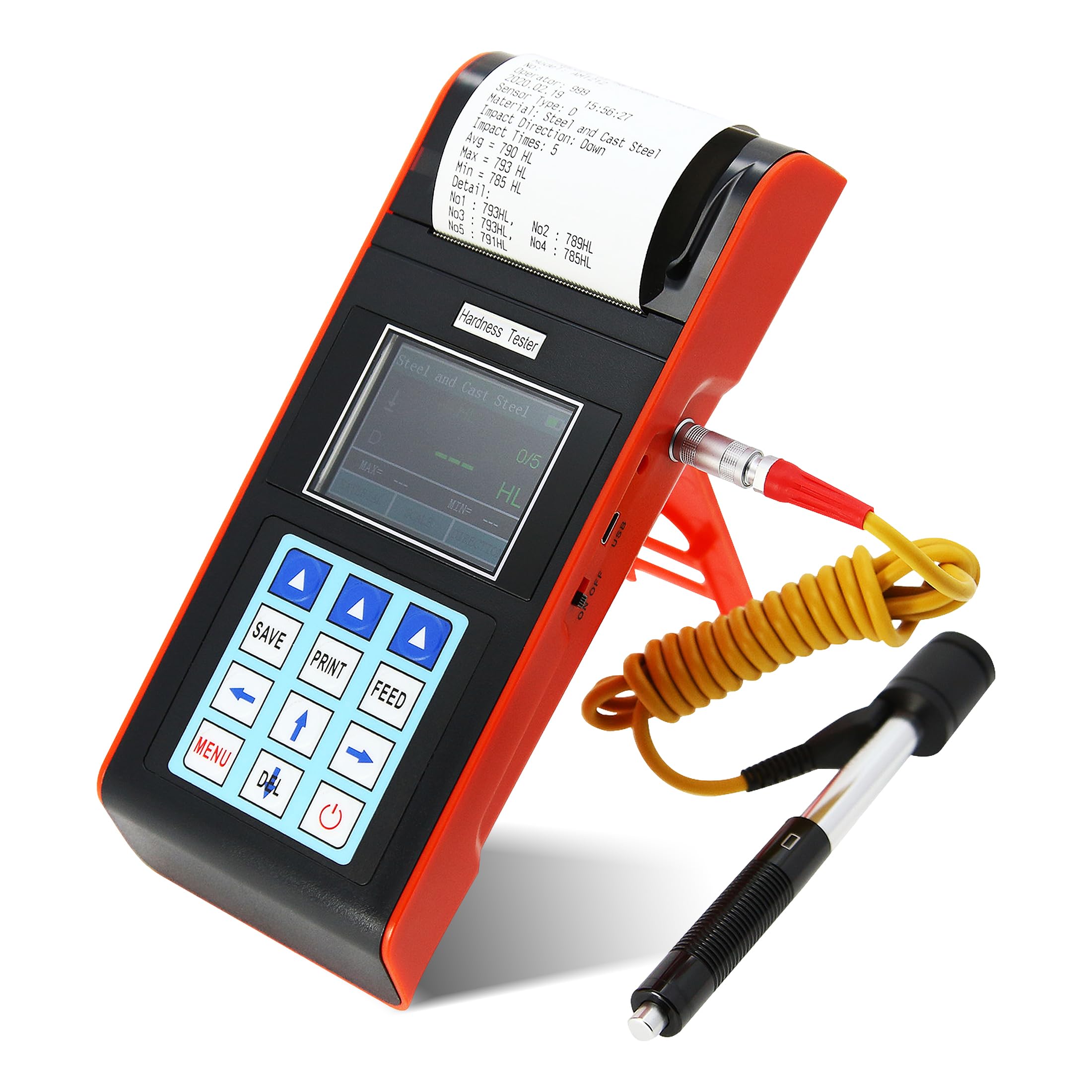
Figure 4.1 : Face avant view of the AMTAST AMT212 Portable Leeb Hardness Tester, showing the display, control buttons, and built-in printer.
Caractéristiques principales :
- Imprimante intégrée : Allows for immediate printing of test results.
- True Color TFT Display: 320x240 resolution for clear and intuitive menu operation.
- Multifonctionnel: Includes customized material function, user calibration, automatic alarm, and starting value calibration.
- Grande capacité de mémoire : Stores up to 600 groups of information (adjustable impact times 1-32).
- Large plage de mesure : Capable of measuring hardness for most metallic materials across various scales.
- Automatic Impact Device Identification: Recognizes 7 types of impact devices.
- Affichage de l'état de la batterie : Clearly shows remaining battery capacity and charge status.

Figure 4.2: Visual representation of the AMT212's core functionalities, including the built-in printer, automatic alarm, dual hardness scale display, and battery indicator. The image also illustrates the device's versatility for use at various angles and in narrow spaces, and shows the standard D impact device.

Figure 4.3 : Côté view of the AMT212, highlighting the integrated kickstand for angled viewing, the USB port for data transfer or charging, and the power ON/OFF switch.

Figure 4.4 : Arrière view of the AMT212, showing the connection point for the standard D impact device and product labeling with model number, battery type, charger specifications, and printer paper width.
5. Installation
5.1 Chargement de la batterie
Before first use, ensure the device is fully charged. Connect the charger to the device's charging port and plug it into a power outlet. The battery status indicator on the display will show the charging progress.
5.2 Connecting the Impact Device
Carefully connect the standard D impact device cable to the designated port on the AMT212. Ensure a secure connection. The device will automatically identify the connected impact device type.
5.3 Chargement du papier de l'imprimante
Open the printer cover located at the top of the device. Insert a roll of 58mm thermal paper, ensuring the paper feeds correctly through the mechanism. Close the cover securely.
6. Mode d'emploi
6.1 Mise sous/hors tension
Maintenez enfoncé le bouton d'alimentation (généralement marqué d'un symbole d'alimentation) pour allumer ou éteindre l'appareil.
6.2 Navigation dans les menus
The AMT212 features a menu-driven interface. Use the arrow keys (Up, Down, Left, Right) and the 'MENU' or 'OK' button to navigate through options and confirm selections. The true color TFT screen provides rich and intuitive information.
6.3 Selecting Material and Hardness Scale
From the main menu, select the appropriate material type (e.g., Steel, Cast Iron, Aluminum Alloy) and the desired hardness scale (e.g., HL, HRC, HB). The device allows for arbitrary switching between materials and hardness scales.
6.4 Réaliser une mesure
- Ensure the surface of the test piece is clean, smooth, and free from scale, oil, or other contaminants.
- Place the impact device firmly and perpendicularly on the test surface.
- Press the release button on the impact device to initiate the impact. The measurement will be displayed on the screen.
- Repeat the measurement multiple times (typically 3-5 times) at different points on the test piece to ensure accuracy and consistency.
- The device can be used at any angle, including upside down, in narrow spaces, or other challenging working conditions.
6.5 Saving and Printing Results
Use the 'SAVE' button to store measurement data in the device's memory. The 'PRINT' button will immediately print the current test results via the built-in printer. The 'FEED' button advances the paper.
6.6 Automatic Alarm Function
The device features an automatic alarm function suitable for batch testing. If a test result falls outside pre-set tolerance limits, the device will automatically alert the user.
6.7 Fonctions d'étalonnage
The AMT212 includes a starting value calibration function to ensure data applicability and accuracy across different codes and standards, as well as a user calibration function for fine-tuning.
7. Hardness Scales and Applicable Materials

Figure 7.1: Display showing the available hardness scales (HL, HB, HRB, HRC, HRA, HV, HS) and their respective measuring ranges. The image also illustrates a typical measurement display with MAX and MIN values.
7.1 Measuring Range:
- DHN : 170 à 960
- HRC: 17.9 à 69.5
- HB: 19 à 683
- HT : 80 à 1042
- HS: 30.6 à 102.6
- HRA: 59.1 à 88
- HRB : 13.5 à 101.7
The device can also switch to Strength (σb) mode.
7.2 Applicable Materials:
The AMT212 is suitable for testing a wide range of metallic materials:
- Steel and Cast Steel
- Acier à outils allié
- Acier inoxydable
- Fonte grise
- Fonte nodulaire
- Alliage d'aluminium coulé
- Copper Zinc Alloys (Brass)
- Copper and Tin Alloy
- Copper (Bronze)
- Acier forgé

Figure 7.2: Graphical representation of the various material categories that can be tested using the AMT212, including different types of steel, cast iron, various alloys, and copper-based materials.
8. Entretien
8.1 Nettoyage de l'appareil
Regularly wipe the exterior of the device with a soft, dry cloth. Do not use liquid cleaners or solvents, as they may damage the display or internal components.
8.2 Cleaning the Impact Device
Use the provided cleaning brush to remove any debris from the impact device, especially the impact body and guide tube. Ensure the impact body moves freely. Do not lubricate the impact device.
8.3 Stockage
When not in use, store the AMT212 and its accessories in the provided carrying case in a dry, dust-free environment, away from direct sunlight and extreme temperatures.
8.4 Entretien de la batterie
To prolong battery life, avoid fully discharging the battery frequently. If storing the device for an extended period, charge the battery to approximately 50% and recharge every few months.
9. Dépannage
| Problème | Cause possible | Solution |
|---|---|---|
| L'appareil ne s'allume pas. | Batterie faible ou déchargée. | Chargez la batterie à l'aide du chargeur fourni. |
| Lectures inexactes. |
|
|
| L'imprimante n'imprime pas. |
|
|
| Display issues (e.g., frozen screen). | Bug logiciel ou erreur temporaire. | Turn off the device, wait a few seconds, then turn it back on. If the problem persists, contact customer support. |
10. Spécifications

Figure 10.1: Detailed specifications of the AMT212, highlighting its precision and technical capabilities.
| Paramètre | Valeur |
|---|---|
| Plage de mesure | HLD:170~960, HRC:17.9~69.5, HB:19~683, HV:80~1042, HS:30.6~102.6, HRA:59.1~88, HRB:13.5~101.7 |
| Measuring Materials | Steel and cast steel, alloy tool steel, stainless steel, gray cast iron, nodular cast iron, cast aluminum alloy, copper zinc alloys (brass), copper and tin alloy, copper(bronze), forged steel |
| Échelles de dureté | HL, HB, HRB, HRC, HRA, HV, HS (can switch to Strength σb mode) |
| Direction de mesure | 360° |
| Erreur d'indication | ±6HLD (D impact device) |
| Afficher | 320x240 true color TFT screen |
| Pouvoir | Batterie Li rechargeable |
| Température de fonctionnement | -20°C~55°C |
| Taille | 210x85x45mm |
| Poids | 0.6 kg |
| Mémoire | Max 600 groups (relative to impact times 1~32 adjustable) |
11. Informations sur la garantie
AMTAST products are manufactured to high quality standards. This product is covered by a limited warranty against defects in materials and workmanship for a period of one (1) year from the original date of purchase. This warranty does not cover damage caused by misuse, accident, unauthorized modification, or normal wear and tear. Please retain your proof of purchase for warranty claims.
12. Assistance clientèle
For technical assistance, troubleshooting, or warranty inquiries, please contact AMTAST customer support. Refer to the contact information provided with your product packaging or visit the official AMTAST website pour les détails de support les plus récents.
When contacting support, please have your product model number (AMT212) and purchase date available.


