1. Introduction
This manual provides detailed instructions for the installation, operation, and maintenance of your SONOFF Zigbee Smart Plug S31 Lite. Please read this manual thoroughly before using the product to ensure proper function and safety.
Caractéristiques principales :
- Simple Setup and Use: Easy pairing with a compatible Zigbee hub.
- Contrôle intelligent: Control connected appliances via smartphone app and set schedules.
- Contrôle vocal : Compatible avec Amazon Alexa et Google Home pour une utilisation mains libres.
- Zigbee Repeater Function: Extends your Zigbee network range.
- Certifié ETL : Garantit la sécurité et la qualité des produits.
- Conception compacte : Does not obstruct adjacent outlets.

Image 1.1: The SONOFF S31 Lite Zigbee Smart Plug in a standard wall outlet.

Image 1.2 : Détail view of the SONOFF S31 Lite Smart Plug, showing its components and safety features.
2. Instructions de configuration
The SONOFF S31 Lite Zigbee Smart Plug requires a compatible Zigbee hub (e.g., SmartThings, Amazon Echo Plus) for smart functionality.
2.1 Appairage avec un concentrateur Zigbee
- Plug the SONOFF S31 Lite Smart Plug into a standard wall outlet.
- Assurez-vous que votre hub Zigbee est allumé et en mode appairage. Consultez le manuel de votre hub pour obtenir des instructions spécifiques sur l'activation du mode appairage.
- Ouvrez l'application eWeLink sur votre smartphone.
- Appuyez sur l'icône « + » en haut à droite pour ajouter un nouvel appareil.
- Follow the on-screen instructions to discover and add the SONOFF S31 Lite Smart Plug to your network. This typically involves selecting the Zigbee device type and confirming the pairing process.
- Once successfully paired, the device will appear in your eWeLink App and be controllable through your Zigbee hub.

Image 2.1: Visual guide for adding a device using the eWeLink app.
2.2 Compatibilité avec le hub
The SONOFF S31 Lite is designed to work with various Zigbee hubs, including:
- Centre SmartThings
- Amazon Echo Plus
- Amazon Echo Show (2nd Gen)
- Amazon Echo Studio

Image 2.2: Compatibility diagram for the SONOFF Zigbee Smart Plug.
3. Mode d'emploi
3.1 Contrôle des applications
Once paired, you can control the smart plug and connected devices through the eWeLink app:
- Contrôle marche / arrêt: Appuyez sur l'icône d'alimentation dans l'application pour allumer ou éteindre l'appareil connecté.
- Programmation: Set custom schedules, timers, or countdowns for automatic operation.
- Surveillance de l'alimentation : View real-time power consumption (if supported by your specific model and app version).

Image 3.1: Controlling a device via the eWeLink app interface.

Image 3.2 : Example of setting a schedule for an appliance.
3.2 Commande vocale
Integrate your SONOFF S31 Lite with Amazon Alexa or Google Home for convenient voice commands. Ensure your Zigbee hub is linked to your voice assistant account.
- Amazon Alexa : After linking your eWeLink or SmartThings account to Alexa, you can use commands like "Alexa, turn on the [device name]" or "Alexa, turn off the [device name]."
- Google Home : Similar integration allows commands such as "Hey Google, turn on the [device name]."
Video 3.1: Demonstration of controlling SONOFF devices using Alexa voice commands.
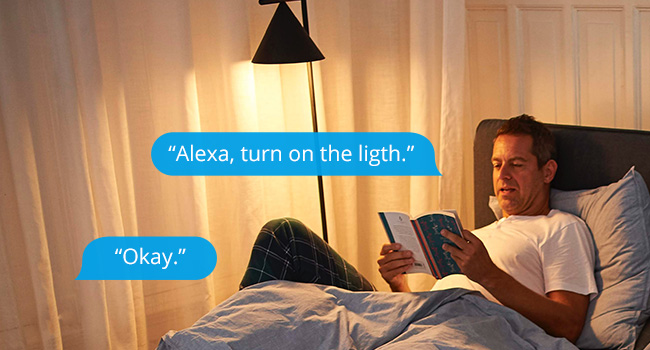
Image 3.3 : Example of using Alexa to control a light connected to the smart plug.
3.3 Commande manuelle
The smart plug features a physical button on its side. Press this button to manually toggle the power of the connected appliance on or off. This action will also update the status in your app.

Image 3.4: The SONOFF S31 Lite Smart Plug used with a lamp, illustrating its versatility.
4. Entretien
To ensure the longevity and optimal performance of your SONOFF Zigbee Smart Plug S31 Lite:
- Veillez à ce que l'appareil reste propre et exempt de poussière. Utilisez un chiffon doux et sec pour le nettoyer.
- Évitez d'exposer l'appareil à une humidité excessive ou à des températures extrêmes.
- N'essayez pas de démonter ou de réparer l'appareil vous-même. Contactez le service client pour obtenir de l’aide.
- Ensure the connected appliance's power consumption does not exceed the smart plug's maximum rating (15 Amp(s).
5. Dépannage
If you encounter issues with your SONOFF Zigbee Smart Plug S31 Lite, consider the following:
- L'appareil ne répond pas :
- Check if the smart plug is properly plugged into the outlet and receiving power.
- Verify that your Zigbee hub is online and functioning correctly.
- Ensure the smart plug is within range of your Zigbee hub or another Zigbee repeater.
- Try re-pairing the device with your Zigbee hub.
- Problèmes de connectivité des applications :
- Vérifiez que votre smartphone dispose d'une connexion internet stable.
- Redémarrez l'application eWeLink.
- Vérifiez les mises à jour de l'application.
- La commande vocale ne fonctionne pas :
- Ensure your Zigbee hub is correctly linked to your voice assistant (Alexa/Google Home) account.
- Verify the device name used in voice commands matches the name in your app.
- Check your voice assistant's settings for any connectivity issues.
If problems persist, please refer to the official SONOFF support resources or contact customer service.
6. Spécifications
| Fonctionnalité | Détail |
|---|---|
| Numéro de modèle | S31 Lite zb |
| Dimensions du produit | 1.57 x 3 x 1.3 pouces |
| Poids de l'article | 3.21 onces |
| Évaluation actuelle | 15 Amps |
| Matériel | Copper (internal components), PC V0 (shell) |
| Connectivité | Zigbee Protocol (Hub Required) |
| Compatibilité | SmartThings, Amazon Echo Plus, Alexa, Google Home |
| Type de montage | Montage enfichable |
7. Garantie et assistance
Pour obtenir des informations sur la garantie, une assistance technique ou toute autre aide, veuillez consulter le site officiel de SONOFF. website or contact their customer service department. Details can typically be found on the product packaging or the SONOFF official website.


