1. Produit terminéview
The Sharp SMD2489ES is a state-of-the-art built-in Smart Microwave Drawer Oven designed for modern kitchens. It integrates seamlessly into your cabinetry, offering both aesthetic appeal and advanced functionality. This model features touchless operation, smart connectivity, and a concealed control panel for a sleek, streamlined look.
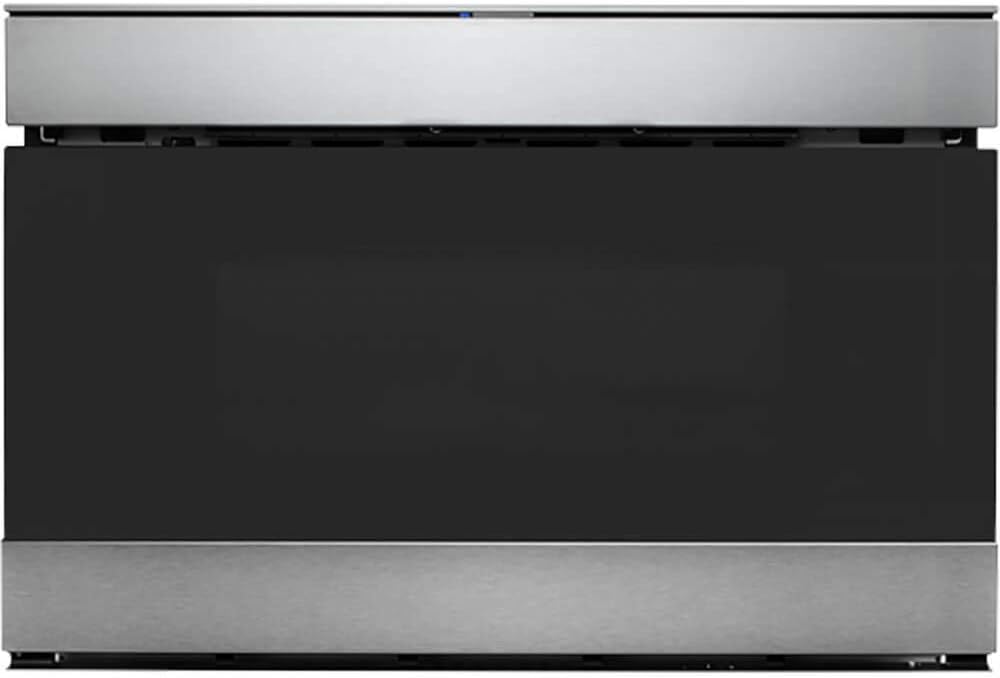
Figure 1 : Face avant view of the Sharp SMD2489ES Smart Microwave Drawer Oven.
2. Principales caractéristiques
- Connectivité intelligente : Works with Alexa and the Sharp Kitchen App for hands-free operation and voice commands.
- Easy Wave Open: Touchless opening of the microwave drawer oven by simply waving your hand.
- Concealed Touch Glass Controls: Controls are discreetly hidden and operate at a convenient 45° angle for easy visibility when needed.
- Built-In Airflow Venting: Supports both traditional "proud mount" and flush installation options without additional kits.
- Conception moderne: Edge-to-edge black glass with a viewing window and stainless steel accents, complemented by LED interior lighting.
- Easy Touch Automatic Drawer System: Smoothly closes the oven with a gentle nudge or button press, preventing spills.
- Sensor Cook & Defrost: Automated cooking and defrosting programs for various food items.
3. Installation et configuration
The SMD2489ES is designed for built-in installation, typically under a countertop or in a kitchen island. It offers flexible installation options:
- Proud Mount: Traditional installation where the microwave slightly protrudes from the cabinetry.
- Montage encastré : For a seamless, integrated look, the microwave can be installed flush with your cabinets. This model features Built-In Airflow venting, eliminating the need for separate trim kits or vent deflectors for flush installation.
For detailed installation instructions, refer to the comprehensive installation guide provided with your appliance. Professional installation is recommended.

Figure 2: The microwave drawer oven seamlessly integrated into a kitchen island.
4. Mode d'emploi
4.1 Opening and Closing the Drawer
- Easy Wave Open: To open the drawer without touching, simply wave your hand up and down near the motion sensor located above the drawer. The drawer will glide open automatically.
- Ouverture/Fermeture manuelle : Press the 'OPEN/CLOSE' button on the control panel.
- Easy Touch Automatic Drawer System: For closing, a gentle nudge on the drawer will activate the automatic closing mechanism.

Figure 3: The microwave drawer in its fully open position, ready for use.
4.2 Utilisation du panneau de commande
The control panel is concealed for a sleek appearance. To access it, open the microwave drawer. The panel is angled at 45 degrees for optimal viewrelation et interaction.

Figure 4 : Gros plan view of the concealed glass touch control panel.
4.3 Fonctionnalités intelligentes et commande vocale
This microwave is Works with Alexa Certified. Download the Sharp Kitchen app and pair it with your Alexa device to enable voice commands. Over 35 voice commands are available, such as "Alexa, defrost 1 pound of chicken," simplifying your cooking experience.
4.4 Cooking and Defrosting
Utilize the Sensor Cook & Defrost menu items to automatically adjust cooking times and power levels based on the food's moisture and temperature. Refer to the full user manual for a complete list of pre-set programs and manual cooking options.
5. Entretien
Un nettoyage et un entretien réguliers garantiront la longévité et les performances optimales de votre four à micro-ondes.
- Nettoyage intérieur: Essuyez l'intérieur avec de l'annonceamp cloth and mild detergent after each use to prevent food buildup. For stubborn stains, place a bowl of water with lemon slices inside and microwave for a few minutes to loosen residue.
- Nettoyage extérieur : Clean the stainless steel and glass surfaces with a soft cloth and a non-abrasive cleaner specifically designed for these materials. Avoid harsh chemicals or abrasive pads.
- Glissières de tiroir : Periodically check the drawer rails for any obstructions and wipe them clean to ensure smooth operation.
6. Dépannage
If you encounter any issues with your microwave oven, refer to the following common troubleshooting tips before contacting customer support:
| Problème | Cause possible | Solution |
|---|---|---|
| Microwave not heating food | Door not fully closed; Power outage; Incorrect settings. | Ensure drawer is completely closed. Check power supply. Verify cooking settings. |
| Drawer not opening/closing smoothly | Obstruction in rails; Sensor issue. | Check for and remove any obstructions. Clean drawer rails. |
| Control panel not visible/lit | Panel is concealed; Power saving mode. | Ensure drawer is open to reveal the panel. Some elements may only light up when active. |
| Les fonctionnalités intelligentes ne fonctionnent pas. | Not paired with app/Alexa; Wi-Fi connectivity issues. | Ensure proper pairing via Sharp Kitchen App. Check Wi-Fi connection. |
Si le problème persiste après avoir essayé ces solutions, veuillez contacter le service client de Sharp.
7. Spécifications
| Fonctionnalité | Détail |
|---|---|
| Nom de marque | Pointu |
| Numéro de modèle | SMD2489ES |
| Capacité | 1.2 pieds cubes |
| Quoitage | 950 watts |
| Type d'installation | Intégré |
| Dimensions du produit | 23.25"P x 23.56"L x 16"H |
| Poids de l'article | 74 livres |
| Couleur | Acier inoxydable |
| Caractéristiques spéciales | Programmable, Easy Wave Open, Sharp Kitchen App compatible |
| Type de dégivrage | Dégivrage automatique |
8. Garantie et assistance
Your Sharp SMD2489ES Smart Microwave Drawer Oven comes with a manufacturer's warranty. Please refer to the warranty card included with your product for specific terms and conditions. For technical assistance, service, or to purchase replacement parts, please contact Sharp customer support through their official website ou les coordonnées fournies dans la documentation de votre produit.


