Introduction
Le Wampler Terraform is a multi-modulation guitar effects pedal designed to provide a wide range of modulation effects in a compact unit. It features 11 distinct effect blocks, stereo and mono routing options, MIDI control, and expression pedal integration. This manual provides detailed instructions for setting up, operating, and maintaining your Terraform pedal.
Installation
Exigences en matière d'alimentation
The Terraform pedal requires a 9-18V DC power supply, center negative, with a minimum current draw of 100mA. Ensure your power supply meets these specifications to prevent damage and ensure optimal performance.
Relations
The pedal offers versatile connectivity options for integration into various guitar rigs.
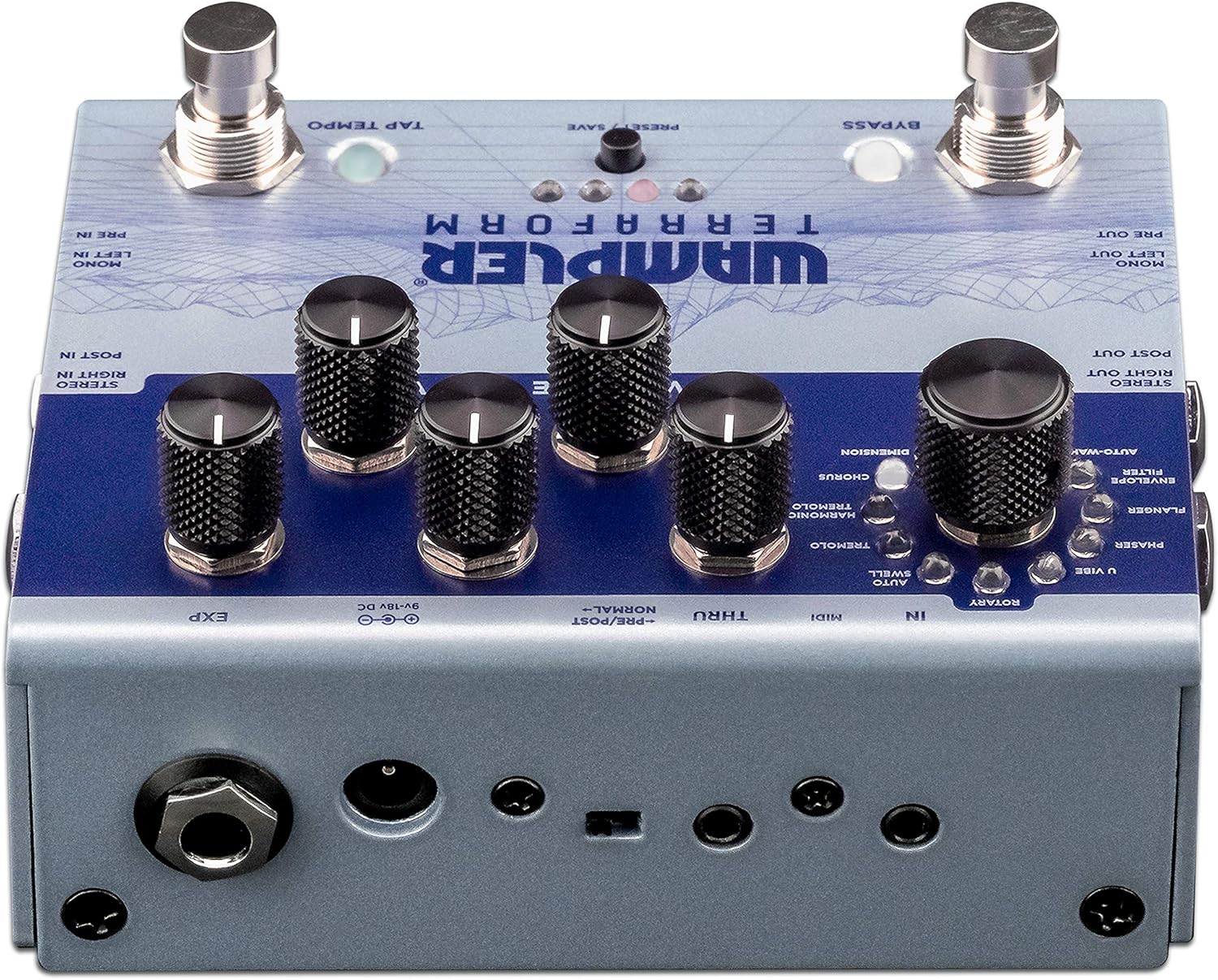
Figure 1: Rear panel connections of the Wampler Terraform pedal.
- Power Input (9-18V DC): Connect your compatible power supply here.
- Mono Left In / Pre In: Standard mono input for your guitar signal.
- Mono Left Out / Pre Out: Standard mono output.
- Stereo Right In / Post In: Input for stereo operation or for effects placed after drive pedals.
- Stereo Right Out / Post Out: Output for stereo operation.
- MIDI In/Thru: Connect MIDI devices for control and synchronization. The pedal includes 3.5mm to 5-pin DIN adapters.
- EXP (Expression Pedal): Connect an expression pedal for real-time control over various parameters.
Mise sous tension initiale
After connecting power and your instrument, the pedal will power on. The LEDs will illuminate, indicating its current state and selected preset.
Mode d'emploi
The Terraform pedal features a user-friendly interface with dedicated knobs and footswitches for intuitive control.

Figure 2 : Plusview du Wampler Terraform pedal controls.
Contrôles
- Bouton de sélection d'effet : This large knob allows you to choose between the 11 available modulation effects. The effects include: Dimension, Chorus, Harmonic Tremolo, Tremolo, AutoSwell, Rotary, U-Vibe, Phaser, Flanger, Envelope Filter, and AutoWah.
- Bouton de vitesse : Permet de régler la vitesse ou le rythme de l'effet de modulation sélectionné.
- Bouton de profondeur : Contrôle l'intensité ou la profondeur de la modulation.
- Bouton de mixage : Mixes the wet (effected) signal with the dry (unaffected) signal.
- Variable Knob: This control's function changes depending on the selected effect, offering additional parameter adjustment specific to each modulation type.
- Bouton de volume : Régle le volume de sortie global de la pédale.

Figure 3: Detail of the effect selection knob.

Figure 4: Detail of the Rate, Depth, and Blend control knobs.
Pédales
- Commutateur au pied Bypass : Engages or disengages the effect.
- Tap Tempo Footswitch: Allows you to tap in the desired tempo for time-based effects.
Préréglages
The Terraform pedal can store up to 8 presets. These presets can be recalled via the front panel button, the footswitches, or through MIDI commands. Refer to the full manual for detailed instructions on saving and recalling presets.
Expression Pedal Functionality
An external expression pedal can be connected to control any of the five main control parameters (Rate, Depth, Blend, Variable, Volume). You can also set the heel and toe points for precise control over the parameter range.
Stereo and Mono Routing
The pedal supports both mono and full stereo operation. Additionally, it allows for splitting the mono signal to route certain effects before your drive pedals or amplifier gain, while other effects follow in your amplifier's effects loop.
Contrôle MIDI
The Terraform pedal is fully MIDI mappable, allowing for external control of parameters, preset changes, and synchronization with other MIDI-enabled gear.
Entretien
Nettoyage
Pour nettoyer la pédale, utilisez un chiffon doux et sec. Évitez les nettoyants abrasifs et les solvants, car ils risquent d'endommager la finition et les composants internes.
Power Supply Care
Always use a regulated power supply that matches the pedal's voltage and current requirements. Consider using a power surge protector to safeguard your equipment from electrical fluctuations and ground noise.
Stockage
Store the pedal in a dry environment, away from extreme temperatures and direct sunlight, when not in use.
Dépannage
Pas de son ou son intermittent
- Vérifiez que toutes les connexions des câbles (entrée, sortie, alimentation) sont bien fixées.
- Verify that the power supply is correctly connected and providing the specified voltage et actuel.
- Assurez-vous que votre instrument et ampLes amplificateurs fonctionnent correctement.
- Check the pedal's bypass status.
Unwanted Noise or Hum
- Assurez-vous d'utiliser une alimentation électrique isolée de haute qualité.
- Vérifiez la présence de boucles de masse dans votre chaîne de signal.
- Tester avec différents câbles.
Pedal Not Responding to Controls
- Verify the pedal is powered on.
- If using MIDI, ensure MIDI connections are correct and the pedal is receiving the expected commands.
- If using an expression pedal, ensure it is properly connected and calibrated.
If issues persist, consult the Wampler support resources or contact customer service.
Caractéristiques
| Fonctionnalité | Détail |
|---|---|
| Marque | Wampler |
| Nom du modèle | Terraform |
| Numéro de modèle | WAMTERRAFORM |
| Dimensions du produit (L x l x H) | 7" x 6" x 4" |
| Poids de l'article | 1.41 livres |
| Voltage | 9-18 Volts DC (Center Negative) |
| Amprage | 100 millièmeamps (minimum) |
| Effets de sortie audio | Dimension, Chorus, Harmonic Tremolo, Tremolo, AutoSwell, Rotary, U-Vibe, Phaser, Flanger, Envelope Filter, AutoWah |
| Type de contrôles | Bouton, pédale |
| Source d'énergie | DC Power Supply |
| Interface matérielle | 1/4-inch Audio, 3.5mm MIDI, Expression Pedal |
| Format du signal | Analogique |
Garantie et assistance
Informations sur la garantie
Le Wampler Terraform Multi-Modulation Guitar Effects Pedal comes with a Garantie de 5 ans covering parts and labor from the date of purchase. This warranty covers defects in materials and workmanship under normal use. Please retain your proof of purchase for warranty claims.
Assistance clientèle
For technical assistance, troubleshooting, or warranty service, please visit the official Wampler website or contact their customer support team. Detailed contact information can typically be found on the Wampler website ou dans les matériaux d'emballage.


