1. Introduction
Thank you for choosing the BESTEK Portable Power Station. This device is a compact and lightweight lithium-ion battery generator designed to provide reliable power for various electronic devices. It features AC outlets, USB ports, and a 12V DC car socket, making it ideal for outdoor activities, emergencies, and general portable power needs. Please read this manual thoroughly before use to ensure safe and optimal operation.
Contenu du colis :
- BESTEK Portable Power Station x 1
- Chargeur AC x 1
- Car Cigarette Lighter Charger x 1
- Étui de voyage x 1
- Manuel d'utilisation x 1
- Carte de service x 1

Image: The BESTEK Portable Power Station shown with its included accessories: AC charger, car charger, travel case, user manual, and service card.
2. Consignes de sécurité
To ensure safe operation and prolong the lifespan of your power station, please observe the following safety precautions:
- Ne pas démonter, réparer ni modifier l'appareil. Un remontage incorrect peut provoquer un incendie ou une électrocution.
- Keep the unit away from water, fire, and extreme temperatures (above 40°C/104°F or below 0°C/32°F).
- Use only the specified charging accessories provided with the unit or approved by BESTEK.
- Évitez de faire tomber l'appareil ou de le soumettre à des chocs violents.
- Ensure proper ventilation during use and charging. Do not block the cooling fan or air inlets/outlets.
- N'insérez pas d'objets étrangers dans les ports ou les ouvertures.
- Tenir hors de portée des enfants.
- Si l'appareil émet de la fumée, des odeurs inhabituelles ou fait des bruits étranges, cessez immédiatement de l'utiliser et contactez le service client.
- Do not use the unit in a sealed environment or where flammable gases may accumulate.
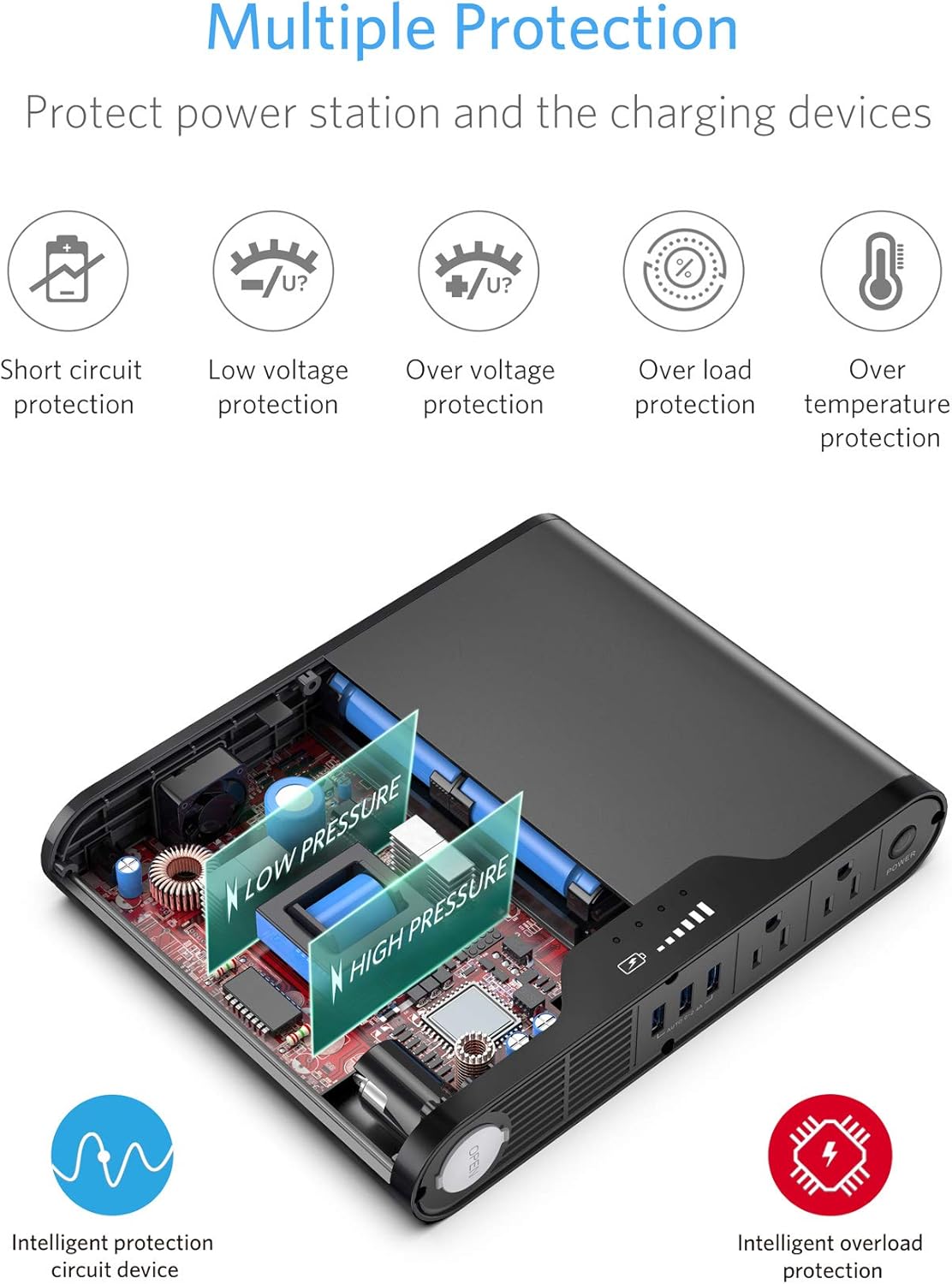
Image: Diagram illustrating the multiple protection features of the power station, including short circuit, low voltage, sur voltage, overload, and over temperature protection.
3. Produit terminéview
The BESTEK Portable Power Station integrates multiple power outputs and safety features into a compact design.

Image : Une image détaillée view of the BESTEK Portable Power Station, highlighting its components: Cigarette lighter socket, Air inlet, USB Ports, AC outlets, Power On/Off button, DC recharging port, and Smart cooling fan. Dimensions are also indicated: 9.56 inches length, 7.4 inches width, and 1.7 inches height.
Composants clés :
- Prises secteur : Two 110V AC outlets for powering standard household electronics up to 150W.
- Ports USB : Three smart USB charging ports (0-2.4A per port, 4.2A max total) for mobile devices.
- Prise allume-cigare : One 12V DC output for car-powered devices.
- DC Recharging Port: Input for AC adapter, car charger, or solar panel.
- Bouton marche / arrêt: Contrôle l'alimentation principale de l'unité.
- Voyants de batterie : LED indicators showing the remaining battery capacity.
- Ventilateur de refroidissement intelligent : S'active automatiquement pour dissiper la chaleur pendant son fonctionnement.

Image: An illustration demonstrating the 3-in-1 functionality of the power station, highlighting its role as a 150W Pure Sine Wave Inverter, a 45000mAh Power Bank, and a Cigarette Lighter power source.
4. Installation
Charge initiale :
Before using your BESTEK Portable Power Station for the first time, it is recommended to fully charge it. This ensures optimal battery performance and longevity.
- Connect the provided AC adapter to the DC recharging port on the power station.
- Plug the AC adapter into a standard wall outlet (100-240V AC).
- The battery indicator lights will illuminate, showing the charging progress. All lights will be solid when fully charged.
- Une fois la charge complète, débranchez l'adaptateur secteur.
5. Mode d'emploi
Mise sous/hors tension :
- To turn on the power station, press and hold the Power On/Off button for approximately 2-3 seconds until the battery indicator lights illuminate.
- To turn off the power station, press and hold the Power On/Off button again for approximately 2-3 seconds until the lights turn off.
Utilisation des prises de courant alternatif :
The power station provides pure sine wave AC output, which is suitable for sensitive electronics.
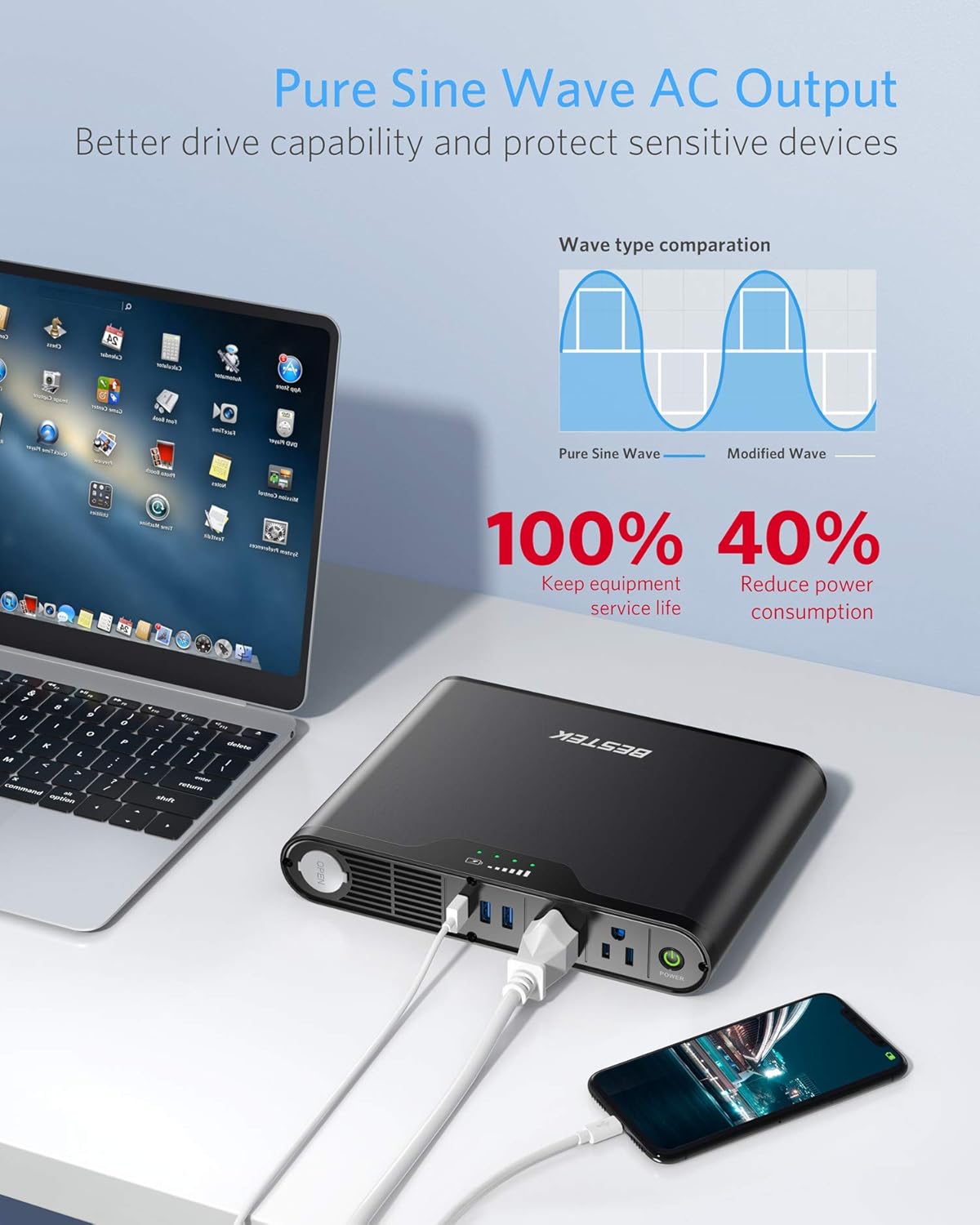
Image: The BESTEK Portable Power Station connected to a laptop and a smartphone, demonstrating its pure sine wave AC output capability. A graph compares pure sine wave to modified wave, highlighting the benefits for equipment service life and reduced power consumption.
- Assurez-vous que la centrale électrique est allumée.
- Plug your device's AC power cord into one of the 110V AC outlets.
- Assurez-vous que la quantité totale d'eautage of connected devices does not exceed 150W. Overloading will trigger the protection mechanism and shut down the unit.
- When finished, disconnect your devices and turn off the power station.
Utilisation des ports USB :
The three USB ports feature smart charging technology, automatically detecting and delivering the optimal current for your devices.
- Assurez-vous que la centrale électrique est allumée.
- Connect your USB-powered device (e.g., smartphone, tablet, camera) to any of the USB ports using a compatible USB cable.
- L'appareil commencera à se charger automatiquement.
- When finished, disconnect your devices.
Using DC Car Socket:
- Assurez-vous que la centrale électrique est allumée.
- Plug your 12V DC car-powered device into the cigarette lighter socket.
- Ensure the device's power consumption does not exceed 150W.
- When finished, disconnect your devices.
Indicateur de batterie :
The LED lights on the unit indicate the remaining battery capacity. Each light typically represents a percentage of the total capacity. Refer to the product's display for exact interpretation.
6. Méthodes de recharge
The BESTEK Portable Power Station offers three convenient ways to recharge:
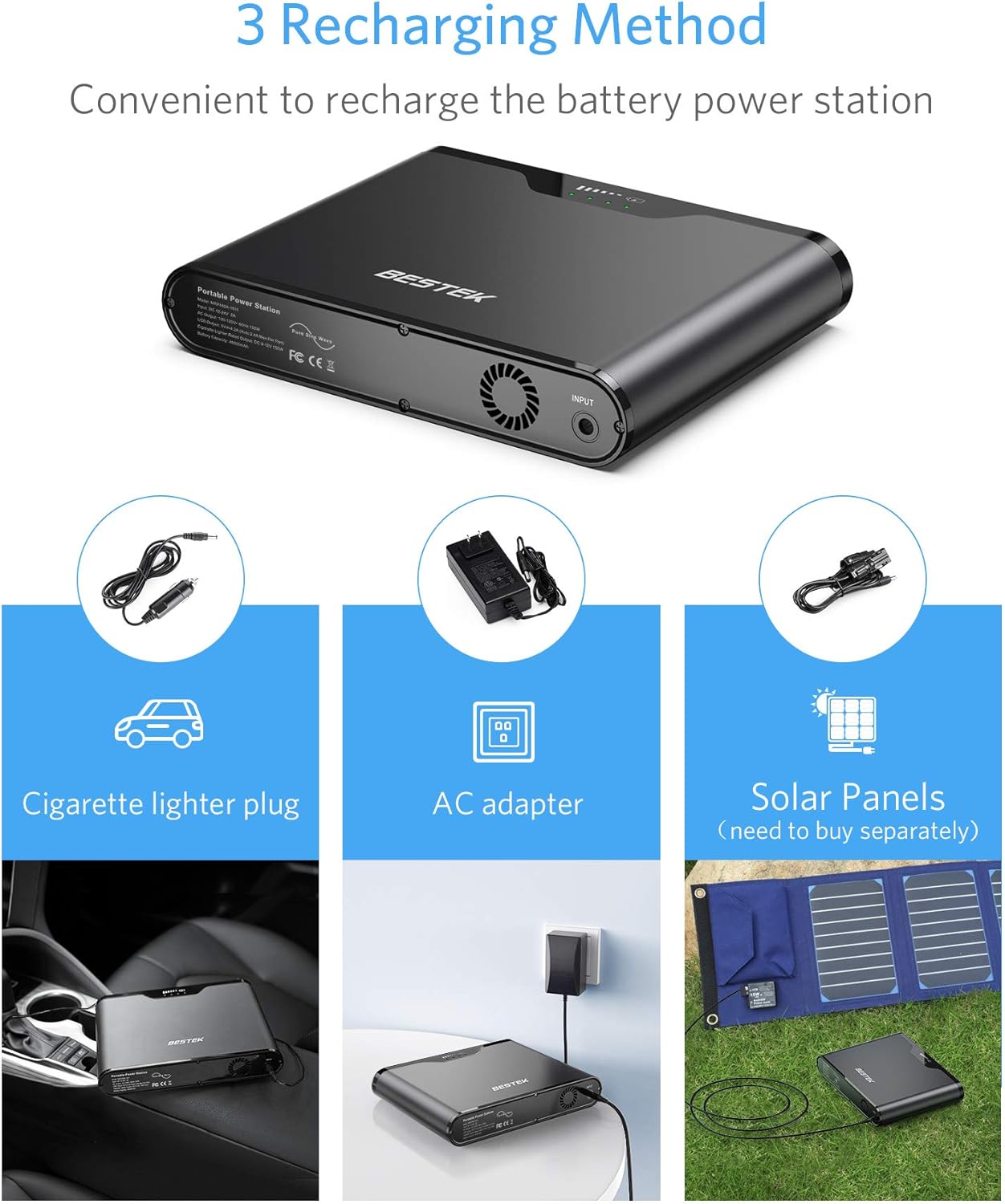
Image: An illustration detailing the three recharging methods for the BESTEK Portable Power Station: using a cigarette lighter plug in a car, an AC adapter from a wall outlet, and solar panels (sold separately).
A. Using AC Adapter (Wall Outlet):
- Connect the provided AC adapter to the DC recharging port on the power station.
- Branchez l’adaptateur secteur sur une prise murale standard.
- Les voyants indicateurs de la batterie afficheront la progression de la charge.
B. Using Car Charger:
- Connect the provided car charger to the DC recharging port on the power station.
- Branchez l'autre extrémité du chargeur de voiture dans la prise allume-cigare de votre véhicule.
- Les voyants indicateurs de la batterie afficheront la progression de la charge.
C. Using Solar Panel (Sold Separately):
- Connect a compatible 15V-24V solar panel (not included) to the DC recharging port on the power station.
- Ensure the solar panel is placed in direct sunlight for efficient charging.
- Les voyants indicateurs de la batterie afficheront la progression de la charge.
7. Entretien
Un entretien adéquat garantit la longévité et les performances de votre centrale électrique.
- Stockage: Store the unit in a cool, dry place, away from direct sunlight and corrosive materials.
- Fréquence de charge: If the unit is not used for extended periods, recharge it every 3-6 months to maintain battery health.
- Nettoyage: Wipe the exterior of the unit with a dry, soft cloth. Do not use harsh chemicals or abrasive cleaners. Ensure all ports are free of dust and debris.
- Température: Avoid operating or storing the unit in extreme temperatures.
8. Dépannage
Si vous rencontrez des problèmes avec votre centrale électrique, consultez les problèmes courants et leurs solutions ci-dessous :
| Problème | Cause possible | Solution |
|---|---|---|
| L'unité ne s'allume pas. | La batterie est épuisée. | Recharge the power station fully. |
| Devices not charging via AC/USB/DC. | Device power consumption exceeds unit's output. Connexion lâche. L'unité est éteinte. | Vérifier l'appareil wattage. Disconnect and reconnect the device. Ensure the power station is on. |
| L'appareil s'arrête inopinément. | Protection contre les surcharges activée. Protection contre la surchauffe activée. | Disconnect high-power devices. Allow unit to cool down in a well-ventilated area. Restart the unit. |
| La charge est lente ou ne fonctionne pas. | Le chargeur n'est pas correctement connecté. Chargeur ou câble défectueux. Le panneau solaire ne reçoit pas assez de lumière solaire. | Ensure all connections are secure. Try a different charger/cable if available. Reposition solar panel for optimal sunlight. |
If the problem persists after trying these solutions, please contact BESTEK customer support.
9. Spécifications
| Fonctionnalité | Spécification |
|---|---|
| Modèle | MRP450A-1511 |
| Type de batterie | Lithium-ion |
| Capacité de la batterie | 167 Wh (45000 mAh / 3.7 V) |
| Entrée DC | 12-24V 2A |
| Sortie CA | 100-120V AC, 60Hz, 150W (Pure Sine Wave) |
| Sortie USB | 3 x 5V/4.2A (0-2.4A per port, 4.2A max total) |
| Sortie allume-cigare | 9-12V DC, 150W |
| Protections | Survoltage, Over-charge, Over-discharge, Over-temperature, Overload, Short-circuit |
| Dimensions (L x l x H) | 24.3 x 18.9 x 4.3 cm (9.57 x 7.44 x 1.69 pouces) |
| Poids | 2.57 kg (5.67 lb) |
10. Garantie et assistance
BESTEK fournit un Garantie de 18 mois for this Portable Power Station from the date of purchase. This warranty covers manufacturing defects and workmanship under normal use.
For technical support, warranty claims, or any questions regarding your product, please contact BESTEK customer service. Our team is available 24 hours a day, 7 days a week to assist you.
Please refer to the service card included in your package for specific contact details or visit the official BESTEK website pour plus d'informations.


