1. Introduction
The Dual DAB 3A Digital Radio Adapter is designed to upgrade your existing audio system with modern digital radio reception and Bluetooth streaming capabilities. This adapter allows you to enjoy DAB+ and FM radio broadcasts with clear digital quality and stream audio wirelessly from compatible devices. Its user-friendly interface and remote control ensure convenient operation.
2. Consignes de sécurité
- Alimentation: Utilisez uniquement l'adaptateur secteur fourni. Assurez-vous que le volumetage correspond aux exigences spécifiées sur l'adaptateur.
- Eau et humidité : Do not expose the device to rain, moisture, or dripping/splashing liquids. Keep it away from water sources.
- Ventilation: Ensure adequate ventilation around the unit. Do not block ventilation openings. Avoid placing the device on soft surfaces that may obstruct airflow.
- Sources de chaleur : Tenez l'appareil éloigné des sources de chaleur telles que les radiateurs, les bouches de chauffage, les poêles ou autres appareils produisant de la chaleur.
- Nettoyage: Débranchez l'appareil avant de le nettoyer. Utilisez un chiffon doux et sec. N'utilisez pas de nettoyants liquides ni d'aérosols.
- Entretien: N'essayez pas de réparer vous-même ce produit. Confiez tous les travaux d'entretien à du personnel de service qualifié.
3. Contenu du colis
Veuillez vérifier que tous les articles énumérés ci-dessous sont inclus dans votre colis :
- Dual DAB 3A Digital Radio Adapter
- Adaptateur secteur
- Télécommande
- Manuel du propriétaire
- Antenne filaire externe
4. Produit terminéview
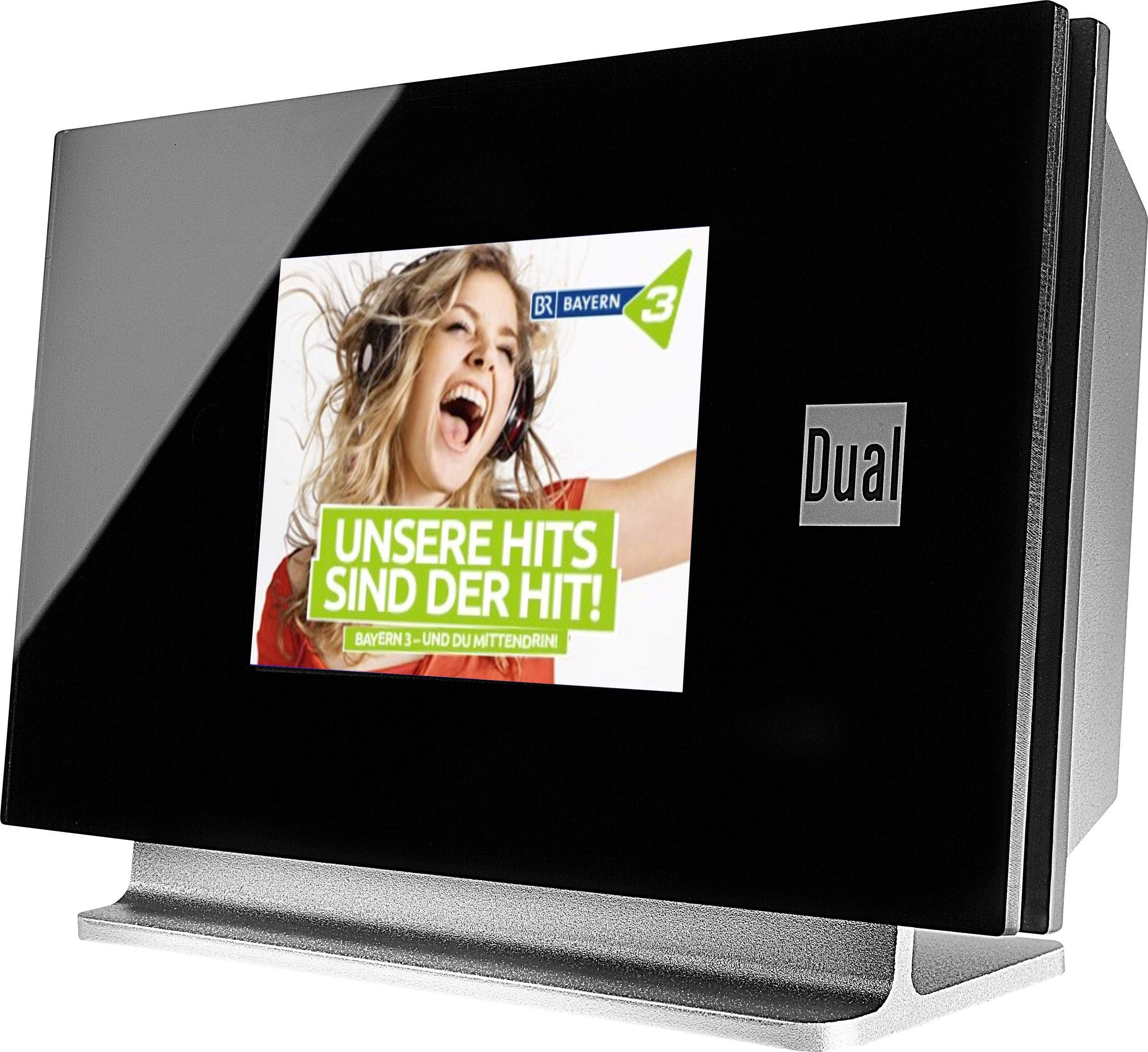
This image displays the Dual DAB 3A Digital Radio Adapter from a front-side angle. The front features a large, black TFT color display showing a radio station's album art and text. The side view indicates the product dimensions: 15 cm (width), 6 cm (depth), and 10.49 cm (height).
Panneau avant
- Écran couleur TFT : Shows station information, track details, album art, and menu options.
Connexions du panneau arrière
- Entrée d'antenne : For connecting the external wire antenna or a commercially available antenna.
- SORTIE AUX : Audio output for connecting to an external amplificateur ou système audio.
- Puissance d'entrée : Pour brancher l'adaptateur secteur.
Télécommande
The included remote control provides full functionality for navigating menus, changing stations, adjusting volume, and selecting input modes.
5. Installation
- Connecter l'antenne : Connect the supplied external wire antenna to the antenna input on the rear panel of the DAB 3A adapter. For optimal reception, extend the antenna fully.
- Connectez-vous au système audio : Use an appropriate audio cable (not included) to connect the AUX-OUT port on the rear of the DAB 3A to an available audio input (e.g., AUX-IN, Line-IN) on your existing amplificateur ou système stéréo.
- Connecter l'alimentation : Plug the AC power adapter into the power input on the rear of the DAB 3A, then plug the adapter into a wall outlet.
- Mise sous tension : Press the Power button on the unit or the remote control to turn on the adapter. The display will illuminate.
- Initial Scan (DAB+): Upon first power-on, the unit may automatically perform a scan for available DAB+ stations. Allow this process to complete.
6. Fonctionnement
Marche/Arrêt
- Appuyez sur le Pouvoir bouton sur l'appareil ou la télécommande pour allumer ou éteindre l'appareil.
Mode radio DAB+
- Appuyez sur le Mode button on the remote control until DAB+ mode is selected.
- If no stations are found or you wish to rescan, navigate to the 'Full Scan' option in the menu and confirm. The adapter will search for available DAB+ stations.
- Utilisez le Haut/Bas navigation buttons on the remote to browse through the list of available stations.
- Presse OK / Entrer pour sélectionner une station.
- The TFT display will show station name, program information, and potentially album art or weather data.
Mode radio FM
- Appuyez sur le Mode button on the remote control until FM mode is selected.
- Pour rechercher automatiquement les stations, appuyez longuement sur Balayage button (or equivalent on remote). The adapter will tune to the next strong station.
- Pour régler manuellement, utilisez le Haut/Bas navigation buttons to adjust the frequency.
Mode Bluetooth
- Appuyez sur le Mode button on the remote control until Bluetooth mode is selected. The display will show 'Bluetooth Pairing' or similar.
- Sur votre smartphone ou tablette, activez Bluetooth et recherchez les appareils disponibles.
- Select 'Dual DAB 3A' from the list of devices to pair.
- Once paired, you can stream audio from your device to the DAB 3A adapter.
Mode AUX IN
- Connect an external audio source (e.g., MP3 player, CD player) to the AUX-IN port on the rear of the DAB 3A using a 3.5mm audio cable (not included).
- Appuyez sur le Mode button on the remote control until AUX-IN mode is selected.
- Audio from the connected external device will now play through your audio system.
7. Entretien
- Nettoyage de l'unité : Disconnect the power adapter before cleaning. Use a soft, dry, lint-free cloth to wipe the surface of the unit. Do not use abrasive cleaners, waxes, or solvents.
- Nettoyage de l'écran : Gently wipe the TFT display with a soft, dry microfiber cloth. Avoid pressing hard on the screen.
- Stockage: Si vous devez entreposer l'appareil pendant une période prolongée, débranchez-le de l'alimentation électrique et rangez-le dans un endroit frais et sec, à l'abri de la lumière directe du soleil et des températures extrêmes.
8. Dépannage
| Problème | Cause possible | Solution |
|---|---|---|
| Pas de courant | Adaptateur secteur non connecté ou prise défectueuse. | Assurez-vous que l'adaptateur secteur est correctement connecté à l'appareil et à une prise de courant fonctionnelle. |
| Mauvaise réception DAB+/FM | Antenna not properly connected or poor signal strength. | Ensure the antenna is fully extended and properly connected. Try repositioning the antenna or the unit. Consider using a stronger external antenna if available. |
| L'appairage Bluetooth échoue | Bluetooth not enabled on source device or adapter is not in pairing mode. | Ensure Bluetooth is enabled on your smartphone/tablet and the DAB 3A is in Bluetooth mode. Try restarting both devices. |
| Pas de son | Volume too low, incorrect input selected on amplifier, or audio cable issue. | Increase the volume on both the DAB 3A and your ampamplificateur. Assurez-vous que votre amplifier is set to the correct input (e.g., AUX-IN). Check the audio cable connections. |
9. Spécifications
- Modèle: 75862
- Technologie d'accord : DAB Plus, FM
- Connectivité : Bluetooth
- Bandes radio prises en charge : FM, DAB+
- Type d'affichage : Affichage couleur
- Source d'alimentation : Adaptateur secteur
- Interface matérielle: Bluetooth
- Appareils compatibles : Smartphone, ordinateur portable
- Caractéristiques spéciales : Bluetooth, télécommande
- Dimensions du produit : 15 x 6 x 10.5 cm
- Poids de l'article : 540 g
10. Garantie et assistance
This product comes with a standard manufacturer's warranty. For detailed warranty information, please refer to the warranty card included in your package or visit the official Dual website. For technical support, troubleshooting assistance, or service inquiries, please contact Dual customer support through their official channels.


