1. Produit terminéview
The OOYCYOO 100 Amp MPPT Solar Charge Controller, Model KP60 100, is designed for efficient management of solar power systems. It automatically identifies 12V or 24V battery systems and is compatible with various battery types, including AGM, Sealed, Gel, Flooded, and Lithium. This controller features advanced Maximum Power Point Tracking (MPPT) technology to maximize energy harvest from solar panels, ensuring optimal charging for your battery bank.
Key features include a backlit LCD display for real-time monitoring, enhanced safety protections, and a high DC/DC transfer efficiency of up to 98.7%.

Figure 1 : Face avant view of the OOYCYOO 100 Amp MPPT Solar Charge Controller, showing the LCD display and connection terminals.
2. Consignes de sécurité
Veuillez lire attentivement toutes les instructions et tous les avertissements avant l'installation et l'utilisation. Le non-respect de ces instructions peut entraîner un choc électrique, un incendie ou des blessures graves.
- Assurez-vous que tous les câbles sont correctement polarisés et solidement connectés afin d'éviter d'endommager le contrôleur et les appareils connectés.
- Always disconnect the solar panel array and battery before installing or adjusting the controller.
- Installez le contrôleur dans un endroit bien ventilé, à l'écart des matériaux inflammables et de la lumière directe du soleil.
- Do not disassemble or attempt to repair the controller. Refer to qualified personnel for service.
- Utilisez des disjoncteurs ou des fusibles appropriés pour toutes les connexions afin de protéger contre les surintensités.
- Wear appropriate personal protective equipment, including eye protection and insulated gloves, during installation.
3. Product Components and Connections
The controller features clearly labeled terminals for solar panel input, battery connection, and load output. It also includes a remote temperature sensor port and USB charging ports.

Figure 2 : Détaillé view of the controller's LCD display, 5S Reset button, Solar Panel Terminal, Battery Terminal, Load Terminal, USB 5V2A ports, Remote Temp Sensor port, and RS485 Communication Port.
Contenu du colis :
- 1 x OOYCYOO 100A MPPT Solar Charge Controller (Model K2500W)
- Capteur de température 1 x
- 1 x Manuel d'utilisation (anglais)
4. Spécifications techniques
The following table outlines the technical specifications for the OOYCYOO 100 Amp MPPT Solar Charge Controller (Model KP60 100).
| Paramètre | Spécification |
|---|---|
| Courant de charge nominal | 100A |
| Volume nominal du systèmetage | 12V/24VDC Auto Identifying |
| 12V System Max. PV Input Power | 1300 W |
| 24V System Max. PV Input Power | 2600 W |
| Max. Volume de circuit ouvert PVtage VOC) | 100 V CC |
| Vol batterietaget gamme | 9V ~ 32V |
| Power Terminal Wire Gauge | 10 AWG |
| Dimensions (L x l x H) | 12 x 7.8 x 3.2 pouces (30.5 x 19.8 x 8.1 cm) |
| Poids | 8.84 livres (4 kg) |
| Type d'affichage | Écran LCD |
| Température de fonctionnement | Jusqu'à 45 °C (113 °F) |
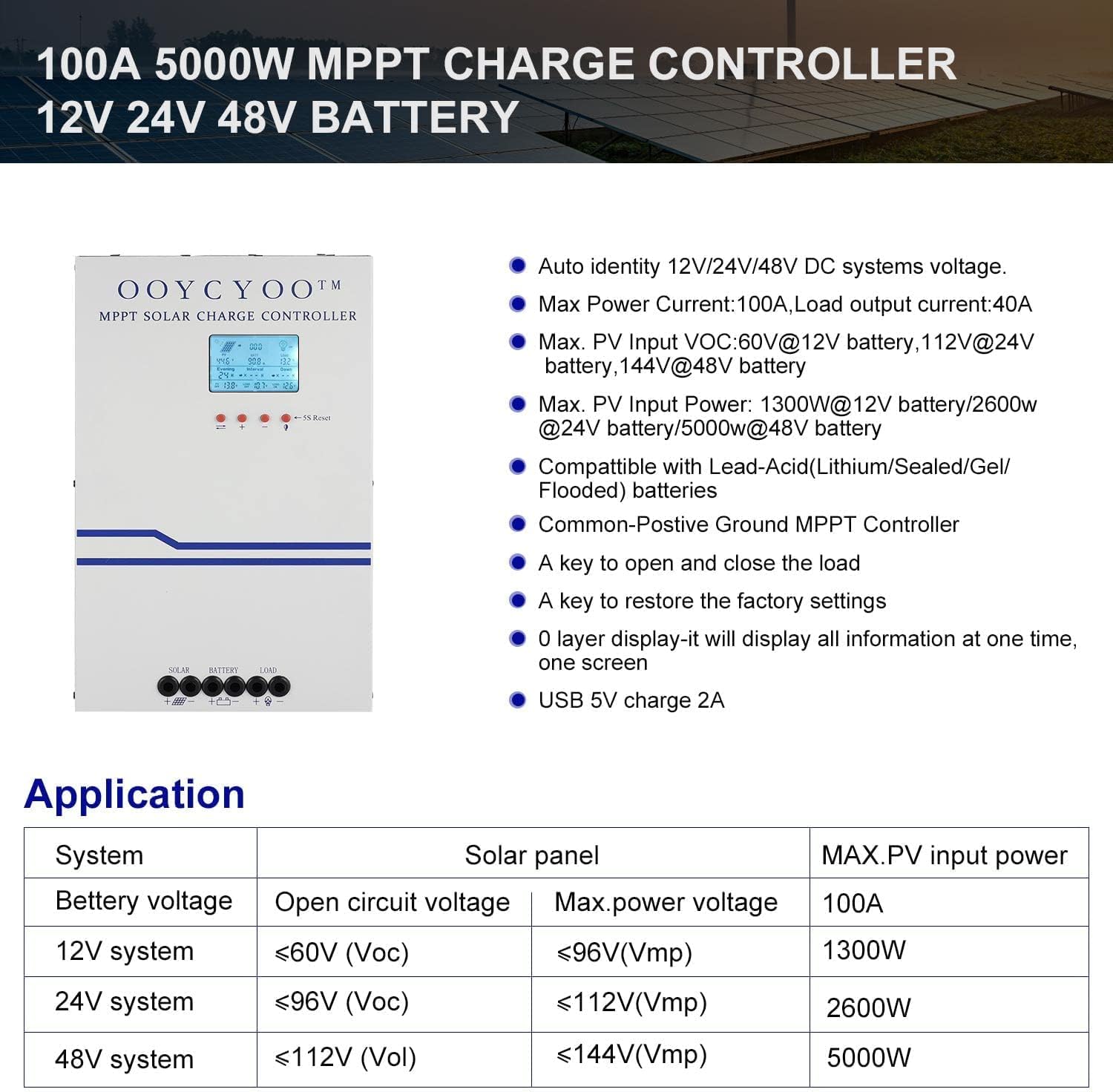
Figure 3: Application table detailing maximum PV input power and voltage for 12V, 24V, and 48V systems.
5. Guide d'installation
Une installation correcte est essentielle au fonctionnement sûr et efficace de votre régulateur de charge solaire. Suivez attentivement les étapes suivantes :
5.1 Montage du contrôleur
- Choisissez un endroit sec et bien ventilé, protégé de la lumière directe du soleil, des températures élevées et de l'humidité.
- Ensure sufficient clearance around the controller for proper airflow, especially around the cooling vents.
- Montez le contrôleur verticalement sur une surface ininflammable à l'aide de fixations appropriées.
5.2 Connexions de câblage
Connect the components in the following order: Battery > Solar Panel > Load. Always ensure correct polarity.
- Connectez la batterie : Connect the battery cables to the battery terminals on the controller. Ensure the positive (+) and negative (-) terminals are correctly matched. The controller will automatically detect the battery voltage (12V ou 24V).
- Connecter le panneau solaire : Connect the solar panel cables to the PV input terminals on the controller. Verify correct polarity. Ensure the open circuit voltage (Voc) of your solar array does not exceed 100VDC.
- Connectez la charge : Connect your DC load to the load output terminals. Ensure the load current does not exceed the controller's rated load current.
- Connecter le capteur de température : Plug the remote temperature sensor into its designated port. This sensor helps the controller optimize charging based on battery temperature.
The controller is compatible with various battery types:

Figure 4: The controller supports AGM, Sealed, Gel, Flooded, and Lithium-Iron phosphate batteries for 12V/24V/48V systems.
6. Guide d'utilisation
Once installed, the controller will begin operation. The LCD display provides real-time system status and allows for configuration.
Affichage LCD 6.1
The backlit LCD display shows various parameters such as battery voltage, courant de charge, vol du panneau solairetage, load status, and accumulated energy (KWH). Use the buttons below the display to navigate through the different screens and access settings.
6.2 Paramètres de base
The controller allows users to set parameters for different battery types (Lithium, LiFePO4, Li(NiCoMn)O2, Flooded, Sealed, Gel). Refer to the on-screen menu for specific adjustments to absorption voltage, vol flottanttage, et faible voltage disconnect settings. A load timer function is also available for controlling DC loads.
6.3 Fonctionnement du ventilateur de refroidissement
The built-in cooling fan activates automatically when the internal temperature exceeds 45°C (113°F) and turns off when the temperature drops below 40°C (104°F). This mechanism ensures optimal performance and extends the lifespan of the controller.
7. Entretien
Un entretien régulier contribue à assurer la longévité et les performances optimales de votre régulateur de charge solaire.
- Nettoyage: Periodically clean the controller's exterior with a dry cloth. Ensure cooling vents are free from dust and debris.
- Relations: Vérifiez annuellement le serrage et l'absence de corrosion de tous les raccordements électriques. Des connexions desserrées peuvent provoquer une surchauffe et des dommages.
- Environnement: Verify that the installation environment remains dry and well-ventilated.
8. Dépannage
The controller incorporates multiple protection functions to safeguard your system. If an issue arises, check the LCD display for error codes or indicators.
8.1 Fonctions de protection
- PV Over Current/Power Protection
- Protection contre les courts-circuits PV
- Protection contre l'inversion de polarité PV
- Night Reverse Charging Protection
- Protection contre l'inversion de polarité de la batterie
- Survol de la batterietaget protection
- Protection contre les décharges de batterie
- Battery Overheating, Controller Overheating Protection
- Lithium Battery Low Temperature Protection
- Protection contre les courts-circuits de charge
- Protection contre les surcharges de charge
- TVS haut volumetage Protection contre les transitoires
8.2 Problèmes courants
- Pas de recharge : Check solar panel connections, ensure sufficient sunlight, and verify battery voltage se trouve dans la plage de fonctionnement.
- Chargement impossible : Check load connections, ensure battery voltage est au dessus du faible voltage disconnect setting, and verify load timer settings.
- Surchauffe: Ensure adequate ventilation around the controller and that cooling vents are clear.
- Vol incorrecttage Lectures : Verify all connections are secure and the temperature sensor is properly installed.
Si le problème persiste après avoir vérifié ces points, veuillez contacter le service client.
9. Garantie et assistance
The OOYCYOO 100 Amp MPPT Solar Charge Controller is a professional product. For any questions or technical assistance, please contact us directly via email. We are committed to providing prompt support and ensuring your satisfaction.
Veuillez vous référer à votre documentation d'achat pour connaître les conditions générales de garantie spécifiques.


