1. Introduction
The Godox X2T-C TTL Wireless Flash Trigger is designed for Canon EOS cameras, offering stable and reliable wireless control over Godox camera flashes, outdoor flashes, and studio flashes equipped with the Godox X wireless radio system. This manual provides comprehensive instructions for setting up, operating, and maintaining your X2T-C trigger, ensuring optimal performance and creative flexibility in your photography.
2. Principales caractéristiques
- Prise en charge du flashage automatique TTL : Fully supports E-TTL II autoflash for Canon.
- Synchronisation à grande vitesse (HSS) : Supports 1/8000s high-speed sync.
- Plusieurs modes de flash : Includes Multi-flash mode and Manual mode.
- Compensation d'exposition au flash (FEC) : Adjust flash output with ±3 stops in 1/3 stop increments.
- Boutons de groupe dédiés : 5 dedicated group buttons (A, B, C, D, E) for quick group management.
- Boutons de fonction : 3 function buttons for quick settings.
- Connectivité Bluetooth : Connects to iPhone/Android devices via the "GodoxPhoto" APP for remote control of flash mode, power output, modeling light, and beep.
- Grand écran LCD : Clear display effect with backlight option.
- Lampe d'assistance AF : New AF assist light for easier autofocus in low-light conditions.
- Precise Power Output: Pro 1/10th of a stop manual precision (1/256 to 1/1).
- Relocated Dial Wheel: Bottom dial wheel for convenient operation, avoiding obstruction of the camera's LCD.
- Griffe porte-accessoires à verrouillage rapide : Slide quick lock hot-shoe for fast and secure mounting.
- Fonction de balayage des canaux : Automatically detects the channel with the least interference.
- Paramètres d'identification sans fil : 99 wireless ID settings (01-99) to prevent interference.
- Mise à jour du firmware: Supports firmware upgrades via Type-C USB cable.
- Prise jack de synchronisation 3.5 mm : For wired triggering.
3. Contenu du colis
- 1 x Godox X2T-C TTL Wireless Flash Trigger
- 1 x Manuel d'utilisation
4. Produit terminéview
Familiarize yourself with the components and controls of your Godox X2T-C trigger.

Figure 1 : Face avant view of the Godox X2T-C trigger, showing the LCD screen and control buttons.

Figure 2 : Détaillé view of the Godox X2T-C's dedicated group buttons (A, B, C, D, E), function buttons, and the relocated bottom dial for quick settings.

Figure 3 : Côté view of the Godox X2T-C, highlighting the Type-C USB port for firmware upgrades, the 3.5mm sync cord jack, and the AA battery compartment.

Figure 4: An annotated image of the Godox X2T-C, illustrating the user-friendly design with dedicated group buttons and function buttons for quick settings.
5. Installation
5.1 Installation de la batterie
- Ouvrez le couvercle du compartiment à piles situé sur le côté de la gâchette.
- Insérez deux piles AA en respectant la polarité (+/-).
- Fermez soigneusement le couvercle du compartiment à piles.
5.2 Montage sur la caméra
- Slide the X2T-C trigger onto your Canon EOS camera's hot shoe.
- Push the quick lock hot-shoe mechanism forward to secure the trigger firmly in place.

Figure 5: The Godox X2T-C wireless flash trigger mounted on a camera hot shoe, ready for use.
5.3 Mise sous/hors tension
Locate the power switch on the side of the trigger. Slide it to the "ON" position to power on the device. Slide it to the "OFF" position to power off.
6. Mode d'emploi
6.1 Contrôles de base
- Bouton MODE : Permet de faire défiler les modes de flash (TTL, Manuel, Multi).
- Bouton MENU : Permet d'accéder au menu principal pour les paramètres avancés.
- Bouton de réglage: Confirme les sélections ou accède aux sous-menus.
- Bouton TOUT : Adjusts settings for all groups simultaneously.
- Boutons de groupe (AE) : Selects individual groups for adjustment.
- Roue de cadran : Permet de naviguer dans les menus et de modifier les valeurs.
6.2 Channel and Group Settings
The X2T-C supports 32 channels and 5 groups (A-E) to manage multiple flashes. To avoid interference, ensure your trigger and flashes are set to the same channel and a unique Wireless ID.
- Appuyez sur le MENU button to access channel and ID settings.
- Use the dial wheel to select the desired channel (CH 01-32) and Wireless ID (ID 01-99).
- Presse ENSEMBLE pour confirmer.
6.3 modes de flash
Appuyez sur le MODE bouton pour parcourir les modes de flash disponibles :
- TTL (À travers l'objectif) : Exposition automatique au flash basée sur la mesure de l'appareil photo.
- Manuel (M): Réglage manuel de la puissance du flash.
- Multi (Stroboscopique) : Émet une série d'éclairs rapides pour des effets créatifs.
6.4 Synchronisation haute vitesse (HSS)
The X2T-C supports HSS up to 1/8000s, allowing you to use flash with fast shutter speeds, ideal for overpowering ambient light or using wide apertures in bright conditions. HSS is typically activated automatically when the shutter speed exceeds the camera's native sync speed, or can be manually enabled in the trigger's settings.
6.5 Compensation d'exposition au flash (FEC)
Adjust the flash output in TTL mode using FEC. This allows you to fine-tune the exposure without changing the camera's settings. Use the dial wheel to adjust FEC values after selecting a group or all groups.
6.6 Modélisation Lamp Contrôle
Maîtriser la modélisation lamp on compatible Godox flashes directly from the X2T-C. Press the MENU button and navigate to the modeling lamp settings to turn it on/off or adjust its brightness.
6.7 Bluetooth and App Control
The X2T-C features built-in Bluetooth for smartphone control.
- Téléchargez l'application « GodoxPhoto » depuis la boutique d'applications de votre smartphone.
- Enable Bluetooth on your smartphone and the X2T-C.
- Open the "GodoxPhoto" APP and connect to your X2T-C.
- You can now control flash mode, power output, modeling light mode, and the beep function of your Godox flashes directly from your phone.
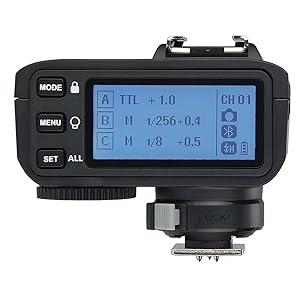
Figure 6: Illustration of the Godox X2T-C's Bluetooth connectivity, allowing control of flash settings via a smartphone application.
6.8 Channel Scan Function
Use the channel scan function to automatically detect the channel with the least interference in your shooting environment, ensuring stable signal transmission.
- Access the scan setting through the MENU.
- Initiate the scan, and the trigger will suggest an optimal channel.
6.9 AF Assist Light
The built-in AF assist light helps your camera achieve focus in challenging low-light conditions. It activates automatically when needed or can be controlled via the trigger's settings.
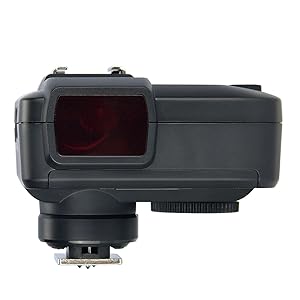
Figure 7: The AF assist beam of the Godox X2T-C, designed to aid camera autofocus in low-light conditions.
6.10 Mise à jour du micrologiciel
Keep your X2T-C up-to-date by regularly checking for firmware updates on the Godox official website. Use a Type-C USB cable to connect the trigger to your computer for the upgrade process.
6.11 Using the 3.5mm Sync Cord Jack
The 3.5mm sync cord jack allows for wired triggering of flashes that do not have the Godox X wireless system built-in. Connect one end of a 3.5mm sync cord to the X2T-C and the other end to your flash's sync port.
Video 1: Official quick view video demonstrating the key features and operation of the Godox X2T Flash Trigger, including its user interface and physical design.
7. Compatibilité
7.1 Compatible Canon EOS Camera Models
- 1Dx Mark II, 1Dx
- 5DS / 5Dsr, 5D Mark IV, 5D Mark III, 5D Mark II, 5D
- 7D Mark II, 7D
- 80D, 70D, 60D, 50D
- 500D, 450D, 400D Digital, 350D Digital
- 100D, 1200D, 1000D, 1100D
- M5, M3
Note: Cameras released before 2012 may not have TTL mode in their D and E groups.
7.2 Compatible Godox Flashes
The X2T-C is compatible with Godox camera flashes, outdoor flashes, and studio flashes that have the Godox X wireless radio system built-in.
8. Entretien
- Garder au sec : This device is not waterproof. Do not expose it to rain or high humidity.
- Évitez le démontage : Do not attempt to disassemble or repair the unit yourself. Unauthorized servicing will void the warranty.
- À manipuler avec précaution : Avoid sudden impacts or dropping the device.
- Contacts propres : Regularly clean the hot shoe contacts with a dry, soft cloth to ensure proper connection.
- Stockage de la batterie : Retirez les piles si l'appareil ne doit pas être utilisé pendant une période prolongée afin d'éviter toute fuite.
9. Dépannage
- Déclencheur ne produisant pas de flash :
- Assurez-vous que les batteries sont correctement installées et chargées.
- Vérifiez que le déclencheur est bien fixé sur la griffe porte-accessoires de l'appareil photo.
- Check that the trigger and flash units are set to the same channel and group.
- Confirm the Wireless ID settings match between the trigger and flash.
- Ensure the flash unit is powered on and ready to fire.
- Sortie flash irrégulière :
- Check the flash mode (TTL/Manual) and Flash Exposure Compensation (FEC) settings.
- Ensure High-Speed Sync (HSS) is correctly enabled if using fast shutter speeds.
- Verify that the flash unit's power settings are appropriate for the scene.
- Problèmes de connexion Bluetooth :
- Make sure the "GodoxPhoto" APP is installed on your smartphone.
- Ensure Bluetooth is enabled on both your smartphone and the X2T-C.
- Restart both the trigger and your smartphone, then try connecting again.
- Check for any firmware updates for the X2T-C.
- AF assist light not working:
- Ensure the AF assist light function is enabled in the trigger's settings.
- The AF assist light typically works best in low-light conditions; in bright environments, it may not activate.
10. Spécifications
| Fonctionnalité | Spécification |
|---|---|
| Dimensions du produit | 2.28 x 2.76 x 2.83 pouces |
| Poids de l'article | 11.5 onces |
| Piles requises | 2 piles AA |
| Autonomie de la batterie | Environ 6 heures |
| Montages compatibles | Canon EOS |
| Vitesse de synchronisation du flash | 1/8000s |
| Portée de transmission (approximative) | 0-100 m |
| Mode de modulation | MSK |
| Chaînes | 32 |
| Identifiant sans fil | 01-99 |
| Groupes | 5 |
| Afficher | Grand écran LCD, rétroéclairage activé ou désactivé |
11. Garantie et assistance
For detailed warranty information, product registration, and technical support, please refer to the official Godox webou contactez votre distributeur local. Conservez votre ticket de caisse comme preuve d'achat pour toute réclamation sous garantie.