Produit terminéview
The lightmaXX CLS Nano RGBW is an LED lighting system featuring four spotlights, designed for use on theater and stage productions. Its compact size and low weight also make it suitable for mobile applications.
Each spotlight is equipped with three powerful 4W QCL LEDs, contributing to a total power consumption of 48 watts. The COB LEDs incorporate red, green, blue, and white primary colors, allowing for the creation of a wide spectrum of other colors through mixing. The beam angle is 25 degrees. Additionally, the QCL LEDs offer stepless dimming from 0-100% and can produce a powerful strobe effect. Control options include DMX and music control.

The lightmaXX CLS Nano RGBW LED Spot Set, showcasing its four individual spotlights mounted on a central bar, with the LEDs emitting green light.
Consignes de sécurité
Veuillez lire et comprendre toutes les consignes de sécurité avant d'utiliser l'appareil. Le non-respect de ces consignes peut entraîner des blessures ou endommager le produit.
- Connectez toujours l'appareil à une prise de courant mise à la terre.
- Assurez une ventilation adéquate autour de l’appareil pour éviter toute surchauffe.
- N'exposez pas l'appareil à la pluie ou à l'humidité.
- Évitez l'exposition directe des yeux à la source lumineuse.
- Seul le personnel qualifié est habilité à effectuer les services ou les réparations.
- Débranchez l’appareil de l’alimentation électrique avant tout nettoyage ou entretien.
Installation
Déballage
Carefully remove the CLS Nano RGBW from its packaging. Inspect the unit for any signs of damage during transit. Retain the packaging for future storage or transport.
Montage
The CLS Nano RGBW is designed for secure mounting on a lighting stand or truss system. Use appropriate clamps and safety cables (not included) to ensure the unit is securely fastened and cannot fall. Ensure the mounting surface can support the weight of the fixture (7.13 kg).
Relations
Connectez l'appareil comme suit :
- Connexion électrique : Use the provided IEC power cable to connect the unit to a suitable mains power outlet.
- Connexion DMX (en option) : For DMX control, connect a 3-pin XLR DMX cable from your DMX controller's output to the unit's DMX IN port. If linking multiple units, connect from the first unit's DMX OUT to the next unit's DMX IN.

Arrière détaillé view of the lightmaXX CLS Nano RGBW, highlighting the power input, DMX In/Out ports, and the digital control display with navigation buttons.
Mode d'emploi
Panneau de configuration terminéview
The control panel on the rear of the unit features a digital display and four buttons:
- M E N U: Permet de naviguer dans les options du menu principal.
- EN HAUT: Augmente les valeurs ou permet de naviguer dans les options du menu.
- VERS LE BAS: Diminue les valeurs ou descend dans les options du menu.
- ENTRER: Confirme les sélections ou accède aux sous-menus.
Modes de fonctionnement
The CLS Nano RGBW offers several operating modes:
- Mode DMX : For external control via a DMX controller.
- Mode automatique: Runs pre-programmed light shows automatically.
- Mode activé par le son : Réagit à la musique ou aux sons grâce à un microphone intégré.
- Mode couleur statique : Affiche une seule couleur constante.
Contrôle DMX
To operate the unit via DMX, set the DMX address using the control panel. Refer to the DMX channel chart in the full manual for specific channel functions (e.g., Dimmer, Red, Green, Blue, White, Strobe, Programs).
Programmes automatiques
Navigate to the Auto mode setting using the MENU button. Use UP/DOWN to select different built-in programs. Press ENTER to confirm. Some programs may allow adjustment of speed or intensity.
Mode activé par le son
Select the Sound-Activated mode from the menu. The unit will use its internal microphone to react to ambient sound. Adjust the microphone sensitivity if available in the menu to fine-tune the response.
Mode couleur statique
In Static Color mode, you can manually select a desired color. Use the UP/DOWN buttons to adjust the intensity of Red, Green, Blue, and White LEDs to create custom colors.

The lightmaXX CLS Nano RGBW LED Spot Set displaying a vibrant red color output from its four spotlights.
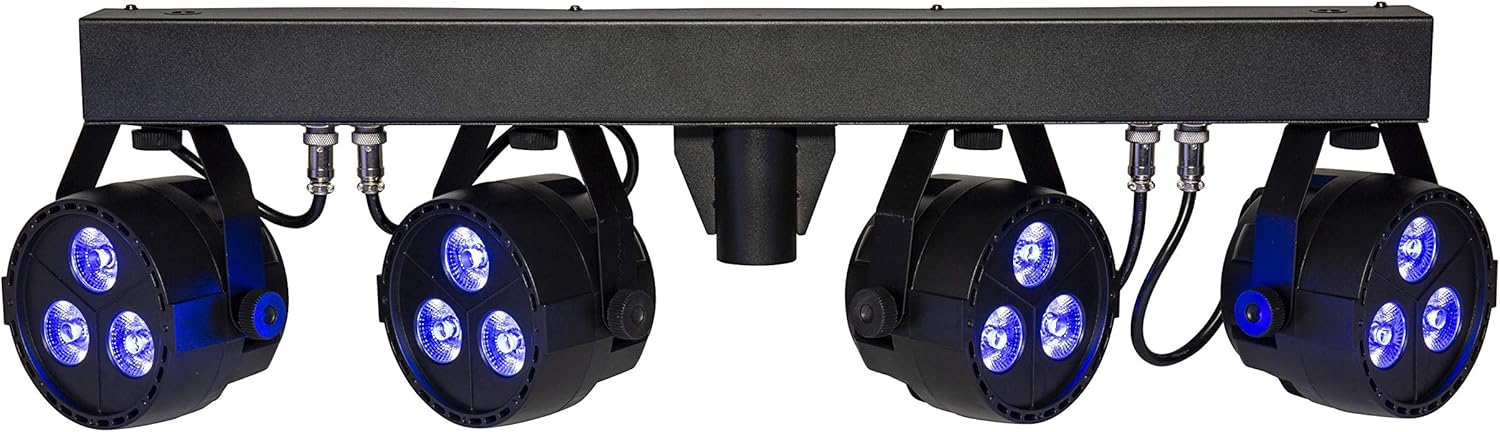
The lightmaXX CLS Nano RGBW LED Spot Set illuminating with a deep blue color.

The lightmaXX CLS Nano RGBW LED Spot Set producing a bright white light.

The lightmaXX CLS Nano RGBW LED Spot Set emitting a warm yellow light.

The lightmaXX CLS Nano RGBW LED Spot Set displaying a cool cyan light.

The lightmaXX CLS Nano RGBW LED Spot Set showcasing a rich purple illumination.

The lightmaXX CLS Nano RGBW LED Spot Set with its spotlights in an off state, showing the clear lenses.
Entretien
Nettoyage
Regular cleaning helps maintain optimal performance and appearance. Disconnect the unit from power before cleaning.
- Utilisez un chiffon doux non pelucheux pour essuyer l'extérieur.
- Pour les lentilles, utilisez un nettoyant spécialisé et un chiffon doux pour éviter les rayures.
- N’utilisez pas de nettoyants abrasifs, de solvants ou de produits chimiques agressifs.
Stockage
When not in use for extended periods, store the CLS Nano RGBW in its original packaging or a suitable flight case. Store in a cool, dry place away from direct sunlight and extreme temperatures.
Dépannage
Cette section aborde les problèmes courants que vous pourriez rencontrer. Si le problème persiste, contactez le service client.
| Problème | Cause possible | Solution |
|---|---|---|
| Pas de courant | Power cable disconnected; Outlet not active; Fuse blown | Check power cable connection; Test outlet with another device; Replace fuse (if applicable and safe to do so) |
| Pas de contrôle DMX | Incorrect DMX address; Faulty DMX cable; DMX controller issue; Master/Slave conflict | Verify DMX address setting; Test/replace DMX cable; Check DMX controller output; Ensure correct Master/Slave configuration |
| Lights not responding in Auto/Sound mode | Incorrect mode selected; Microphone sensitivity too low (Sound mode) | Ensure correct operating mode is selected; Adjust microphone sensitivity in Sound mode |
| L'unité surchauffe | Insufficient ventilation; Blocked cooling vents | Ensure adequate space around the unit; Clean any dust or debris from cooling vents |
Caractéristiques
| Modèle | LIG0015656-000 |
| Marque | lumièremaXX |
| Dimensions (L x l x H) | 88.6 x 38 x 18.8 cm |
| Poids | 7.13 kg |
| Type de LED | 4 x (3x 4W QCL RGBW LEDs) |
| Consommation totale d'énergie | 48 watts |
| Angle du faisceau | 25° |
| Modes de contrôle | DMX, Auto, Sound-activated, Static Color |
| Caractéristiques | Dimmable, Strobe Effect, DMX Control, Music Control, RGBW LED |
| Source d'énergie | Mains Power (IEC C14) |
| Fabricant | lumièremaXX |
| Pays d'origine | Allemagne |
| Première date disponible | 15 janvier 2020 |
Garantie et assistance
This lightmaXX product is covered by a manufacturer's warranty. For specific warranty terms and conditions, please refer to the documentation included with your purchase or contact the seller directly.
For technical support, troubleshooting assistance beyond this manual, or spare parts inquiries, please contact your authorized lightmaXX dealer or the manufacturer's customer service department. Keep your purchase receipt and model number (LIG0015656-000) ready when contacting support.


