1. Introduction
The Waveshare Industrial RS232/RS485 to Ethernet Converter is a robust device designed for reliable data transmission between serial devices (RS232/RS485) and an Ethernet network. It features a high-performance M4 series 32-bit ARM processor, ensuring stable and efficient operation in industrial environments. This converter supports dual serial ports, allowing independent operation of RS232 and RS485 interfaces simultaneously. Its versatile working modes and configuration options make it suitable for a wide range of applications.
2. Caractéristiques
- Processeur: M4 series 32-bit ARM processor with up to 120MHz frequency for fast, stable, and reliable performance.
- Interface Ethernet : 10/100M Auto-MDI/MDIX, compatible with both cross-over and straight-through cables.
- Dual Serial Ports: Independent RS232 and RS485 interfaces operating simultaneously.
- Configurable Baudrate: Supports 600bps to 230.4Kbps with five parity options (None, Odd, Even, Mark, Space).
- Multi-Indicators: LEDs for monitoring communication and working status.
- Modes de fonctionnement : TCP Server, TCP Client, UDP Server, UDP Client, HTTPD Client (supports GET and POST).
- Modbus Support: Suitable for industrial applications.
- Websocket Support: Bi-directional transparent data transmission with RS232/RS485 via webpage.
- Méthodes de configuration : Via webpage, AT commands, serial protocol, and network protocol.
- Personnalisation : Supports customized heartbeat packets, registration packets, and webpage.
- RFC2217-like Protocol: Communicates with devices whose serial settings may change.
- Stabilité de la connexion : KeepAlive mechanism, auto re-connecting, and time-out reboot.
- Fonctionnalités du réseau : DNS domain name resolution, DHCP (auto-obtained or static IP).
- Micrologiciel : Upgradable via the network.
- Options de réinitialisation : Restore to factory settings via software and/or hardware.
- Adresse MAC : Comes with a default MAC address, which is customizable.
- Outils logiciels : Module configuration software, TCP/UDP testing tool, VCOM virtual serial port software.
3. Contenu du colis
Vérifiez que tous les éléments énumérés ci-dessous sont inclus dans votre colis :
- Waveshare Industrial RS232/RS485 to Ethernet Converter
- Adaptateur secteur (CC 5V)
- Câble Ethernet
- RS232 Male-to-Male Cable
- RS232 Male-to-Female Cable

Image: The package contents include the main converter unit, a power adapter, an Ethernet cable, and two RS232 cables (male-to-male and male-to-female).
4. Produit terminéview
4.1. Composants et indicateurs
The converter features several ports and LED indicators to monitor its status and facilitate connections.
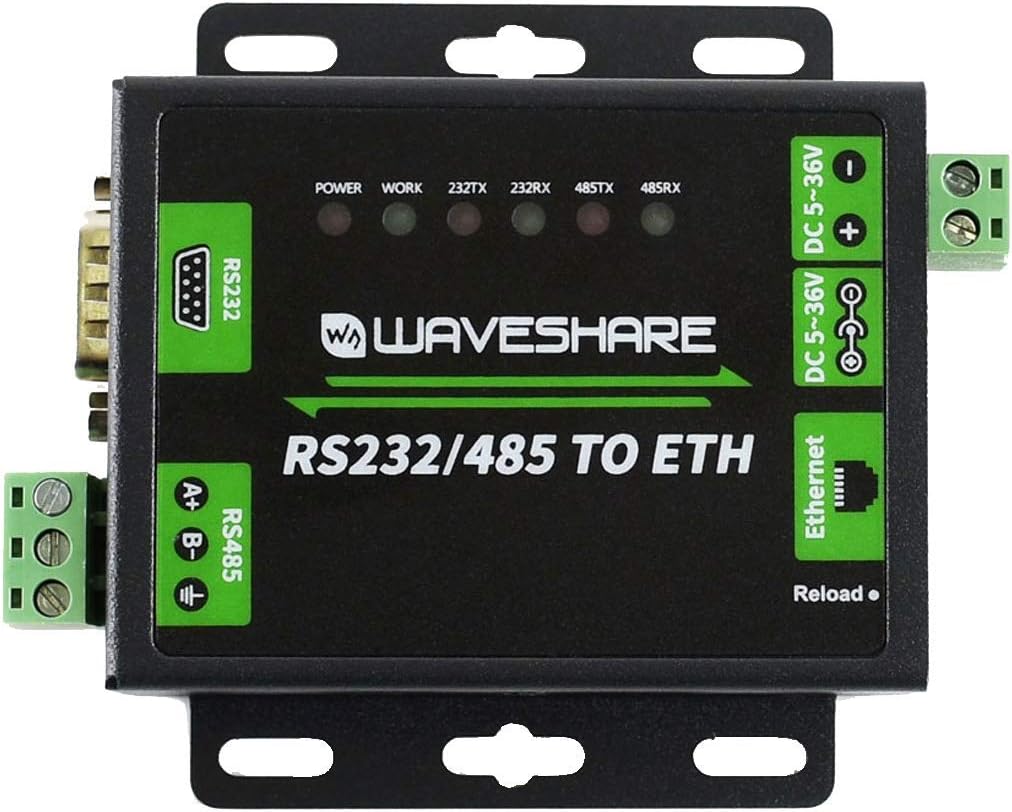
Image : Haut view of the converter highlighting the RS232 port, RS485 terminals, Ethernet port, DC power input, and LED indicators.
- DEL D'ALIMENTATION : Indique l'état de l'alimentation.
- WORK LED: Indicates device working status.
- 232TX/232RX LEDs: Indicate data transmission/reception activity on the RS232 port.
- 485TX/485RX LEDs: Indicate data transmission/reception activity on the RS485 port.
- Bouton de rechargement : Used for factory reset or other specific functions as per configuration.
4.2. Ports
- Port RS232 : Standard DB9 male connector for RS232 serial communication.
- RS485 Terminals: Screw terminals for RS485 differential pair (A+, B-) and ground.
- Port Ethernet: RJ45 connector for 10/100M Ethernet connection.
- Entrée d'alimentation CC : Barrel jack for DC 5-36V power supply.
- DC 5-36V Terminals: Screw terminals for alternative DC 5-36V power input.

Image : Côté view of the converter showing the DB9 RS232 port and the green screw terminals for RS485.

Image : Côté view of the converter showing the RJ45 Ethernet port and the DC power input barrel jack.
5. Installation
5.1. Connexion initiale
- Connecter l'alimentation : Connect the provided power adapter to the DC power input port (DC 5-36V). The POWER LED should illuminate.
- Connexion Ethernet : Connect an Ethernet cable from the converter's RJ45 port to your network switch or router.
- Connecter des périphériques série : Connect your RS232 device to the DB9 port and/or your RS485 device to the RS485 screw terminals.
5.2. Paramètres par défaut
The device comes with default network settings for initial configuration.

Image: Bottom label of the converter displaying default configuration details.
- IP par défaut: 192.168.0.7
- Nom d'utilisateur: administrateur
- Mot de passe: administrateur
- Saisir: DC 5-36V/500mA
- Default MAC Address: (Specific address printed on the label, e.g., 9CA525RD7B9A)
It is recommended to change the default login credentials after initial setup for security purposes.
6. Modes de fonctionnement
The converter supports various operating modes to suit different network communication requirements:
- Serveur TCP : The converter listens for incoming TCP connections from clients.
- Client TCP : The converter initiates a TCP connection to a specified remote server.
- UDP Server: The converter listens for incoming UDP packets.
- UDP Client: The converter sends UDP packets to a specified remote host and port.
- HTTPD Client: Supports HTTP GET and POST requests for data transmission.
- Modbus : Optimized for Modbus protocol communication, commonly used in industrial automation.
- Webprise: Enables bi-directional transparent data transmission between the serial port and a webpage.
7. Configuration
The converter's settings can be configured using several methods:
- Webpage: Access the converter's web interface by entering its IP address (default: 192.168.0.7) into a web browser. This provides a graphical interface for all settings.
- Commandes AT : Configuration can be performed by sending specific AT commands via the serial port.
- Protocole série : A dedicated serial protocol allows for programmatic configuration.
- Protocole réseau : Configuration can also be done over the network using specific protocols.
- Logiciel de paramétrage : Waveshare provides dedicated software for easy configuration on a host computer.
8. Entretien
- Mise à jour du firmware: The device firmware can be upgraded via the network to incorporate new features or bug fixes. Refer to the Waveshare website pour obtenir la dernière version du firmware et les instructions de mise à jour.
- Restaurer les paramètres d'usine : If configuration issues arise, the device can be restored to its factory default settings via software or by pressing the 'Reload' button (refer to specific instructions for the button sequence).
- KeepAlive Mechanism: The built-in KeepAlive mechanism helps detect broken connections and automatically re-establishes them, ensuring continuous operation.
- Time-out Reboot: Configure a time-out reboot (no-data reboot) to ensure long-term stable connections, especially in environments where intermittent communication might occur.
9. Dépannage
If you encounter issues with the converter, consider the following:
- Pas d'alimentation : Assurez-vous que l'adaptateur secteur est correctement branché et fournit la tension spécifiée.tage (DC 5-36V). Check the POWER LED.
- Aucune connexion réseau : Verify the Ethernet cable connection. Check network settings (IP address, subnet mask, gateway). Ensure the Ethernet port LEDs are active.
- Échec de la communication série : Check serial port wiring (RS232 pinout, RS485 A+/B- polarity). Verify baudrate, data bits, parity, and stop bits settings match the connected serial device. Observe 232TX/RX and 485TX/RX LEDs for activity.
- Impossible d'accéder Web Interface: Ensure your computer's IP address is in the same subnet as the converter's default IP (192.168.0.x). Try pinging the converter's IP address.
- Connexion intermittente : Check for network interference or cable issues. Review KeepAlive and time-out reboot settings.
- Retour aux paramètres d'usine: If configuration becomes problematic, perform a factory reset.
For further assistance, refer to the Waveshare official webconsultez le site ou contactez leur assistance technique.
10. Spécifications
| Fonctionnalité | Spécification |
|---|---|
| Processeur | M4 series 32-bit ARM, 120 MHz |
| BÉLIER | LPDDR4 |
| Vitesse de la mémoire | 120 MHz |
| Interface Ethernet | 10/100M Auto-MDI/MDIX |
| Ports série | 1x RS232 (DB9), 1x RS485 (Screw Terminal) |
| Baudrate | 600 bps ~ 230.4 Kbps |
| Parity Options | Aucun, Impair, Pair, Marque, Espace |
| Puissance d'entrée | DC 5-36V (Barrel Jack or Screw Terminal) |
| Système opérateur | Linux (interne) |
| Poids de l'article | 1.1 livre (environ 0.5 kg) |
| Dimensions du colis | 8.07 x 6.18 x 1.89 pouces (environ 20.5 x 15.7 x 4.8 cm) |
| Numéro de modèle | RS232/485 VERS ETH |
| Technologie de connectivité | Ethernet |
10.1. Dimensions physiques

Image: Technical drawing showing the dimensions of the converter in millimeters (e.g., 85.70mm height, 82.76mm width, 25.20mm depth).
11. Garantie et assistance
Pour obtenir des informations sur la garantie, l'assistance technique et des ressources supplémentaires, veuillez consulter le site officiel de Waveshare. website. You can find detailed documentation, software downloads, and contact information for customer service there.
Waveshare Official Website: www.waveshare.com


