1. Introduction et plusview
Thank you for choosing the Lorex Analog 4K Weatherproof Indoor/Outdoor HD Wired Add-On Security Camera. This manual provides essential information for the proper installation, operation, and maintenance of your new security camera. This camera is designed as an add-on unit and requires a compatible Lorex recorder (DVR/NVR) for full functionality.
This camera features 4K resolution for superior image clarity, robust weatherproof construction for reliable indoor and outdoor use, and advanced deterrence features such as motion-activated lights and remote-triggered sirens. Its long-range night vision ensures comprehensive surveillance even in low-light conditions.
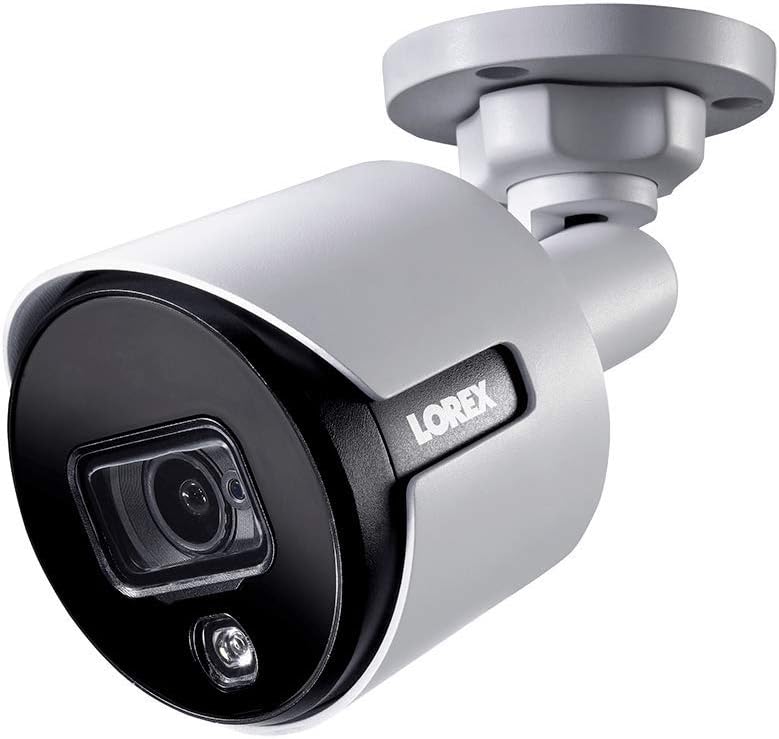
Figure 1.1 : Angle avant view of the Lorex 4K Weatherproof Security Camera. This image shows the camera's bullet form factor, lens, and integrated light.
2. Contenu du colis
The Lorex Analog 4K Weatherproof Indoor/Outdoor HD Wired Add-On Security Camera package includes:
- 1 x Lorex Analog 4K Weatherproof Indoor/Outdoor HD Wired Add-On Security Camera (Model: LBV8543XW)
- Kit de montage (vis et chevilles)
- Allen Key (for adjustment)
Note: This is an add-on camera. Video cables, power adapters, and a compatible Lorex recorder are sold separately and are required for operation.
3. Principales caractéristiques
- Résolution 4K Ultra HD : Provides exceptional detail and clarity with an 8MP effective still resolution.
- Conception résistante aux intempéries (IP67) : Durable metal housing ensures reliable performance in various weather conditions, suitable for both indoor and outdoor installation.
- Long Range Night Vision: See clearly up to 150 feet (45m) in ambient night conditions and up to 98 feet (30m) in total darkness. Features Color Night Vision for enhanced detail in low light.
- Motion-Activated Warning Light: Integrated LED light can be triggered by motion to deter intruders.
- Remote-Triggered Siren: Activate a loud siren directly from your Lorex recorder or connected app to scare away unwanted visitors.
- Wired Connectivity (BNC): Ensures a stable and secure connection to your Lorex DVR/NVR system.
- Large plage de températures de fonctionnement : Functions reliably in temperatures up to 60 degrees Celsius.
4. Configuration et installation
Before installation, ensure you have a compatible Lorex recorder (DVR/NVR) and necessary video/power cables.
4.1 Choisir un emplacement
Choisissez un emplacement qui offre les conditions souhaitées viewing angle and is within reach of your Lorex recorder and a power source. Consider areas prone to intrusion, such as entry points or vulnerable perimeters. The camera is suitable for ceiling mount and wall mount applications.

Figure 4.1 : Côté view of the Lorex 4K Weatherproof Security Camera, showing its adjustable mounting base.
4.2 Montage de la caméra
- Marquer les trous de perçage : Utilisez le gabarit de montage (s'il est fourni) ou la base de la caméra pour marquer les emplacements de perçage.
- Trous de forage : Drill pilot holes for the mounting screws. If mounting on drywall or masonry, insert the provided wall plugs.
- Caméra sécurisée : Alignez la base de la caméra avec les trous percés et fixez-la à l'aide des vis fournies.
- Ajuster l'angle : Loosen the adjustment screws on the camera body using the Allen key to position the camera for the optimal viewAjuster l'angle. Serrer les vis une fois le réglage effectué.
4.3 Connexion de l'appareil photo
- Connectez le câble vidéo : Connect one end of the BNC video cable (not included) to the camera's BNC port and the other end to an available video input channel on your Lorex recorder.
- Connecter l'alimentation : Connect the camera's power input to a compatible power adapter (not included). Ensure the power adapter is connected to a power outlet.
- Power On Recorder: Ensure your Lorex recorder is powered on and properly configured.
5. Mode d'emploi
Once the camera is physically installed and connected to your Lorex recorder, you can begin operation.
5.1 Viewenvoyer un flux en direct
Access your Lorex recorder's interface (via monitor, Lorex Home app, or client software) to view the live video feed from the camera. Ensure the correct channel is selected.

Figure 5.1 : Gros plan view of the Lorex 4K Weatherproof Security Camera's lens and integrated light.
5.2 Motion Detection and Smart Deterrence
Your Lorex recorder manages motion detection settings. Refer to your recorder's manual for detailed instructions on configuring motion zones and sensitivity.
- Motion-Activated Light: The camera's integrated light can be set to activate automatically upon motion detection. This setting is typically configured within your Lorex recorder's deterrence or alarm settings.
- Remote-Triggered Siren: You can manually activate the camera's siren through your Lorex recorder's interface or the Lorex Home app. This feature is useful for immediate deterrence.

Figure 5.2: The Lorex 4K Weatherproof Security Camera mounted on a brick wall at night, demonstrating its motion-activated light feature.
5.3 Vision nocturne
The camera automatically switches to night vision mode in low-light conditions. The infrared (IR) LEDs provide illumination for clear black and white video. Color Night Vision (CNV) may be available if there is sufficient ambient light, providing full-color video in low-light scenarios.
6. Entretien
Un entretien régulier garantit des performances optimales et une longue durée de vie à votre caméra de sécurité.
- Nettoyage: Nettoyez régulièrement l'objectif et le boîtier de l'appareil photo avec un chiffon doux et sec.amp Chiffon. Évitez les nettoyants abrasifs ou les solvants qui pourraient endommager la finition ou la lentille.
- Vérifier les connexions : Ensure all cable connections (BNC and power) are secure and free from corrosion, especially for outdoor installations.
- Mises à jour du micrologiciel : Regularly check the Lorex website or your recorder's settings for available firmware updates for your camera and recorder to ensure the latest features and security enhancements.
- Conditions environnementales : While weatherproof, extreme conditions outside the specified operating temperature range (up to 60°C) may affect performance.
7. Dépannage
If you encounter issues with your Lorex camera, refer to the following common troubleshooting steps:
| Problème | Cause possible | Solution |
|---|---|---|
| Aucun flux vidéo de la caméra | Connexion de câble desserrée La caméra n'est pas alimentée. Incorrect channel selected on recorder | Vérifiez les connexions BNC et d'alimentation. Ensure power adapter is working and connected. Verify the correct input channel on your Lorex recorder. |
| Mauvaise qualité d'image / vidéo floue | Lentille sale Mise au point incorrecte (si réglable) Cable interference/damage | Nettoyez l'objectif de la caméra avec un chiffon doux. Ensure the camera is properly focused (if applicable). Check video cable for damage or interference. Use high-quality cables. |
| La vision nocturne ne fonctionne pas | LED infrarouges obstruées Puissance insuffisante Paramètres de l'appareil photo | Assurez-vous que rien ne bloque les LED infrarouges. Vérifiez la stabilité de l'alimentation électrique. Check night vision settings on your Lorex recorder. |
| La détection de mouvement ne se déclenche pas. | Incorrect motion zone setup Sensibilité trop faible Obstruction dans view | Review and adjust motion detection zones on your recorder. Increase motion sensitivity. Clear any obstructions from the camera's field of view. |
For more advanced troubleshooting, consult your Lorex recorder's user manual or visit the Lorex support website.
8. Spécifications
| Fonctionnalité | Spécification |
|---|---|
| Numéro de modèle | LBV8543XW |
| Résolution de capture vidéo | 4K (Résolution effective en image fixe de 8 MP) |
| Technologie de connectivité | BNC (Wired) |
| Utilisation intérieure/extérieure | Intérieur, extérieur |
| Évaluation de la protection internationale | IP67 (résistant aux intempéries) |
| Gamme de vision nocturne | 150 pieds (45 m) |
| Caractéristiques spéciales | Motion Sensor, Night Vision, Motion Activated Lights, Remote-Triggered Siren |
| Facteur de forme | Balle |
| Matériel | Métal |
| Operating Temperature (Upper) | 60 degrés Celsius |
| Dimensions du produit (L x l x H) | 16 x 6 x 6 pouces |
| Poids de l'article | 0.01 onces |
| Code UPC | 695529017136 |
| Méthode de contrôle | App, Remote (via compatible Lorex recorder) |
9. Garantie et assistance
Lorex products are designed for reliability and performance. For information regarding your product's warranty, please refer to the warranty policy available on the official Lorex website or the documentation included with your Lorex recorder.
For technical support, product registration, or to download the latest software and firmware updates, please visit the official Lorex support page or the Lorex Store:
- Lorex Store: Visit the Lorex Store on Amazon
- Guide de l'utilisateur (PDF) : Un guide d'utilisation complet au format PDF est également disponible en téléchargement : Télécharger Guide de l'utilisateur
When contacting support, please have your product model number (LBV8543XW) and serial number ready.