1. Introduction
This manual provides essential instructions for the installation, operation, and maintenance of your FSP iFP600 Uninterruptible Power Supply (UPS). Please read this manual thoroughly before installing or operating the unit to ensure proper function and safety. The FSP iFP600 is designed to provide reliable power backup and surge protection for your electronic devices.

Illustration 1.1 : Avant view of the FSP iFP600 UPS, showcasing son design compact et son écran LCD intégré.
2. Consignes de sécurité
Please adhere to these important safety guidelines during installation, operation, and maintenance of the UPS:
- N'ouvrez pas le boîtier UPSasing. L'appareil ne contient aucune pièce réparable par l'utilisateur. Toute réparation doit être effectuée par un technicien qualifié.
- Ne branchez pas d'appareils susceptibles de surcharger l'onduleur, tels que des imprimantes laser, des aspirateurs ou des radiateurs.
- Assurez-vous que l'onduleur est branché sur une prise de courant alternatif mise à la terre.
- Avoid placing the UPS in direct sunlight, near heat sources, or in environments with excessive dust, humidity, or corrosive substances.
- Position the UPS in a well-ventilated area to prevent overheating.
- In case of fire, use a dry chemical extinguisher. Water can be hazardous.
- The battery inside the UPS is not user-replaceable. Battery replacement should only be performed by qualified personnel.
3. Produit terminéview
The FSP iFP600 UPS provides reliable power protection for your critical electronics. It features a compact design and an intuitive LCD display for monitoring status.
3.1 Contenu du paquet
À l'ouverture du colis, veuillez vérifier que tous les composants sont présents et non endommagés :
- FSP iFP600 UPS Unit
- Manuel de l'utilisateur (ce document)
- Cordon d'alimentation
- Câble de communication USB
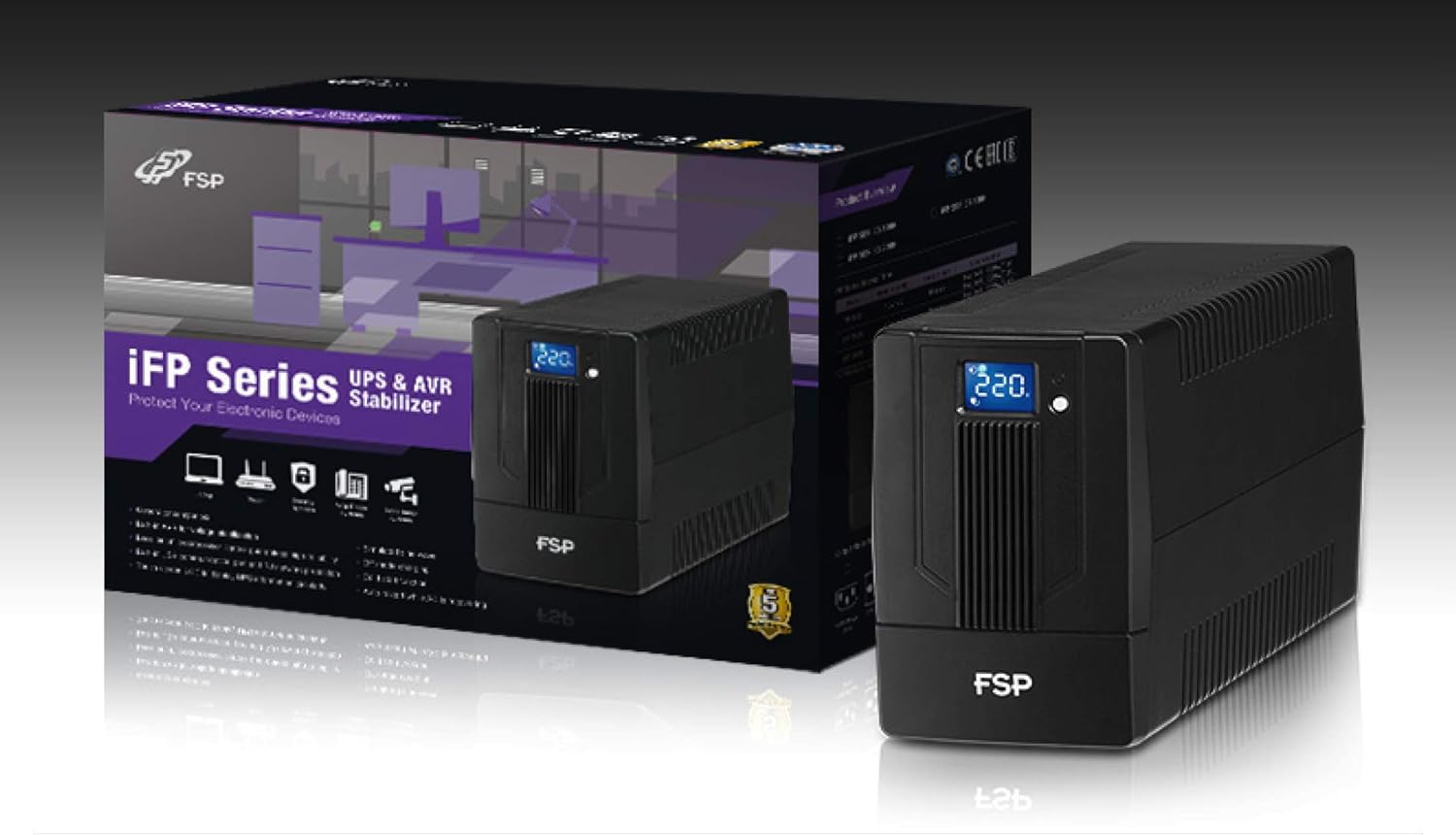
Image 3.1: The FSP iFP600 UPS shown alongside its retail packaging, illustrating the product's presentation.
3.2 Composants du panneau arrière
Familiarize yourself with the connections on the rear panel of the UPS:

Image 3.2 : Détail view of the FSP iFP600 UPS rear panel, highlighting connection points.
- Points de vente : Two SCHUKO type outlets for connecting protected equipment.
- Entrée CA : Connects the UPS to the main utility power.
- Fusible/Disjoncteur : Overcurrent protection for the UPS.
- Communication USB : Port for connecting to a computer for monitoring and management.
- Combo RJ11/RJ45 Surge Protection: Provides surge protection for telephone/network lines.
4. Configuration et installation
Follow these steps to set up your FSP iFP600 UPS:
- Déballage: Retirez délicatement le colis UPS de son emballage. Vérifiez qu'il n'a pas été endommagé pendant le transport.
- Placement: Place the UPS on a flat, stable surface in a clean, cool, and well-ventilated area. Ensure adequate clearance around the unit for airflow.
- Charge initiale : Connect the UPS to a standard grounded AC outlet using the provided power cord. Allow the unit to charge for at least 4-6 hours before initial use to ensure optimal battery performance. The UPS will charge whether it is turned on or off.
- Connecter l'équipement : Plug your computer, monitor, and other critical electronic devices into the UPS outlets (A). Do not connect surge suppressors or power strips to the UPS outlets.
- Communication USB (en option) : Connect the USB cable from the UPS USB port (D) to your computer's USB port to enable power management software features (software not included, typically downloaded from manufacturer's webplacer).
- RJ11/RJ45 Protection (Optional): For surge protection of your telephone or network line, connect the incoming line to the 'IN' port of the Combo RJ11/RJ45 (E) and connect the 'OUT' port to your device.
5. Mode d'emploi
5.1 Mise sous/hors tension
- Pour allumer : Maintenez enfoncé le bouton d'alimentation situé sur le panneau avant pendant environ 2 secondes jusqu'à ce que vous entendiez un bip et que l'écran LCD s'illumine.
- Pour éteindre : Press and hold the power button for approximately 2 seconds until you hear a beep and the LCD display turns off.
5.2 Informations sur l'écran LCD
The FSP iFP600 features an LCD display that provides real-time status information. The display is touch-sensitive for navigating information.

Image 5.1: The LCD display of the FSP iFP600 UPS, indicating voltage output and its touch-screen functionality.
The LCD display typically shows:
- Vol d'entréetage
- Volume de sortietage
- Niveau de charge de la batterie
- Niveau de charge
- Operating Mode (e.g., AC mode, Battery mode)
- Warning/Fault Indicators
5.3 Battery Mode Operation
When the utility power fails or fluctuates outside acceptable limits, the UPS will automatically switch to battery mode. During battery mode, the UPS will provide power to connected equipment from its internal battery. An audible alarm will sound to indicate battery operation.
6. Entretien
Proper maintenance ensures the longevity and reliability of your UPS.
- Nettoyage: Utilisez un chiffon doux et sec pour nettoyer l'extérieur de l'onduleur. N'utilisez pas de nettoyants liquides ni en aérosol.
- Entretien de la batterie: To maximize battery life, ensure the UPS is connected to AC power and fully charged. If the UPS is stored for an extended period, recharge it every three months to prevent battery degradation.
- Remplacement de la batterie : The internal battery (12V / 7Ah x1) is not user-serviceable. Battery replacement should only be performed by FSP-certified service personnel or a qualified technician. Incorrect battery replacement can pose a risk of explosion or injury.
- Stockage: Store the UPS in a cool, dry place with adequate ventilation. Ensure the battery is fully charged before storage.
7. Dépannage
Refer to the following table for common issues and their solutions. If the problem persists, contact FSP support.
| Symptôme | Alarme sonore | Cause possible | Solution |
|---|---|---|---|
| UPS operating on battery power | Bips toutes les 10 secondes | Utility power failure or fluctuation | Save work and shut down equipment if power outage is prolonged. UPS will return to AC mode when power is restored. |
| Avertissement de batterie faible | Bips toutes les secondes | La charge de la batterie est extrêmement faible | Immediately save work and shut down connected equipment. |
| État de surcharge | Bips toutes les 0.5 seconde | Connected equipment exceeds UPS capacity | Disconnect non-essential equipment until the alarm stops. Ensure total load is within UPS capacity. |
| Panne de l'onduleur | Bip continu | Défaut ou dysfonctionnement interne | Turn off the UPS and disconnect it from the AC outlet. Contact FSP technical support. |
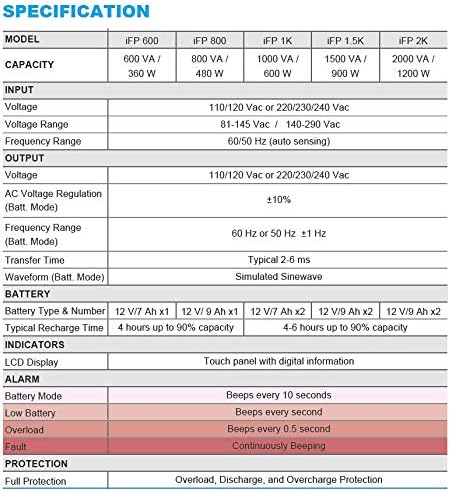
Image 7.1: Excerpt from the FSP iFP series specification table, detailing alarm indicators and their meanings.
8. Spécifications
Detailed technical specifications for the FSP iFP600 UPS:
| Fonctionnalité | Spécification |
|---|---|
| Modèle | iFP 600 |
| Capacité | 600 VA / 360 W |
| Vol d'entréetage | 110/120 Vac or 220/230/240 Vac |
| Vol d'entréetaget gamme | 81-145 Vac / 140-290 Vac |
| Plage de fréquences d'entrée | 60/50 Hz (détection automatique) |
| Volume de sortietage | 110/120 Vac or 220/230/240 Vac |
| Vol ACtage Régulation (Mode Batt.) | ±10% |
| Output Frequency Range (Batt. Mode) | 60 Hz or 50 Hz ±1 Hz |
| Temps de transfert | Typique 2-6 ms |
| Forme d'onde (mode Batt.) | Onde sinusoïdale simulée |
| Type et numéro de batterie | 12V / 7Ah x1 |
| Temps de recharge typique | 4 heures jusqu'à 90 % de capacité |
| Indicateurs | LCD Display (Touch panel with digital information) |
| Protection | Overload, Discharge, and Overcharge Protection |
| Poids de l'article | 9.24 livres (4.2 kg) |
| Dimensions du produit (L x l x H) | 11.81 x 3.98 x 5.59 pouces |
| Couleur | Noir |
| Matériel | Métal |
9. Garantie et assistance
FSP products are designed for reliability and performance. For warranty information, please refer to the warranty card included with your product or visit the official FSP website. For technical support, troubleshooting assistance, or service inquiries, please contact FSP customer service through their official channels.
Vous trouverez plus d'informations et de ressources d'assistance sur le site web. FSP Store on Amazon.


