Introduction
This manual provides detailed instructions for the proper setup, operation, and maintenance of your Timex TW4B17400 Analog-Digital Watch. Please read this manual thoroughly to ensure optimal performance and longevity of your timepiece. Keep this manual for future reference.
Produit terminéview
The Timex TW4B17400 is a men's analog-digital watch featuring a black dial and a brown leather strap. It combines traditional analog timekeeping with digital functionalities.
Caractéristiques principales :
- Affichage de l'heure analogique et numérique
- Durable Leather Strap
- Veilleuse Indiglo
- Fonctionnalités du chronographe
- Fonction d'alarme
Composants de la montre :
Familiarisez-vous avec les principaux composants de votre montre :

Image : Côté view of the Timex TW4B17400 watch. This image displays the watch case from the side, highlighting the crown (center knob) and two pushers (buttons) on either side of the crown, used for adjusting time and accessing digital functions. The brown leather strap is also visible.
- Couronne: Utilisé pour le réglage de l'heure analogique.
- Poussoirs (Boutons) : Used for operating digital functions such as setting digital time, date, alarm, and chronograph.
- Cadran: Displays analog time and includes a digital display window.
- Sangle: Brown leather strap with a buckle closure.
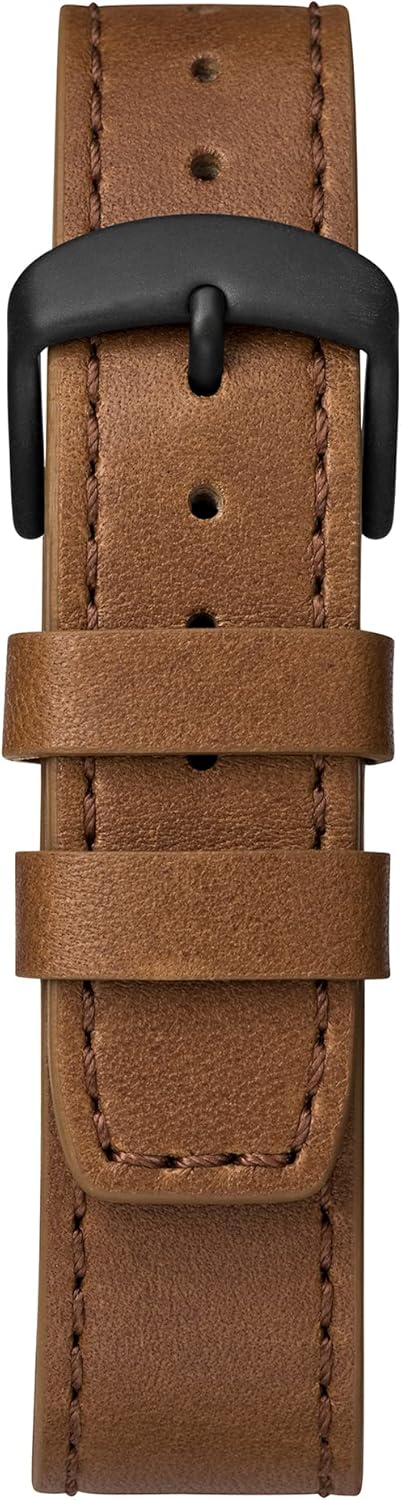
Image: Close-up of the brown leather strap and black buckle of the Timex TW4B17400 watch. The detailed stitching on the leather and the two strap loops are clearly visible.
Installation
Battery Installation (If Required):
Your watch comes with a CR2 battery installed. If the watch is not functioning, the battery may need to be replaced. It is recommended to have battery replacement performed by a qualified watch technician to ensure proper sealing and water resistance.
Réglage de l'heure analogique :
- Pull the crown (center knob) out to the furthest position.
- Tournez la couronne dans le sens horaire ou antihoraire pour régler les aiguilles des heures et des minutes à l'heure correcte.
- Une fois l'heure réglée, repoussez la couronne dans sa position initiale pour démarrer le mouvement de la montre.
Réglage de l'heure et de la date numériques :
The digital functions are typically controlled by the pushers. Refer to the specific instructions below for common digital settings. The exact sequence may vary slightly; consult the full Timex manual for your movement if detailed steps are needed.
- Press the MODE button (usually one of the side pushers) repeatedly until the digital display shows the time setting mode (often indicated by flashing digits).
- Use the SET/ADJUST button (another pusher) to select the digit you wish to change (e.g., hours, minutes, 12/24-hour format).
- Use the START/STOP button (another pusher) to increase the value of the flashing digit.
- Répétez les étapes 2 et 3 pour les minutes, l'année, le mois et le jour.
- Une fois tous les réglages corrects, appuyez sur le bouton MODE pour quitter le mode de réglage.
Opérationnel
Reading Analog Time:
The hour and minute hands indicate the current time in a traditional format.
Using Digital Functions:
- Bouton Mode : Cycles through different digital modes (Time, Date, Alarm, Chronograph, Timer).
- Set/Adjust Button: Used to select items for adjustment within a mode.
- Bouton Marche/Arrêt : Used to start/stop functions (e.g., chronograph) or increment values during setting.
Veilleuse Indiglo :
To illuminate the watch face in low-light conditions, press and hold the crown or a designated pusher (refer to your watch's specific button layout). The Indiglo feature will light up the dial for a few seconds.
Fonction d'alarme :
- Press the MODE button until the alarm mode is displayed.
- Use the SET/ADJUST button to select the hour or minute to set.
- Use the START/STOP button to change the alarm time.
- Press the MODE button to confirm and exit.
- To activate/deactivate the alarm, typically press a specific pusher while in alarm mode.
Chronographe (Chronomètre):
- Press the MODE button until the chronograph mode is displayed (usually shows 00:00:00).
- Press the START/STOP button to start timing.
- Press the START/STOP button again to stop timing.
- Press the RESET button (often the same as SET/ADJUST) to clear the chronograph to zero.
Entretien
Nettoyer sa montre :
Essuyez le boîtier et le verre de la montre avec un chiffon doux et sec.amp Pour le bracelet en cuir, utilisez un chiffon doux et sec. Évitez les produits chimiques agressifs et les matériaux abrasifs, car ils pourraient endommager la finition de la montre ou le bracelet.
Résistance à l'eau :
While your watch may be water-resistant, it is not waterproof. Avoid prolonged exposure to water, such as swimming or showering, unless the specific water resistance rating (e.g., 50m, 100m) is clearly indicated on the watch and suitable for such activities. Always ensure the crown is pushed in completely to maintain water resistance.
Entretien des bracelets en cuir :
Leather straps can be affected by moisture, sweat, and direct sunlight. To prolong the life of your leather strap:
- Éviter l'exposition prolongée à l'eau.
- Nettoyer avec un chiffon doux et sec.
- Allow the strap to air dry if it gets wet; do not use direct heat.
- Avoid contact with cosmetics, oils, and perfumes.
Dépannage
Montre ne fonctionne pas / Affichage numérique vide :
- Vérifiez si la couronne est complètement enfoncée.
- La pile est peut-être à remplacer. Consultez un horloger professionnel.
Affichage de l'heure incorrect :
- Refer to the "Setting Analog Time" and "Setting Digital Time and Date" sections to reset the time.
- Ensure the watch has not been exposed to strong magnetic fields, which can affect accuracy.
Indiglo ne fonctionne pas :
- Assurez-vous que la batterie est suffisamment chargée.
- Confirm you are pressing the correct button for Indiglo activation.
Caractéristiques
| Fonctionnalité | Détail |
|---|---|
| Marque | Timex |
| Numéro de modèle | TW4B17400 |
| Département | Pour des hommes |
| Matériel | Leather (Strap) |
| Dimensions du produit | 3.99 x 10.01 x 5.99 cm |
| Poids de l'article | 66.3 grammes |
| Type de batterie | 1 CR2 (inclus) |
| Première date disponible | 26er août 2019 |
| ASIN | B07PJCC2TK |
Garantie et assistance
Pour obtenir des informations sur la garantie et l'assistance clientèle, veuillez consulter le site officiel de Timex. webConsultez le site web ou la carte de garantie fournie avec votre achat. Conservez votre preuve d'achat pour toute réclamation au titre de la garantie.
For further assistance, you may visit the official Timex support page: Assistance Timex