Introduction
This manual provides detailed instructions for the safe installation, operation, and maintenance of your Fanimation Levon Custom DC Motor Ceiling Fan, model MAD7912BBN. The Levon Custom series offers a versatile design with various optional blade and finish combinations, allowing for a personalized aesthetic. This fan is designed for indoor use and features a DC motor for efficient performance, along with Wi-Fi compatibility and fanSync Bluetooth for modern control options.
Consignes de sécurité
Veuillez lire et comprendre toutes les instructions avant de commencer l'installation. Le non-respect de ces instructions peut entraîner un choc électrique, un incendie ou des blessures.
- Ensure the installation site is structurally sound and can support the fan's weight (approximately 19 pounds).
- All electrical connections must be made in accordance with local codes, ordinances, and the National Electric Code (NEC). If you are unfamiliar with electrical wiring, consult a qualified electrician.
- Coupez l'alimentation au niveau du disjoncteur principal avant toute installation ou opération de maintenance.
- N’utilisez pas le ventilateur si le cordon d’alimentation ou la prise est endommagé.
- Tenez vos mains, vos cheveux et vos vêtements éloignés des pales du ventilateur en mouvement.
- Ce ventilateur est conçu pour une utilisation en intérieur uniquement.
Contenu du colis
Carefully unpack all components and ensure you have received all items listed below. If any parts are missing or damaged, contact Fanimation customer support immediately.
- DC Motor Assembly (Fanimation Levon Custom)
- Support de montage
- Tige descendante
- Baldaquin
- Kit de visserie (vis, rondelles, connecteurs de fils)
- fanSync Bluetooth Receiver
- Manuel d'instructions
- Note: Fan blades and optional LED Light Kit are sold separately.
Configuration et installation
Installation of the Fanimation Levon Custom ceiling fan requires basic electrical knowledge. If you are unsure about any steps, please consult a qualified electrician.
1. Préparez le site d'installation
Ensure the electrical box is securely mounted to the building structure and is rated for fan support. The fan requires a 120V AC power supply.
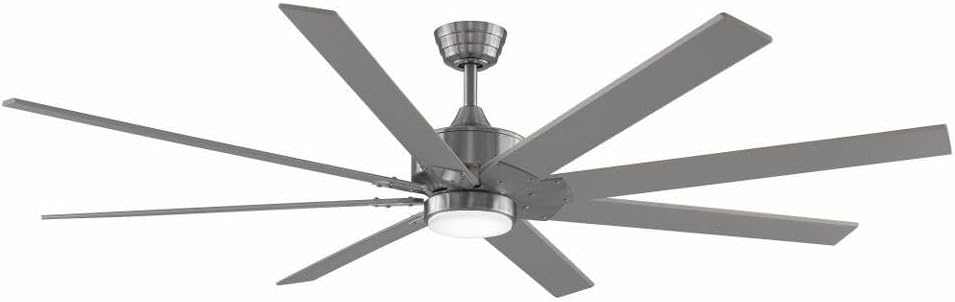
Figure 1: Assembled Fanimation Levon Custom DC Motor Ceiling Fan. This image shows the complete fan unit, including the motor housing, downrod, and a set of eight fan blades (sold separately), all in a brushed nickel finish.
2. Mount the Bracket and Downrod
Attach the mounting bracket to the electrical box. Secure the downrod to the fan motor assembly, ensuring all pins and screws are tightened.
3. Connexions électriques
Connect the fan's electrical wires to the household wiring according to the wiring diagram provided in the separate detailed installation guide. Ensure proper grounding. The fanSync Bluetooth receiver should be wired in line as per instructions for remote and smart control functionality.

Figure 2 : Côté view of the Fanimation Levon Custom DC Motor Ceiling Fan. This perspective highlights the sleek profile of the motor housing and the angle of the fan blades, demonstrating its modern design.
4. Attach Fan Blades and Light Kit (Optional)
Securely attach the fan blades (sold separately) to the motor housing. If installing the optional LED light kit (sold separately), follow its specific installation instructions.

Figure 3 : Gros plan view of the Fanimation Levon Custom DC Motor Ceiling Fan's central housing. This image focuses on the brushed nickel finish of the motor unit and the integrated light fixture, which is part of the optional LED light kit.
Mode d'emploi
Your Fanimation Levon Custom fan can be controlled via the included fanSync Bluetooth remote or through a compatible Wi-Fi enabled smart device (with required controls sold separately).
- Marche/Arrêt : Use the designated button on your remote or smart device interface to turn the fan on or off.
- Contrôle de vitesse : The fan offers 3 distinct power levels. Adjust the fan speed using the speed control buttons on your remote or the slider/buttons in your smart application.
- Contrôle de la lumière (le cas échéant) : If an optional LED light kit is installed, use the light control buttons on your remote or smart device to turn the light on/off and adjust brightness (if dimmable).
- Connectivité Wi-Fi : For Wi-Fi control, ensure you have the necessary Wi-Fi compatible controls and follow their specific pairing instructions to connect your fan to your home network.
Entretien
Un entretien régulier garantira la longévité et les performances optimales de votre ventilateur de plafond.
- Nettoyage: Pour nettoyer le ventilateur, essuyez-le avec un chiffon doux et sec.amp cloth. Do not use abrasive cleaners or solvents, as these may damage the finish or blades.
- Inspection de la lame : Vérifiez régulièrement le serrage des fixations des lames. Des lames desserrées peuvent provoquer des vibrations et du bruit.
- Lubrification du moteur : Le moteur à courant continu est lubrifié en permanence et ne nécessite aucun huilage supplémentaire.
- Connexions électriques : Annually inspect all electrical connections for any signs of wear or loosening. Ensure power is disconnected before inspection.
Dépannage
If you experience issues with your Fanimation Levon Custom ceiling fan, refer to the following common problems and solutions:
| Problème | Cause possible | Solution |
|---|---|---|
| Le ventilateur ne démarre pas | Ventilateur hors tension ; connexions électriques desserrées ; pile de la télécommande faible. | Check circuit breaker and wall switch. Ensure all wire connections are secure. Replace remote control batteries. |
| Le ventilateur vacille | Vis de fixation des lames desserrées ; lames déséquilibrées ; support de montage desserré. | Tighten all blade screws. Use a balancing kit (not included) to balance blades. Ensure mounting bracket is securely fastened. |
| Fonctionnement bruyant | Vis desserrées ; bourdonnement du moteur ; lames heurtant un obstacle. | Check and tighten all screws. A slight motor hum is normal for DC motors. Ensure nothing is obstructing the blade path. |
| La télécommande ne fonctionne pas | Low battery; Not paired correctly; Obstruction between remote and receiver. | Replace batteries. Refer to fanSync pairing instructions. Ensure clear line of sight. |
Caractéristiques
Detailed technical specifications for the Fanimation Levon Custom DC Motor Ceiling Fan (Model MAD7912BBN).
| Marque | Fanimation |
| Nom du modèle | Levon Custom DC Motor - BN |
| Numéro de modèle | MAD7912BBN |
| Couleur | Nickel brossé |
| Conception de ventilateur électrique | Ventilateur de plafond |
| Source d'énergie | Électrique avec fil |
| Dossier spécial | Wi-Fi Enabled (with separate controls) |
| Type de finition | Fini |
| Capacité de débit d'air | 8244 CFPH |
| Voltage | 120.0 V |
| Poids de l'article | 18.96 livre (environ 8.6 kg) |
| Dimensions du produit | 52 x 52 x 15.58 pouces (environ 132 x 132 x 39.6 cm) |
| Utilisation intérieure/extérieure | Intérieur |
| Matériau de la lame | Plastic (if purchased separately) |
| Nombre de niveaux de puissance | 3 |
| Code UPC | 840506087224 |
Informations sur la garantie
The Fanimation Levon Custom DC Motor Ceiling Fan is backed by a Garantie à vie limitée. This warranty covers defects in materials and workmanship under normal use. For specific terms, conditions, and limitations, please refer to the warranty documentation included with your purchase or visit the official Fanimation website.
Assistance clientèle
If you have any questions, require technical assistance, or need to report a missing or damaged part, please contact Fanimation customer support. Have your model number (MAD7912BBN) and purchase information ready when contacting support.
For the most up-to-date contact information and additional resources, please visit the official Fanimation website: www.fanimation.com


