Introduction
Thank you for choosing the EZQuest USB C Hub Docking Station 8-in-1. This manual provides detailed instructions for setting up, operating, and maintaining your device. Please read this manual thoroughly before use to ensure optimal performance and longevity of your product.
Produit terminéview
The EZQuest USB C Hub Docking Station 8-in-1 is designed to expand the connectivity of your USB-C enabled devices, offering a comprehensive solution for various peripherals and display needs. It features multiple ports for data transfer, video output, network connection, and power delivery.
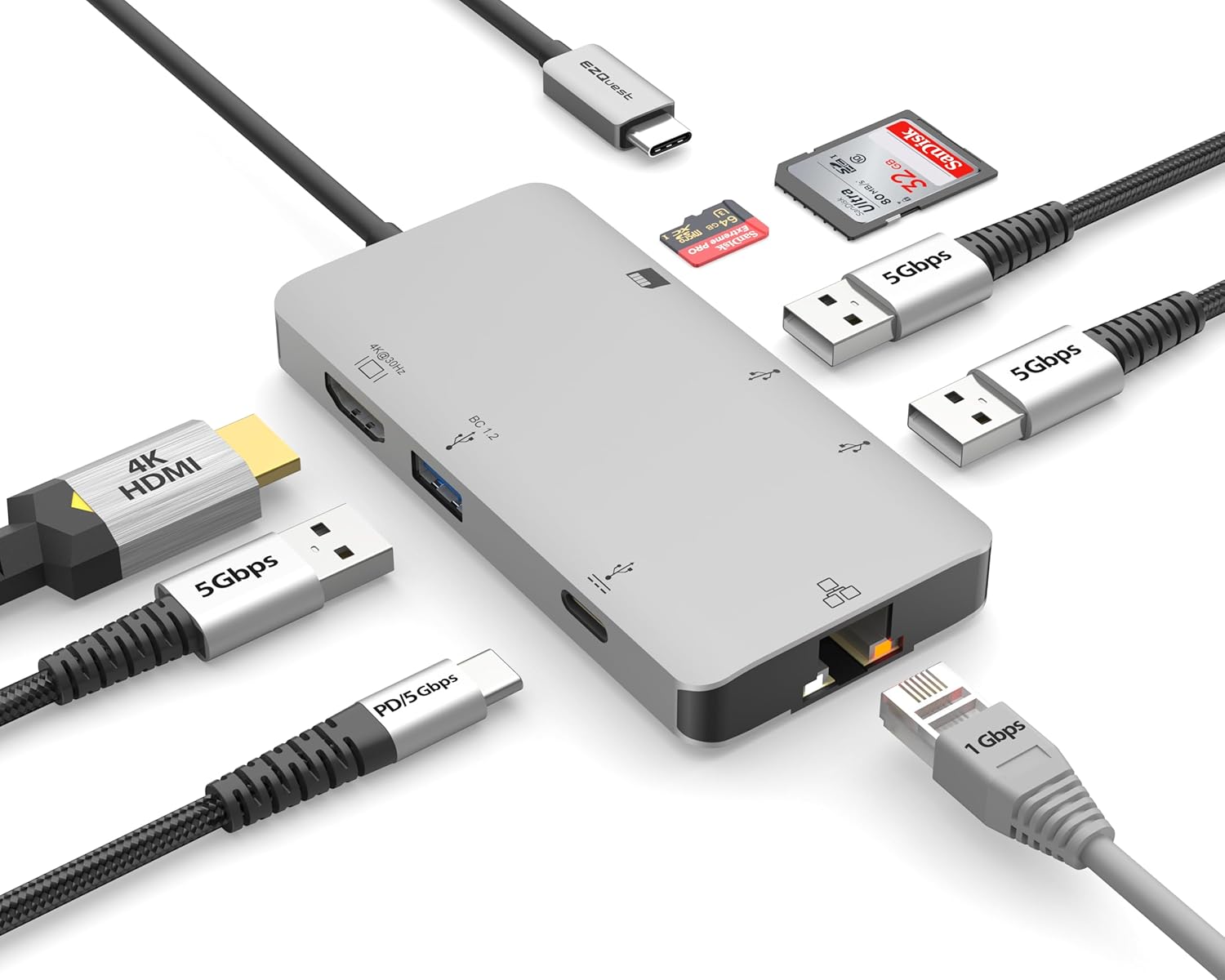
Image: The EZQuest USB C Hub Docking Station 8-in-1, showcasing son design compact et son câble USB-C intégré.

Image: A diagram illustrating the 8-in-1 expansion capabilities of the hub, including HDMI, USB-C PD, USB 3.0, Ethernet, and card readers.
Instructions d'installation
- Se connecter au périphérique hôte : Plug the integrated USB-C cable of the EZQuest hub into an available USB-C/Thunderbolt 3/4 port on your laptop, tablet, or smartphone.
- Alimentation électrique (en option) : For charging your host device, connect your USB-C power adapter to the USB-C Power Delivery port on the hub. The hub supports up to 100W input with 85W pass-through charging.
- Affichage HDMI : Connect an HDMI cable from your monitor to the HDMI port on the hub for 4K 30Hz video output.
- Connexion Ethernet : For a stable wired network, connect an Ethernet cable to the Gigabit Ethernet port on the hub.
- Périphériques USB : Connect your USB-A devices (e.g., mouse, keyboard, external hard drive) to the three USB-A 3.0 ports.
- SD/Micro SD Cards: Insert your SD or Micro SD cards into the respective slots for data transfer.

Image: A user connecting the EZQuest USB C Hub to a laptop's USB-C port.

Image: Illustrates connecting a power adapter to the hub for pass-through charging of a laptop.
Mode d'emploi
Sortie d'affichage (HDMI)
The HDMI port supports 4K resolution at 30Hz. Connect an HDMI-enabled display to extend or mirror your desktop for enhanced productivity or multimedia viewing. Ensure your display and device support 4K 30Hz for optimal performance. Note that the USB-C ports on the hub are for data and power delivery, not for connecting a monitor.
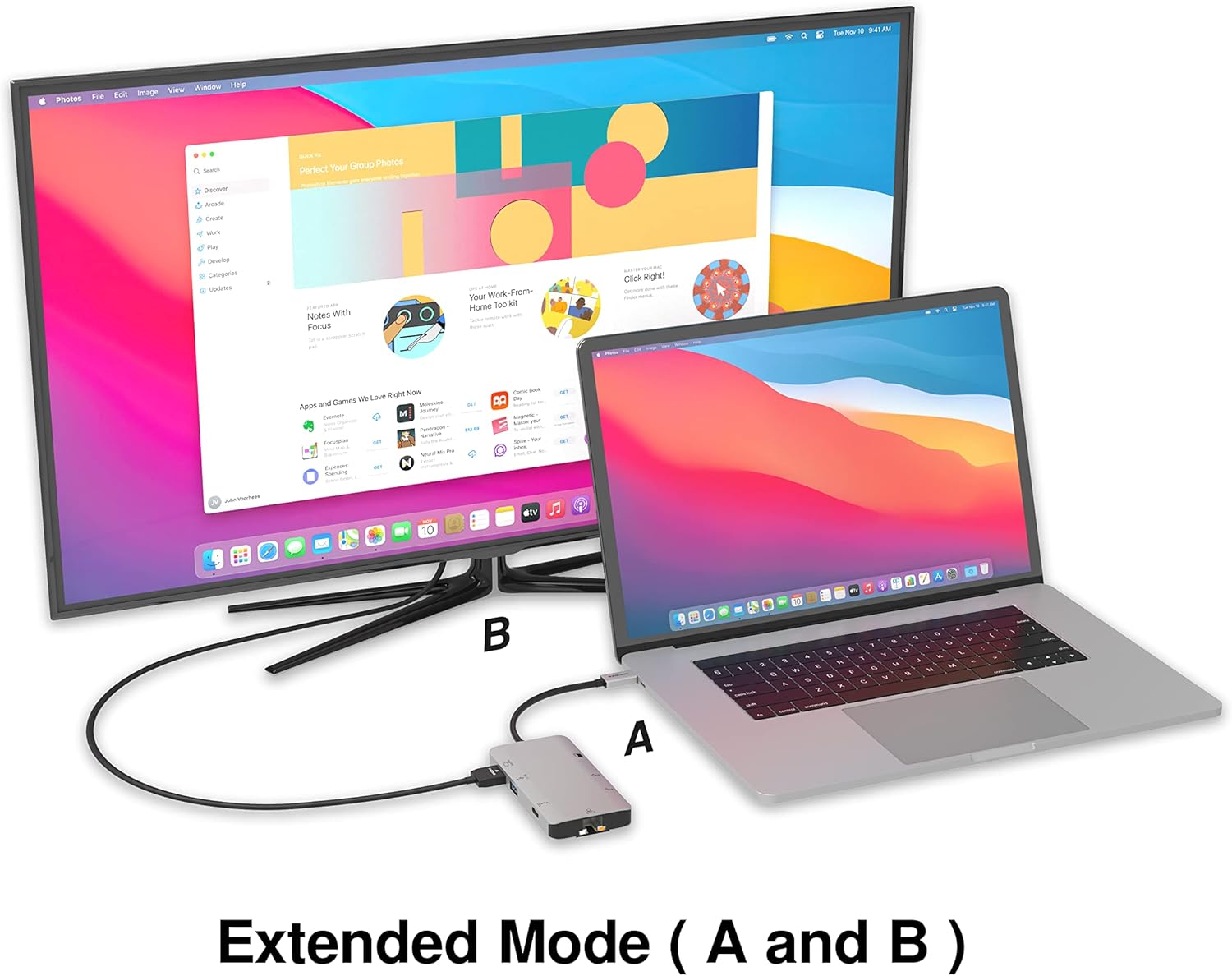
Image: A laptop connected to an external monitor via the hub, demonstrating extended display mode.
Data Transfer (USB-A & SD/Micro SD)
The three USB-A 3.0 ports offer data transfer speeds up to 5Gbps. The SD and Micro SD card slots allow for simultaneous read and write operations, facilitating quick file transferts depuis les cartes mémoire.

Image: Various devices like USB drives, SD cards, and an Ethernet cable connected to the EZQuest hub.
Network Connection (Gigabit Ethernet)
The Gigabit Ethernet port provides a stable and high-speed wired internet connection, ideal for large downloads, uploads, or streaming where Wi-Fi might be unreliable. An LED indicator confirms network activity.
Distribution d'énergie
The USB-A ports distribute power efficiently. One USB-A port with BC1.2 outputs 5V/1.5A (7.5W), while the other two USB-A ports deliver 5V/0.9A (4.5W) each. The total shared power when all ports are in use is 10 watts.

Image: A diagram detailing the power output and data transfer speeds of the USB-A ports on the hub.
Fonctionnalités et ports
| Type de port | Quantité | Fonctionnalité |
|---|---|---|
| HDMI | 1 | 4K @ 30Hz Video Output (Extended/Mirror Mode) |
| USB-C Power Delivery/Data | 1 | Up to 100W Power Input (85W Pass-Through), 5Gbps Data Transfer |
| USB-A 3.0 | 3 | 5Gbps Data Transfer (One port BC1.2 5V/1.5A, two ports 5V/0.9A) |
| Gigabit Ethernet | 1 | 10/100/1000 Mbps Wired Network Connection with LED Indicator |
| Lecteur de carte SD | 1 | SDHC/SDXC Read/Write |
| Lecteur de carte Micro SD | 1 | Micro SDHC/SDXC Read/Write |
Compatibilité
This USB C Hub is compatible with a wide range of devices:
- Computers featuring USB-C, USB 4, Thunderbolt 4, or Thunderbolt 3 ports.
- USB-C smartphones and tablets equipped with OTG (On-The-Go) support.
Unsupported Device:
- The USB-A ports on this docking station do not support Apple SuperDrive. For connecting an Apple SuperDrive, an alternative adapter (e.g., EZQuest X40100 USB-C to USB-A Female Mini Adapter) directly to your Mac is recommended.
Dépannage
- Aucune sortie d'affichage :
- Assurez-vous que le port USB-C de votre appareil hôte prend en charge la sortie vidéo (mode alternatif DisplayPort).
- Vérifiez toutes les connexions des câbles (USB-C du hub à l'appareil, HDMI du hub au moniteur).
- Verify your monitor input source is set correctly to HDMI.
- Essayez un autre câble HDMI ou un autre moniteur si possible.
- Problèmes de charge :
- Assurez-vous que votre adaptateur secteur USB-C est connecté au port USB-C PD du hub.
- Vérifiez que votre adaptateur secteur fournit une puissance suffisante.tage (up to 100W recommended for laptops).
- Check if the host device's USB-C port supports Power Delivery.
- Transfert de données lent :
- Assurez-vous d'utiliser des périphériques et des câbles compatibles USB 3.0 pour des vitesses optimales.
- The total shared power for USB-A ports is 10W; excessive power draw from multiple devices may affect performance.
- Ethernet ne fonctionne pas :
- Vérifiez la connexion du câble Ethernet à la fois au hub et à votre routeur/modem.
- Vérifiez les paramètres réseau de votre appareil hôte.
- Ensure the LED indicator on the Ethernet port is active.
- SD/Micro SD Card Not Recognized:
- Assurez-vous que la carte est complètement insérée dans l'emplacement prévu.
- Essayez de réinsérer la carte ou d'utiliser une autre carte.
- Vérifiez si la carte est endommagée ou corrompue.
Caractéristiques
| Fonctionnalité | Détail |
|---|---|
| Numéro de modèle | X40030 |
| Dimensions du produit | 0.81 x 1.63 x 0.2 pouces |
| Poids de l'article | 1.6 onces |
| Interface matérielle | USB Type C |
| Sortie HDMI | 4K @ 30Hz |
| Entrée USB-C PD | Jusqu'à 100 W |
| Sortie USB-C PD | Jusqu'à 85 W |
| USB-A 3.0 Data Speed | 5 Gbit/s |
| Vitesse Ethernet | 1 Gigabit (10/100/1000 Mbps) |
| Assistance pour lecteur de cartes | SDHC, SDXC, Micro SDHC, Micro SDXC |
| Matériel | Anodized Aluminum Housing |
Entretien
- Nettoyage: Utilisez un chiffon doux et sec pour nettoyer le moyeu. Évitez les nettoyants liquides et les aérosols.
- Stockage: Rangez le moyeu dans un endroit frais et sec, à l'abri de la lumière directe du soleil et des températures extrêmes.
- Manutention: Évitez de faire tomber l'appareil ou de le soumettre à des chocs violents. Ne tentez pas de démonter le hub.
Garantie et assistance
The EZQuest USB C Hub Docking Station 8-in-1 comes with a Garantie sans souci d'un an. This warranty covers manufacturing defects and ensures peace of mind regarding your investment.
For technical support, warranty claims, or any product-related inquiries, please visit the official EZQuest website or contact their customer service team through the contact information provided with your product packaging.


