Introduction
This manual provides detailed instructions for the installation, operation, and maintenance of the Hanwha Techwin HCV-6070R 2MP Outdoor Vandal-Resistant Dome Camera. This camera is designed for outdoor security surveillance, offering 2-megapixel resolution, a 2.8-12mm manual varifocal lens, and night vision capabilities with a BNC connection.
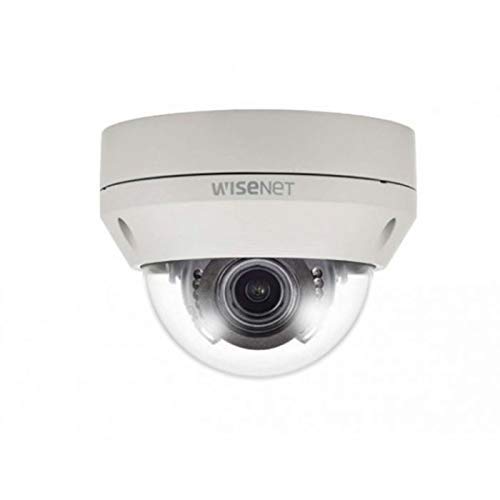
Figure 1: Hanwha Techwin HCV-6070R 2MP Outdoor Vandal-Resistant Dome Camera.
Consignes de sécurité
Please read all safety instructions carefully before installing or operating the camera. Keep this manual for future reference.
- Ensure the power supply matches the camera's requirements to prevent electrical shock or fire.
- N’exposez pas l’appareil photo à des températures extrêmes, à l’humidité ou à des environnements corrosifs.
- L'installation doit être effectuée par un personnel qualifié, conformément aux normes électriques locales.
- Évitez d'exposer directement l'objectif à des sources de lumière intense pendant des périodes prolongées.
- Ne tentez pas de démonter ou de modifier l'appareil photo. Cela annulera la garantie.
Contenu du colis
Vérifiez que tous les éléments sont présents dans le colis :
- Hanwha Techwin HCV-6070R Dome Camera (1 unit)
- Vis et ancrages de montage
- Modèle d'installation
- Guide de démarrage rapide
- Waterproof Cap (if applicable)
Installation
1. Montage de la caméra
The HCV-6070R is designed for wall mounting. Choose a suitable outdoor location that provides the desired surveillance coverage and is protected from direct impact.
- Use the provided installation template to mark the drilling holes on the wall.
- Drill holes according to the template and insert the wall anchors.
- Secure the camera base to the wall using the mounting screws.
- Réglez la caméra viewing angle as needed before tightening all screws.
2. Câblage et connexions
The camera utilizes a BNC connection for video output and requires a separate power supply. Ensure all connections are secure and weatherproof for outdoor use.
- Connexion vidéo : Connect a BNC cable from the camera's BNC port to the video input of your DVR (Digital Video Recorder).
- Connexion électrique : Connect a 12V DC power adapter (not included) to the camera's power input. The camera operates at 8 watts.
- Connectivité sans fil: The camera supports Wi-Fi for remote control and monitoring. Refer to the operating section for initial Wi-Fi setup.

Figure 2 : Example of a BNC coaxial cable for video connection. Ensure a secure connection to the camera and DVR.
3. Configuration initiale
After physical installation and power-up, access the camera settings via your connected DVR or a compatible mobile application (Android controller type specified).
- Régler la date et l'heure.
- Configure network settings for Wi-Fi connectivity.
- Adjust video quality and recording preferences.
Utilisation de l'appareil photo
1. Surveillance et enregistrement vidéo
The camera provides 2MP effective video resolution, capturing video at 1080p and a frame rate of 30 fps. Video is typically recorded in MPEG-4 format.
- Accéder en direct view et enregistré footage through your connected DVR or the remote control application.
- Ensure your DVR is configured to record from the correct channel.
2. Adjusting Focus and Zoom
The HCV-6070R features a 2.8-12mm manual varifocal lens with optical zoom. Adjustments are made manually on the camera body.
- Loosen the focus and zoom locking screws on the camera lens assembly.
- Adjust the zoom ring to achieve the desired field of view.
- Adjust the focus ring until the image is clear and sharp.
- Tighten the locking screws to secure the settings.
3. Night Vision and Low Light Performance
Equipped with night vision and "Night Color" low light technology, the camera automatically switches to infrared mode in low light conditions to provide clear surveillance footage. The light source type is LED.
- Ensure no obstructions block the infrared LEDs on the camera.
- The camera will automatically activate its infrared illuminators when ambient light levels drop.
4. Détection de mouvement
The camera supports motion-only alerts. Configure motion detection zones and sensitivity settings through your DVR or the remote control application.
- Définir des zones spécifiques à l'intérieur de la caméra view pour la détection de mouvement.
- Réglez le niveau de sensibilité pour minimiser les fausses alarmes.
- Configure alert notifications (e.g., email, push notifications) via your DVR or application.
5. Télécommande
The camera can be controlled remotely using a compatible Android application. Ensure the camera is connected to your Wi-Fi network.
- Download and install the Hanwha Techwin mobile application on your Android device.
- Follow the in-app instructions to add and connect to your HCV-6070R camera.
- Grâce à l'application, vous pouvez view vivre footage, access recordings, and adjust certain camera settings.
Entretien
Un entretien régulier garantit des performances optimales et une longue durée de vie à votre appareil photo.
- Nettoyage de la lentille : Gently wipe the camera lens with a soft, clean, lint-free cloth. For stubborn dirt, use a lens cleaning solution specifically designed for optical surfaces.
- Nettoyage du boîtier : Nettoyez le boîtier extérieur de l'appareil photo avec un produit nettoyant pour appareils photo.amp tissu. N'utilisez pas de produits chimiques agressifs ou de nettoyants abrasifs.
- Inspection des câbles : Periodically check all cables and connections for signs of wear, damage, or corrosion, especially for outdoor installations.
- Mises à jour du micrologiciel : Check the Hanwha Techwin website for any available firmware updates to ensure your camera has the latest features and security patches.
Dépannage
| Problème | Cause possible | Solution |
|---|---|---|
| Pas de sortie vidéo | No power; Loose BNC connection; Incorrect DVR input selected. | Check power supply; Secure BNC cable; Select correct channel on DVR. |
| Image floue ou floue | Lens out of focus; Dirty lens. | Manually adjust focus (refer to Operating section); Clean the lens. |
| La vision nocturne ne fonctionne pas | IR LEDs blocked; Insufficient power; Camera stuck in day mode. | Clear obstructions; Verify power supply; Restart camera. |
| La détection de mouvement ne se déclenche pas. | Incorrect sensitivity settings; Motion detection zone not configured. | Adjust sensitivity; Configure motion detection zones in DVR/app. |
| Cannot connect via Wi-Fi | Incorrect Wi-Fi password; Camera out of range; Network issues. | Verify Wi-Fi credentials; Move camera closer to router; Check network status. |
Caractéristiques
| Modèle | VHC-6070R |
| Marque | HANWHA Techwin |
| Résolution vidéo efficace | 2 MP (1080p) |
| Fréquence d'images | 30 images par seconde |
| Type de lentille | Objectif varifocal manuel 2.8-12 mm |
| Type de mise au point | Mise au point manuelle |
| Type de zoom | Zoom optique |
| Technologie de connectivité | Wireless (Wi-Fi), BNC Connection |
| Source d'énergie | Manual (requires external 12V DC power adapter) |
| Quoitage | 8 watts |
| Utilisation intérieure/extérieure | De plein air |
| Dossier spécial | Night Vision (Night Color low light technology) |
| Facteur de forme | Dôme |
| Type de montage | Support mural |
| Appareils compatibles | DVR |
| Méthode de contrôle | Remote (Android Controller Type) |
| Évaluation de la protection internationale | IP54 |
| Technologie de capteur photo | CMOS |
| Format de capture vidéo | MPEG-4 |
| Type d'alerte | Mouvement seulement |
Garantie et assistance
For warranty information and technical support, please refer to the official Hanwha Techwin webConsultez leur site web ou contactez directement leur service client. Conservez votre reçu d'achat comme preuve d'achat pour toute réclamation au titre de la garantie.
Fabricant: Hanwha
Date de mise en ligne sur Amazon : 19 février 2019