Introduction
The TOZO T12 Wireless Earbuds offer a high-quality audio experience with advanced features designed for convenience and durability. This manual provides essential information for setting up, operating, and maintaining your earbuds to ensure optimal performance.
Qu'y a-t-il dans la boîte
- TOZO Wireless Earbuds
- Étui de chargement sans fil
- Eartips (5 pairs in various sizes)
- Câble de chargement USB-C
- Manuel d'utilisation
Produit terminéview
The TOZO T12 earbuds feature a 10mm dynamic driver system for premium sound, Bluetooth 5.3 for stable connectivity, and IPX8 waterproofing. The charging case includes an LED digital display for battery status.
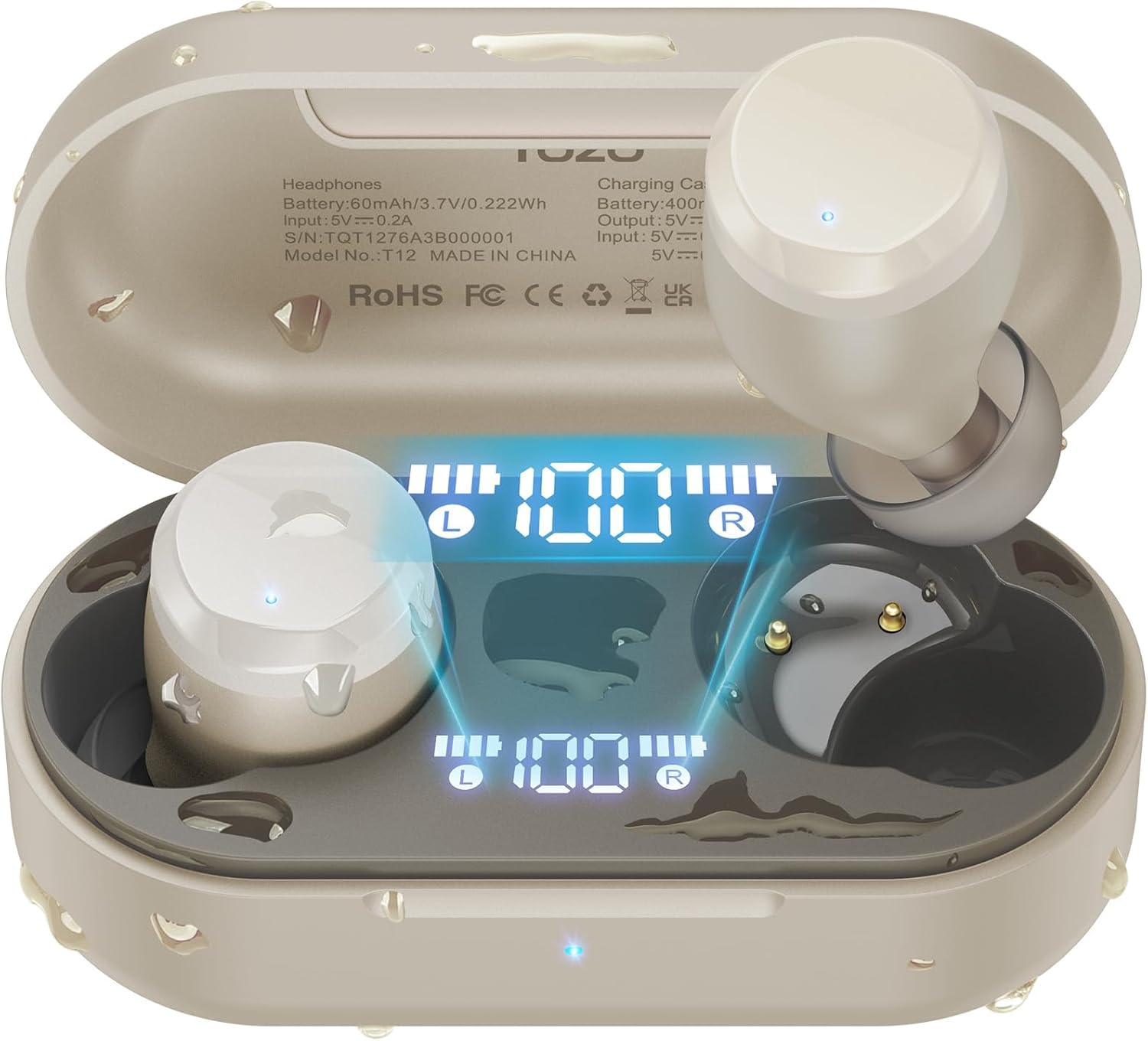
Figure 1: TOZO T12 Wireless Earbuds and Charging Case in Champcouleur agne.
Affichage numérique à LED
The charging case is equipped with a built-in LED digital display that provides real-time information on the battery status of both the charging case and the individual earbuds.

Figure 2: The LED digital display on the charging case shows battery levels for the case and each earbud.
Qualité sonore améliorée
The T12 earbuds feature newly upgraded 10mm dynamic drivers, offering a 56.3% increase in vibration area compared to standard drivers. This design aims to deliver powerful bass and detailed sound reproduction.

Figure 3: Illustration of the 10mm dynamic driver with an enlarged diaphragm for improved sound.
Conception étanche
With advanced IPX8 waterproofing, the TOZO T12 earbuds are protected against sweat and rain, making them suitable for various activities including outdoor exercise and swimming.

Figure 4: The earbuds are shown in water, highlighting their IPX8 waterproof rating.
Official Product Video: TOZO T12 Features
Vidéo 1 : Cette vidéo présente un aperçuview of the TOZO T12 Wireless Earbuds, showcasing their design and key features such as sound quality and comfort.
Installation
Initial Pairing and Auto Reconnection
- Ouvrez le boîtier de charge. Les écouteurs passeront automatiquement en mode appairage.
- On your device (smartphone, tablet, etc.), go to Bluetooth settings and select "TOZO T12" from the list of available devices.
- Once paired, the earbuds will automatically reconnect to your device when the case is opened for subsequent uses.

Figure 5 : Example of one-step pairing with a smartphone, showing the earbuds connected.
TOZO App Customization
Enhance your audio experience by downloading the official TOZO App. The app allows you to:
- Explore 16 preset EQ modes to match your music style.
- Customize the EQ settings to your personal preferences.
- Access white noise options for relaxation.

Figure 6: The TOZO App interface displaying various EQ settings and white noise tracks.
Mode d'emploi
Commandes tactiles
The TOZO T12 earbuds feature touch-sensitive controls for managing playback, calls, and voice assistants. Refer to the quick start guide included in the packaging for specific tap functions.
Charger les écouteurs et l'étui
The charging case provides up to 55 hours of total playtime with multiple charges, while the earbuds offer 15 hours on a single charge.
- Chargement USB-C: Connectez le câble USB-C fourni au port de chargement du boîtier et à une source d'alimentation.
- Chargement sans fil : Placez l'étui de chargement sur un chargeur sans fil compatible (non inclus).
Figure 7: The charging case supports both wireless and USB-C cable charging.
Official Product Video: TOZO T12 Unboxing and Features
Video 2: This video provides an unboxing experience and highlights various features of the TOZO T12 earbuds, including their design and functionality.
Entretien
Nettoyage
Regularly clean the earbuds and charging case to maintain optimal performance and hygiene. Use a soft, dry cloth to wipe surfaces. For the eartips, remove them and clean with a mild soap solution, then rinse and dry thoroughly before reattaching.
Résistance à l'eau
The IPX8 rating means the earbuds can withstand submersion in water up to 1 meter for 30 minutes. However, it is recommended to dry the earbuds completely before placing them back in the charging case to prevent damage to the charging contacts.
Dépannage
- Les écouteurs ne se connectent pas : Ensure both earbuds are in the charging case, then open the lid. Check your device's Bluetooth settings to ensure "TOZO T12" is selected. If issues persist, try resetting the earbuds (refer to the quick start guide for specific reset instructions).
- Un des écouteurs ne fonctionne pas : Replacez les deux écouteurs dans l'étui de chargement, fermez le couvercle, puis rouvrez-le. Cela permet souvent de les resynchroniser.
- Problèmes de charge : Ensure the USB-C cable is securely connected or the wireless charging pad is properly aligned. Clean the charging contacts on both the earbuds and the case.
- Mauvaise qualité sonore : Ensure the eartips provide a good seal in your ear canal. Try different sized eartips for a better fit. Clean any debris from the earbud speakers.
Official Product Video: TOZO T12 Ergonomic Edition Overview
Vidéo 3 : Cette vidéo présente un aperçuview of the TOZO T12 Ergonomic Edition, detailing its features and benefits for users.
Caractéristiques
| Fonctionnalité | Spécification |
|---|---|
| Marque | TOZO |
| Numéro de modèle | T12 |
| Couleur | ChampAgnès |
| Placement des oreilles | Dans l'oreille |
| Technologie de connectivité | Sans fil (Bluetooth) |
| Version Bluetooth | 5.3 |
| Portée Bluetooth | 10 mètres |
| Niveau de résistance à l'eau | Étanchéité IPX8 |
| Autonomie moyenne de la batterie (écouteurs) | 15 heures (charge unique) |
| Battery Average Life (with Case) | 55 heures |
| Temps de charge de la batterie | 1.5 heures |
| Contrôle du bruit | Call ENC Noise Cancelling Mic |
| Type de pilote audio | Pilote dynamique |
| Taille du pilote audio | 10 millimètres |
| Méthode de contrôle | App, Touch Control |
| Poids de l'article (écouteur) | 4.6 grammes (chacun) |
| Poids de la mallette de transport | 37 gramme |
Garantie et assistance
TOZO products are covered by a manufacturer's warranty. For detailed warranty information, product support, or to contact customer service, please visit the official TOZO webConsultez le site ou reportez-vous à la carte de garantie incluse dans l'emballage de votre produit.
TOZO officiel Website: www.tozostore.com


