Introduction
This manual provides essential instructions for the safe and efficient use of your Smart Kingfisher Rechargeable Lithium Battery and USB Charger. Please read this manual thoroughly before use and retain it for future reference.
Consignes de sécurité
- Avertissement: N'essayez pas de charger des piles non rechargeables.
- Avertissement: Do not charge batteries from other suppliers unless explicitly stated as compatible.
- Keep the charger and batteries away from water and moisture.
- Ne pas démonter, écraser ou perforer les batteries ou le chargeur.
- Évitez d'exposer les piles à des températures extrêmes ou à la lumière directe du soleil.
- Jetez les piles de manière responsable, conformément à la réglementation locale.
Contenu du colis
Vérifiez que tous les éléments sont présents dans votre colis :
- 2 x 425 Rechargeable Lithium Batteries
- 1 x Dual-Port USB Charger
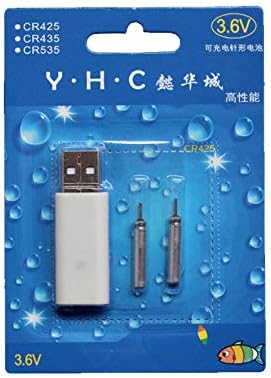
Image: Retail packaging showing the USB charger and two 425 rechargeable batteries.

Image: A pair of Smart Kingfisher 425 rechargeable lithium batteries.
Installation
The Smart Kingfisher USB charger is designed for ease of use. No complex setup is required.
- Identify the USB charger and the 425 rechargeable batteries.
- Connect the USB charger to a compatible power source (see "Operating Instructions" for options).

Image: The USB charger unit with its two charging pins visible.
Mode d'emploi
Charger les batteries
The charger features two ports, allowing for simultaneous charging of two batteries.
- Insert the 425 rechargeable batteries into the charging ports of the USB charger. Ensure a secure connection.
- Connect the USB charger to a power source. Compatible power sources include:
- USB power adapter (wall charger)
- Banque d'alimentation
- Chargeur de voiture
- Laptop or PC USB port
- Observez le voyant LED du chargeur :
- A LED verte indique que les batteries sont actuellement en charge.
- A LED rouge indicates that the batteries are fully charged.
- Le temps de charge complet est généralement d'environ 3 heures.
- Once fully charged, disconnect the charger from the power source and remove the batteries.
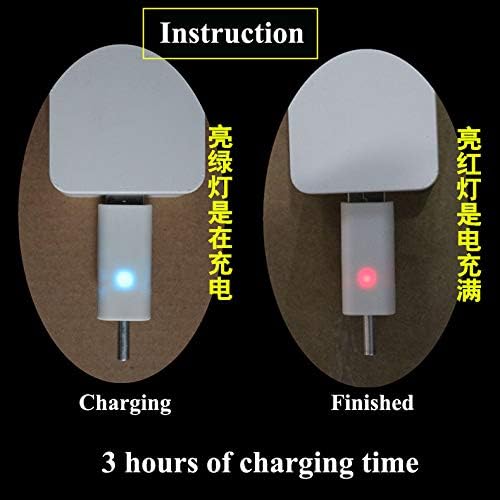
Image: Visual guide for charging status: green light for charging, red light for fully charged. Indicates a 3-hour charging time.

Image: Diagram illustrating multiple methods for charging the device, including car chargers, wall adapters, power banks, and laptops.
Entretien
- Clean the charger and batteries with a dry, soft cloth. Do not use liquids or abrasive cleaners.
- Store the batteries and charger in a cool, dry place when not in use.
- Avoid storing fully discharged batteries for extended periods to prolong their lifespan.
Dépannage
| Problème | Cause possible | Solution |
|---|---|---|
| Batteries not charging (no LED indication) |
|
|
| Charging takes longer than 3 hours |
|
|
| Red LED does not turn on after extended charging |
|
|
Caractéristiques
- Matériel: Plastique
- Poids du produit : 20 g (total for charger and batteries)
- Type de batterie : 425 Rechargeable Lithium Battery (compatible with CR425, CR435, CR535)
- Type de chargeur : Chargeur USB à deux ports
- Saisir: USB (compatible with various USB power sources)
- Indicateur de charge : Green LED (charging), Red LED (fully charged)
- Temps de charge approximatif : 3 heures
Garantie et assistance
For warranty information or technical support, please refer to the retailer's return policy or contact the manufacturer directly. Keep your purchase receipt as proof of purchase.
Pour obtenir de l'aide supplémentaire, vous pouvez consulter le product page on Amazon.com.mx.


