1. Introduction
This manual provides detailed instructions for the safe and proper installation, operation, and maintenance of your Mount Plus OB-600 Outdoor Weatherproof Tilt TV Wall Mount. Please read this manual thoroughly before installation and retain it for future reference.
The Mount Plus OB-600 is designed to securely mount most 37-inch to 86-inch televisions in outdoor environments. Its robust construction and weatherproof features ensure durability and reliable performance.
2. Consignes de sécurité
AVERTISSEMENT : Le non-respect de ces instructions peut entraîner des blessures graves, des dommages matériels ou l'annulation de votre garantie.
- Assurez-vous que la surface de montage puisse supporter en toute sécurité le poids combiné du support et du téléviseur.
- Ne pas dépasser la capacité de poids maximale de 176 lb (80 kg).
- Utilisez toujours un équipement de sécurité approprié, notamment une protection oculaire, lors de l'installation.
- Si vous avez des doutes concernant une quelconque étape du processus d'installation, consultez un professionnel qualifié.
- Tenez les enfants et les animaux domestiques éloignés de la zone de travail pendant l'installation.
- Vérifiez régulièrement tous les raccords et fixations pour vous assurer qu'ils restent bien en place.
3. Contenu du colis
Verify that all components are present and undamaged before beginning installation. If any parts are missing or damaged, contact Mount Plus customer support.
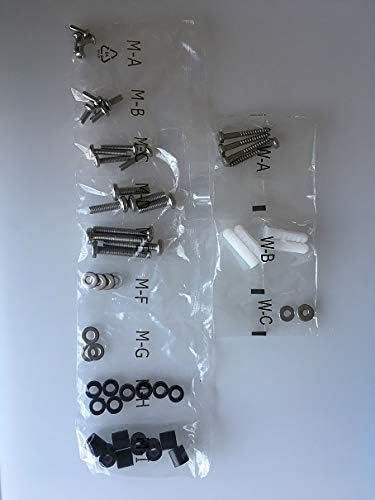
Figure 3.1 : Assorted hardware for the Mount Plus OB-600, including various screws, washers, and wall anchors, organized in labeled bags.
- Ensemble de plaque murale
- Bras de support TV (2x)
- Kit de quincaillerie de montage (vis, rondelles, entretoises, chevilles)
- Manuel d'instructions
4. Spécifications
| Fonctionnalité | Détail |
|---|---|
| Numéro de modèle | OB-600 |
| Marque | Monture Plus |
| Compatibilité de la taille du téléviseur | Most 37" - 86" TVs |
| Capacité de poids maximale | 176 livres (80 kg) |
| Compatibilité VESA | 75x75, 100x100, 100x150, 150x100, 150x150, 200x100, 200x200, 300x200, 300x300, 400x200, 400x300, 400x400, 600x400 mm |
| Plage d'inclinaison | +5° à -10° |
| Profile (Distance from Wall) | 54 mm (2.1") |
| Matériel | Stainless Steel, Powder-Coated Galvanized Steel |
| Poids de l'article | 8.98 livres |
| Code UPC | 638845988612 |
5. Configuration et installation
Before you begin, ensure you have the necessary tools: drill, stud finder (for wood studs), level, measuring tape, pencil, and a screwdriver.
5.1. Déterminer l'emplacement de montage
Choose a suitable outdoor wall location. The mount is designed for patios, decks, and balconies. Ensure the wall structure can support the combined weight of the mount and your TV.

Figure 5.1 : Example of the Mount Plus OB-600 installed on an outdoor brick wall, demonstrating its intended use in an outdoor living space.
5.2. Fixez les supports de télévision au téléviseur.
- Posez délicatement votre téléviseur face contre une surface douce et propre.
- Identifiez les trous de montage VESA à l'arrière de votre téléviseur.
- Select the appropriate screws and spacers from the hardware kit that fit your TV's VESA pattern.
- Attach the two TV bracket arms to the back of your TV, ensuring they are centered and securely fastened. The arrows on the brackets should point upwards.
5.3. Install Wall Plate to Wall
- Hold the wall plate against the wall at your desired height and use a level to ensure it is perfectly horizontal. Mark the drilling locations with a pencil.
- Drill pilot holes at the marked locations. For wood studs, use a smaller drill bit. For concrete or brick, use a masonry drill bit and insert wall anchors.
- Fixez la plaque murale au mur à l'aide des tire-fonds et des rondelles fournis. Serrez fermement tous les boulons, sans toutefois les serrer excessivement.
5.4. Mount Television to Wall Plate
- With assistance, carefully lift the TV with the attached brackets and hook the brackets onto the top edge of the wall plate.
- Allow the TV to hang freely, ensuring the brackets are properly seated on the wall plate.
- Secure the TV to the wall plate using the safety screws or locking mechanism at the bottom of the TV bracket arms. This prevents accidental dislodgement.

Figure 5.2 : Un gros plan view of the Mount Plus OB-600's anti-theft design, showing a padlock securing the TV bracket to the wall plate, preventing unauthorized removal.
6. Mode d'emploi
6.1. Réglage de l'angle d'inclinaison
The Mount Plus OB-600 features a free-tilting design, allowing you to adjust the TV's vertical viewing angle. Loosen the tilt adjustment knobs on the sides of the TV bracket arms, adjust the TV to the desired angle (+5° to -10°), and then tighten the knobs to secure the position.
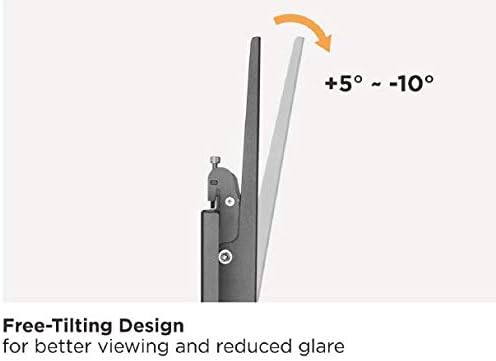
Figure 6.1 : Visual representation of the Mount Plus OB-600's tilt functionality, demonstrating the ability to adjust the screen angle from 5 degrees upward to 10 degrees downward for optimal viewréduction de l'éblouissement et de l'éclairage.
6.2. Réglage du niveau
After installation, if minor leveling adjustments are needed, the mount allows for a built-in level adjustment of ±5mm (±0.19"). This feature helps ensure your TV is perfectly horizontal.
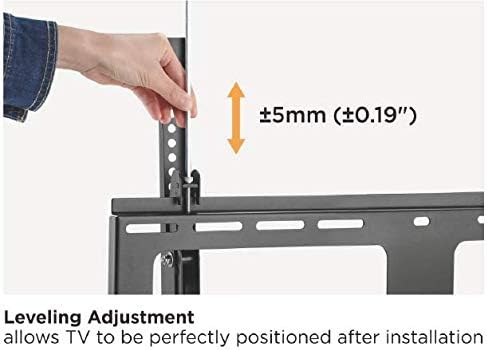
Figure 6.2 : A hand demonstrating the leveling adjustment feature of the Mount Plus OB-600, which allows for fine-tuning the TV's horizontal position by up to ±5mm after initial installation.
6.3. Fonction antivol
The mount includes an anti-theft design. Once the TV is mounted, a padlock (not included) can be inserted through the designated hole on the bottom of the TV bracket arms to deter unauthorized removal of the television.
7. Entretien
To ensure the longevity and safe operation of your Mount Plus OB-600, regular maintenance is recommended, especially in outdoor environments.
- Nettoyage: Essuyez le support avec un chiffon doux et sec.amp cloth to remove dust and debris. Avoid abrasive cleaners or solvents that could damage the powder-coated finish.
- Inspection: Vérifiez régulièrement le serrage et la sécurité de tous les boulons, vis et fixations. Resserrer si nécessaire.
- Contrôle de la corrosion : Although designed for outdoor use with a powder-coated finish and stainless steel screws, regularly inspect for any signs of rust or corrosion, especially in coastal or harsh weather conditions. Address any issues promptly.
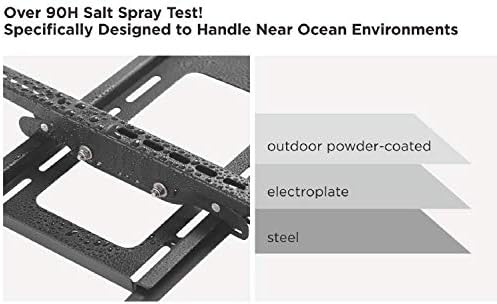
Figure 7.1 : Illustration of the Mount Plus OB-600's multi-layer construction, highlighting the outdoor powder-coated finish, electroplate, and steel base designed for enhanced weather resistance and durability.
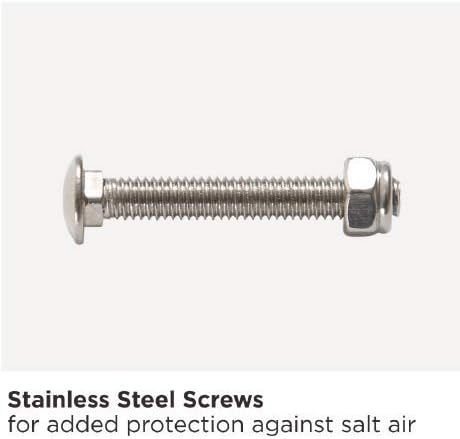
Figure 7.2 : A close-up image of a stainless steel screw, emphasizing its role in providing additional protection against salt air and corrosion in outdoor environments.
8. Dépannage
| Problème | Cause possible | Solution |
|---|---|---|
| TV appears crooked after installation. | Wall plate not level, or TV not level on brackets. | Use the built-in level adjustment feature (±5mm) to fine-tune the TV's horizontal position. If the wall plate is significantly off, you may need to re-install it. |
| TV is difficult to tilt or does not stay in position. | Tilt adjustment knobs are too tight or too loose. | Loosen the tilt adjustment knobs to adjust the angle, then tighten them firmly to secure the TV in the desired position. |
| La monture semble instable. | Loose fasteners, incorrect installation, or unsuitable wall material. | Immediately remove the TV. Check all wall plate and TV bracket fasteners for tightness. Ensure the wall material is appropriate and anchors are correctly installed. Consult a professional if unsure. |
| Pièces manquantes dans l'emballage. | Erreur d'emballage. | Contact Mount Plus customer support for replacement parts. |
9. Informations sur la garantie
Mount Plus products are designed for durability and performance. For specific warranty details, please refer to the warranty card included with your product or visit the official Mount Plus webConsultez le site. Conservez votre reçu d'achat comme preuve d'achat pour toute réclamation au titre de la garantie.
10. Assistance clientèle
If you have any questions, require assistance with installation, or need to report missing/damaged parts, please contact Mount Plus customer support:
- Website: Visit the Mount Plus Store on Amazon (pour des informations générales sur le produit)
- Refer to your product packaging or included documentation for direct contact information (phone/email).


