Introduction
Thank you for choosing the SIMOLIO Kids Wireless Headphones Model JH-711. This manual provides essential information for the proper setup, operation, and maintenance of your headphones. Please read it carefully to ensure safe and optimal use.
Caractéristiques du produit
- 3-Level Volume Limiting: Protects children's hearing with switchable volume limits (75dB for toddlers, 85dB for kids, 94dB for adults). This feature is active in both wired and wireless modes.
- Isolation acoustique : Over-ear design provides passive noise reduction, helping to block external sounds for improved listening focus.
- Wireless & Wired Modes: Offers Bluetooth connectivity for wireless use and includes a 3.5mm audio cable for wired connection when the battery is depleted or for non-Bluetooth devices.
- Microphone intégré : Enables hands-free calling and voice chat.
- Port de partage audio : Allows another headphone to connect and share audio from the same device.
- Durable & Flexible Design: Constructed with memory stainless steel strips in the headband for impressive durability and flexibility, designed to withstand active use. Earmuffs feature an anti-shedding design.
- Pliable et compact : Easy to fold and store in the included EVA carrying case, ideal for travel and school.
- Longue durée de vie de la batterie : Jusqu'à 15 heures d'autonomie sur une seule charge.

The headphones feature a 3-level volume limiter to protect hearing, adjustable for toddlers, kids, and adults.
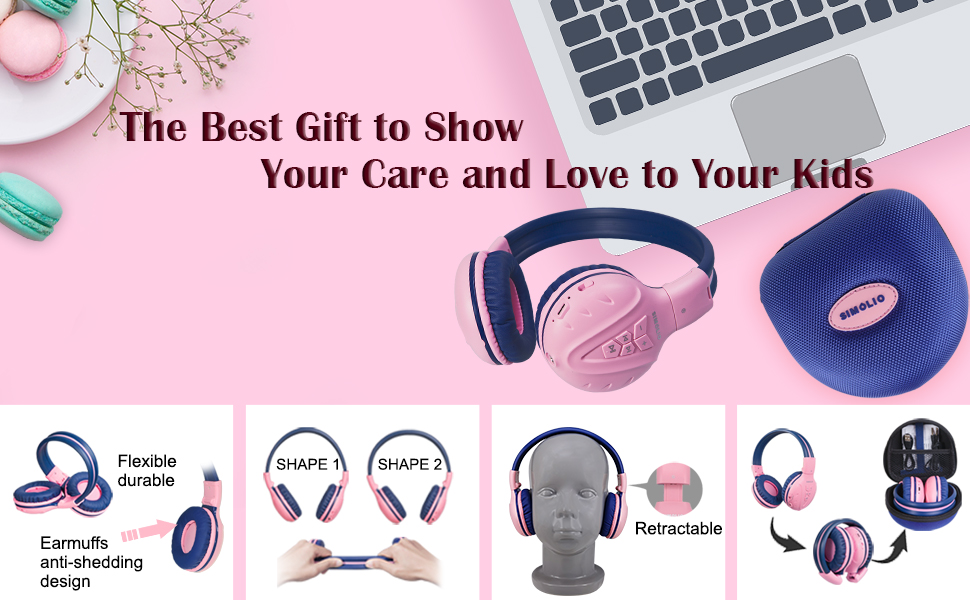
The flexible and durable design allows the headphones to withstand bending and twisting.
Qu'y a-t-il dans la boîte
Le forfait comprend les éléments suivants :
- SIMOLIO Kids Wireless Headphones JH-711
- Câble de chargement (USB)
- Câble AUX (câble audio 3.5 mm)
- Manuel d'utilisation
- Carrying EVA Case
Installation
1. Charger les écouteurs
Before first use, fully charge the headphones. Connect the provided USB charging cable to the charging port on the headphones and to a USB power source (e.g., computer, wall adapter). The LED indicator will show charging status and turn off when fully charged.
2. Couplage Bluetooth
- Assurez-vous que les écouteurs sont éteints.
- Press and hold the Multi-Function Button (MFB) until the LED indicator flashes blue and red alternately, indicating pairing mode.
- Sur votre appareil (smartphone, tablette, etc.), activez le Bluetooth et recherchez les appareils disponibles.
- Sélectionnez « SIMOLIO JH-711 » dans la liste des appareils.
- Une fois connecté, l'indicateur LED clignotera lentement en bleu.
3. Connexion en mode filaire
To use the headphones in wired mode, connect one end of the 3.5mm AUX cable to the audio jack on the headphones and the other end to the audio output of your device. The headphones will automatically switch to wired mode, even if the battery is dead.

The headphones support both wireless Bluetooth mode and wired mode via the included AUX cable.
4. Volume Limiter Adjustment
Locate the 3-level volume limiter switch on the headphones. Adjust the switch to the desired maximum volume level:
- 75dB (S): Recommended for toddlers or very quiet environments.
- 85dB (M): Recommended for children in general listening environments.
- 94dB (L): Recommended for adults or noisy environments.

Adjust the physical switch to select the appropriate volume limit.
5. Using the Sharing Port
The headphones feature an additional sharing jack on the right side. To share audio, plug another headphone into this port. This allows two users to listen to the same audio source simultaneously.

Connect another headphone to the sharing port to share audio with a friend.
Mode d'emploi
1. Marche/Arrêt
- Mise sous tension : Maintenez le bouton multifonction enfoncé pendant environ 3 secondes jusqu'à ce que le voyant LED s'allume.
- Éteindre: Maintenez le bouton multifonction enfoncé pendant environ 3 secondes jusqu'à ce que le voyant LED s'éteigne.
2. Lecture de musique
- Lecture/Pause : Appuyez brièvement sur le MFB.
- Piste suivante : Appuyez brièvement sur le bouton « + ».
- Piste précédente: Appuyez brièvement sur le bouton « - ».
- Monter le son: Appuyez longuement sur le bouton « + ».
- Baisser le volume: Appuyez longuement sur le bouton « - ».
3. Gestion des appels
Lorsqu'il est connecté via Bluetooth :
- Répondre/Terminer l'appel : Appuyez brièvement sur le MFB.
- Rejeter l'appel : Appuyez longuement sur le bouton multifonction.

Le microphone intégré permet de passer des appels mains libres.
Entretien
- Nettoyez les écouteurs avec un chiffon doux et sec. N'utilisez pas de produits nettoyants abrasifs ni de solvants.
- Évitez d'exposer les écouteurs à des températures extrêmes, à l'humidité ou à la lumière directe du soleil.
- Store the headphones in the provided EVA carrying case when not in use to protect them from dust and damage.
- Ne tentez pas de démonter ou de modifier les écouteurs, car cela annulera la garantie et pourrait les endommager.

The headphones fold compactly and fit into the included EVA case for easy storage and transport.
Dépannage
| Problème | Cause possible | Solution |
|---|---|---|
| Les écouteurs ne s'allument pas. | Batterie faible. | Chargez complètement les écouteurs. |
| Impossible de coupler via Bluetooth. | Écouteurs non en mode appairage ; Bluetooth de l’appareil désactivé ; trop éloignés de l’appareil. | Assurez-vous que les écouteurs sont en mode appairage (voyant rouge/bleu clignotant). Activez le Bluetooth de votre appareil. Rapprochez les écouteurs de votre appareil (à moins de 9 mètres). |
| Aucun son en mode sans fil. | Volume trop faible ; appareil non connecté ; sortie audio incorrecte sélectionnée. | Increase headphone and device volume. Re-pair headphones. Check device audio settings. |
| Aucun son en mode filaire. | Câble AUX mal inséré ; câble endommagé ; volume de l’appareil trop faible. | Ensure AUX cable is securely connected at both ends. Try a different AUX cable. Increase device volume. |
Caractéristiques
| Fonctionnalité | Détail |
|---|---|
| Nom du modèle | Kids Bluetooth Headphones JH-711 |
| Technologie de connectivité | Sans fil (Bluetooth), filaire (prise jack 3.5 mm) |
| Version Bluetooth | 4.0 |
| Portée Bluetooth | 9 mètres |
| Contrôle du bruit | Isolation acoustique |
| Sensibilité | 94dB (maximum) |
| Autonomie de la batterie | 15 heures |
| Temps de charge | 3 heures |
| Poids de l'article | 187 grammes (6.6 onces) |
| Dimensions du produit | 5.51 x 3.15 x 5.31 pouces |
| Matériel | Nylon, Stainless Steel (headband) |
| Matériau de l'étui de transport | EVA |
| Caractéristiques spéciales | 3 Adjustable Volume Limited, Microphone, Durable, Flexible, Foldable, Wired & Wireless, Share Port, EVA Case |
Vidéo officielle du produit
Cette vidéo offre un aperçu visuelview of the SIMOLIO Bluetooth Headphones for Kids with Case JH-711, demonstrating its features and functionality.
Garantie et assistance
SIMOLIO products are designed for quality and reliability. For specific warranty information, please refer to the warranty card included with your product or visit the official SIMOLIO website. If you encounter any issues or require technical assistance, please contact SIMOLIO customer support through their official channels.


