1. Introduction
Welcome to the user manual for your AAXA LED Pico Micro Video Projector. This compact and versatile projector is designed for personal media sharing, business presentations, and home cinema experiences. This manual provides detailed instructions on setting up, operating, maintaining, and troubleshooting your device to ensure optimal performance.
Contenu du colis
Veuillez vérifier que tous les articles sont présents dans votre colis :
- Projecteur vidéo LED Pico Micro AAXA
- Câble USB
- Câble AV
- Mini Tripod (optional, may vary by package)
- Adaptateur secteur (non mentionné explicitement, mais sous-entendu pour la charge)
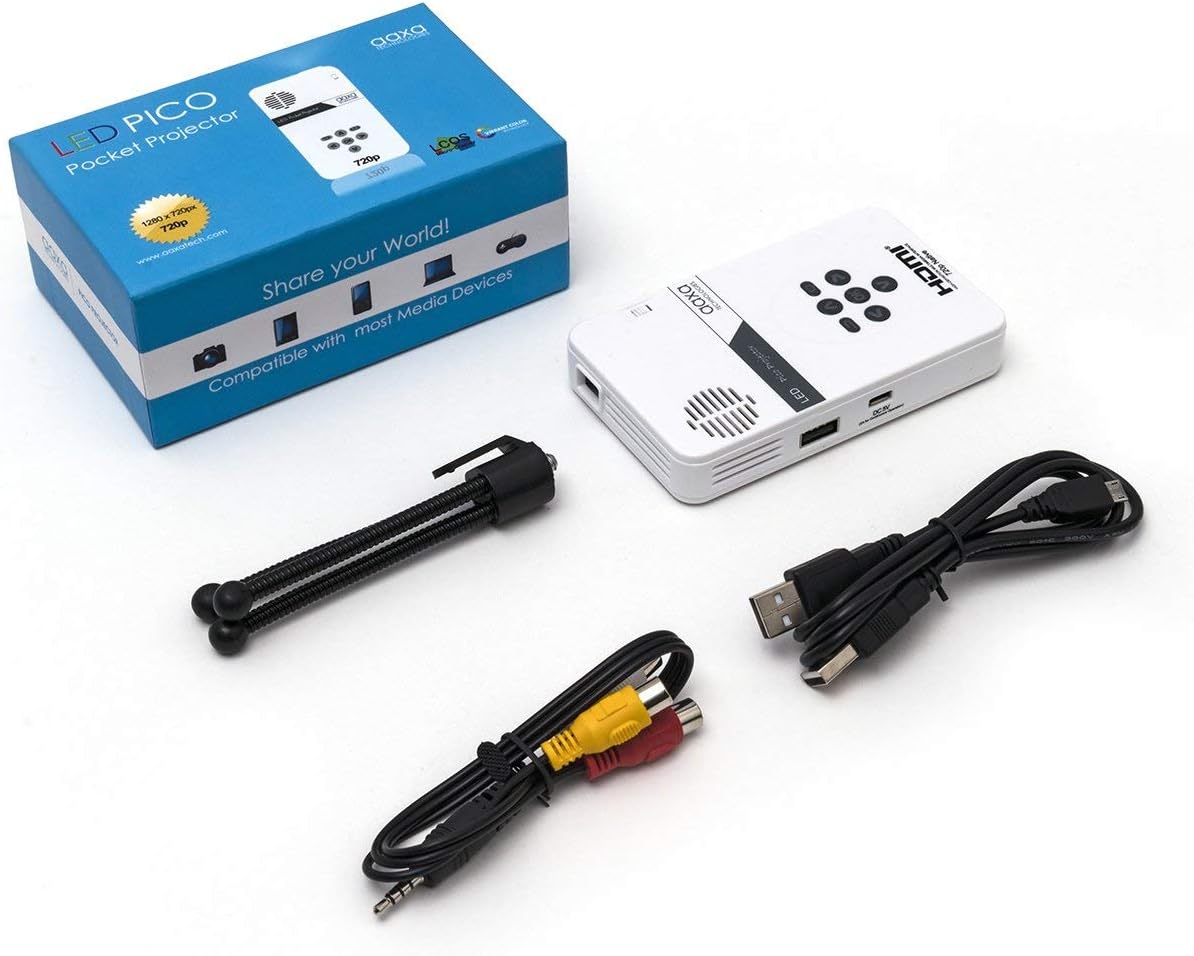
Figure 1: Package contents including the projector, cables, and tripod.
2. Produit terminéview
The AAXA LED Pico Micro Video Projector is a compact device featuring a user-friendly interface and multiple connectivity options. It is designed for portability and ease of use.
Caractéristiques principales :
- Ultra Bright 25 Lumens LED light source with 15,000-hour lifespan.
- High Definition 720p (1280x720) native resolution, supporting up to 1080p input.
- Vibrant Color Technology for rich and accurate colors.
- Built-in 80-minute rechargeable Lithium-ion battery.
- Integrated media player and speakers.
- Compact and lightweight design (4.25 x 2.36 x 0.7 inches, 6.3 ounces).
Commandes et ports :
Familiarize yourself with the various controls and connection ports on your projector:

Figure 2 : Haut view of the projector with navigation buttons (Up, Down, Left, Right, OK, Menu, Back) and speaker grille.
- Boutons de navigation: Permet de naviguer dans les menus et de sélectionner les options.
- Grille de haut-parleur : For audio output from the built-in speakers.
- Molette de mise au point : Situé sur le côté, il sert à régler la netteté de l'image.

Figure 3 : Face avant view of the projector showing the HDMI, AV, and 3.5mm audio out ports.
- Entrée HDMI : Connectez-vous à des ordinateurs portables, des consoles de jeux ou d'autres appareils compatibles HDMI.
- Entrée AV : Pour connecter des appareils plus anciens à l'aide du câble AV fourni.
- Sortie audio 3.5 mm : Connectez des écouteurs ou des haut-parleurs externes.

Figure 4 : Côté view of the projector showing the USB port and DC 5V charging port.
- Port USB : Pour connecter des clés USB pour la lecture multimédia.
- Entrée CC 5 V : Alimentation pour recharger la batterie interne.

Figure 5 : Côté view of the projector showing the TF Card slot.
- Micro SD (TF Card) Slot: Insert a Micro SD card (up to 16GB) for media playback.
3. Installation
3.1 Mise sous tension/hors tension et charge
- Chargement : Connect the supplied micro USB cable to the DC 5V input on the projector and a compatible USB power source. The LED indicator will show charging status.
- Mise sous tension : Press and hold the power button (usually located near the focus wheel or on the top panel) until the projector powers on.
- Éteindre: Press and hold the power button again until the projector shuts down.
3.2 Positionnement du projecteur
Place the projector on a stable, flat surface. For optimal image quality, project onto a smooth, light-colored wall or a dedicated projector screen. The distance from the surface will determine the image size.

Figure 6: The projector can be mounted on a tripod for stable positioning and angle adjustment.
3.3 Réglage de la mise au point
To achieve a clear image, rotate the focus wheel located on the side of the projector until the projected image appears sharp and in focus.
4. Mode d'emploi
4.1 Connexion d'appareils
- HDMI: Connect an HDMI cable from your source device (laptop, game console, etc.) to the HDMI input port on the projector. Select HDMI as the input source in the projector's menu.
- UN V: Use the provided AV cable to connect to devices with composite video and audio outputs. Select AV as the input source.
- USB/MicroSD : Insert a USB flash drive into the USB port or a Micro SD card into the TF Card slot. The projector's media player interface will typically appear, allowing you to browse and play files.
4.2 Lecture multimédia
The built-in media player supports various video, music, and picture formats. Use the navigation buttons on the projector to browse files et sélectionnez le contenu à lire.
4.3 Sortie audio
The projector has built-in speakers. For private listening or enhanced audio, connect headphones or external speakers to the 3.5mm Audio Out port.
5. Entretien
- Nettoyage: Use a soft, dry cloth to clean the exterior of the projector. For the lens, use a lens cleaning cloth and specialized lens cleaning solution. Do not use abrasive cleaners.
- Stockage: Lorsqu'il n'est pas utilisé, rangez le projecteur dans un endroit frais et sec, à l'abri de la lumière directe du soleil et des températures extrêmes.
- Entretien de la batterie: Pour prolonger la durée de vie de la batterie, évitez de la décharger complètement et fréquemment. Rechargez régulièrement le projecteur, même s'il n'est pas utilisé.
6. Dépannage
| Problème | Cause possible | Solution |
|---|---|---|
| Aucune image projetée | Projector not powered on; incorrect input source; loose cable connection. | Ensure projector is on and charged. Select correct input source (HDMI, AV, USB/SD). Check all cable connections. |
| L'image est floue | Focus not adjusted; projector too close/far from surface. | Adjust the focus wheel until the image is clear. Adjust the distance of the projector from the projection surface. |
| Pas de son | Volume trop faible ; périphérique audio externe connecté ; format audio non pris en charge. | Increase volume. Disconnect external audio devices if using internal speakers. Ensure audio format is supported. |
| Le projecteur s'éteint inopinément. | Batterie faible ; surchauffe. | Charge the battery. Ensure proper ventilation and clear any obstructions from vents. |
7. Spécifications
| Fonctionnalité | Détail |
|---|---|
| Marque | AAXA Technologies |
| Numéro de modèle | KP-101-01-cr |
| Résolution d'affichage | 1280 x 720 (Native), Max 1080p Input |
| Luminosité | 25 lumens |
| Source de lumière de la vie | 100 000 heures (LED) |
| Technologie de connectivité | HDMI, USB, Micro SD, 3.5mm Aux Out, Composite AV |
| Autonomie de la batterie | Up to 80 minutes (Lithium-Ion) |
| Dimensions du produit | 4.25 x 2.36 x 0.7 pouces |
| Poids de l'article | 6.3 onces |
| Utilisations recommandées | Entreprises, Éducation, Cinéma à domicile |
8. Garantie et assistance
This product is offered as an Amazon Renewed item, which means it has been professionally inspected and tested to work and look like new. Amazon Renewed products are eligible for replacement or refund under the Amazon Renewed Guarantee if you are not satisfied with your purchase.
For further assistance or technical support, please refer to the official AAXA Technologies webconsultez le site ou contactez directement leur service client.


