1. Introduction
This manual provides essential instructions for the safe and efficient use of your KOAMTAC KDC280 Barcode Data Collector. The KDC280 is a compact and versatile device designed for collecting 1D and 2D barcode data, offering flexible connectivity options via Bluetooth and USB. Please read this manual thoroughly before operating the device and retain it for future reference.
2. Consignes de sécurité
- N’exposez pas l’appareil à des températures extrêmes, à l’humidité ou à des substances corrosives.
- Évitez de faire tomber l'appareil ou de le soumettre à des chocs violents.
- Ne tentez pas de démonter ou de modifier l'appareil. Cela annulera la garantie et pourrait l'endommager.
- Use only the charging cradle and accessories provided or approved by KOAMTAC.
- Gardez l'appareil à l'écart des champs magnétiques puissants.
- Jetez les piles conformément aux réglementations locales.
3. Contenu du colis
Verify that all items are present in your KDC280 package:
- KOAMTAC KDC280 Barcode Data Collector
- USB Bluetooth Dongle
- Socle de chargement
- Câble USB
- Cordon
- Manuel rapide

Image: The KOAMTAC KDC280 data collector shown with its charging cradle, USB Bluetooth dongle, and lanyard.
4. Produit terminéview
The KDC280 is a miniature barcode data collector capable of reading both 1D and 2D barcodes. It features a small display for user feedback and navigation buttons. Its primary function is to scan and store barcode data or transmit it in real-time to a host device via Bluetooth or USB.
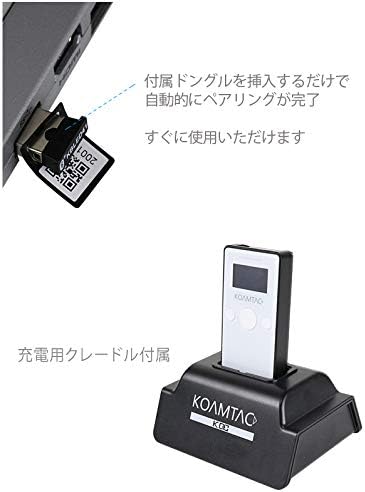
Image : Un gros plan view of the KDC280 device, its charging cradle, and the USB Bluetooth dongle.
5. Installation
5.1. Charging the KDC280
Before initial use, fully charge the KDC280 battery. Place the KDC280 into the charging cradle. Connect the USB cable to the charging cradle and then to a power source (e.g., computer USB port or USB wall adapter). The device's display will indicate charging status.
5.2. Connecting via USB Bluetooth Dongle
For quick and automatic pairing with a host device, use the included USB Bluetooth dongle.
- Insert the USB Bluetooth dongle into an available USB port on your computer or host device.
- Power on the KDC280.
- The KDC280 will automatically detect and pair with the dongle. A confirmation message will appear on the KDC280's display once pairing is successful. The device is then ready for immediate use.

Image: Illustration showing the USB Bluetooth dongle being inserted into a port, enabling automatic pairing with the KDC280. The charging cradle is also visible.
5.3. Connecting via Standard Bluetooth
To connect to a host device without the dongle, follow the standard Bluetooth pairing procedure:
- Assurez-vous que le Bluetooth est activé sur votre appareil hôte (par exemple, smartphone, tablette, ordinateur).
- On the KDC280, navigate to the Bluetooth menu and select 'Pairing Mode'.
- On your host device, search for available Bluetooth devices. Select 'KDC280' from the list.
- Suivez les instructions à l’écran pour terminer le processus de couplage.
6. Operating the KDC280
6.1. Mise sous/hors tension
- Pour allumer l'appareil : maintenez le bouton d'alimentation enfoncé jusqu'à ce que l'écran s'allume.
- To power off: Press and hold the power button until the 'Power Off' option appears on the display, then confirm.
6.2. Scanner les codes-barres
- Point the KDC280's scanner window at the barcode.
- Press the scan button. A successful scan will typically be indicated by a beep and/or a green LED light.
- The scanned data will appear on the KDC280's display and/or be transmitted to the connected host device.
6.3. Transfert de données
When connected via Bluetooth, scanned data is typically transmitted in real-time to the host application. If operating in batch mode (data stored internally), connect the KDC280 via USB to a computer and use the provided utility software to download the stored data.
7. Entretien
7.1. Nettoyage
- Essuyez l'appareil avec un chiffon doux, damp tissu. N'utilisez pas de produits chimiques agressifs ou de nettoyants abrasifs.
- Pour des performances de numérisation optimales, assurez-vous que la fenêtre du scanner est propre et exempte de poussière ou de traces de doigts.
7.2. Entretien de la batterie
- Évitez de décharger complètement la batterie fréquemment.
- Rangez l'appareil dans un endroit frais et sec s'il n'est pas utilisé pendant une période prolongée.
- If the battery performance significantly degrades, contact support for replacement options.
8. Dépannage
8.1. L'appareil ne s'allume pas
- Ensure the battery is charged. Connect the device to the charging cradle and a power source.
- Vérifiez que le bouton d'alimentation est correctement enfoncé et maintenu enfoncé.
8.2. Unable to Scan Barcodes
- Check if the scanner window is clean and unobstructed.
- Vérifiez que le code-barres n'est pas endommagé ou mal imprimé.
- Verify the device is in the correct scanning mode.
8.3. Connection Issues (Bluetooth/USB)
- Bluetooth : Ensure the KDC280 is in pairing mode or already paired. Check Bluetooth settings on the host device. Restart both devices.
- Clé USB : Ensure the dongle is fully inserted and recognized by the host device. Restart the KDC280 and reinsert the dongle.
- Cable USB: Try a different USB port or cable. Ensure drivers are correctly installed if required by your operating system.
9. Spécifications
| Marque | KOAMTAC |
| Modèle | KDC280 |
| Compatibilité des codes-barres | 1D and 2D Barcodes |
| Connectivité | Bluetooth, câble USB |
| Source d'énergie | Alimenté par batterie |
| Accessoires inclus | USB Bluetooth Dongle, Charging Cradle |
10. Garantie et assistance
For warranty information, technical support, or service inquiries, please refer to the warranty card included with your product or visit the official KOAMTAC webLes coordonnées du service client sont généralement disponibles sur le site du fabricant. website.


