1. Produit terminéview
The EZoneTronics Android Car Radio is a double DIN multimedia system designed for in-car entertainment and navigation. It features a touch screen display, Android operating system, built-in Bluetooth, Wi-Fi connectivity, and GPS capabilities. This unit supports various applications and media playback, enhancing your driving experience.
Caractéristiques principales :
- Commande au volant : Compatible with factory steering wheel controls (resistive analog signal input only). Digital CANBUS signals may require an external converter.
- Navigation GPS: Integrated GPS module. Download preferred map applications from the Play Store after connecting to Wi-Fi.
- Wi-Fi intégré: Allows downloading applications from the Play Store.
- Bluetooth et radio FM : Bluetooth for hands-free calls and music streaming. FM radio with preset stations for real-time traffic, news, and weather.
Composants inclus :
The package includes the Android Player unit, GPS Antenna, Power Harness, 2 USB adapters, User Manual, RCA output wire, Camera Input wire, and 2 Installation brackets.

Figure 1: EZoneTronics Android Car Radio unit and included accessories.
2. Installation
Proper installation is crucial for optimal performance. It is recommended to have the unit installed by a professional if you are unfamiliar with car audio wiring.
2.1 Connexions de câblage :
- Faisceau d'alimentation : Connect the main power harness to your vehicle's power supply, ensuring correct positive, negative, and accessory connections.
- Antenne GPS: Connectez l'antenne GPS et positionnez-la dans un endroit dégagé. view du ciel pour une réception optimale du signal.
- Adaptateurs USB : Utilize the provided USB adapters for connecting external devices or media.
- Sortie RCA : Se connecter à l'externe amplifiers or subwoofers using the RCA output wires.
- Entrée caméra : Connecter un arrièreview camera to the dedicated camera input wire for parking assistance.
2.2 Commande au volant (SWC) :
If your vehicle has factory steering wheel controls based on a resistive analog signal, the SWC feature can be retained by connecting the appropriate wires. For vehicles using a digital CANBUS data signal, an additional digital-to-resistive converter may be required. If your car does not have factory SWC, an external steering wheel controller (wired connection) can be added.

Figure 2: Steering Wheel Control in operation.
3. Fonctionnement
3.1 Commandes de base :
The unit features a fully capacitive touch screen for control. Side buttons typically include Power, Volume Up/Down, Home, and Back functions.
3.2 Navigation GPS :
After connecting to a Wi-Fi network, access the Play Store to download your preferred navigation application. Ensure the GPS antenna is properly installed for accurate positioning.

Figure 3: GPS Navigation Function.
3.3 Connectivité Bluetooth :
Enable Bluetooth on your mobile phone and search for the car radio. Pair the devices to enable hands-free calling, access your phone book, and stream audio via A2DP.

Figure 4: Bluetooth features including hands-free calls and EQ regulation.
3.4 Wi-Fi and App Installation:
Connect the unit to a Wi-Fi hotspot (e.g., from your mobile phone) to access the Play Store. You can download and install various applications, including streaming services like Netflix.
3.5 Mirror Link Function:
The Mirror Link function allows you to display your smartphone screen on the car radio. Android phones can be controlled via USB, while iPhones can mirror video and audio wirelessly.
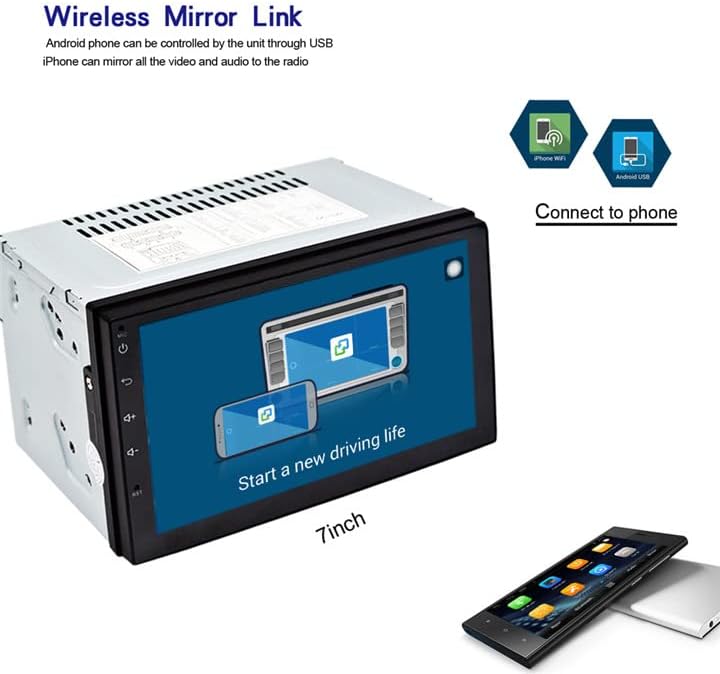
Figure 5: Wireless Mirror Link setup.
Radio FM 3.6 :
Access the FM radio function to tune into local stations. You can save your favorite stations as presets for quick access.

Figure 6 : Interface radio FM.
4. Spécifications
| Fonctionnalité | Description |
|---|---|
| Marque | EZoneTronics |
| Numéro de modèle | 10 |
| Technologie de connectivité | Bluetooth, Wi-Fi |
| Type de contrôleur | Androïde |
| Caractéristiques spéciales | Bluetooth intégré, écran tactile |
| Appareils compatibles | Smartphone |
| Type de connecteur | USB |
| Mode de sortie audio | Stéréo |
| Configuration des canaux de son surround | 4.0 |
| Encodage vidéo | H.264 |
| Puissance de sortie | 45 watts |
| Nombre de canaux | 4 |
| Services Internet pris en charge | Netflix |
| Méthode de contrôle | Application, tactile |
| Type de sortie audio | Bluetooth |
| Format | AMM |
| Fabricant | Rhythm Electronics Limited |

Figure 7 : Dimensions du produit.
5. Dépannage
If you encounter issues with your EZoneTronics Android Car Radio, please refer to the following general troubleshooting steps:
- Pas d'alimentation : Check all power connections, including the main power harness and vehicle's fuse box. Ensure the accessory wire is correctly connected.
- Pas de son : Verify speaker connections and ensure the volume is not muted or set to minimum. Check RCA connections if using external amplificateurs.
- Problèmes de signal GPS : Assurez-vous que l'antenne GPS est installée dans un endroit dégagé. view du ciel. Vérifiez la connexion de l'antenne à l'appareil.
- Problèmes de connexion Bluetooth : Assurez-vous que le Bluetooth est activé sur l'autoradio et sur votre appareil mobile. Essayez de déconnecter puis de reconnecter les appareils.
- L'écran tactile ne répond pas : Essayez de redémarrer l'appareil. Si le problème persiste, une réinitialisation d'usine peut être nécessaire (reportez-vous aux paramètres à l'écran pour cette option).
- Dysfonctionnements de l'application : Ensure the unit is connected to Wi-Fi and the app is updated to the latest version. Clear the app's cache or reinstall it if necessary.
For persistent issues, contact EZoneTronics customer support for further assistance.
6. Consignes de sécurité
Always prioritize safety while operating your vehicle. Do not operate the car radio in a way that distracts you from driving. Adjust settings or interact with applications only when the vehicle is safely parked. Adhere to all local traffic laws and regulations.


