Introduction
The Xfinity HD 720p Wireless Indoor/Outdoor Home Security Camera allows you to monitor your home environment with live video accessible from anywhere. Designed for both indoor and outdoor use, this camera provides essential security features to keep you informed.
Qu'y a-t-il dans la boîte
- Xfinity HD 720p Wireless Security Camera (Model: SCHC2AEW)
- Adaptateur secteur
- Câble USB
- Matériel de montage (vis et chevilles)

Image: Xfinity Home Security Camera and accessories neatly packaged in its box.
Guide d'installation
- Connexion électrique : Connect the camera to the power adapter using the provided USB cable, then plug the adapter into a standard electrical outlet.
- Téléchargement de l'application: Download the official Xfinity Home app from your smartphone's app store (iOS App Store or Android Google Play).
- Appariement de l'appareil : Open the Xfinity Home app and follow the on-screen instructions to add a new device. You will typically need to scan a QR code on the camera or manually enter its details to pair it with your home Wi-Fi network. Ensure your Wi-Fi network is 2.4 GHz for compatibility.

Image: The Xfinity Home Security Camera placed on a surface, ready for setup.
Mode d'emploi
En direct View et les commandes de base
Once paired, access the live video feed through the Xfinity Home app. The app provides controls for:
- Diffusion en direct : View foo en temps réeltage de votre appareil photo.
- Enregistrement: Enregistrer manuellement des clips vidéo.
- Capture d'écran : Capturez des images fixes à partir du flux en direct.
- Audio bidirectionnel: Speak through the camera's speaker and hear audio from its microphone.
Vision nocturne
The camera features night vision capabilities for clear monitoring in low-light conditions. This feature automatically activates when ambient light is insufficient, providing a black-and-white image. Some models may offer color night vision depending on ambient light and settings.
Détection de mouvement et alertes
Configure motion detection settings within the Xfinity Home app to receive alerts on your smartphone when activity is detected. You can customize sensitivity levels and notification preferences.
Options de stockage
The camera supports local storage via a MicroSD card (not included). Insert a compatible MicroSD card into the designated slot to store recorded video clips directly on the device. Cloud storage options may also be available through your Xfinity Home service subscription.
Installation et montage
The Xfinity Home Security Camera can be placed on a flat surface or mounted to a wall. Use the included mounting hardware for secure wall installation. Ensure the camera is positioned to cover the desired monitoring area.
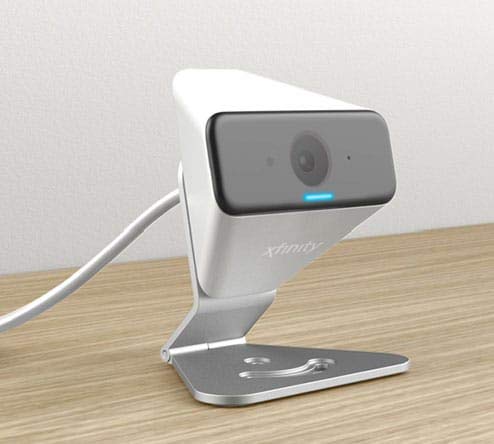
Image: The Xfinity Home Security Camera positioned on a desk, demonstrating its compact design.
Spécifications du produit
| Fonctionnalité | Détail |
|---|---|
| Numéro de modèle | SCHC2AEW |
| Résolution de capture vidéo | 720p |
| Technologie de connectivité | Sans fil (Wi-Fi) |
| Protocole de connectivité | Wi-Fi (2.4 GHz compatible) |
| Utilisation intérieure/extérieure | Intérieur, extérieur |
| Caractéristiques spéciales | Détecteur de mouvement, vision nocturne |
| Source d'énergie | DC (12 Volts, 1 Watt) |
| Dimensions (L x l x H) | 3 x 3 x 2 pouces |
| Poids de l'article | 1.57 livres |
| Évaluation de la protection internationale | IP65 |
Dépannage
- Pas d'alimentation : Assurez-vous que l'adaptateur secteur est correctement branché à la fois à l'appareil photo et à une prise électrique fonctionnelle.
- Problèmes de connectivité : Verify your Wi-Fi network is 2.4 GHz. Restart your router and the camera. Ensure the camera is within range of your Wi-Fi signal.
- L'application ne répond pas : Close and reopen the Xfinity Home app. If the issue persists, try reinstalling the app.
- Mauvaise qualité vidéo : Vérifiez la puissance de votre signal Wi-Fi. Assurez-vous que l'objectif de la caméra est propre et dégagé.
Garantie et support client
For warranty information, please refer to the documentation included with your purchase or visit the official Xfinity support website. For technical assistance or customer service, please contact Xfinity customer support directly.


