1. Produit terminéview
The Road Angel Halo Pro is an advanced dual-channel dashcam system designed to provide comprehensive video surveillance for your vehicle. It records high-resolution footage from both the front and rear of your vehicle, offering peace of mind and crucial evidence in the event of an incident. Its compact design ensures minimal obstruction to your view.

Figure 1.1: Road Angel Halo Pro Dashcam Front and Rear Units.
Caractéristiques principales :
- Enregistrement à double caméra : Captures 2K (1440p) footage from the front and 1080p from the rear simultaneously.
- Large ViewAngles d'attaque : 140-degree front and 120-degree rear viewing angles for extensive coverage.
- GPS intégré : Records speed and location data for accurate incident reconstruction.
- Capteur G : Automatically detects impacts and sudden movements, locking the current footage pour éviter l'écrasement.
- Mode stationnement : Provides 24/7 surveillance when your vehicle is parked, protecting against bumps and vandalism.
- Connectivité Wi-Fi : Seamlessly connect to the dashcam via a smartphone app for live view, footage playback, and settings management.
- Enregistrement en boucle : Enregistre en continu, écrasant les plus anciens fichiers.tage lorsque la carte mémoire est pleine.
- Vision nocturne : Enhanced low-light performance for clear recordings in challenging conditions.

Figure 1.2 : Plusview of Halo Pro's main features including dual cameras, 2K quality, wide viewing angles, parking mode, and GPS/telematics.
2. Configuration et installation
Proper installation is crucial for optimal performance of your Road Angel Halo Pro Dashcam. Please follow these steps carefully.
2.1 Contenu du paquet
Avant de commencer, assurez-vous que tous les composants sont présents :
- Road Angel Halo Pro Front Camera Unit
- Road Angel Halo Pro Rear Camera Unit
- Câble de connexion de la caméra arrière
- Power Cable (12V USB-C)
- Support de montage avec coussinet adhésif
- Manuel de l'utilisateur (ce document)
2.2 Insertion de la carte Micro SD
The Halo Pro supports Micro SD cards up to 128GB (sold separately). A high-speed Class 10 or U3 card is recommended for reliable recording.
- Locate the Micro SD card slot on the side of the front camera unit.
- Insérez la carte Micro SD en orientant les contacts dorés vers l'extérieur, jusqu'à ce qu'elle s'enclenche.
- Pour retirer la carte, appuyez doucement dessus jusqu'à entendre un clic, puis relâchez pour l'éjecter.
2.3 Installation de la caméra embarquée
Choose a location that does not obstruct the driver's view or interfere with airbags. The recommended position is behind the rearview miroir.
- Clean the windshield surface thoroughly where the dashcam will be mounted. Ensure it is dry and free of dust.
- Attach the adhesive pad to the mounting bracket.
- Peel off the protective film from the adhesive pad and firmly press the bracket onto the chosen location on the windshield for at least 30 seconds.
- Slide the front camera unit onto the mounted bracket until it locks securely.
- For the rear camera, mount it on the rear windshield, ensuring a clear view. Connect it to the front unit using the provided rear camera cable. Route the cable neatly along the vehicle's interior trim.

Figure 2.1: Illustration of dual front and rear dashcam placement and their respective viewangles d'inclinaison (140° à l'avant, 120° à l'arrière).
2.4 Connexion d'alimentation
Connect the power cable to the dashcam's USB-C port and route it to your vehicle's 12V power outlet (cigarette lighter socket) or a hardwire kit (sold separately) for parking mode functionality.
- Plug the small end of the power cable into the USB-C port on the dashcam.
- Plug the other end into your vehicle's 12V power outlet.
- Démarrez votre véhicule. La caméra embarquée devrait s'allumer automatiquement et commencer à enregistrer.
3. Utilisation de la caméra embarquée
The Road Angel Halo Pro is designed for simple operation, with most functions managed via the dedicated smartphone app.
3.1 Mise sous tension initiale et enregistrement
Once connected to power, the dashcam will automatically power on and begin loop recording when the vehicle's ignition is on. The front and rear cameras will record simultaneously.
3.2 Smartphone App Integration
The Road Angel app allows you to control settings, view vivre footage, et télécharger les enregistrements.
- Download the "Road Angel Halo" app from your smartphone's app store (available on iOS and Android).
- Allumez la caméra de tableau de bord.
- On your smartphone, go to Wi-Fi settings and connect to the dashcam's Wi-Fi network (SSID and password can be found on the dashcam or in the manual).
- Open the Road Angel Halo app. You should now see the live view from the dashcam and be able to access its features.
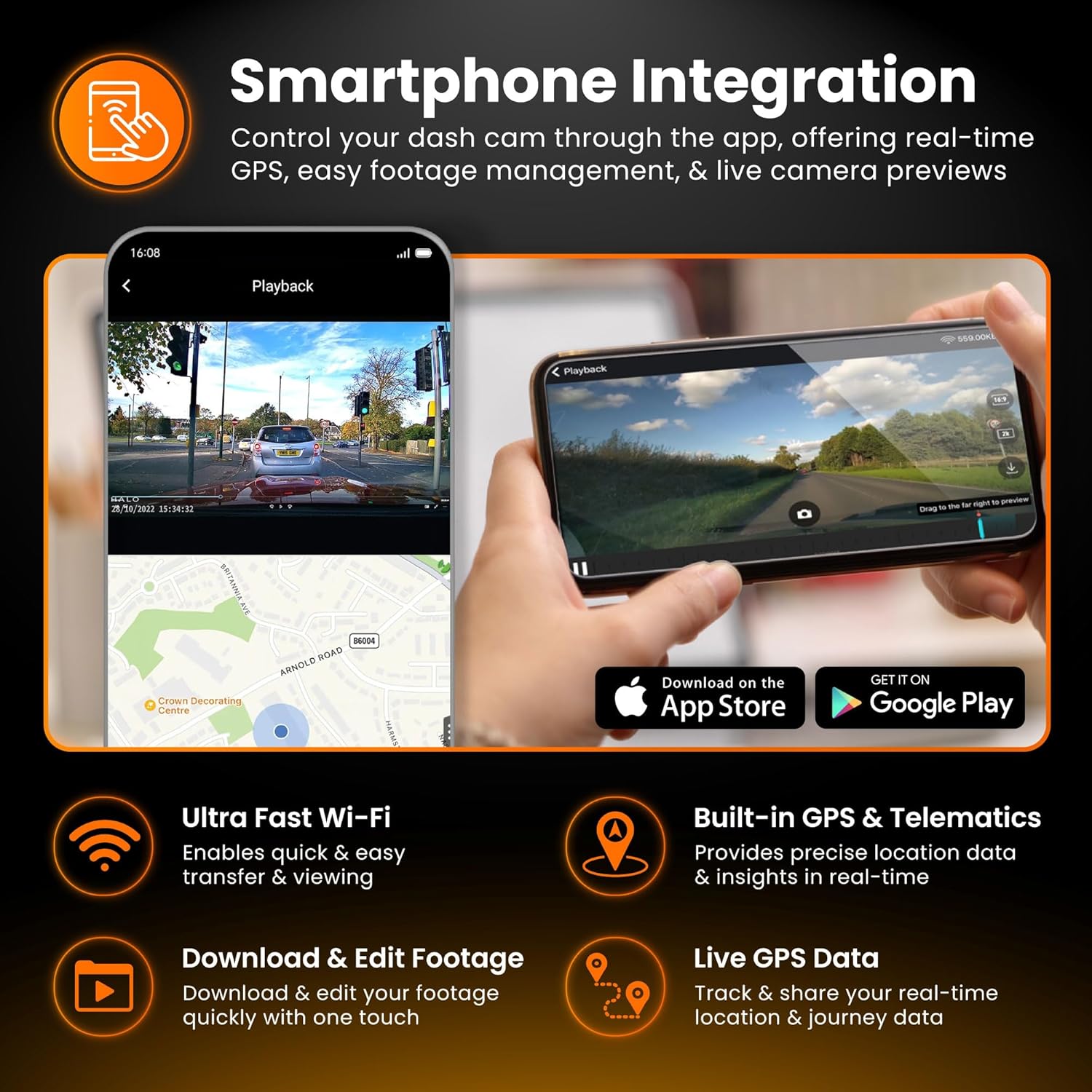
Figure 3.1: Smartphone integration showing live view, playback, and app download options for the Halo Pro.
3.3 Capteur G et enregistrement d'urgence
The built-in G-Sensor detects sudden impacts or rapid acceleration/deceleration. When triggered, it automatically locks the current video segment, preventing it from being overwritten by loop recording. These emergency fileLes fichiers sont stockés dans un dossier séparé sur la carte SD.
3.4 Mode de stationnement
For 24/7 surveillance, the Parking Mode feature requires a continuous power supply (e.g., via a hardwire kit). In parking mode, the dashcam will monitor for impacts or motion and record accordingly, conserving power when idle.

Figure 3.2: Parking Mode feature, illustrating G-Sensor detection and continuous surveillance for your vehicle.
3.5 Accessing and Managing Footage
Footage can be accessed and managed in two primary ways:
- Via une application pour smartphone : Connect to the dashcam's Wi-Fi, open the app, and navigate to the playback or gallery section. You can view, download, and share video clips directly from your phone.
- Via carte microSD : Remove the Micro SD card from the dashcam and insert it into a computer's card reader. Video files are typically organized into folders (e.g., Normal, Event, Parking).

Figure 3.3: Accessing and managing footage instantly on your smartphone via Wi-Fi, showing 2K front and 1080p rear capture.
4. Entretien
Un entretien régulier garantit la longévité et les performances optimales de votre caméra embarquée.
4.1 Gestion des cartes microSD
It is recommended to format the Micro SD card regularly (e.g., once a month) using the dashcam's app or settings menu. This helps prevent data corruption and ensures smooth recording. Replace the SD card if you experience frequent errors or degraded performance.
4.2 Nettoyage des lentilles
Periodically clean the front and rear camera lenses with a soft, lint-free cloth. Avoid abrasive materials or harsh chemicals that could scratch the lens or damage the coating.
4.3 mises à jour du micrologiciel
Vérifiez l'ange de la route website or app periodically for firmware updates. Keeping your dashcam's firmware up-to-date can improve performance, add new features, and resolve bugs.
5. Dépannage
If you encounter issues with your Road Angel Halo Pro, refer to the following common problems and solutions.
5.1 Dashcam Not Powering On
- Vérifiez la connexion électrique : Ensure the power cable is securely plugged into both the dashcam and the vehicle's 12V outlet.
- Puissance du véhicule : Verify that the vehicle's 12V outlet is receiving power (e.g., by testing with another device).
- Fusible: Check the fuse in your vehicle's fuse box that corresponds to the 12V outlet.
5.2 "SD Card Error" Message
- Formater la carte SD: Format the Micro SD card using the dashcam's app or by inserting it into a computer and formatting it to FAT32.
- Check SD Card Compatibility: Ensure you are using a Class 10 or U3 Micro SD card from a reputable brand.
- Replace SD Card: Si les erreurs persistent, la carte SD est peut-être défectueuse et doit être remplacée.
5.3 Problèmes de connexion Wi-Fi
- Dashcam On: Ensure the dashcam is powered on and Wi-Fi is enabled.
- Oubliez le réseau : On your phone, 'forget' the dashcam's Wi-Fi network and try reconnecting.
- Redémarrez les appareils : Restart both your smartphone and the dashcam.
- Autorisations de l'application : Ensure the Road Angel Halo app has necessary permissions (e.g., location, local network access) on your smartphone.
5.4 Mauvaise qualité vidéo
- Nettoyer les lentilles : Ensure both front and rear camera lenses are clean and free from smudges or dirt.
- Film protecteur : Vérifiez si un film protecteur est toujours présent sur les lentilles.
- Paramètres de résolution : Verify that the recording resolution is set to the highest available (2K front, 1080p rear) in the app settings.
6. Spécifications
Detailed technical specifications for the Road Angel Halo Pro Dashcam.
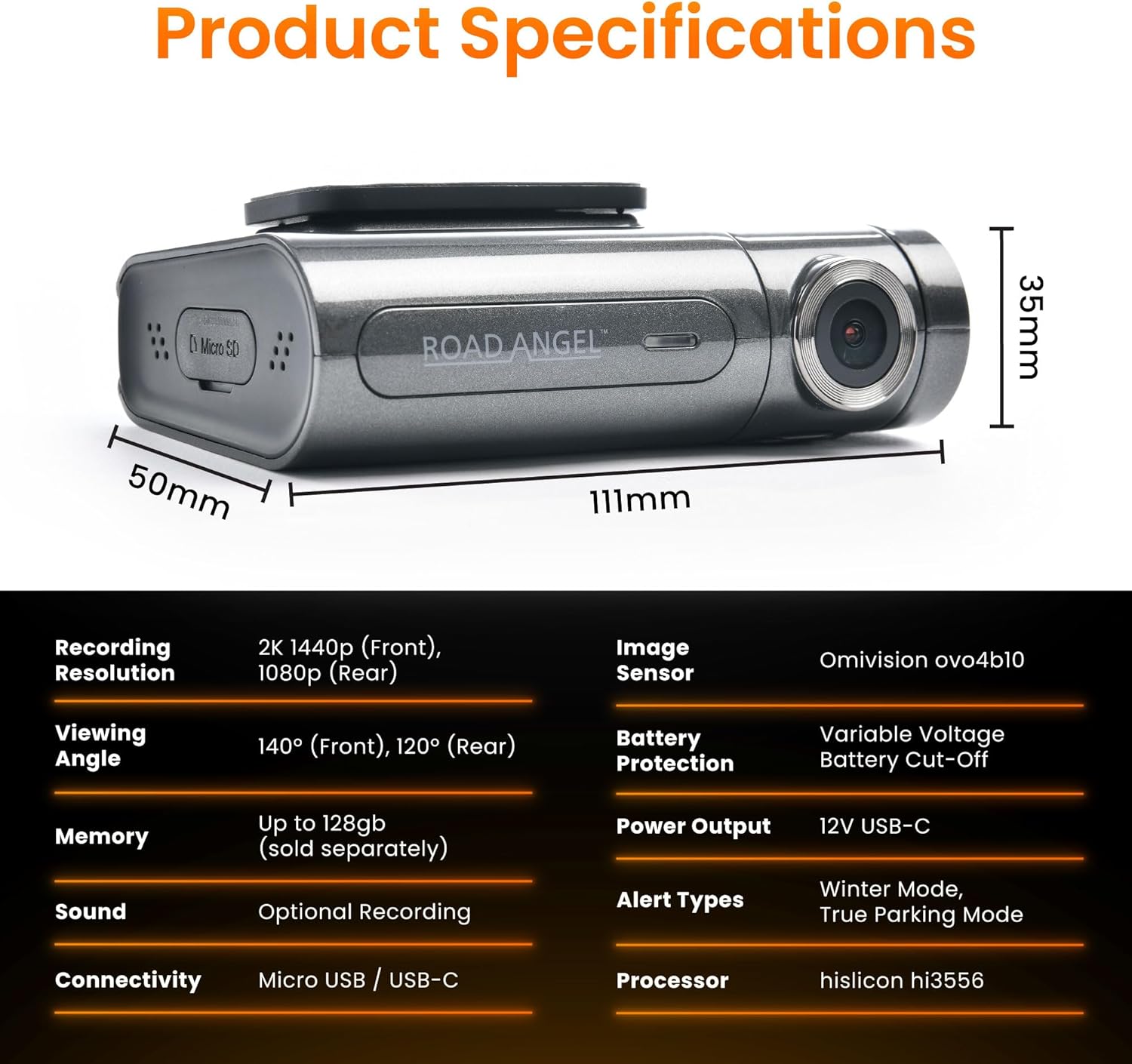
Figure 6.1: Detailed product specifications including dimensions and technical parameters.
| Fonctionnalité | Spécification |
|---|---|
| Numéro de modèle | Aura HD3 |
| Résolution d'enregistrement | Avant : 2K (1440p), Arrière : 1080p |
| ViewAngle d'attaque | Avant : 140°, Arrière : 120° |
| Capteur d'images | Omnivision ovo4b10 |
| Processeur | Hisilicon hi3556 |
| Prise en charge de la mémoire | Up to 128GB Micro SD (Class 10/U3 recommended) |
| Connectivité | Wi-Fi, Micro USB / USB-C |
| Capteur G | Intégré |
| GPS | Intégré |
| Type d'affichage | Écran LCD |
| Puissance d'entrée | USB-C 12 V |
| Product Dimensions (Front Unit) | 6.2 x 9.3 x 2.8 cm |
| Poids du produit | 0.13 kg (130 g) |
| Température de fonctionnement | Refer to manufacturer's guidelines |
7. Garantie et assistance
For warranty information, technical support, and frequently asked questions, please visit the official Road Angel webConsultez leur site web ou contactez directement leur service client. Conservez votre preuve d'achat pour toute réclamation au titre de la garantie.
Road Angel Official Website: www.roadangelgroup.com


