1. Introduction
This manual provides essential information for the safe and efficient operation of your Zerone 10.8V-12V Lithium Battery Charger. This charger is designed for use with 10.8V to 12V Lithium-Ion batteries, offering quick and reliable charging. Please read this manual thoroughly before first use and retain it for future reference.

Image 1: The Zerone 10.8V-12V Lithium Battery Charger, showing its compact design and universal compatibility label.
2. Consignes de sécurité
Always observe the following safety precautions to reduce the risk of electric shock, fire, or serious injury:
- Lisez toutes les instructions: Avant d'utiliser le chargeur, lisez toutes les instructions et les mises en garde sur le chargeur, la batterie et le produit utilisant la batterie.
- Utilisation en intérieur uniquement : N'exposez pas le chargeur à la pluie ou à des conditions humides.
- Vol correcttage: Assurer l'alimentation voltage correspond au voltage spécifié sur la plaque signalétique du chargeur.
- Éviter les dommages : N’utilisez pas le chargeur s’il a subi un choc violent, une chute ou tout autre dommage. Confiez-le à un technicien qualifié.
- Ventilation: Do not block any ventilation openings. Ensure adequate airflow around the charger during operation.
- Débranchez lorsque vous ne vous en servez pas : Always unplug the charger from the power outlet before attempting any maintenance or cleaning, and when not in use.
- Utilisez les piles spécifiées : Only charge batteries specifically designed for this charger. Charging other battery types may cause them to burst, leading to personal injury and damage.
- Ne pas court-circuiter : Ne jamais court-circuiter les bornes de la batterie.
- Garder loin des enfants: Cet appareil n'est pas destiné à être utilisé par des personnes (y compris les enfants) ayant des capacités physiques, sensorielles ou mentales réduites, ou manquant d'expérience et de connaissances, à moins qu'elles ne bénéficient d'une surveillance ou d'instructions concernant l'utilisation de l'appareil par une personne responsable de leur sécurité.
3. Contenu du colis
Vérifiez que tous les articles sont présents et en bon état :
- 1 x Zerone 10.8V-12V Lithium Battery Charger
- 1 x Manuel d'utilisation
4. caractéristiques du produit
The Zerone 10.8V-12V Lithium Battery Charger offers the following key features:
- Compatibilité universelle: Specifically designed for 10.8V to 12V Lithium-Ion batteries.
- Indicateur LED : Built-in LED display provides intuitive monitoring of battery status.
- Gestion intelligente de la charge : Utilizes a 'first in, first charged' system and protects against overload.
- Chargement rapide : Capable of charging a 12V Lithium-Ion 1.5Ah battery in approximately 50 minutes.
- Compatibilité étendue avec les modèles : Compatible with models such as DC10WD, DC10SB, DC10WC, BL1015, BL1016, BL1021B, and BL1041B.

Image 2: The charger displaying its compatibility with various battery models, including DC10WD, DC10SB, DC10WC, BL1015, BL1016, BL1021B, and BL1041B.
5. Installation
Suivez ces étapes pour configurer votre chargeur de batterie :
- Déballer le chargeur : Retirez soigneusement le chargeur et tous les composants de l'emballage.
- Connexion à l'alimentation : Plug the charger's power cord into a standard 100V-260V AC electrical outlet. The charger's LED indicator will flash green once to confirm power connection.
- Préparer la batterie : Ensure the battery to be charged is clean and free from debris.
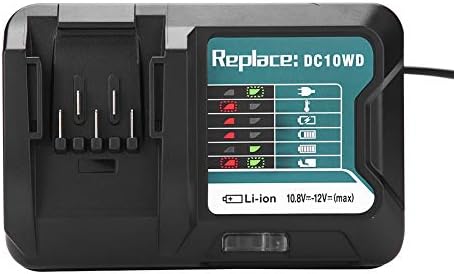
Image 3: The Zerone charger with its integrated power cord, ready for connection to an electrical outlet.
6. Mode d'emploi
Pour charger une batterie :
- Insérer la batterie : Alignez la batterie avec l'emplacement du chargeur et faites-la glisser jusqu'à ce qu'elle s'enclenche correctement.
- Chargement du moniteur : The LED indicator will show the charging status. Refer to the "LED Indicator Guide" section for detailed explanations of the light patterns.
- Chargement terminé : Once the battery is fully charged, the LED indicator will show a solid green light.
- Retirer la batterie : Press the release button on the battery (if applicable) and slide it out of the charger.
- Débrancher le chargeur : Débranchez le chargeur de la prise de courant lorsqu'il n'est pas utilisé.

Image 4: The Zerone charger with a compatible lithium-ion battery inserted, ready for charging.
7. Guide des indicateurs LED
The charger features an LED display to communicate the battery's status:
| Voyant lumineux | Statut |
|---|---|
| Vert clignotant | Le chargeur est branché et prêt. |
| Clignotant rouge | Battery is in cooling mode. Charging will begin once the battery temperature is within the optimal range. |
| Red Sustained Light | Battery is currently charging (0-100%). |
| Green Sustained Light | Charging is completed. The battery is fully charged. |
| Red and Green Flashing | Indicates a defective battery pack or charger. |

Image 5 : Un gros plan view of the charger's LED indicator panel, detailing the meaning of each light pattern for battery status.
8. Entretien
Un entretien approprié garantit la longévité et les performances de votre chargeur :
- Nettoyage: Débranchez le chargeur avant de le nettoyer. Essuyez l'extérieur du chargeur avec un chiffon doux et sec. N'utilisez ni eau ni produits chimiques.
- Stockage: Rangez le chargeur dans un endroit sec et frais, à l'abri de la lumière directe du soleil et de l'humidité.
- Inspectez régulièrement : Periodically inspect the charger and its cord for any signs of damage. If damage is found, discontinue use and seek professional repair.
9. Dépannage
Si vous rencontrez des problèmes avec votre chargeur, consultez les problèmes et solutions courants suivants :
- Le chargeur ne s'allume pas :
- Assurez-vous que le cordon d'alimentation est correctement branché à la fois au chargeur et à une prise électrique fonctionnelle.
- Vérifiez le bon fonctionnement de la prise électrique avec un autre appareil.
- Battery not charging (Red Flashing LED):
- The battery may be too hot or too cold. Allow the battery to reach room temperature before attempting to charge again. Charging will automatically resume once the temperature is optimal.
- Battery not charging (Red and Green Flashing LED):
- This indicates a defective battery or charger. Try charging a different, known-good battery. If the issue persists, the charger may be faulty. If only the original battery causes this, the battery is likely defective.
- Charge lente :
- Assurez-vous que la batterie est bien insérée dans le chargeur.
- Verify that the battery is compatible with this charger.
Si ces étapes ne résolvent pas le problème, veuillez contacter le service client.
10. Spécifications
| Spécification | Détail |
|---|---|
| Numéro de modèle | Zeronegfvetp6dn8-01 |
| Vol d'entréetage | 100 V-260 V CA, 50-60 Hz |
| Volume de sortietage | 10.8 V-12 V (CC) |
| Dimensions du produit | 4.72 x 1.97 x 5.91 pouces |
| Poids de l'article | 11.6 onces (0.33 kilogrammes) |
| Fabricant | Zéro un |
| Types de batteries compatibles | 10.8V-12V Lithium-Ion (e.g., BL1015, BL1016, BL1021B, BL1041B) |
| Compatible Charger Models | DC10WD, DC10SB, DC10WC |

Image 6 : Le bas view of the Zerone charger, showing its input/output specifications and model number.
11. Garantie et assistance
For warranty information or technical support, please refer to the documentation provided with your purchase or contact Zerone customer service through the retailer where the product was purchased. Keep your purchase receipt as proof of purchase.


