1. Introduction
The Nanit Plus Smart Baby Monitor and Wall Mount provides a comprehensive solution for monitoring your baby. This system offers a crystal-clear overhead view of the crib, enabling HD video and audio monitoring, sleep tracking, and breathing motion detection. It integrates advanced sensors for temperature and humidity, ensuring a comfortable environment for your baby. This manual provides detailed instructions for setting up, operating, and maintaining your Nanit Plus monitor.
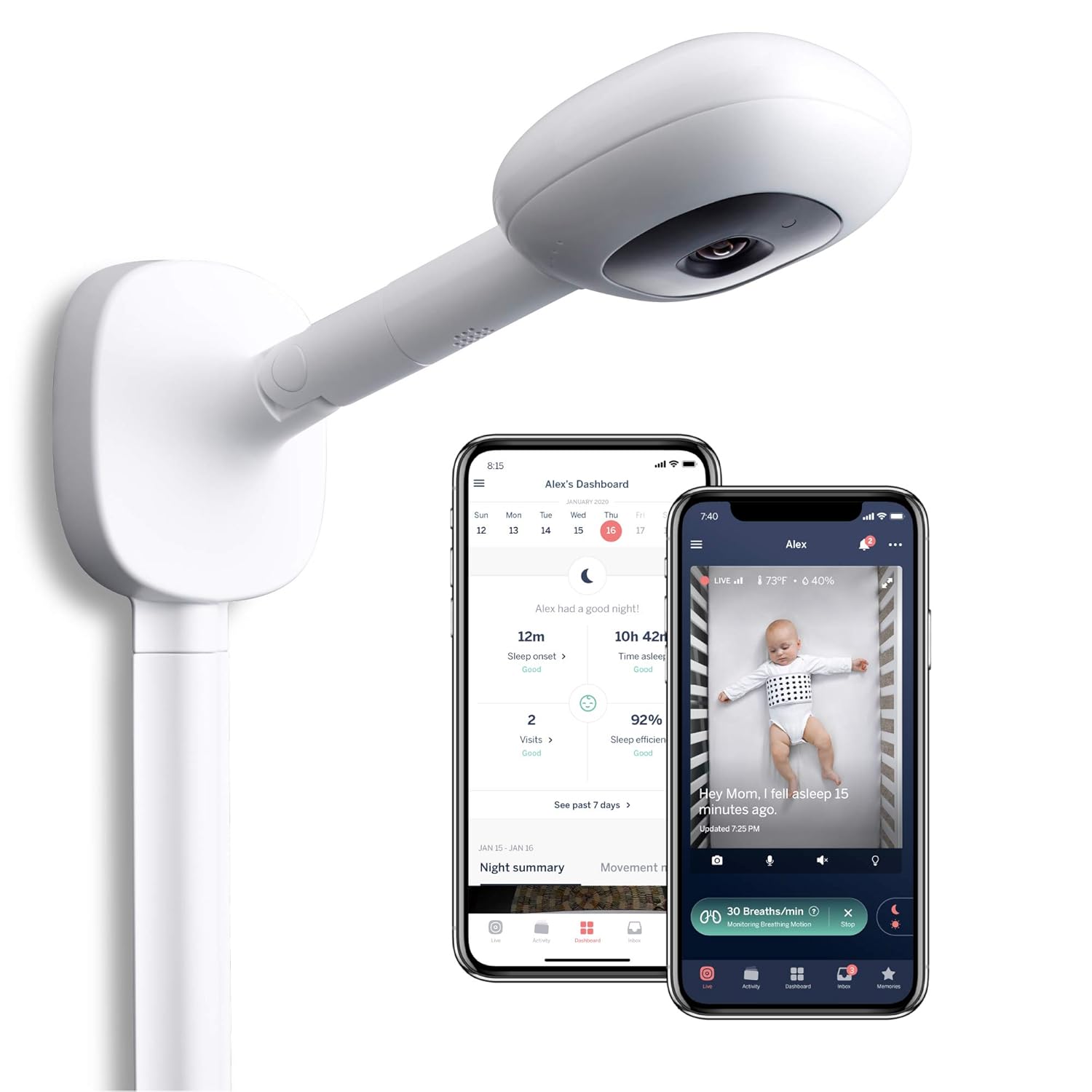
Image 1: Nanit Plus Smart Baby Monitor with Wall Mount and accompanying mobile application interface.
2. Contenu du colis
Verify that all components are present in your Nanit Plus package:
- Nanit Plus Camera Unit
- Wall Mount (includes cable management)
- Adaptateur secteur
- Matériel de montage (vis, chevilles)
- Guide de démarrage rapide
Note: Breathing Wear for breathing motion monitoring is sold separately.

Image 2: Nanit Breathing Wear, an accessory for breathing motion monitoring (sold separately).
3. Configuration et installation
3.1. Téléchargement de l'application et création d'un compte
- Download the Nanit app from the Apple App Store or Google Play Store.
- Ouvrez l'application et suivez les instructions à l'écran pour créer un nouveau compte ou vous connecter à un compte existant.
- Add your Nanit Plus camera to your account by following the in-app pairing process. Ensure your device is connected to a 2.4 GHz Wi-Fi network during setup.
3.2. Installation murale
The wall mount positions the Nanit Plus camera securely above your baby's crib, providing an optimal bird's-eye view. Proper installation is crucial for accurate monitoring and safety.
- Choose a wall location directly above the center of the crib. Ensure there are no obstructions to the camera's view.
- Utilisez le gabarit de montage fourni pour marquer les trous de perçage sur le mur.
- Percez des avant-trous et insérez les chevilles si nécessaire.
- Secure the wall mount base to the wall using the provided screws.
- Attach the camera arm to the base.
- Route the power cable through the integrated cable management system to ensure it is out of reach of your baby.
- Branchez l'adaptateur secteur à l'appareil photo et branchez-le à une prise de courant.

Image 3: Wall mount installation demonstrating bird's-eye view and safe cable management.
3.3. Free Stand Installation (Optional)
If using the optional free stand, assemble the tripod base and attach the camera arm. Position the stand next to the crib, ensuring stability and a clear view du bébé.
4. Operating the Nanit Plus Monitor
The Nanit app serves as your primary interface for controlling and monitoring your Nanit Plus camera.
4.1. Vivre View et les commandes de base
Access the live feed of your baby's crib through the Nanit app. The live view fournit :
- HD Video & Night Vision: Clear video feed day and night.
- Zoom: Pinch to zoom in on your baby.
- Audio bidirectionnel: Use the microphone icon to speak to your baby and the speaker icon to hear them.
- Audio de fond : Listen to your baby even when the app is in the background.
- Veilleuse intégrée : Control the camera's integrated night light.

Image 4: Nanit app live view with various control options and feature indicators.
4.2. Sleep Tracking and Analysis
The Nanit Plus camera tracks your baby's sleep patterns and provides personalized insights and guidance directly through the app.
- View daily and weekly sleep summaries, including sleep duration, wake-ups, and sleep efficiency.
- Receive personalized tips and recommendations to improve your baby's sleep.

Image 5: Nanit app displaying sleep guidance and daily sleep statistics.
4.3. Breathing Motion Monitoring
When used with Nanit Breathing Wear (sold separately), the camera can monitor your baby's breathing motion without any electronic sensors touching them.
- Dress your baby in the Nanit Breathing Wear. The unique pattern on the fabric allows the camera to detect subtle movements.
- Activate breathing motion monitoring in the Nanit app.
- The app will display real-time breathing rate and alert you if no breathing motion is detected for a specified period.

Image 6: Baby in crib wearing Nanit Breathing Wear for motion monitoring.
4.4. Smart Notifications and Sensors
The Nanit Plus provides intelligent alerts to keep you informed about your baby's environment.
- Sound & Motion Notifications: Receive alerts for significant sound or movement in the crib.
- Temperature & Humidity Sensors: Monitor the nursery's temperature and humidity levels directly from the app. Set custom thresholds for alerts.

Image 7 : Terminéview of Nanit Plus features including environmental sensors and security.
4.5. Memories and Multiple Users
- Souvenirs: The app automatically captures and organizes key moments and milestones, creating a digital baby book.
- Utilisateurs multiples: Share access to your Nanit camera with family members or caregivers through the app's 'Parenting Team' feature.

Image 8: Nanit app 'Memories' feature, capturing and organizing baby milestones.
4.6. Produit terminéview Vidéo
Vidéo 1 : Un overview of the Nanit Plus Smart Baby Monitor's features and benefits.
5. Entretien
To ensure optimal performance and longevity of your Nanit Plus monitor, follow these maintenance guidelines:
- Nettoyage: Gently wipe the camera lens and exterior with a soft, dry, lint-free cloth. Do not use abrasive cleaners or solvents.
- Mises à jour logicielles : Keep your Nanit app and camera firmware updated to the latest versions. The app will notify you when updates are available.
- Inspection des câbles : Periodically check the power cable and wall mount for any signs of wear or damage. Ensure cables remain securely managed and out of reach.
6. Dépannage
If you encounter issues with your Nanit Plus monitor, refer to the following common troubleshooting steps:
- No Live Video/Connectivity Issues:
- Assurez-vous que votre réseau Wi-Fi est actif et que la caméra est à portée.
- Restart your Wi-Fi router and the Nanit camera by unplugging it for 30 seconds and plugging it back in.
- Verify that the Nanit app is updated to the latest version.
- Breathing Motion Not Detected:
- Ensure your baby is wearing the Nanit Breathing Wear correctly and the pattern is visible to the camera.
- Check the app for a 'Restart monitoring session' prompt. You may need to adjust the baby's position or the camera's view to center the Breathing Wear pattern within the designated circle in the app.
- Confirm that the camera's view est dégagé.
- Mauvaise qualité audio :
- Check the volume settings on your mobile device and within the Nanit app.
- Ensure there are no external sources of interference near the camera or your mobile device.
- Temperature/Humidity Readings Incorrect:
- Ensure the camera is not placed directly in sunlight or near a heat/AC vent, which can affect sensor accuracy.
For further assistance, consult the Nanit app's help section or contact Nanit customer support.
7. Spécifications
| Fonctionnalité | Détail |
|---|---|
| Marque | Nanit |
| Numéro de modèle | N211US |
| Matériel | Plastique |
| Couleur | Blanc |
| Appareils compatibles | Smartphones (iOS, Android) |
| Dimensions du produit | 3.3"L x 3.5"l x 1"H |
| Poids de l'article | 16 onces (1 livre) |
| Type de capteur | Auditory, Night Vision, Room Temperature, Humidity |
| Technologies de communication | Wifi |
| Type de batterie | Lithium-Ion (for camera, not required for operation) |
| Code UPC | 857034008010 |
8. Garantie et assistance
The Nanit Plus Smart Baby Monitor comes with a manufacturer's warranty. For detailed information regarding warranty coverage, terms, and conditions, please refer to the warranty card included in your product packaging or visit the official Nanit website.
For technical support, product inquiries, or assistance with any issues not covered in this manual, please contact Nanit Customer Support through the Nanit app or their official website. Have your product model number (N211US) and proof of purchase ready when contacting support.