1. Introduction
The Denon DCD-800NE is a single-disk CD player designed for high-resolution audio playback. It features an integrated USB port for playing various digital file formats. The player incorporates Advanced AL32 Processing Plus and an innovative circuitry structure to ensure accurate and interference-free sound reproduction, faithful to the original recording. It supports hi-res playback up to PCM192/24 and DSD 2.8 MHz/5.6 MHz via its USB port. The Pure Direct Mode allows for direct sound output to amplifiers, bypassing additional processing for clean and detailed audio. Its vibration-resistant design minimizes adverse audio effects, maintaining Denon's sound quality standards.

Figure 1 : Devant view of the Denon DCD-800NE CD Player with its remote control. The display shows track information and playback status.
2. Installation
2.1 Déballage
Retirez soigneusement tous les composants de l'emballage. Assurez-vous que les éléments suivants sont présents :
- Denon DCD-800NE CD Player
- Télécommande (RC-1223)
- Two "AAA" batteries for the remote
- 47" Stereo RCA cable
- Owner's Manual on CD-ROM (for detailed instructions)
- Guide de démarrage rapide
- Informations sur la garantie
- Consignes de sécurité
2.2 Placement
Place the DCD-800NE on a stable, level surface away from direct sunlight, heat sources, and excessive vibration. Ensure adequate ventilation around the unit.
2.3 Connexions
Connect the DCD-800NE to your amplifier or receiver using the provided RCA cable or a digital audio cable (optical or coaxial, not included). For optimal sound quality, ensure all connections are secure.
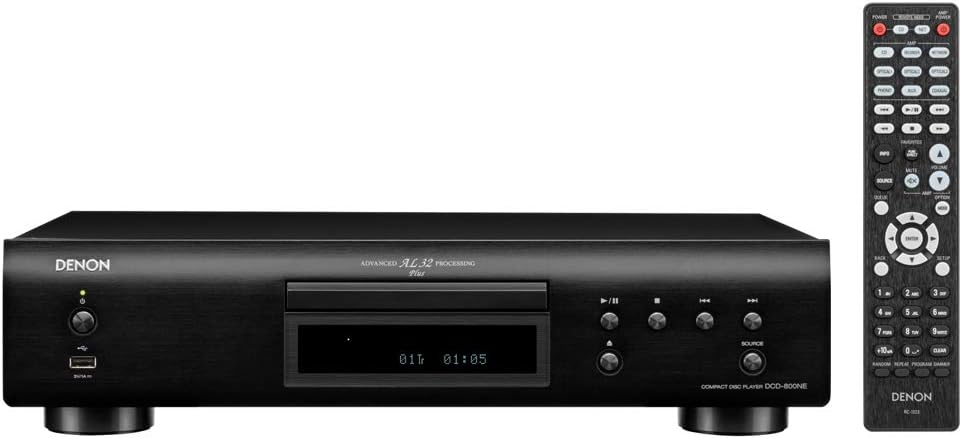
Figure 2 : Rear panel connections of the DCD-800NE, including analog audio out (RCA), digital audio out (optical and coaxial), and IR control ports.
- Sortie audio analogique : Connect the RCA cables from the "AUDIO OUT" jacks on the DCD-800NE to the corresponding analog input jacks on your amplifier (e.g., "CD IN").
- Sortie audio numérique : For digital connection, use an optical or coaxial digital cable (not supplied) to connect the "DIGITAL AUDIO OUT" (OPTICAL or COAXIAL) jack on the DCD-800NE to a digital input on your amplificateur ou DAC.
- Connexion électrique : Once all audio connections are made, connect the power cord to the DCD-800NE and then to an AC power outlet.
2.4 Installation des piles de la télécommande
Open the battery compartment on the back of the remote control and insert the two "AAA" batteries, ensuring correct polarity (+/-). Close the compartment.
3. Fonctionnement
3.1 Mise sous/hors tension
Press the power button on the front panel or the remote control to turn the unit on or off.
3.2 Lecture de CD
- Appuyez sur le OUVRIR/FERMER bouton pour ouvrir le tiroir du disque.
- Place a CD with the label side up into the disc tray.
- Appuyez sur le OUVRIR/FERMER button again to close the tray. The player will read the disc.
- Appuyez sur le JOUER bouton pour démarrer la lecture.
- Utilisez le SAUTER buttons to navigate between tracks and the PAUSE or ARRÊT boutons pour contrôler la lecture.
3.3 Lecture USB
The DCD-800NE features a front USB-A port for playing audio files from USB storage devices (e.g., USB flash drives, external hard drives).
- Insérez un périphérique de stockage USB dans le port USB situé sur le panneau avant.
- Appuyez sur le USB button on the front panel or remote to select the USB input.
- Use the navigation buttons on the remote to browse folders and select desired audio files.
- Presse JOUER to begin playback. The player supports hi-res formats like PCM192/24 and DSD 2.8 MHz/5.6 MHz, as well as MP3, WMA, and FLAC.
3.4 Mode Direct Pur
Activate Pure Direct Mode to bypass digital processing circuits that can color the audio signal. This provides a cleaner, more direct sound path, ideal for critical listening. Refer to the full Owner's Manual for instructions on enabling this mode.
3.5 Integration with Denon 800NE Series
The DCD-800NE is designed to integrate seamlessly with other Denon 800NE series components, such as the PMA-800NE Integrated Amplifier and DNP-800NE Network Audio Player, for a complete high-fidelity system. A single remote control can operate the entire 800NE series.
Vidéo 1: Un plusview of the Denon 800NE series, demonstrating the DCD-800NE CD player's features, including its integration with the PMA-800NE amplifier and DNP-800NE network player, advanced processing, and vibration-resistant design. It highlights CD and USB playback capabilities.
4. Entretien
4.1 Nettoyage de l'appareil
Essuyez l'extérieur de l'appareil avec un chiffon doux et sec. N'utilisez pas de nettoyants abrasifs, de cires ni de solvants, car ils pourraient endommager la finition. Évitez de vaporiser des liquides directement sur l'appareil.
4.2 Disques de nettoyage
Handle CDs by their edges. If a disc is dirty, wipe it gently from the center outwards with a soft, lint-free cloth. Do not use harsh chemicals or abrasive materials, as these can scratch the disc surface and affect playback quality.
4.3 Aération
Ensure that the ventilation openings on the unit are not blocked. Proper airflow is essential to prevent overheating and maintain optimal performance.
5. Dépannage
If you experience issues with your DCD-800NE, consult the following common troubleshooting steps before seeking professional service.
- Pas d'alimentation :
- Check if the power cord is securely plugged into the unit and the AC outlet.
- Assurez-vous que la prise de courant est fonctionnelle.
- Pas de son :
- Verify that the audio cables are correctly connected between the DCD-800NE and your amplificateur/récepteur.
- Assurez-vous que la source d'entrée correcte est sélectionnée sur votre amplificateur/récepteur.
- Check the volume level on both the DCD-800NE and your amplificateur/récepteur.
- Disc Does Not Play / Disc Error:
- Assurez-vous que le disque est propre et exempt de rayures ou de traces.
- Make sure the disc is inserted correctly with the label side up.
- Essayez de lire un autre disque pour déterminer si le problème vient du lecteur ou du disque.
- Some discs may not be compatible (e.g., certain recordable CD-R/RW formats).
- USB Device Not Recognized / Files Ne joue pas :
- Ensure the USB device is formatted correctly (FAT16/FAT32).
- Vérifiez que le son files are in a supported format (MP3, WMA, FLAC, WAV, DSD).
- The player supports up to 255 folders on a USB drive.
- Some USB devices may require external power or may not be compatible.
- La télécommande ne fonctionne pas :
- Check if the batteries are inserted correctly and are not depleted.
- Ensure there are no obstructions between the remote control and the unit's IR sensor.
- Pointez la télécommande directement vers l’unité.
For more detailed troubleshooting, refer to the Owner's Manual on CD-ROM.
6. Spécifications
| Fonctionnalité | Détail |
|---|---|
| Dimensions du produit | 10.5 x 17.12 x 4.5 pouces |
| Poids de l'article | 9.48 livres |
| Numéro de modèle | DCD-800NE |
| Technologie de connectivité | USB |
| Composants inclus | CD player, Remote control (RC-1223), Two "AAA" batteries, 47" Stereo RCA cable, Owner's Manual on CD-ROM, Quick Start Guide, Warranty Information, Safety Instructions |
| Date de première disponibilité | 13 septembre 2018 |
Remarque: les spécifications peuvent être modifiées sans préavis.
7. Informations sur la garantie
Denon products are manufactured to the highest quality standards. This product is covered by a limited warranty. Please refer to the "Warranty Information" document included in your product packaging or on the Owner's Manual CD-ROM for specific terms, conditions, and duration of the warranty applicable to your region. Keep your proof of purchase for warranty service.
8. Assistance clientèle
For technical assistance, product inquiries, or service requests, please contact Denon customer support. You can find contact information on the official Denon website or in the "Quick Start Guide" included with your product.
Ressources en ligne : Visit the official Denon webSite regroupant les FAQ, les mises à jour logicielles et des ressources d'assistance supplémentaires.