Introduction
This manual provides comprehensive instructions for the installation, operation, and maintenance of your Kaadas K7-5 Push-Pull Keyless Smart Lock. Please read this manual thoroughly before using the product to ensure proper function and safety. Keep this manual for future reference.
Produit terminéview et fonctionnalités
The Kaadas K7-5 is an advanced keyless smart lock designed for convenience and security. It offers multiple access methods and intelligent features.
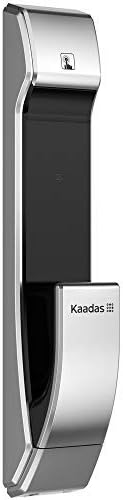
Image : Côté view of the Kaadas K7-5 Smart Lock, showcasinson design élégant.
Caractéristiques principales :
- Push-Pull Operation: One-step intuitive door opening experience.
- Verrouillage automatique : Ensures the door is locked automatically after closing.
- Méthodes d'accès multiples : Fingerprint, Password, RFID Card, and Mechanical Key.
- Sweden FPC Fingerprint Sensor: Provides accurate and swift recognition (less than 1 second).
- Fake PIN Code Feature: Allows adding random numbers before and after the real password to prevent exposure.
- Double authentification : Strengthens security by requiring two authentication methods (e.g., password + fingerprint/card).
- In-Home Security (Double-locking): Prevents unexpected unlocking attempts from outside when activated.
- Safe Handle Function: Locks the indoor handle to prevent unauthorized opening from inside, useful for child safety or peephole security.
- Unlock Records Query: Allows checking who unlocked the door and when.
- Alimentation de secours : Use a 5V power bank via Micro USB in case of battery discharge.
- Avertissement de batterie faible : Voice sound and LED light alert for battery replacement.
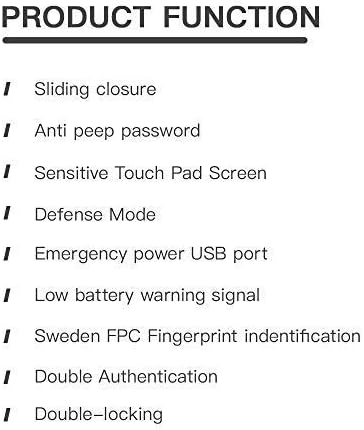
Image: A list detailing key product functions such as sliding closure, anti-peep password, sensitive touch pad, defense mode, emergency power USB port, low battery warning, Sweden FPC fingerprint identification, double authentication, and double-locking.
Configuration et installation
The Kaadas K7-5 smart lock requires precise installation for optimal performance and security. It is highly recommended to have this lock installed by a qualified professional.
Considérations générales relatives à l'installation :
- Ensure your door thickness is compatible (typically 38-60mm).
- The lock is designed for universal installation, suitable for various door opening directions.
- Refer to the detailed installation template and hardware provided with your lock.

Image: An exploded diagram showing all components of the Kaadas K7-5 Smart Lock, including the front and back panels, mortise, and various screws and pins for assembly.
Mode d'emploi
The Kaadas K7-5 offers multiple ways to unlock your door. Ensure the lock is properly powered with 8 AA alkaline batteries (DC 6V).
1. Déverrouillage par empreinte digitale
Place your registered finger on the FPC fingerprint sensor. The lock will recognize your fingerprint in less than 1 second and unlock.
2. Unlocking with Password
Enter your registered password on the touch pad. The lock supports 6-12 digit passwords. Press the confirmation key to unlock.
- Faux code PIN : To prevent others from guessing your password, you can enter random numbers before or after your actual password. For example, if your password is "123456", you can enter "987123456321" where "123456" is embedded within other numbers.
3. Déverrouillage par carte RFID
Present your registered RFID card to the card reader area on the lock. The lock will verify the card and unlock.
4. Unlocking with Mechanical Key
In case of emergency or battery failure, use the provided mechanical key to manually unlock the door.
5. Verrouillage automatique
After the door closes, the lock will automatically engage the mortise to secure the door. This eliminates the need to manually check if the door is locked.
6. Double Authentication Mode
This mode enhances security by requiring two different authentication methods to unlock the door. For example, you might need to use a password followed by a fingerprint, or a card followed by a password. Refer to the lock's settings menu for activation and configuration.
7. In-Home Security (Double-locking)
When you are inside your home, activate the double-locking feature using the [CLOSE] button on the indoor unit. This prevents any unlocking attempts from the outside, even with valid credentials.
8. Safe Handle Function
When enabled, the indoor handle will be locked. This feature is useful for preventing children from accidentally opening the door or for added security if your door has a peephole that could be exploited.
Entretien
Proper maintenance ensures the longevity and reliable operation of your Kaadas K7-5 smart lock.
1. Remplacement de la batterie
The lock will provide a voice sound and LED light warning when the batteries are low. Replace all 8 AA alkaline batteries promptly to avoid interruption of service. Do not mix old and new batteries or different types of batteries.
2. Emergency Power Backup
If the batteries are completely discharged, you can temporarily power the lock using a 5V power bank connected to the Micro USB port located on the exterior unit. This allows you to unlock the door and replace the internal batteries.
3. Nettoyage
Nettoyez les surfaces extérieures de la serrure avec un chiffon doux et sec. Évitez d'utiliser des nettoyants abrasifs, des solvants ou des produits chimiques agressifs, car ils pourraient endommager la finition et les composants électroniques.
Dépannage
If you encounter issues with your Kaadas K7-5 smart lock, consider the following common solutions:
- La serrure ne répond pas : Check the batteries. If the batteries are low or dead, replace them or use the emergency power backup.
- Empreinte digitale non reconnue : Assurez-vous que votre doigt est propre et sec. Si le problème persiste, réenregistrez votre empreinte digitale.
- Mot de passe incorrect : Double-check the entered password. Ensure you are not in Fake PIN code mode if you are not intentionally using it.
- La porte ne se verrouille/déverrouille pas correctement : Check for any obstructions in the door frame or mortise. Ensure the lock is properly aligned.
- Sons inhabituels : If the lock makes unusual sounds, it may indicate a mechanical issue. Contact customer support.
For persistent issues, refer to the full troubleshooting guide available on the Kaadas official website ou contacter le support client.
Caractéristiques
Below are the technical specifications for the Kaadas K7-5 Push-Pull Keyless Smart Lock.
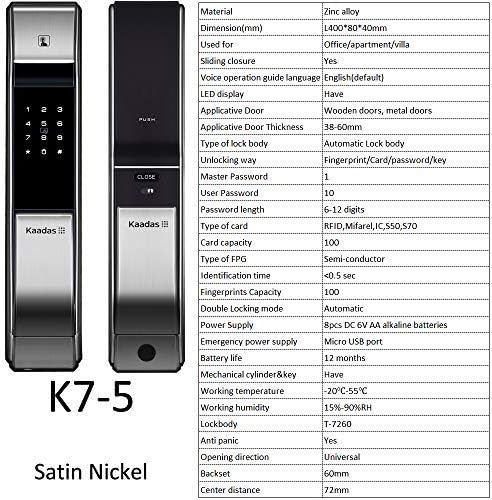
Image : recto et verso views of the Kaadas K7-5 Smart Lock, accompanied by a detailed table of specifications including material, dimensions, unlocking methods, and power supply.
| Matériel | Alliage de zinc |
| Dimensions (L x l x H) | 400 x 80 x 40 mm (environ 15.75 x 3.15 x 1.57 pouces) |
| Type de porte applicable | Wooden doors, metal doors |
| Épaisseur de porte applicable | 38-60mm |
| Type of Lock Body | Automatic Lock body |
| Méthodes de déverrouillage | Fingerprint, Card, Password, Key |
| Master Password Capacity | 1 |
| User Password Capacity | 10 |
| Longueur du mot de passe | 6-12 chiffres |
| Type de carte | RFID, Mifare, IC550, 570 |
| Capacité de la carte | 100 |
| Type d'empreintes digitales | Semi-conductor (FPC) |
| Moment d'identification | <0.5 seconde |
| Fingerprints Capacity | 100 |
| Double Locking Mode | Automatique |
| Alimentation électrique | 8pcs DC 6V AA alkaline batteries |
| Alimentation électrique d'urgence | Port micro USB |
| Autonomie de la batterie | Environ 12 mois |
| Mechanical Cylinder & Key | Oui |
| Température de fonctionnement | -20°C à 55°C |
| Humidité de travail | 15%-90% HR |
| Lockbody | T-7260 |
| Anti-panique | Oui |
| Sens d'ouverture | Universel |
| Backset | 60 mm |
| Distance du centre | 72 mm |

Image: A technical drawing illustrating the dimensions of the Kaadas K7-5 Smart Lock, showing a height of 400mm, width of 80mm, and depth of 40mm. Note: Manual measurements may have slight deviations.
Garantie et assistance
For information regarding warranty coverage, technical support, or service, please refer to the warranty card included with your product or visit the official Kaadas webVous pouvez également contacter votre point de vente pour obtenir de l'aide.
Fabricant: Kaadas


