Introduction
Thank you for choosing the 360 Robot Vacuum and Mop Cleaner. This intelligent cleaning device is designed to provide efficient and thorough cleaning for your home, featuring advanced laser navigation, powerful suction, and smart app control. This manual will guide you through the setup, operation, and maintenance of your new robot vacuum to ensure optimal performance and longevity.

The 360 Robot Vacuum and Mop Cleaner, Model S6, shown with its companion mobile application interface.
Consignes de sécurité
- Lisez attentivement toutes les instructions avant d’utiliser l’appareil.
- Ne laissez pas les enfants utiliser l'aspirateur robot. Surveillez les enfants et les animaux domestiques lorsque le robot est en marche.
- Veillez à placer la station de charge sur une surface plane contre un mur, en laissant un espace dégagé autour.
- Do not use the robot vacuum in wet environments or near liquids.
- Avant de nettoyer le sol, retirez tous les câbles qui traînent, les petits objets ou les objets fragiles afin d'éviter qu'ils ne s'emmêlent ou ne l'endommagent.
- Do not use the robot vacuum to pick up large debris, sharp objects, or burning/smoking materials.
- Utilisez uniquement le chargeur et la batterie d'origine fournis par le fabricant.
- Effectuez l'entretien régulier décrit dans ce manuel afin de garantir un fonctionnement sûr et efficace.
Contenu du colis
Vérifiez que tous les composants sont présents dans le package :
- 360 Robot Vacuum and Mop Cleaner (S6)
- Station de chargement
- Adaptateur secteur
- Réservoir d'eau
- Chiffon de vadrouille
- Brosses latérales (2 paires)
- Outil de nettoyage
- Manuel d'utilisation
- Batterie (pré-installée)
- Filtre (préinstallé)
Produit terminéview
Familiarize yourself with the main components of your 360 Robot Vacuum and Mop Cleaner.

Surview of the robot vacuum's intelligent features including anti-collision, anti-drop sensors, long-lasting battery, LDS laser navigation, and SLAM algorithm for mapping.
Haut View:
- Capteur de navigation laser LDS : Pour une cartographie et une navigation précises.
- Bouton Marche/Nettoyage : Press to start/pause cleaning, long press to turn on/off.
- Bouton de recharge : Appuyez pour renvoyer le robot à sa station de charge.
- Dustbin Compartment: Situé sous le couvercle supérieur.
Bas View:
- Brosse principale : Pour un nettoyage en profondeur des tapis et des sols durs.
- Brosses latérales : Pour balayer les débris des bords et des coins.
- Roues motrices : Pour se déplacer sur différentes surfaces.
- Omni-directional Wheel: For steering.
- Contacts de charge : To connect with the charging dock.
- Capteurs de falaise : To prevent falling down stairs.
- Wall Sensor: To sweep along walls and corners effectively.
Installation
1. Recharger l'aspirateur robot
- Place the charging dock on a hard, level surface against a wall. Ensure there is at least 0.5 meters (1.6 feet) of clear space on both sides and 1.5 meters (4.9 feet) in front of the dock.
- Connect the power adapter to the charging dock and plug the other end into a power outlet.
- Place the robot vacuum onto the charging dock, ensuring the charging contacts align. The robot will announce that it is charging. For first use, fully charge the robot before operation.
2. Connecting to the 360 Robot App
- Download the "360 Robot" app from the App Store (iOS) or Google Play Store (Android).
- Ouvrez l'application et créez un compte ou connectez-vous.
- Follow the in-app instructions to add your device. This typically involves selecting your robot model, connecting to its Wi-Fi hotspot, and then connecting the robot to your home Wi-Fi network (2.4GHz only).
- Une fois connecté, vous pouvez contrôler le robot. view cleaning maps, set schedules, and access advanced features through the app.
Opérationnel
Démarrage d'un cycle de nettoyage
- Via le bouton robot : Press the Power/Clean button on the robot once to start a cleaning cycle. Press again to pause.
- Via l'application : Open the 360 Robot app and tap the "Clean" button. You can also select specific cleaning modes (e.g., Spot cleaning, Proximity cleaning) or set schedules.
- Via Voice Command (Alexa): If integrated with Alexa, you can use voice commands like "Alexa, ask 360 Robot to start cleaning."
Modes de nettoyage

The robot vacuum is capable of both sweeping (vacuuming) and mopping, utilizing its main brush, side brushes, and mop cloth.
- Nettoyage automatique : The robot intelligently maps your home and cleans systematically. It identifies carpet and automatically switches to Max Mode with 1800Pa suction power for deep cleaning.
- Nettoyage des taches : Permet au robot de nettoyer intensivement une petite zone spécifique.
- Proximity Cleaning: Cleans a designated area around the robot.
- Mode nettoyage : Fixez le réservoir d'eau avec l'adamp mop cloth. The robot will mop hard floors. Note: The mopping function is designed for light mopping and not for heavy stains.
Fonctionnalités avancées de l'application
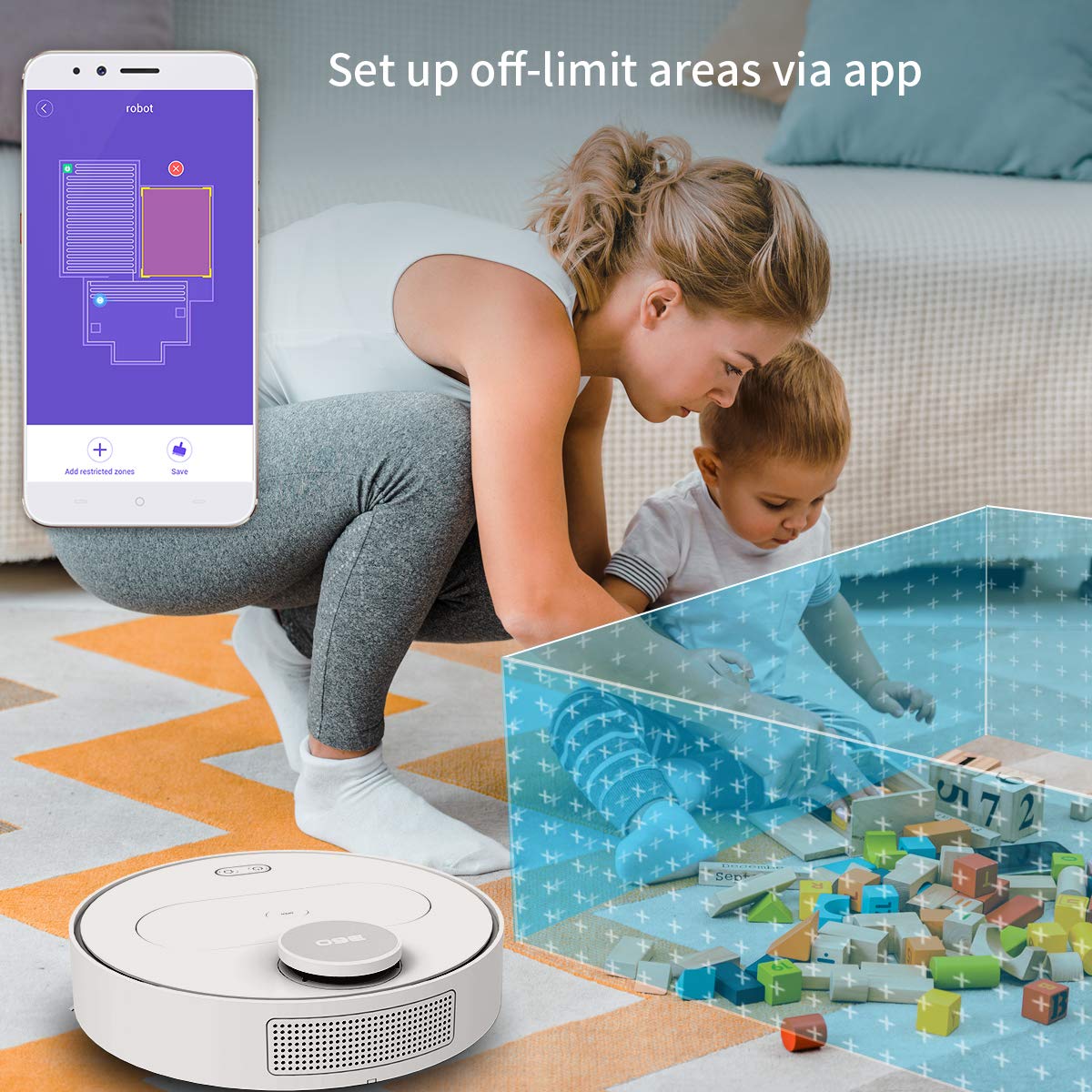
The 360 Robot app allows users to define and set up off-limit areas on the cleaning map, preventing the robot from entering specific zones.
- Multi-map Management: Save and manage multiple floor plans for different levels of your home.
- Off-limit Area: Draw virtual boundaries or no-go zones on the map to prevent the robot from entering specific areas.
- Programmation: Programmez des plages horaires spécifiques pour que le robot démarre automatiquement le nettoyage.
- Télécommande: Manually control the robot's movement using the app.
- Nettoyage des pistes : Monitor the robot's real-time cleaning path and progress on the map.
- Niveaux d'aspiration : Adjust suction power (Quiet, Normal, Powerful, Max) according to your cleaning needs.
Automatic Recharge and Breakpoint Resume
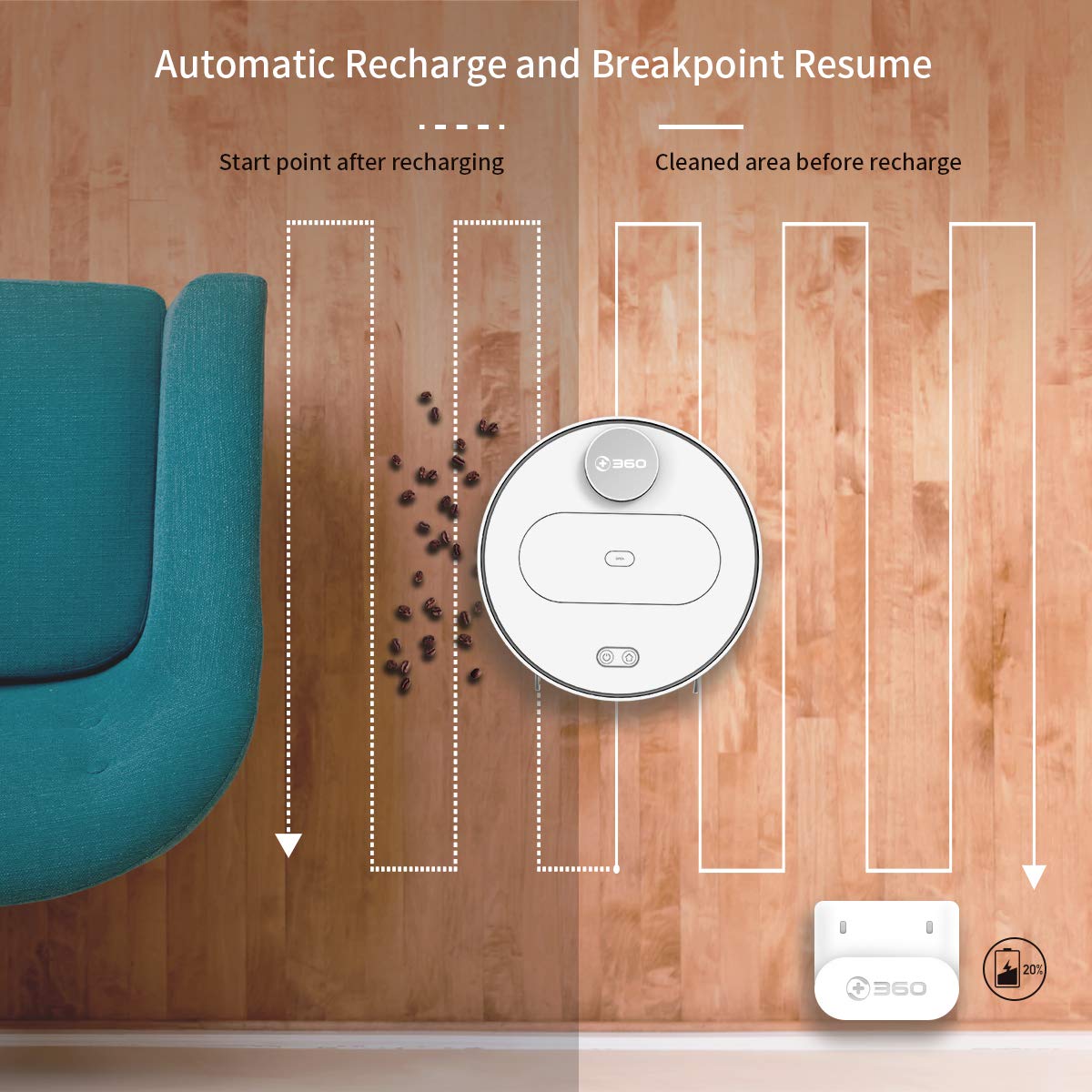
The robot automatically returns to its charging dock when the battery is low and resumes cleaning from the last uncleaned spot after recharging.
When the battery level is low during a cleaning cycle, the robot will automatically return to its charging dock. Once fully recharged, it will resume cleaning from where it left off, ensuring complete coverage of your home.
Entretien
Un entretien régulier est essentiel pour des performances optimales et la longévité de votre aspirateur robot.
1. Vider la poubelle
- Ouvrez le capot supérieur du robot et retirez la poubelle.
- Ouvrez le couvercle de la poubelle et videz son contenu dans une poubelle classique.
- Il est recommandé de vider la poubelle après chaque cycle de nettoyage.
2. Nettoyage du filtre

The 360 Robot Vacuum features a washable HEPA filter, which helps maintain high filtration efficiency and contributes to cleaner indoor air.
- Retirez le filtre de la poubelle.
- Tap the filter gently to remove loose dirt.
- Rinse the filter under running water. Ensure it is completely dry before reinserting it into the dustbin. Do not use a brush or other tools to clean the filter, as this may damage it.
- It is recommended to clean the filter weekly and replace it every 3-6 months, depending on usage.
3. Brosses de nettoyage
- Brosse principale : Remove the main brush cover and then the main brush. Use the provided cleaning tool to remove hair and debris tangled around the brush. Reinstall the brush and cover. Clean weekly.
- Brosses latérales : Check side brushes for tangled hair or debris. If necessary, remove them (they can be pulled off) and clean. Reinstall, ensuring they click into place. Replace if worn or damaged. Clean monthly.
4. Nettoyage des capteurs et des contacts de charge
- Wipe the cliff sensors (on the bottom of the robot), wall sensor (on the side), and charging contacts (on the robot and charging dock) with a clean, dry cloth. This ensures proper navigation and charging. Clean monthly.
5. Entretien du réservoir d'eau et de la serpillière
- Après avoir passé la serpillière, retirez le réservoir d'eau et videz l'eau restante.
- Remove the mop cloth and wash it thoroughly. Allow it to air dry completely before reattaching or storing.
- Do not leave water in the tank when the robot is not in use for extended periods.
Dépannage
| Problème | Cause possible | Solution |
|---|---|---|
| Le robot ne s'allume pas. | Batterie faible ou déchargée. | Placez le robot sur sa station de charge et assurez-vous qu'il est en charge. |
| Le robot ne peut pas se connecter au Wi-Fi. | Mot de passe Wi-Fi incorrect ; réseau 5 GHz ; robot trop éloigné du routeur. | Ensure correct 2.4GHz Wi-Fi password. Move robot closer to router. Restart robot and router. |
| Le robot se bloque fréquemment. | Obstacles on the floor; narrow spaces. | Clear obstacles. Use the app to set off-limit areas for problematic zones. |
| Mauvaise performance de nettoyage. | Poubelle pleine ; filtre bouché ; brosses emmêlées. | Vider le bac à poussière. Nettoyer ou remplacer le filtre. Nettoyer les brosses principales et latérales. |
| Le robot ne retourne pas à la station de chargement. | Charging dock obstructed; charging contacts dirty. | Ensure clear space around the dock. Clean charging contacts on both robot and dock. |
Caractéristiques
| Fonctionnalité | Détail |
|---|---|
| Marque | 360 |
| Nom du modèle | S6 |
| Caractéristiques spéciales | Anti-Collision, Anti-Fall, Washable Filter |
| Couleur | Multicolore |
| Type de filtre | Tissu |
| Autonomie de la batterie | 110 minutes |
| Source d'énergie | Alimenté par batterie |
| Méthode de contrôle | Application |
| Appareils compatibles | Alexa |
| Poids de l'article | 3 kg 490 g |
| Dimensions de l'article (LxlxH) | 35 x 35 x 10 centimètres |
Garantie et assistance
For warranty information and technical support, please refer to the warranty card included in your product packaging or visit the official 360 SmartAI website. You can also contact customer service through the 360 Robot app for assistance.
Pour plus de ressources et une FAQ, veuillez consulter le site web suivant : 360 Boutique sur Amazon.


