Introduction
The LAUNCH X431 CRP919X is an advanced automotive diagnostic tool designed for comprehensive vehicle system analysis and maintenance. This device offers a wide range of functions, including ECU coding, bi-directional control, and over 35 reset services, making it suitable for both professional technicians and advanced DIY enthusiasts. It supports a vast array of vehicle models from 1996 to 2025, incorporating modern protocols like CAN FD and DoIP, and providing access to FCA SGW.

Qu'y a-t-il dans la boîte
Upon unboxing your LAUNCH X431 CRP919X, verify that all components are present:
- 2025 LAUNCH ELITE CRP919X OBD2 Scanner x 1
- OBD2 Diagnostic Cable x 1
- DC 5V Charging Cable x 1
- US/UK/EU Plug Adapter x 1
- Multilingual Quick Start Guide x 1

Configuration et utilisation initiale
- Chargement de l'appareil : Connect the DC 5V Charging Cable to the scanner and a power outlet using the provided adapter. Ensure the device is fully charged before first use.
- Mise sous tension : Maintenez le bouton d'alimentation enfoncé pour allumer le scanner.
- Connexion Wi-Fi : Navigate to the settings menu and connect the device to a stable Wi-Fi network. This is crucial for software updates and online functions.
- Mises à jour logicielles : After connecting to Wi-Fi, check for and install any available software updates to ensure optimal performance and access to the latest features and vehicle coverage.
- Connexion au véhicule : Locate the vehicle's OBD2 port (usually under the dashboard). Connect the OBD2 Diagnostic Cable from the scanner to the vehicle's OBD2 port.
Mode d'emploi
1. Diagnostic complet du système
The CRP919X provides OE-level full system diagnostics, allowing you to scan all available electronic control units (ECUs) in the vehicle. This includes systems such as Engine, ABS, Airbag, Transmission, TPMS, and more. The tool can read and clear Diagnostic Trouble Codes (DTCs), display live data streams, and access ECU information.
- Lecture automatique du numéro VIN : This feature automatically identifies the vehicle's VIN (Vehicle Identification Number) for quick and accurate vehicle identification. For older models without Auto VIN capability, manual selection is available.
- Lire les codes : Récupérer les codes d'erreur de diagnostic actuels, en attente et permanents.
- Effacer les codes : Effacer les codes d'anomalie (DTC) de la mémoire du véhicule une fois les réparations terminées.
- Flux de données en direct : View real-time data parameters from various sensors and components. The 8-in-1 graphing feature allows for simultaneous display of multiple data streams for detailed analysis.


2. Codage de l'ECU
The CRP919X supports advanced ECU coding, a feature typically found in professional OEM scanners. This allows for customization and modification of pre-programmed options within the vehicle's ECUs. Functions include:
- Uncovering Hidden Features: Activate features not enabled at the factory.
- Disabling Unwanted Functions: Turn off features like seatbelt reminder chimes or daytime running lights.
- Coding Retrofitted Components: Integrate new components into the vehicle's system.
- Codage de variantes (programmation hors ligne) : Program specific variants or options in ECUs.
- Adaptive Data Resets: Reset learned values for various components.
- Correspondance des composants : Match new modules (e.g., ECM, TCM) to the vehicle.
Caution: Always back up the ECU data before performing any coding operations.


3. Commande bidirectionnelle (tests actifs)
This function allows the scanner to send commands to vehicle ECUs to perform specific tests and verify component functionality. This significantly reduces diagnostic time by pinpointing faulty components without disassembly.
Common active tests include:
- Tête adaptativeamp Ajustement
- Configuration du climatiseur
- Window Wipers operation
- Doors and Sunroof operation
- Mirrors and Interior Lights control
- Wheel Heating activation
- Horn Assessment
- ABS Pump Motor activation
- Modulating Throttle
- Test de vibration de l'injecteur
- Activation du ventilateur de radiateur


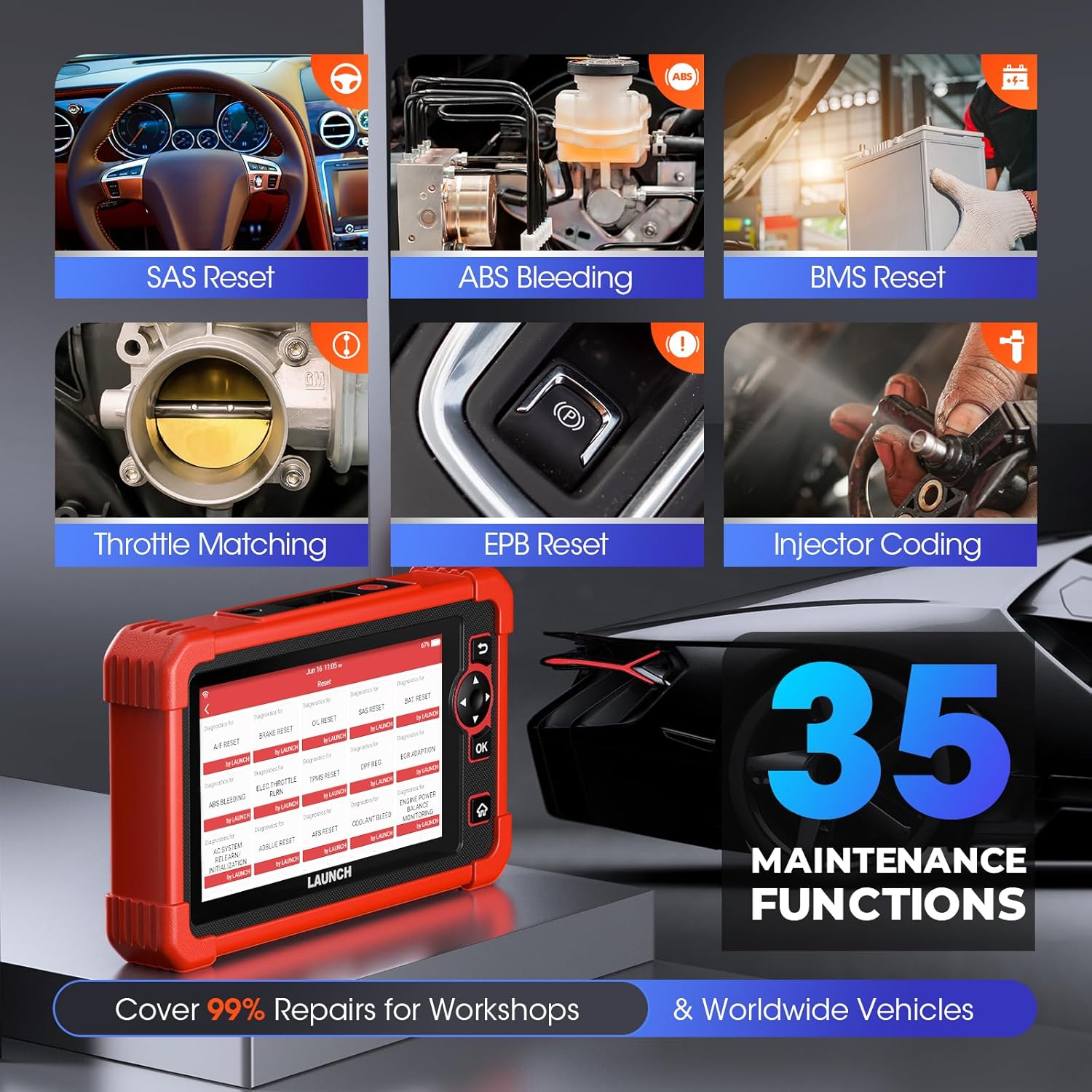
4. Fonctions spéciales (35+ services de réinitialisation)
The CRP919X provides access to over 35 commonly used maintenance and reset functions, covering a wide range of vehicle services:
- Réinitialisation de l'entretien de l'huile
- Codage des injecteurs
- EPB (Electronic Park Brake) Reset
- Saignement ABS
- Étalonnage du capteur d'angle de braquage (SAS)
- Réapprentissage de l'accélérateur
- Réinitialisation du BMS (système de gestion de la batterie)
- Régénération du DPF (filtre à particules diesel)
- Réparation des airbags
- Réinitialisation du TPMS (système de surveillance de la pression des pneus)
- Air/Fuel Reset
- Réinitialisation AdBlue
- AFS (Adaptive Front-Lighting System) Reset
- NOX Sensor Reset
- Réinitialisation des pneus
- Mode de transport
- Étalonnage du niveau d'air
- Étalonnage Windows
- CCS (Cruise Control System) Calibration
- Seat Occupancy Calibration
- Initialisation du toit ouvrant
- AC Initialization
- Crankshaft Position Sensor Adaptive Relearn
- Appariement de la boîte de vitesses
- Équilibre des pouvoirs
- Vol élevétage Détection de batterie
- Changement de langue
- FRM Reset
- Test EVAP
- Standardisation des sièges
- A/T Code Reset
- Numéro d'identification du véhicule (VIN) (Inscrire)
- Réinitialiser l'unité de contrôle
- EGR Adaptation (New)
- GPF (Gas Particular Filter) Regeneration (New)
- Cylinder Power Balance Test (New)

5. Advanced Protocol Support
- CAN FD : Supports GM models from 2019 and later, eliminating the need for separate CAN FD adapters and offering 6X faster data transfer rates.
- DoIP : Integrates with BMW (F&G chassis), Volvo (2018+), Land Rover, and Jaguar (2017+) models, enabling higher data rates via UDS over TCP/IP and Ethernet.
- FCA AutoAuth SGW: Provides access to FCA vehicles (Chrysler, Jeep, Dodge, Fiat, etc.) produced after 2017 for code clearance, bi-directional control, and special functions. Note: An AutoAuth account must be procured independently.

6. Modules étendus (facultatifs)
The CRP919X can be expanded with optional modules for enhanced diagnostic capabilities:
- Testeur de batterie (BST360) : For efficient battery and electrical system health assessments.
- TPMS (X431 TSGUN): For sensor activation, programming, and relearning.
Note: These add-on tools (BST360/X431 TSGUN) are available for separate purchase.
7. Diagnostic Report Sharing & Printing
Upon completion of a scan, the CRP919X generates a comprehensive diagnostic report in PDF format. This report can be easily shared via email or printed, facilitating communication between mechanics and clients.

Entretien
- Mises à jour logicielles : Regularly connect the device to Wi-Fi and check for software updates. These updates provide new features, expanded vehicle coverage, and performance improvements.
- Nettoyage: Utilisez un chiffon doux et sec.amp Utilisez un chiffon pour nettoyer l'appareil. Évitez les nettoyants abrasifs et les solvants.
- Stockage: Rangez le scanner dans un endroit frais et sec, à l'abri de la lumière directe du soleil et des températures extrêmes.
- Entretien de la batterie: Pour une durée de vie optimale de la batterie, évitez de la décharger complètement fréquemment. Rechargez l'appareil régulièrement, surtout s'il doit être rangé pendant une période prolongée.
Dépannage
This section addresses common issues you might encounter with your LAUNCH X431 CRP919X.
| Problème | Cause possible | Solution |
|---|---|---|
| L'appareil ne s'allume pas. | Low battery; Power button not held long enough; Device malfunction. | Charge the device for at least 30 minutes. Press and hold the power button for 3-5 seconds. If issue persists, contact customer support. |
| Impossible de se connecter au véhicule. | OBD2 cable not securely connected; Vehicle ignition off; Vehicle not supported; Faulty OBD2 port. | Ensure cable is firmly connected. Turn vehicle ignition to ON position (engine off). Verify vehicle compatibility. Test with another vehicle if possible. |
| La mise à jour du logiciel a échoué. | Unstable Wi-Fi connection; Insufficient storage; Server issues. | Ensure strong Wi-Fi signal. Clear some data/apps if storage is low. Try updating again later. |
| Specific function not working (e.g., ECU Coding). | Vehicle not supported for that function; Software not updated; Incorrect procedure. | Verify vehicle compatibility for the specific function. Ensure software is up to date. Refer to the on-screen instructions or contact support for detailed procedures. |
Pour les problèmes non répertoriés ici ou si les solutions proposées ne résolvent pas le problème, veuillez consulter la section d'assistance.
Caractéristiques
| Fonctionnalité | Détail |
|---|---|
| Marque | LANCEMENT |
| Modèle | LANCEMENT CRP919X |
| Système opérateur | Android 10.0 |
| Résolution d'affichage | 1024x600 |
| Poids de l'article | 6.27 livres |
| Dimensions du produit | 12.8 x 11.14 x 5.31 pouces |
| Capacité de la batterie | 6100mAh (approx. 12 hours continuous operation) |
| BÉLIER | 4 Go |
| ROM | 64 Go |
| Connectivité | Dual 2.4G & 5GHz WiFi, 5G WiFi communication |
| Protocoles pris en charge | CAN FD, DoIP, OBD2 (all 10 modes) |
| Couverture du véhicule | Plus de 150 marques, plus de 10 000 modèles (1996-2025) |
Garantie et assistance
LAUNCH is committed to providing high-quality products and excellent customer service.
- Mises à jour gratuites : Benefit from 2 years of free software updates from the date of purchase (since September 2022).
- Engagement qualité : The product comes with a 5-Year Quality Undertaking.
- Retours et échanges : A 60-Day Return & Replacement policy is available.
- Post-sale Service: 24/7 post-sale service is provided.
- Commentaires en ligne : You can submit diagnostic queries online to LAUNCH for expert analysis and troubleshooting.
- Assistance à distance : The device supports remote assistance via TeamViewer for swift issue resolution.
For further assistance, please refer to the official LAUNCH support channels or the contact information provided in your quick start guide.


