Introduction
This user manual provides detailed instructions for the DinoFire USB Rechargeable RF 2.4 GHz Green Light Presentation Remote. Designed for seamless presentations, this wireless presenter offers a bright green laser pointer, long-range control, and multi-functional buttons for an enhanced user experience. Please read this manual thoroughly before use to ensure optimal performance and safety.
Caractéristiques du produit
- Conception rechargeable : Built-in battery provides weeks of use on a single 1-hour charge, eliminating the need for frequent battery replacement.
- Bright Green Laser Pointer: Features a green laser that is 6 times brighter than red lasers, ensuring clear visibility on various backgrounds up to 300 feet.
- Connectivité Plug & Play : Simply plug the USB receiver into your computer's USB port for immediate use, no software installation required.
- Commande multifonctionnelle : Includes buttons for Page Forward/Backward, Hyperlink activation, Window Switching, and Volume Control.
- Longue portée sans fil : Offers a wireless control range of up to 100 feet, allowing freedom of movement during presentations.
- Portable et ergonomique : Pen-like size with magnetic USB storage for the receiver, designed for comfortable handling and easy portability.
- Large compatibilité : Supports Windows 2003 / XP / Vista / 7 / 8 / 10, Mac OS, Linux, Android, and software like PowerPoint, Google Slides, Keynote, Prezi, PDF, MS Word, ACD See.
Contenu du colis
- 1 x DinoFire Wireless Presenter Remote
- 1 x Wireless USB Receiver (2-in-1 USB-A and Type-C)
- 1 x câble de chargement USB
- 1 x Manuel d'utilisation
- 1 x étui de transport

Image: The DinoFire presentation remote, its USB receiver, and the included carrying case.
Installation
- Charge the Presenter: Before first use, connect the presenter to a USB power source using the provided USB charging cable. A full charge takes approximately 1-2 hours. The indicator light will change to show charging status.
- Insérer le récepteur USB : Locate the USB receiver stored magnetically within the presenter. Plug the receiver into an available USB-A or USB-C port on your computer.
- Mise sous tension : Turn on the presenter using the ON/OFF switch, usually located on the side.
- Connexion automatique : The presenter should automatically connect to your computer. No additional drivers or software are typically required.

Image: The presentation remote connected via USB for charging, illustrating the USB Fast Charging feature.
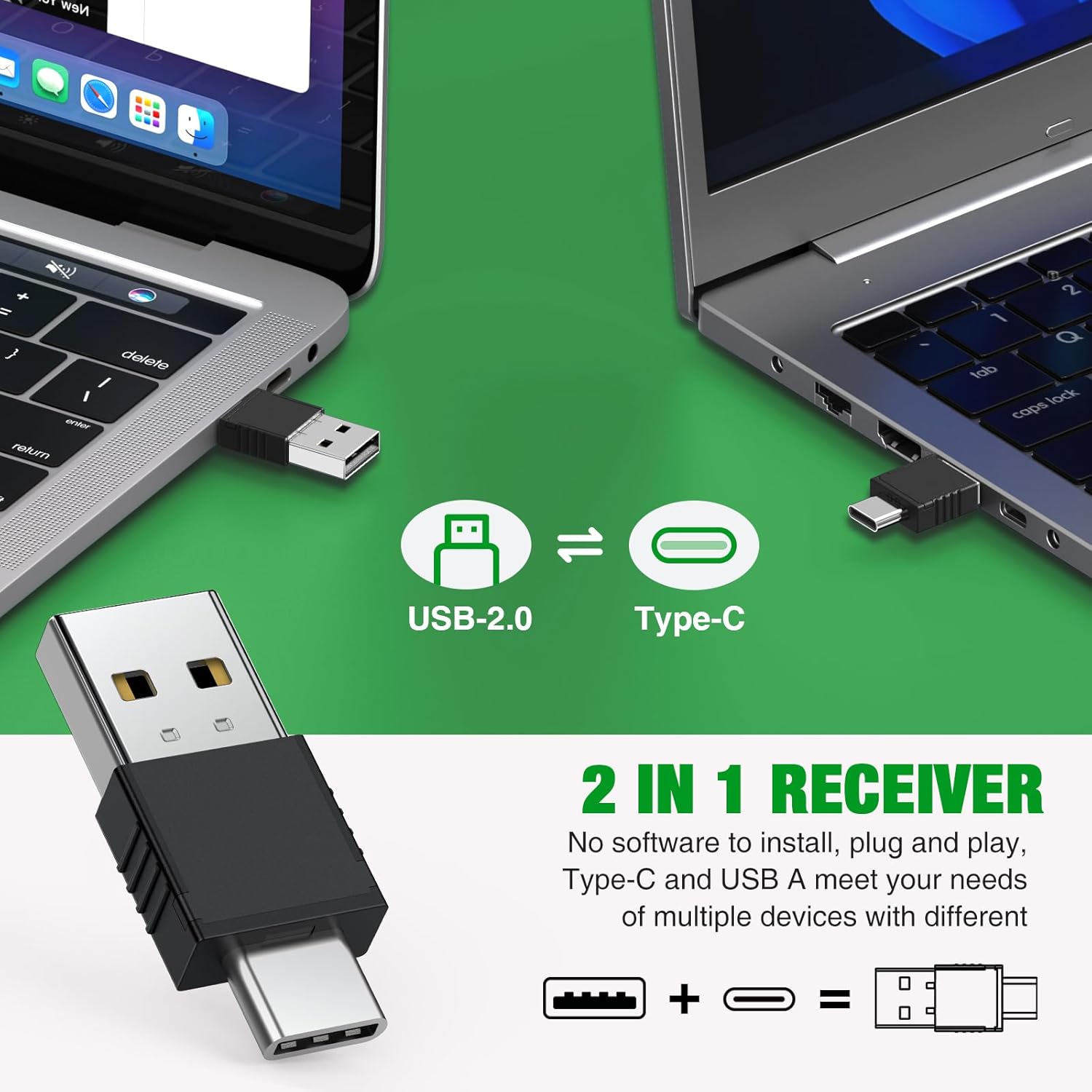
Image: The versatile 2-in-1 USB receiver, featuring both USB-A and Type-C connections for broad compatibility.
Mode d'emploi
Familiarize yourself with the buttons on your DinoFire presentation remote:
- Green Laser Pointer Button: Press and hold to activate the green laser pointer. Release to turn off.
- Page Up/Forward Button (▲): Press to advance to the next slide or page in your presentation.
- Page Down/Backward Button (▼): Press to go back to the previous slide or page.
- Bouton Lien hypertexte : Used to activate hyperlinks within your presentation.
- Switch Windows Button: Allows you to switch between open applications or windows on your computer.
- Boutons de contrôle du volume (+/-) : Adjust the system volume up or down.

Image : Un gros plan view of the green laser light, highlighting its brightness and visibility.

Image: Visual representation of how to manage volume using the dedicated buttons on the remote.
Video: An official product video demonstrating the key features and functions of the DinoFire Rechargeable Presentation Clicker with Green Light, including charging, laser operation, and slide control.
Compatibilité
The DinoFire Presentation Remote is designed for broad compatibility:
- Systèmes d'exploitation : Windows 2003 / XP / Vista / 7 / 8 / 10, Mac OS, Linux, Android.
- Logiciel: PowerPoint, Google Slides, Keynote, Prezi, PDF, MS Word, ACD See, and other presentation software.

Image: Visual representation of the wide range of operating systems and presentation software compatible with the device.
Chargement et autonomie de la batterie
The DinoFire presenter features a built-in rechargeable Lithium Polymer battery. To charge, connect the included USB cable to the presenter and a USB power source (e.g., computer USB port, wall adapter). A full charge typically takes 1-2 hours and provides several weeks of usage, depending on frequency of use.
Image: The presentation remote connected via USB for charging, indicating its long battery life after a short charge.
Dépannage
| Problème | Solution possible |
|---|---|
| Le présentateur ne répond pas. |
|
| Le pointeur laser est faiblement lumineux ou ne fonctionne pas. |
|
| Portée sans fil limitée. |
|
| Buttons not functioning correctly in specific software. |
|
Caractéristiques
- Numéro de modèle : Q06
- Connectivité : RF 2.4 GHz Wireless
- Laser Color: Feu vert
- Portée sans fil : Jusqu'à 100 pieds (30 mètres)
- Portée des lasers : Jusqu'à 300 pieds (90 mètres)
- Type de batterie : Batterie lithium-polymère rechargeable (incluse)
- Temps de charge : Environ 1 à 2 heures
- Poids de l'article : 3.52 onces (environ 100 grammes)
- Dimensions du colis : 6.85 x 1.69 x 1.46 pouces
- Appareils compatibles : Laptop, PC, Mac, Android devices with USB port
Consignes de sécurité
Veuillez respecter les consignes de sécurité suivantes :
- Sécurité laser: Do not point the laser beam directly at people's eyes or at aircraft. Laser radiation can be harmful.
- Enfants: Gardez l’appareil hors de portée des enfants.
- Démontage: Ne tentez pas de démonter ou de modifier l'appareil. Cela annulera la garantie et pourrait causer des dommages ou des blessures.
- Température: Évitez d'exposer l'appareil à des températures extrêmes ou à la lumière directe du soleil.
- Eau: N’exposez pas l’appareil à l’eau ou à une humidité excessive.
Image: A visual reminder to never point the laser directly at faces or eyes.
Garantie et assistance
DinoFire products are designed for reliability and performance. For any questions, technical support, or warranty inquiries, please refer to the contact information provided with your purchase or visit the official DinoFire website. Conservez votre reçu d’achat pour les réclamations au titre de la garantie.
Pour plus d'informations, visitez le DinoFire Store on Amazon.