Produit terminéview
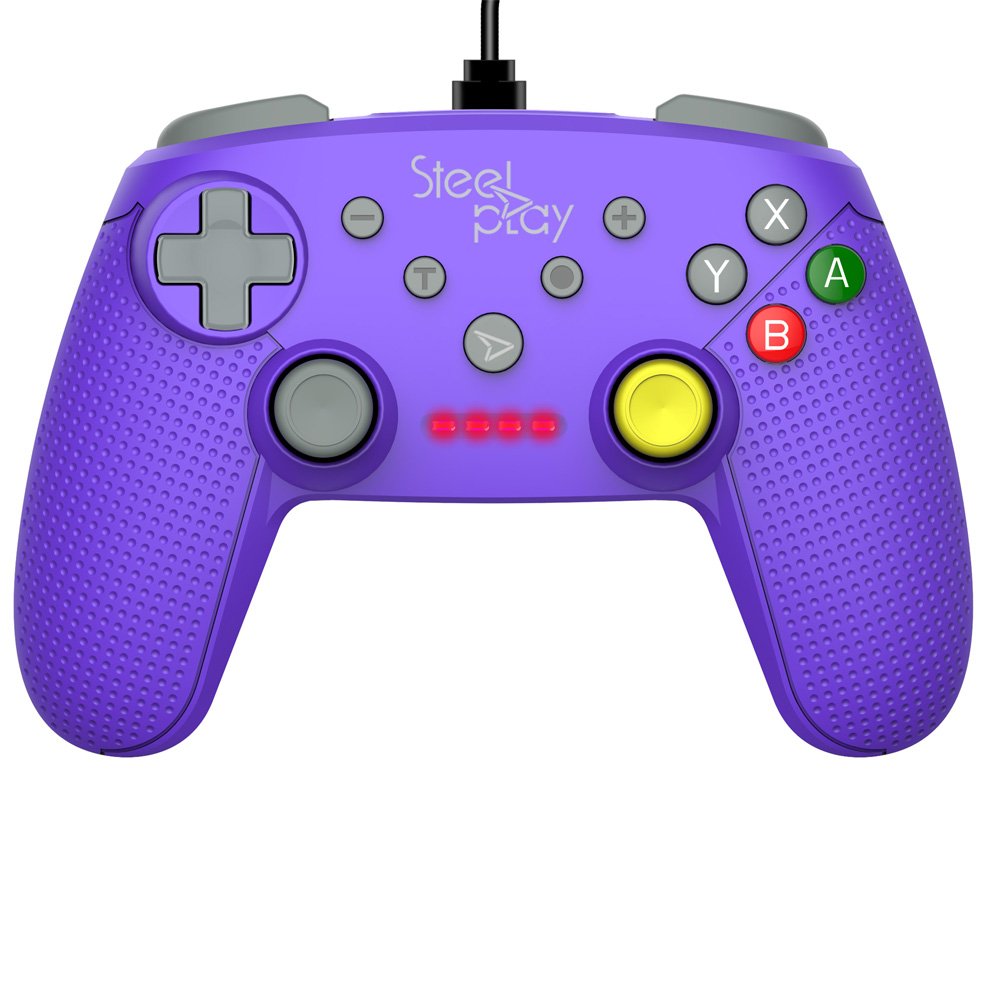
The Steelplay Wired Controller GCUBE (model ECO0622) is designed for use with the Nintendo Switch console, providing a reliable wired connection for uninterrupted gameplay. This controller features a comfortable ergonomic grip, a 2.5-meter USB cable, and includes advanced functionalities such as a gyro sensor, dual vibration feedback, and a turbo function button.
Instructions d'installation
- Connectez le contrôleur : Insert the USB connector of the Steelplay Wired Controller GCUBE into an available USB port on your Nintendo Switch dock.
- Mise sous tension de la console : Ensure your Nintendo Switch console is powered on and connected to your TV or in handheld mode with the dock.
- Reconnaissance automatique : The console should automatically detect the controller. The player indicator lights on the controller will illuminate to show its assigned player number.
- Begin Gameplay: You can now use your Steelplay Wired Controller GCUBE for gaming.
Utilisation du contrôleur
The Steelplay Wired Controller GCUBE features a standard layout for intuitive gameplay.
Fonctions des boutons :
- Joysticks analogiques gauche/droite : Pour le contrôle des mouvements et de la caméra.
- Croix directionnelle (D-Pad) : Pour une saisie directionnelle précise.
- Boutons A/B/X/Y : Boutons d'action, généralement utilisés pour sauter, attaquer, interagir, etc.
- L/R Buttons (Shoulder Buttons): Often used for quick actions or menu navigation.
- ZL/ZR Buttons (Trigger Buttons): Analog or digital triggers for specific in-game actions.
- Bouton moins (-) : Typically opens in-game menus or performs specific actions.
- Bouton Plus (+) : Typically pauses the game or opens system menus.
- Bouton d'accueil: Retour au menu HOME de la Nintendo Switch.
- Bouton de capture : Takes screenshots of your gameplay.
Caractéristiques spéciales :
- Fonction gyroscopique : The controller includes a built-in gyro sensor for motion control in compatible games. This allows for intuitive aiming or steering by tilting the controller.
- Double retour de vibration : Experience enhanced immersion with haptic feedback that responds to in-game events.
- Fonction Turbo: The turbo function allows for rapid, repeated input of a button press. To activate, press and hold the Turbo button, then press the desired action button (e.g., A, B, X, Y, L, R, ZL, ZR). To deactivate, repeat the process.
Entretien
Proper care ensures the longevity and optimal performance of your controller.
- Nettoyage: Utilisez un chiffon doux et sec pour essuyer la manette. Pour les saletés tenaces, frottez légèrement avec un chiffon doux et sec.ampNettoyez le chiffon avec de l'eau. Évitez d'utiliser des produits chimiques agressifs, des solvants ou des nettoyants abrasifs.
- Stockage: Rangez la manette dans un endroit frais et sec, à l'abri de la lumière directe du soleil et des températures extrêmes.
- Entretien des câbles : Avoid bending or twisting the USB cable excessively. Do not pull the cable to disconnect the controller; always grasp the plug.
- Évitez les liquides : Tenez la manette éloignée des liquides afin d'éviter tout dommage interne.
Dépannage
- Le contrôleur ne répond pas :
- Ensure the USB cable is securely connected to both the controller and the Nintendo Switch dock.
- Try connecting the controller to a different USB port on the dock.
- Redémarrez votre console Nintendo Switch.
- Boutons ou joysticks ne fonctionnant pas correctement :
- Vérifiez la présence d'obstructions physiques ou de débris autour des boutons ou des joysticks.
- Ensure the controller's firmware is up to date. Firmware updates may be necessary and typically require connection to a PC. Refer to the Steelplay official website for specific instructions and update tools.
- Vibration ne fonctionne pas :
- Vérifiez que la vibration est activée dans les paramètres de votre console Nintendo Switch et dans le jeu auquel vous jouez.
- Assurez-vous que la manette est correctement connectée.
Caractéristiques
| Fonctionnalité | Détail |
|---|---|
| Numéro de modèle | ECO0622 |
| Compatibilité | Nintendo Switch |
| Connectivité | Filaire (USB) |
| Longueur du câble | 2.5 mètres |
| Dimensions | 17.2 x 7 x 20.3 cm |
| Poids | 360 g |
| Caractéristiques spéciales | Gyro Function, Dual Vibration Feedback, Turbo Function Button, Rubberized Grip Surface, Ergonomic Grip |
Informations sur la garantie
For detailed warranty information regarding your Steelplay Wired Controller GCUBE, please refer to the warranty card included with your product or visit the official Steelplay webLes conditions de garantie peuvent varier selon la région et le détaillant.
Assistance clientèle
If you encounter any issues or have questions not covered in this manual, please contact Steelplay customer support. Contact information can typically be found on the official Steelplay website ou sur l'emballage du produit.


