Introduction
This manual provides detailed instructions for the setup, operation, maintenance, and troubleshooting of your Jaycar Composite AV to HDMI Converter (Model AC-1722). Please read this manual thoroughly before using the device to ensure proper functionality and to prevent damage.
Caractéristiques principales
- Converts Composite Video and Stereo Audio (RCA) to HDMI output.
- Supports HDMI 1080p or 720p output resolutions.
- Compatible with NTSC and PAL video systems.
- Fonctionnement prêt à l'emploi.
Contenu du colis
Veuillez vérifier que tous les articles sont présents dans votre colis :
- Jaycar Composite AV to HDMI Converter (AC-1722)
- Adaptateur secteur (5 V CC)
- Manuel de l'utilisateur (ce document)
Produit terminéview
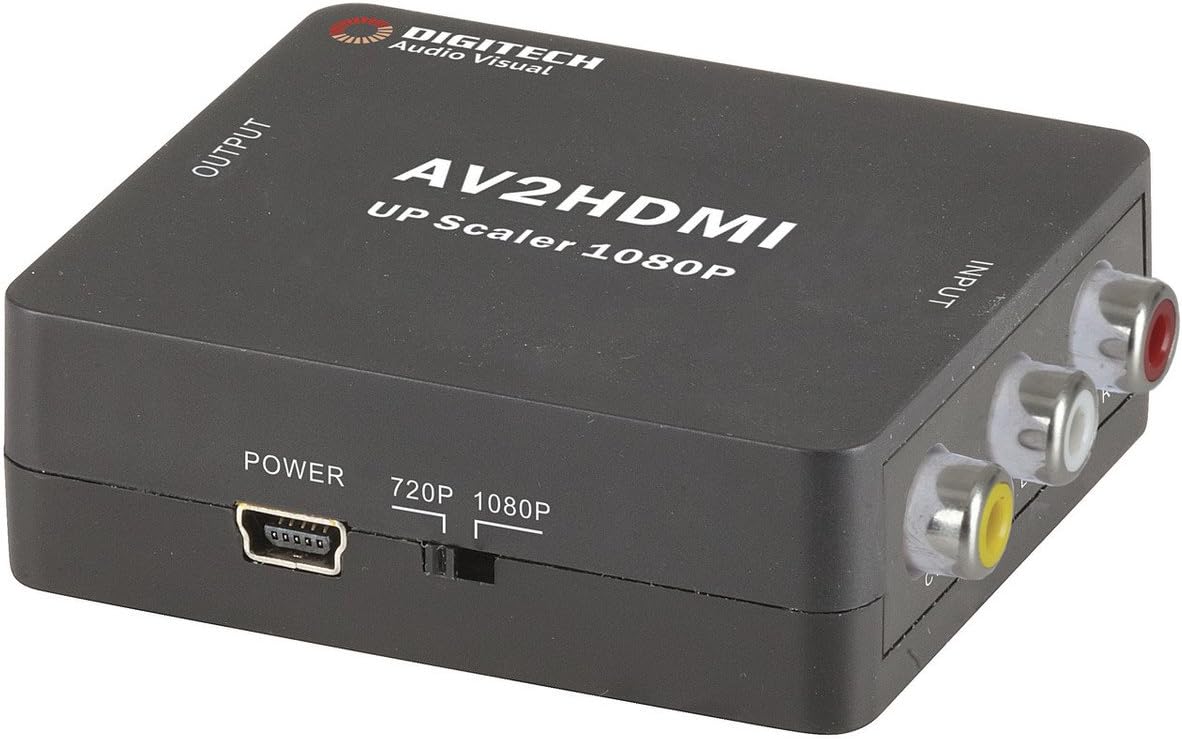
Image 1: Devant view of the Jaycar Composite AV to HDMI Converter. This image displays the top and front of the converter, showing the "AV2HDMI UP Scaler 1080P" label, "OUTPUT" and "INPUT" indicators, the power input, and the 720p/1080p resolution switch. The Composite AV input ports (yellow, white, red) are visible on the right side.

Image 2: Côté view of the converter showing the HDMI output port. This port is labeled "HDMI" and is where the HDMI cable connects to your display device.

Image 3: Côté view of the converter showing the Composite AV input ports. These ports are labeled "CVBS" (yellow for video), "L" (white for left audio), and "R" (red for right audio).

Image 4: Côté view of the converter showing the power input port and the 720p/1080p resolution switch. The power port is a mini-USB type, and the switch allows selection between 720p and 1080p output resolutions.
Instructions d'installation
- Connecter le périphérique source : Connect your Composite AV source device (e.g., DVD player, VCR, game console) to the converter's input ports. Match the yellow RCA cable to the "CVBS" port, the white RCA cable to the "L" (Left Audio) port, and the red RCA cable to the "R" (Right Audio) port.
- Connect Display Device: Connect an HDMI cable from the converter's "HDMI" output port to an available HDMI input on your display device (e.g., TV, monitor, projector).
- Select Output Resolution: Use the 720p/1080p switch on the converter to select your desired output resolution. For most modern displays, 1080p is recommended. If you experience issues, try 720p.
- Connecter l'alimentation : Connect the provided 5V DC power adapter to the converter's "POWER" input port, then plug the adapter into a wall outlet. The converter will power on automatically.
- Sélectionnez l'entrée sur l'écran : Turn on your display device and select the corresponding HDMI input channel to view the converted signal.
Mode d'emploi
The Jaycar Composite AV to HDMI Converter is designed for plug-and-play operation. Once all connections are made and power is supplied, the converter will automatically scale the analog AV signal to the selected HDMI output resolution (720p or 1080p).
- Ensure your source device is powered on and outputting a Composite AV signal.
- Verify your display device is set to the correct HDMI input.
- If no image appears, check all cable connections and the power supply.
- Experiment with the 720p/1080p switch if the image is distorted or not displayed correctly.
Entretien
The converter requires minimal maintenance. Follow these guidelines to ensure longevity:
- Conservez l'appareil dans un endroit sec et bien ventilé, à l'abri de la lumière directe du soleil, des températures élevées et de l'humidité.
- Évitez de laisser tomber ou de soumettre l'appareil à des impacts violents.
- Nettoyez l'extérieur avec un chiffon doux et sec. N'utilisez pas de nettoyants liquides ni de solvants.
- Assurez-vous que tous les câbles sont bien connectés, mais ne les forcez pas.
Dépannage
| Problème | Cause possible | Solution |
|---|---|---|
| Aucune sortie vidéo ou audio. |
|
|
| Distorted or flickering image. |
|
|
| No audio, but video is present. |
|
|
Caractéristiques
| Type d'entrée | Composite Video and Audio (3 RCA) |
| Type de sortie | HDMI de type A |
| Résolutions prises en charge | 1080p (1920 x 1080), 720p |
| Systèmes vidéo | NTSC, PAL |
| Besoin en énergie | 5 V CC (adaptateur secteur inclus) |
| Dimensions du produit (L x l x H) | 54 mm x 60 mm x 20 mm (environ 2.13 po x 2.36 po x 0.79 po) |
| Poids du produit | 80g |
Informations sur la garantie
This Jaycar product comes with a Garantie d'un an À compter de la date d'achat, cette garantie couvre les défauts de matériaux et de fabrication dans des conditions normales d'utilisation. Elle ne couvre pas les dommages causés par une mauvaise utilisation, un accident, une modification non autorisée ou une installation incorrecte.
For warranty claims, please retain your proof of purchase and contact Jaycar customer support.
Assistance clientèle
If you require further assistance or have questions not covered in this manual, please contact Jaycar customer support through their official weble site ou le détaillant où vous avez acheté le produit.
For the latest support information, please visit the official Jaycar website: www.jaycar.com.au


