Waveshare 7inch HDMI LCD (H)

Manuel d'utilisation de l'écran tactile capacitif LCD HDMI 7 pouces Waveshare

Model: 7inch HDMI LCD (H)

Introduction

This manual provides detailed instructions for setting up, operating, and maintaining your Waveshare 7-inch HDMI Capacitive Touch Screen LCD. This display features a 1024x600 resolution IPS panel, capacitive touch functionality, and broad compatibility with various single-board computers and PCs.

Contenu du colis

Vérifiez que tous les éléments énumérés ci-dessous sont inclus dans votre colis :

Waveshare 7-inch HDMI LCD Package Contents

Image: Contents of the Waveshare 7-inch HDMI LCD package, including the display, HDMI cable, USB cable, HDMI adapter, and mounting hardware.

Caractéristiques du produit

Waveshare 7-inch HDMI LCD Features Overview

Image : Terminéview of the 7-inch HDMI Touch Display's key specifications including size, resolution, display interface, panel type, viewing angle, touch type, touch points, touch port, OSD menu, and audio outputs.

Instructions d'installation

1. Connexion à Raspberry Pi

  1. Connect the HDMI port of the Raspberry Pi to the HDMI port of the display using the provided HDMI cable.
  2. Connect the USB port of the Raspberry Pi to the Micro-B USB port labeled "Touch" on the display using the provided USB A to Micro-B cable. This provides power to the display and enables touch functionality.
  3. For Raspberry Pi Zero series, use the included HDMI to Micro HDMI adapter.
  4. Ensure the Raspberry Pi is powered by a suitable 5V/3A (or higher, depending on Pi model) power supply. The display can draw power from the USB connection, but an external power supply for the Pi is essential.

2. Connexion à un PC (Windows)

  1. Connect the HDMI output of your PC to the HDMI input of the display.
  2. Connect a USB port on your PC to the Micro-B USB port labeled "Touch" on the display. This provides power and enables 5-point touch functionality.
  3. The display is driver-free for Windows 11/10/8.1/8/7.

3. Connecting to Jetson Nano

  1. Connect the HDMI output of the Jetson Nano to the HDMI input of the display.
  2. Connect a USB port on the Jetson Nano to the Micro-B USB port labeled "Touch" on the display. This provides power and enables single-point touch functionality.
  3. Ensure the Jetson Nano is powered by a suitable 5V/4A power supply.
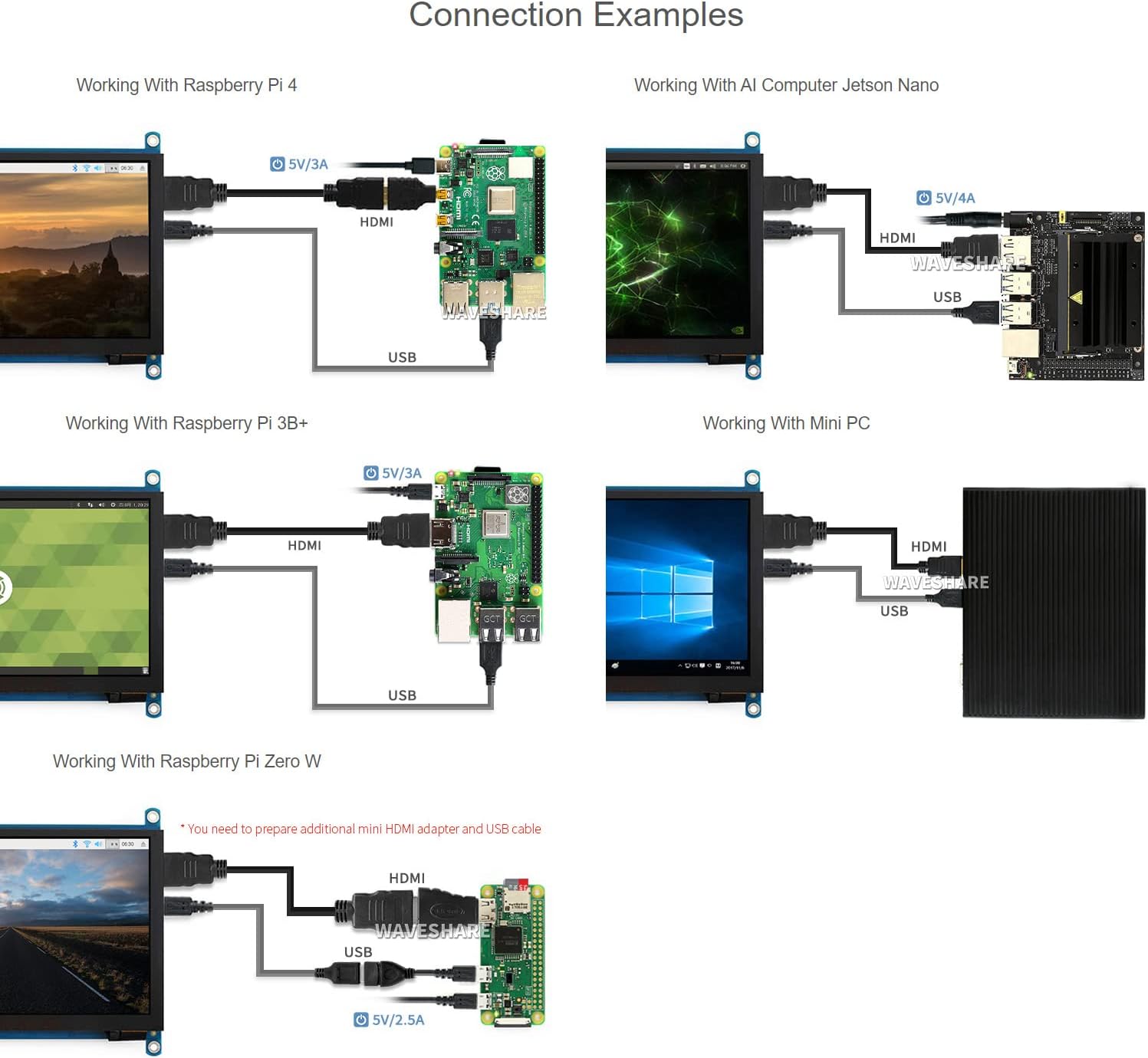
Waveshare 7-inch HDMI LCD Connection Examples

Image: Diagrams illustrating various connection examples for the 7-inch HDMI LCD with Raspberry Pi 4, Jetson Nano, Raspberry Pi 3B+, Raspberry Pi Zero W, and a Mini PC, showing HDMI and USB cable connections.

Mode d'emploi

1. Mise sous/hors tension

The display powers on automatically when connected to a powered device via HDMI and USB. To power off, disconnect the power source from the connected device or the display's USB power input.

2. Navigation dans le menu OSD

The display features an On-Screen Display (OSD) menu for various settings. Use the physical buttons on the side of the display to navigate and adjust settings such as brightness, contrast, and power management. Refer to the "Appearance and Dimensions" section for button identification.

3. Contrôle tactile

The display supports capacitive touch input. When connected via USB to a compatible operating system (Raspberry Pi OS, Ubuntu, Kali, Windows), the touch functionality will be recognized automatically without additional drivers. The number of touch points supported depends on the operating system (e.g., 5-point touch on Windows, single-point on Jetson Nano Ubuntu).

Waveshare 7-inch HDMI LCD Touch Control and Gaming

Image: Demonstrates the capacitive touch control functionality on the 7-inch HDMI LCD, showing a hand interacting with a web browser interface. Also shows the display connected to a game console, indicating support for gaming display.

4. Sortie audio

Audio can be output through the 3.5mm audio jack or the 4PIN header for external speakers. Ensure your connected device is configured to output audio via HDMI.

Entretien

Dépannage

Caractéristiques

Taille de l'écran7 pouces
Résolution1024 x 600 (Hardware), up to 1920x1080 (Software)
Type de panneauIPS
ViewAngle d'attaque170°
Type tactileCapacitif
Points de contact5-point (Windows), Single-point (Jetson Nano), 5-point (Raspberry Pi OS)
Interface d'affichageHDMI, VGA (requires separate cable)
Sortie audio3.5mm Jack, 4PIN Header
Puissance d'entrée5V CC (via USB)
Dimensions du produit7.09 x 5.51 x 1.97 pouces (180 x 140 x 50 mm environ)
Poids de l'article0.352 onces (environ 10 grammes)

Prise en charge des appareils et du système

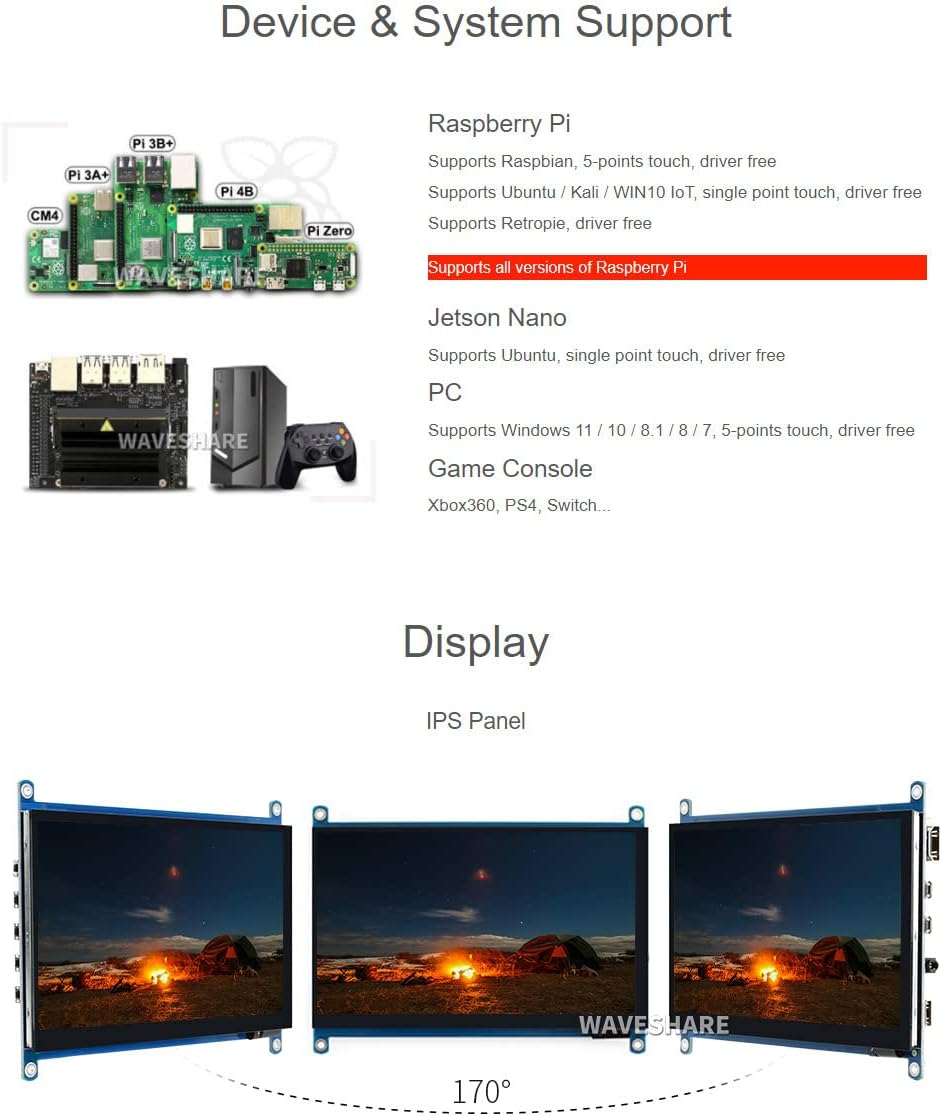
Waveshare 7-inch HDMI LCD Device and System Support

Image: Illustrates various compatible devices including Raspberry Pi models (Pi 3A+, Pi 3B+, Pi 4B, CM4, Pi Zero), Jetson Nano, and a generic PC setup, along with a list of supported operating systems and touch capabilities.
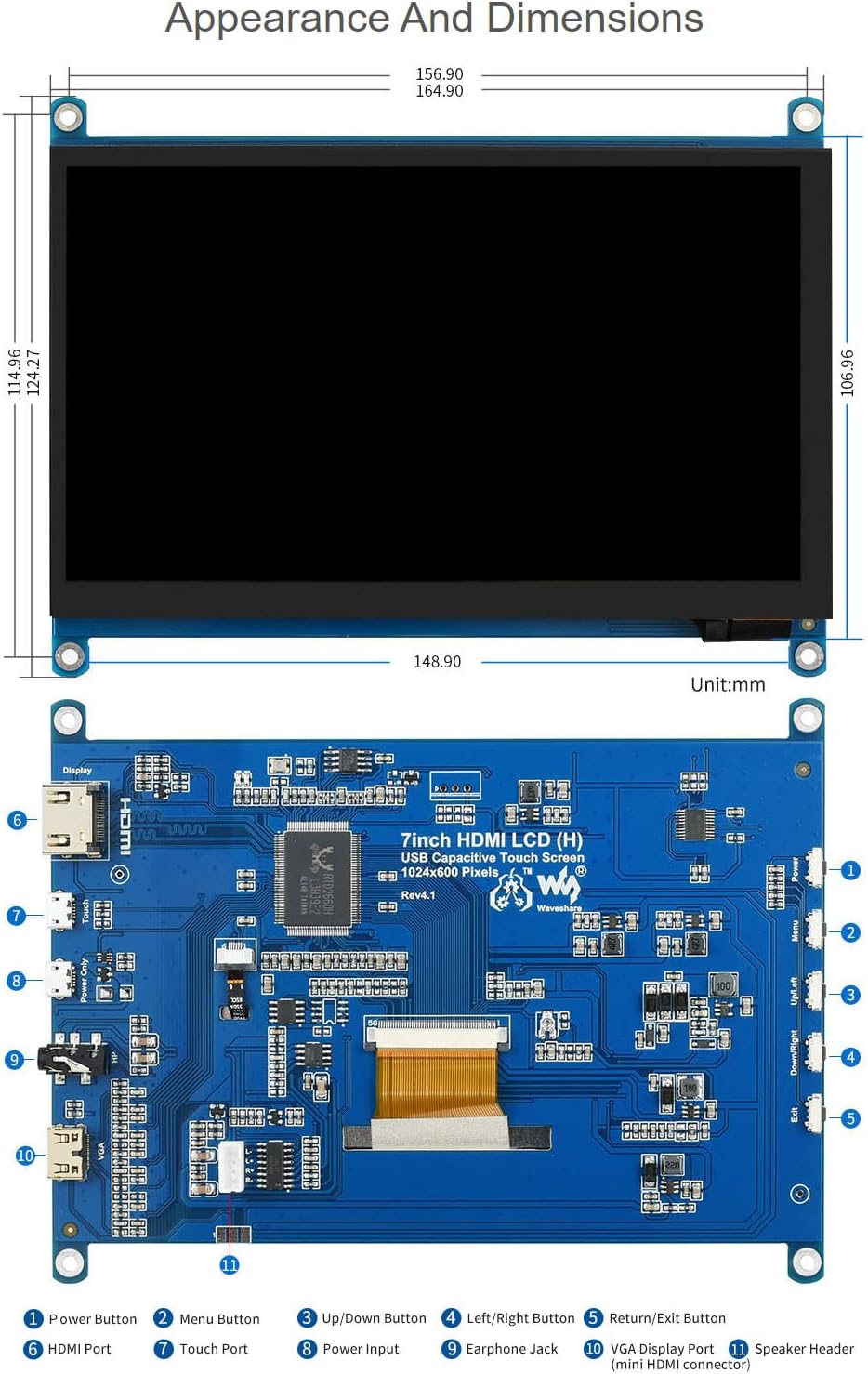
Waveshare 7-inch HDMI LCD Appearance and Dimensions

Image: Technical drawing showing the physical dimensions of the 7-inch HDMI LCD in millimeters, along with a detailed diagram identifying various ports and buttons on the display's circuit board, such as HDMI port, touch port, power input, earphone jack, VGA display port, and OSD menu buttons.

Garantie et assistance

Waveshare is committed to providing high-quality products and customer service.

For technical assistance or warranty claims, please contact Waveshare customer support through their official channels.

Waveshare Support and Service Information

Image: Details Waveshare's commitment to support and service, including rigorous testing, one-to-one technical service, 24-hour response, 30-day free replacement, 365-day free repair, and lifetime technical service.

Certifications

This product holds the following certifications:

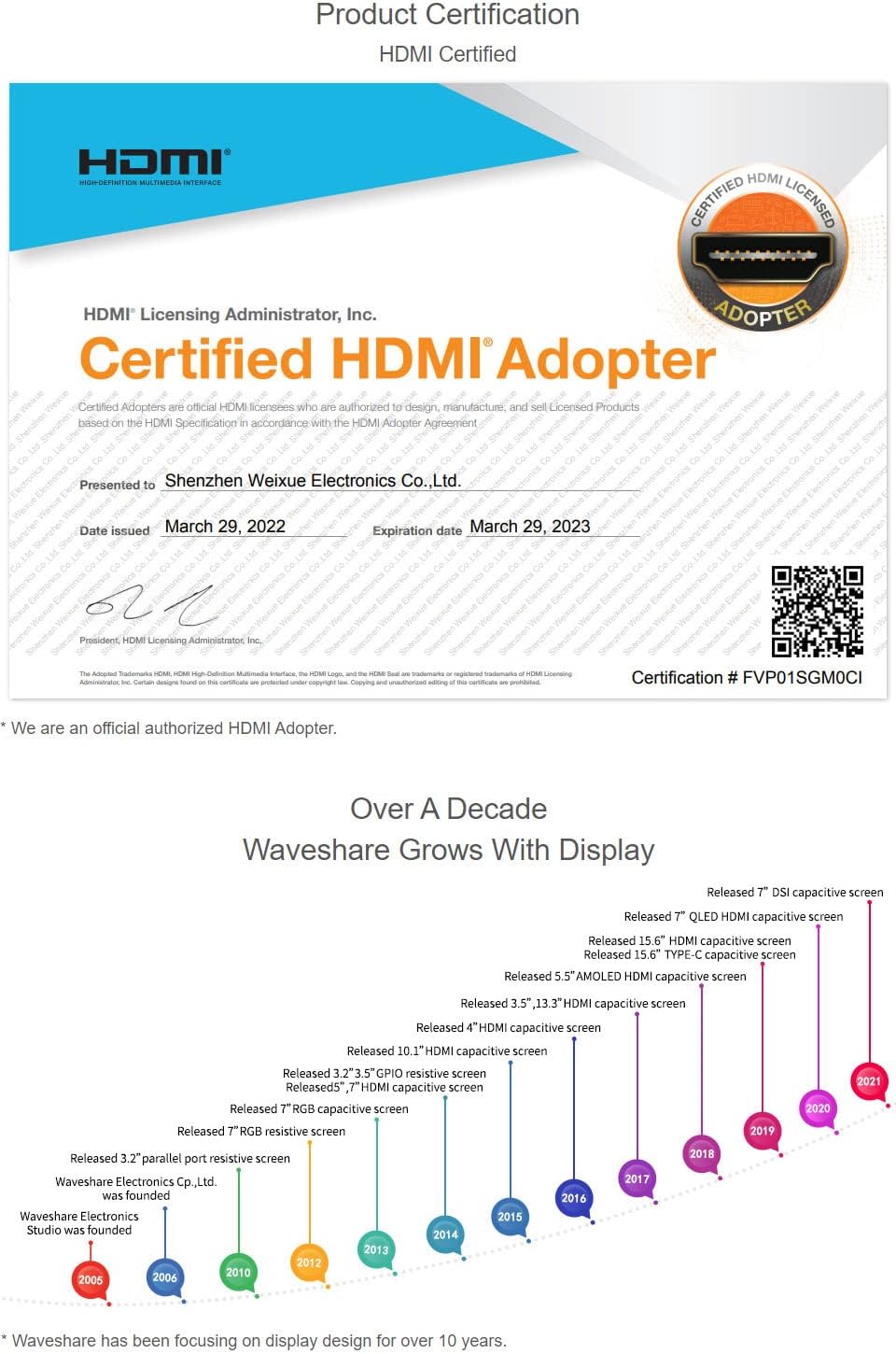
HDMI Certified Adapter Certificate

Image: A certificate indicating that Waveshare is an officially authorized HDMI adopter, ensuring compliance with HDMI standards for quality and reliability.

RoHS and CE Certifications

Image: Displays certificates for RoHS compliance and CE marking, indicating the product meets relevant environmental and safety standards.

Documents connexes - 7inch HDMI LCD (H)

Préview Manuel d'utilisation de l'écran LCD HDMI 7 pouces Waveshare (C) : Guide d'installation et d'utilisation
Ce manuel d'utilisation guide les utilisateurs à travers la configuration et le fonctionnement de l'écran Waveshare 7 pouces HDMI LCD (C), en détaillant ses spécifications, les méthodes de connexion pour Raspberry Pi et PC, et des conseils d'utilisation essentiels pour des performances optimales.
Préview Manuel d'utilisation de l'écran LCD HDMI Waveshare 10.1 pouces (G) : Installation, caractéristiques et connexions
Découvrez l'écran LCD HDMI 10.1 pouces Waveshare (G) avec étui. Ce manuel d'utilisation présente les caractéristiques essentielles, les consignes de sécurité, les guides de connexion pour Raspberry Pi, Jetson Nano et PC, et répond aux questions les plus fréquentes.
Préview Écran LCD Waveshare 4 pouces DSI pour Raspberry Pi : Installation et guide
Guide détaillé pour l'écran LCD Waveshare 4 pouces DSI, couvrant les fonctionnalités, la connexion matérielle, l'installation du logiciel, la rotation de l'écran, le contrôle du rétroéclairage et le dépannage pour Raspberry Pi.
Préview Guide d'utilisation de l'écran tactile LCD HDMI 7 pouces Waveshare pour Raspberry Pi
Guide d'utilisation complet pour l'écran LCD HDMI 7 pouces Waveshare, couvrant la configuration, l'installation des pilotes, le calibrage tactile et l'utilisation avec Raspberry Pi.
Préview Écran LCD IPS rond Waveshare 5 pouces 1080 x 1080 - Guide d'utilisation
Découvrez l'écran rond IPS LCD Waveshare de 5 pouces (1080 x 1080 pixels). Ce guide détaille ses caractéristiques, ses spécifications et son installation pour Raspberry Pi et PC Windows, y compris le calibrage tactile et la connectivité.
Préview Écran tactile capacitif Waveshare 4.3 pouces DSI LCD pour Raspberry Pi
Découvrez l'écran tactile capacitif IPS 4.3 pouces DSI de Waveshare (800 x 480 pixels) conçu pour Raspberry Pi. Il est doté d'une interface MIPI DSI, d'une installation sans pilote et d'un rétroéclairage contrôlé par logiciel.