1. Introduction
Merci pour votre achatasing the Bytech Massive Bluetooth Long Bar Speaker-BK. This manual provides essential information for the proper setup, operation, and maintenance of your new speaker. Please read this manual thoroughly before using the product to ensure optimal performance and longevity.
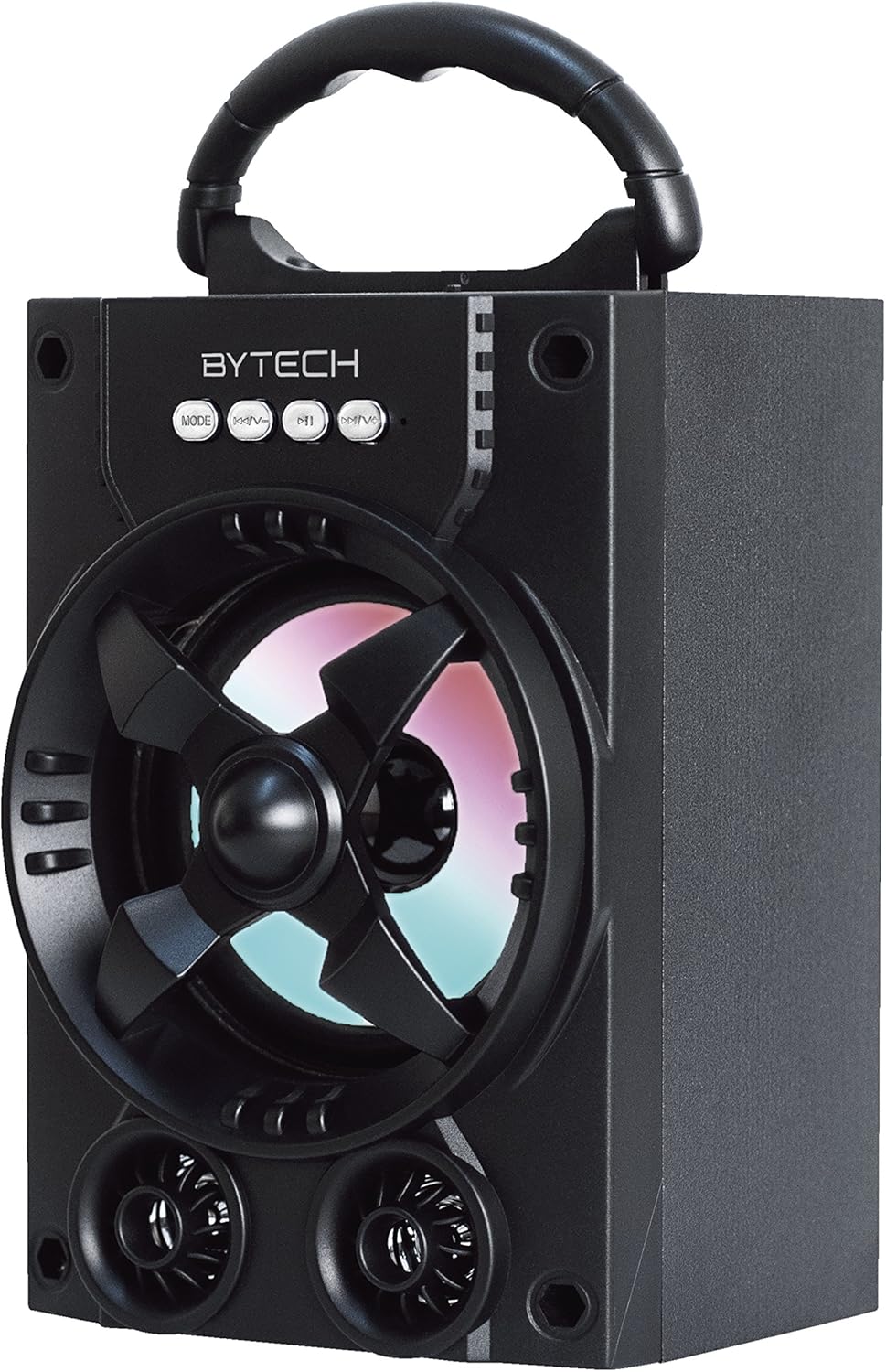
Figure 1.1 : Face avant view of the Bytech Massive Bluetooth Long Bar Speaker-BK, showcasing its design, handle, and speaker grille with LED lights.
2. Contenu du colis
Veuillez vérifier que le colis contient les éléments suivants :
- Bytech Massive Bluetooth Long Bar Speaker-BK
- Câble de chargement USB
- Manuel de l'utilisateur (ce document)
Si des articles sont manquants ou endommagés, veuillez contacter le service client.
3. caractéristiques du produit
- LED Performance Lights: Dynamic LED lights that synchronize with your music for an enhanced audio-visual experience.
- Poignée de transport pratique : Integrated handle for easy portability, allowing you to take your music anywhere.
- Connectivité Bluetooth universelle : Seamlessly connect wirelessly to your smartphone, tablet, or other Bluetooth-enabled devices.
- Son surround: Designed to deliver a high-quality surround sound experience.
- Conception portable : Ideal for various settings, including parties, outdoor gatherings, and personal use.

Figure 1.2: The speaker shown with its retail packaging, illustrating its key features such as multi-color LED lights, Bluetooth connectivity, and surround sound capability.
4. Commandes et indicateurs
The speaker features intuitive controls and indicators for easy operation:
- Bouton MODE : Press to switch between available input modes (e.g., Bluetooth).
- Bouton V : Press to decrease volume. Long press to skip to the previous track.
- Bouton V+ : Appuyez pour augmenter le volume. Appuyez longuement pour passer au morceau suivant.
- Bouton M : (Function not explicitly detailed, typically for mode or mute)
- Lumières LED : Indicate power status, charging status, and provide dynamic light effects during audio playback.
5. Guide de configuration
5.1 Chargement de l'enceinte
- Connectez la petite extrémité du câble de chargement USB au port de chargement de l'enceinte.
- Connectez l'extrémité la plus large du câble de chargement USB à un adaptateur secteur USB (non inclus) ou au port USB d'un ordinateur.
- Le voyant LED indiquera l'état de charge (par exemple, rouge pendant la charge, éteint une fois la charge complète).
- Prévoir environ 3 à 4 heures pour une charge complète avant la première utilisation.
5.2 Mise sous/hors tension
- To power on, press and hold the Power button (location not specified, typically near charging port or on control panel) for a few seconds until you hear an audible prompt or see the LED lights activate.
- Pour éteindre l'appareil, maintenez le bouton Marche/Arrêt enfoncé jusqu'à ce que l'enceinte s'éteigne.
5.3 Couplage Bluetooth
- Ensure the speaker is powered on and in Bluetooth pairing mode (indicated by a flashing LED light or audible prompt).
- Sur votre smartphone ou tablette, accédez aux paramètres Bluetooth.
- Rechercher available devices. The speaker will appear as "BYTECH" or a similar name.
- Sélectionnez l'enceinte dans la liste pour lancer l'appairage.
- Once successfully paired, the LED indicator will typically become solid, and you may hear a confirmation tone.
6. Mode d'emploi
6.1 Lecture audio via Bluetooth
- After successful Bluetooth pairing, open your preferred music application on your connected device.
- Select and play your desired audio. The sound will be streamed wirelessly to the speaker.
- Use the V+ and V- buttons on the speaker or your connected device to adjust the volume.
- Long press V+ or V- to skip tracks.
6.2 LED Performance Lights
The speaker features integrated LED lights that enhance your listening experience. These lights typically activate automatically when the speaker is powered on and playing audio. Specific controls for light modes are not detailed, but they are designed to provide dynamic visual effects.
6.3 Changement de mode
Appuyez sur le MODE button to cycle through available input modes. While Bluetooth is the primary connectivity, other modes (if available, such as FM radio or AUX input) can be accessed via this button.
7. Maintenance et entretien
- Nettoyage: Utilisez un chiffon doux et sec pour nettoyer l'extérieur du haut-parleur. N'utilisez pas de nettoyants abrasifs, de cires ni de solvants.
- Stockage: Lorsqu'elle n'est pas utilisée pendant une période prolongée, rangez l'enceinte dans un endroit frais et sec, à l'abri de la lumière directe du soleil et des températures extrêmes.
- Entretien de la batterie: Pour prolonger la durée de vie de la batterie, évitez de la décharger complètement et fréquemment. Rechargez régulièrement l'enceinte, même lorsqu'elle n'est pas utilisée, afin de préserver la batterie.
- Résistance à l'eau : Ce produit est PAS waterproof. Avoid exposure to water, rain, or excessive moisture to prevent damage.
8. Dépannage
Si vous rencontrez des problèmes avec votre haut-parleur, consultez les problèmes et solutions courants suivants :
| Problème | Cause possible | Solution |
|---|---|---|
| Le haut-parleur ne s'allume pas. | Batterie faible. | Chargez complètement l'enceinte. |
| Aucun son provenant du haut-parleur. | Volume trop faible ; appareil non apparié ; mode incorrect. | Increase volume on speaker and device; Ensure successful Bluetooth pairing; Press MODE button to select correct input. |
| Connexion Bluetooth instable ou défaillante. | Device too far; Interference; Pairing issue. | Move device closer to speaker (within 33 ft/10m); Avoid obstacles; Forget device on your phone and re-pair. |
| Les lumières LED ne fonctionnent pas. | Speaker not powered on or playing audio. | Ensure speaker is on and audio is playing. |
9. Spécifications
| Fonctionnalité | Détail |
|---|---|
| Marque | Bytech |
| Nom du modèle | PARTECH |
| Numéro de modèle de l'article | BCAUBS134BK |
| Type de haut-parleur | Son surround |
| Technologie de connectivité | Bluetooth |
| Technologie de communication sans fil | Bluetooth |
| Appareils compatibles | Smartphone |
| Puissance de sortie maximale du haut-parleur | 20 watts |
| Réponse en fréquence | 20 kHz |
| Impédance | 1 ohms |
| Taille du haut-parleur | 5 pouces |
| Source d'énergie | Électrique filaire (pour la recharge) |
| Type de batterie | 1 batterie lithium-ion requise |
| Couleur | Noir |
| Dimensions du produit | 4.75 x 5.5 x 8.5 pouces |
| Poids de l'article | 1.3 livres |
| Est étanche | Non |
| Pays d'origine | Chine |
| Code UPC | 805112038121 |
10. Informations sur la garantie
Bytech products are manufactured to the highest quality standards. For specific warranty terms and conditions, please refer to the warranty card included with your purchase or visit the official Bytech webConsultez le site. Conservez votre preuve d'achat pour toute réclamation au titre de la garantie.
11. Assistance clientèle
For technical assistance, troubleshooting, or general inquiries, please contact Bytech customer support. Contact information can typically be found on the product packaging, the official Bytech website, ou votre reçu d'achat.
Remarque : Aucune vidéo officielle du produit fournie par le vendeur n'était disponible pour intégration sur la base des données fournies.