1. Introduction
This manual provides essential information for the safe and efficient operation of your Digi International WR21-L52A-DE1-TB Cellular Wireless Router. Please read this manual thoroughly before installation and use, and retain it for future reference. This device is designed to provide reliable cellular connectivity for various applications.
2. Consignes de sécurité
- Alimentation: Utilisez uniquement l'adaptateur secteur fourni avec l'appareil. L'utilisation d'un adaptateur non conforme risque d'endommager l'appareil et d'annuler la garantie.
- Ventilation: Assurez une ventilation adéquate autour du routeur. Ne bloquez pas les ouvertures de ventilation.
- Environnement: Avoid exposing the device to extreme temperatures, humidity, direct sunlight, or corrosive environments.
- Entretien: N’essayez pas d’ouvrir ou de réparer l’appareil vous-même. Confiez toute réparation à un personnel qualifié.
- Antennes: Ensure antennas are securely connected before powering on the device.
3. Contenu du colis
Vérifiez que tous les éléments sont présents dans le colis :
- Digi International WR21-L52A-DE1-TB Cellular Wireless Router
- Adaptateur secteur
- Antennas (quantity may vary)
- Câble Ethernet
- Guide de démarrage rapide (le cas échéant)
Si des articles sont manquants ou endommagés, contactez immédiatement votre fournisseur.
4. Produit terminéview
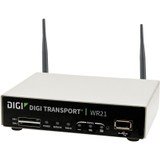
Image : Avant view of the Digi International WR21-L52A-DE1-TB Cellular Wireless Router. This image displays the compact form factor of the device, likely showing ports for antennas, power, and network connections.
The Digi International WR21-L52A-DE1-TB is a robust cellular wireless router designed for reliable and secure connectivity. It features multiple connectivity options and is suitable for various industrial and enterprise applications requiring remote access and data transfer over cellular networks.
5. Installation
5.1. Installation de la carte SIM
- Assurez-vous que le routeur est éteint et déconnecté de la source d’alimentation.
- Locate the SIM card slot(s) on the device. Refer to the device's physical markings for exact location.
- Insert the activated cellular SIM card into the slot with the gold contacts facing down and the notched corner oriented correctly. Push until it clicks into place.
- If applicable, secure the SIM card tray or cover.
5.2. Connexion de l'antenne
- Identify the cellular antenna ports (typically labeled 'MAIN' and 'DIV' or similar).
- Screw the provided cellular antennas onto the corresponding ports until finger-tight. Do not overtighten.
- Positionnez les antennes pour une réception optimale du signal.
5.3. Connexion électrique
- Branchez l'adaptateur secteur au port d'entrée d'alimentation du routeur.
- Branchez l'adaptateur secteur dans une prise électrique appropriée.
- The router will power on automatically or may require pressing a power button. Observe the LED indicators for power status.
5.4. Connexion réseau (facultatif)
- To connect a device via Ethernet, plug one end of an Ethernet cable into an available LAN port on the router.
- Plug the other end of the Ethernet cable into the network port of your computer or other network device.
6. Mode d'emploi
6.1. Mise sous/hors tension
- Mise sous tension : Connect the power adapter. The device will typically power on automatically. Observe the power LED.
- Éteindre: Disconnect the power adapter from the electrical outlet. For controlled shutdown, refer to the device's web interface or specific documentation for a software shutdown procedure if available.
6.2. Accéder au Web Interface
- Ensure your computer is connected to the router via Ethernet or Wi-Fi (if enabled).
- Ouvrir un web navigateur (par exemple, Chrome, Firefox, Edge).
- Saisissez l'adresse IP par défaut du routeur (par exemple, 192.168.1.1 or 192.168.0.1) into the address bar and press Enter. Refer to the Quick Start Guide or device label for the exact default IP address.
- Enter the default username and password when prompted. These are typically found on a label on the device or in the Quick Start Guide.
- Upon successful login, you will access the router's configuration interface.
6.3. Configuration de base
Dans le cadre de web via l'interface, vous pouvez configurer différents paramètres :
- Cellular Settings: Verify APN settings, signal strength, and connection status.
- Paramètres réseau : Configure LAN IP address, DHCP server, and port forwarding.
- Sécurité: Change default login credentials, configure firewall rules, and VPN settings.
- Mise à jour du firmware: Check for and apply firmware updates to ensure optimal performance and security.
7. Entretien
- Nettoyage: Utilisez un chiffon doux et sec pour nettoyer l'extérieur de la défonceuse. N'utilisez pas de nettoyants liquides ni d'aérosols.
- Mises à jour du micrologiciel : Vérifiez régulièrement les instructions du fabricant. webSite de mise à jour du micrologiciel. Maintenir le micrologiciel à jour garantit l'accès aux dernières fonctionnalités, aux correctifs de sécurité et aux améliorations de performances.
- Conditions environnementales : Ensure the router is operating within its specified temperature and humidity ranges to prevent overheating or damage.
8. Dépannage
8.1. No Cellular Connection
- Verify the SIM card is correctly inserted and activated with your cellular provider.
- Check antenna connections and ensure they are positioned for optimal signal.
- Connectez-vous à web interface to check cellular signal strength and connection status.
- Redémarrez le routeur.
8.2. Accès impossible Web Interface
- Ensure your computer is directly connected to the router via Ethernet.
- Verify your computer's IP address is in the same subnet as the router (e.g., if router is 192.168.1.1, computer should be 192.168.1.x).
- Essayez de vider le cache de votre navigateur ou d'utiliser un autre navigateur.
- If you forgot the password, a factory reset might be necessary (refer to specific device documentation for this procedure, as it will erase all configurations).
8.3. Vitesse de connexion lente
- Check cellular signal strength in the web interface. Weak signal can lead to slow speeds.
- Assurez-vous que les antennes sont correctement positionnées et dégagées.
- Verify your cellular data plan has not reached its data cap or is being throttled.
- Restart the router and connected devices.
9. Spécifications
| Fonctionnalité | Description |
|---|---|
| Modèle | WR21-L52A-DE1-TB |
| Marque | Digi International |
| Protocole de connectivité | Cellulaire |
| Technologie de connectivité | USB |
| Méthode de contrôle | Télécommande |
| Dossier spécial | WPS |
| Appareils compatibles | Ordinateur personnel |
| Utilisations recommandées | Maison |
| Code UPC | 747356312219 |
10. Garantie et assistance
For detailed warranty information, please refer to the warranty card included with your product or visit the official Digi International website. Technical support is available through the manufacturer's support channels. Please have your product model number (WR21-L52A-DE1-TB) and serial number ready when contacting support.


