Introduction
This manual provides detailed instructions for the installation, operation, and maintenance of your ORICO 3.5-inch USB 3.1 External Hard Drive Enclosure. This enclosure is designed to convert a 3.5-inch SATA HDD or SSD into an external storage device, offering high-speed data transfer and broad compatibility.

Image: The ORICO 3.5-inch USB 3.1 External Hard Drive Enclosure shown with its detachable vertical stand.
Contenu du colis
Veuillez vérifier que tous les articles sont présents dans le colis :
- 1 boîtier de disque dur de 3.5 pouces
- 1 x USB Cable (USB-C to USB-A)
- 1 x adaptateur secteur 12 V/2 A
- 1 base amovible.
- 1 x tournevis

Image: All components included in the ORICO 3.5-inch external hard drive enclosure package.
Configuration et installation
Follow these steps to install your 3.5-inch SATA hard drive or SSD into the enclosure:
- Ouvrez le boîtier : Utilisez le tournevis fourni pour ouvrir le couvercle du boîtier.
- Insérer un disque dur : Carefully slide your 3.5-inch SATA HDD or SSD into the enclosure, ensuring it connects securely to the internal SATA connector.
- Fermez l'enclos : Replace the cover and tighten the screws using the screwdriver.
- Connexion à l'alimentation : Connect the 12V/2A power adapter to the enclosure's power port and plug it into an electrical outlet.
- Connectez-vous à l'ordinateur : Connect the USB cable from the enclosure's USB 3.1 Type-C port to an available USB port on your computer. The device is plug-and-play.

Image: Step-by-step visual instructions for hard drive installation and connection.
The enclosure includes a detachable base for vertical placement, which can help save desk space. For portability, the main enclosure can be used without the base.

Image: The enclosure can be used vertically with its stand to save space or horizontally for portability.
Mode d'emploi
Once connected, the enclosure will be recognized by your operating system. A blue LED indicator on the front of the enclosure will illuminate to show power and activity status.

Image: The blue LED indicator signifies power and data activity.
Vitesse de transfert des données
The enclosure supports USB 3.1 Gen1 to SATA 3.0 with a maximum data transfer rate of 5 Gbps. It also supports the UASP (USB Attached SCSI Protocol) for enhanced performance, especially with SSDs.
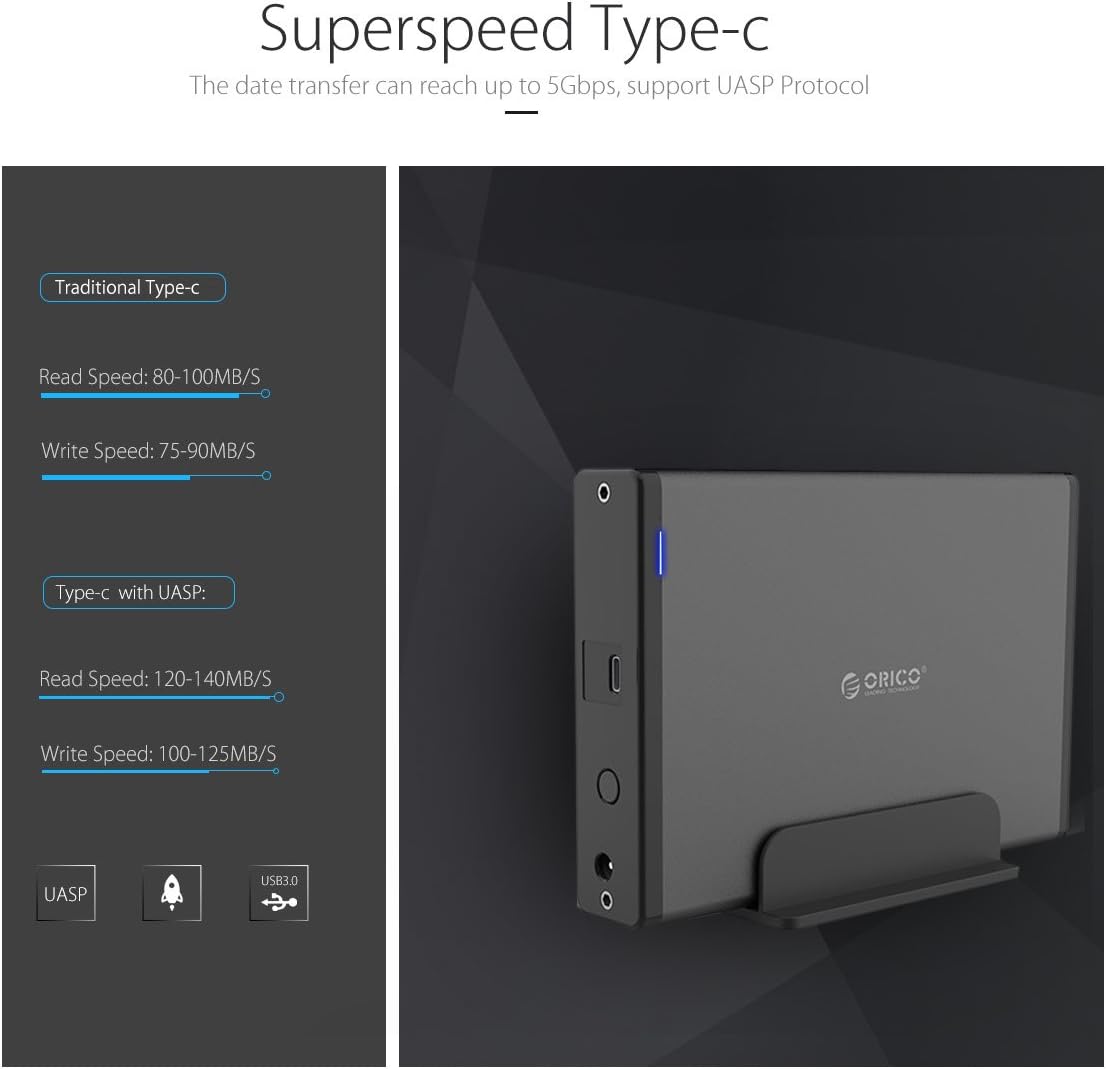
Image: Comparison of data transfer speeds with and without UASP support.
Smart Auto Sleep Function
The enclosure features a smart auto-sleep function that activates after 10 minutes of inactivity to conserve power and extend the lifespan of your hard drive.

Image: The enclosure enters sleep mode after 10 minutes of idle time.
Compatibilité
Ce boîtier est conçu pour une large compatibilité :
- Type de disque dur: Supports 3.5-inch SATA I/II/III HDDs and SSDs.
- Capacité maximale : Prend en charge les disques durs jusqu'à 18 To.
- Systèmes d'exploitation : Compatible with Windows 10/8/7, Mac OS 8.0 and above, and Linux systems.
- Interface: Connects via USB 3.1 Gen1 Type-C port.
Important: Ensure your hard drive uses a Serial ATA (SATA) port. This enclosure is not compatible with Parallel ATA (IDE) ports.

Image: Visual guide to distinguish between compatible SATA and incompatible IDE ports.
Caractéristiques
| Modèle | 7688 USB C (7688C3) |
| Technologie de connectivité | SATA, USB |
| Interface | USB 3.1 Gen1 (Type-C), SATA 3.0 |
| Vitesse de transfert des données | Jusqu'à 5 Gbit/s |
| Type de lecteur pris en charge | Disque dur/SSD SATA 3.5 pouces |
| Capacité de stockage maximale | 18 TB (up to 20 TB mentioned in some specifications) |
| Matériel | High-quality Magnesium Alloy, Aluminum, ABS |
| Dimensions (L x l x H) | 17.4 x 12.5 x 2.8 cm |
| Poids | 560 g |
| Adaptateur secteur | 12 V/2 A |
| Caractéristiques | UASP Support, Hot Swap, Plug and Play, Smart Auto Sleep (10 mins) |
Dépannage
- Appareil non reconnu:
- Vérifiez que l'adaptateur secteur est correctement branché et que le boîtier est sous tension.
- Vérifiez la connexion du câble USB au boîtier et à votre ordinateur. Essayez un autre port USB ou un autre câble.
- Verify that the hard drive is properly seated within the enclosure and connected to the SATA interface.
- For Windows users, check Disk Management to see if the drive appears but needs initialization or formatting. For Mac users, check Disk Utility.
- If using Windows 11 and experiencing recognition issues, ensure your system drivers are up to date. Some users have reported compatibility challenges with specific Windows 11 configurations.
- Transfert de données lent :
- Ensure you are connected to a USB 3.0 or USB 3.1 port on your computer. Connecting to a USB 2.0 port will result in slower speeds.
- Vérifiez que votre système d'exploitation et vos pilotes prennent en charge UASP pour des performances optimales.
- La vitesse du disque dur lui-même peut constituer un facteur limitant.
- Hard Drive Not Fitting:
- Ensure you are using a 3.5-inch SATA HDD/SSD. The enclosure is not designed for 2.5-inch drives or IDE drives.
- Check for any internal obstructions or misalignments. Some hard drives might have slight variations in dimensions; ensure proper alignment with the SATA connector.
- Déconnexion aléatoire du boîtier :
- Check power connections and USB cable integrity.
- Disable USB selective suspend settings in your computer's power options (Windows) or energy saver settings (Mac) to prevent the system from powering down the USB port.
Entretien
Pour garantir la longévité et les performances optimales de votre boîtier ORICO :
- Veillez à ce que le boîtier reste propre et exempt de poussière. Utilisez un chiffon doux et sec pour le nettoyer.
- Évitez d'exposer l'appareil à des températures extrêmes, à l'humidité ou à la lumière directe du soleil.
- Ne pas laisser tomber le boîtier ni le soumettre à des chocs violents.
- Always safely eject the hard drive from your operating system before disconnecting the USB cable or power.
- Rangez le boîtier dans un endroit frais et sec lorsqu'il n'est pas utilisé.
Garantie et assistance
Les produits ORICO sont couverts par une garantie constructeur standard. Pour connaître les conditions générales de garantie, veuillez consulter la carte de garantie fournie avec votre produit ou visiter le site officiel d'ORICO. website. For technical support or customer service, please contact ORICO customer support through their official channels.
Fabricant: ORICO Technologies Co., Ltd


