Introduction
This manual provides comprehensive instructions for the setup, operation, maintenance, and troubleshooting of your Thomson Universal 2-in-1 Zapper Remote Control ROC Z107. Please read this manual carefully before using the device to ensure optimal performance and longevity.
Produit terminéview
The Thomson ROC Z107 is a universal remote control designed to operate two devices, typically a Television (TV) and a Set-Top Box (STB). It features large buttons for ease of use and includes a learning function for expanded compatibility.
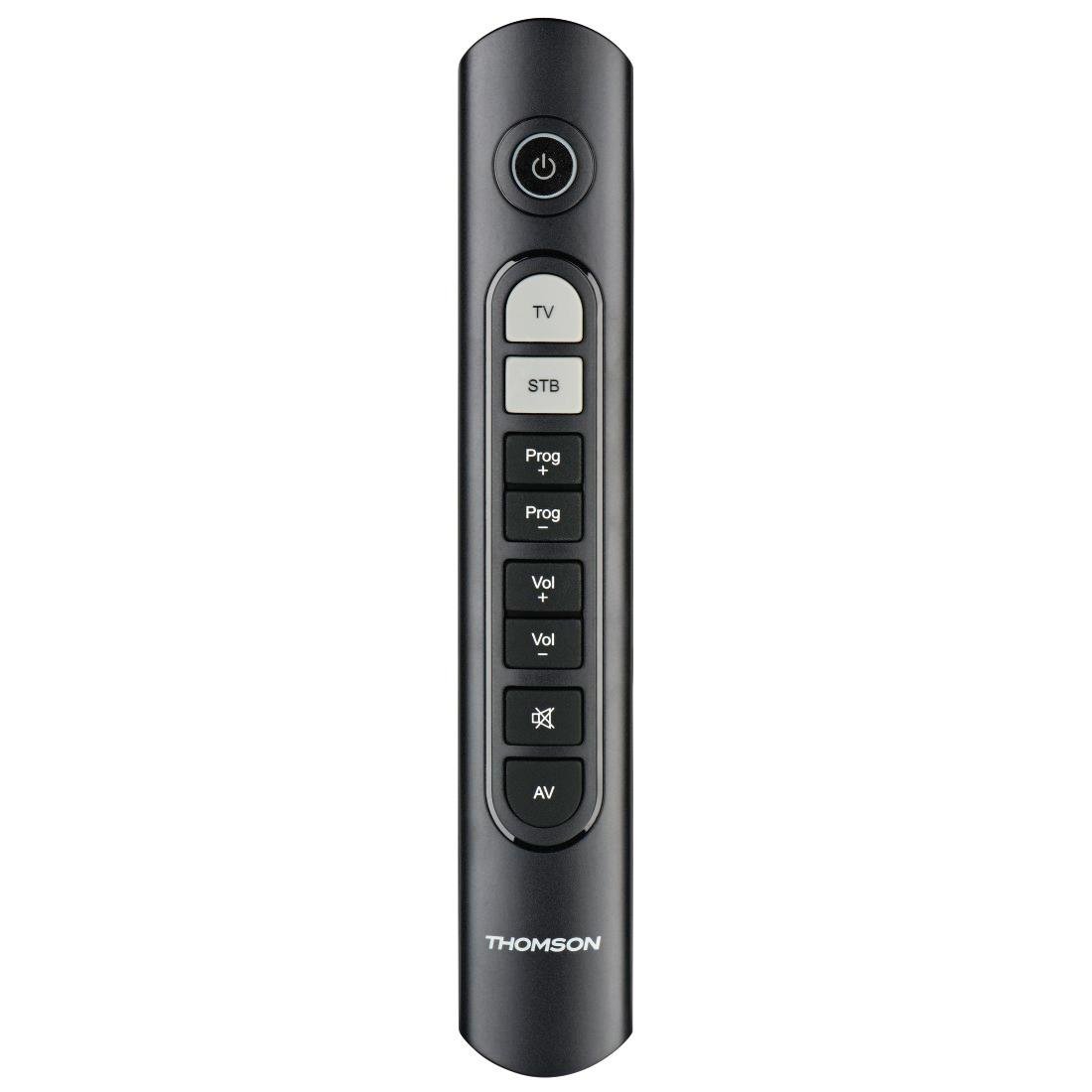
Image: Thomson Universal 2-in-1 Zapper Remote Control ROC Z107. This image displays the remote control from a slightly angled top-down perspective, highlighting its ergonomic design and the layout of its primary buttons.
Installation
1. Installation de la batterie
- Ouvrez le couvercle du compartiment des piles au dos de la télécommande.
- Insert two AAA batteries, ensuring correct polarity (+ and -). Two AAA batteries are included with your purchase.
- Fermez soigneusement le couvercle du compartiment à piles.
2. Initial Programming (Pre-programmed Devices)
The remote control is pre-programmed for many popular brands such as LG, Sony, Samsung, Sharp, and Philips. For these brands, the remote may function immediately after battery installation without further setup. Test the remote with your TV and STB.
3. Learning Function (For Unlisted or Specific Functions)
If your device is not immediately compatible or if you wish to add specific functions from your original remote, use the learning function:
- Place the Thomson remote and your original remote control head-to-head, approximately 2-5 cm apart.
- Press and hold the desired device button (TV or STB) on the Thomson remote until the indicator light blinks.
- Press the button on the Thomson remote that you wish to program. The indicator light will blink slowly.
- Press the corresponding button on your original remote control. The indicator light on the Thomson remote will blink rapidly to confirm successful learning.
- Répétez l'opération pour les autres boutons si nécessaire.
- Press the device button (TV or STB) again to exit learning mode.
4. Master Volume and Program Selection
This feature allows you to designate which device (TV or STB) controls the volume and program channels, regardless of which device mode the remote is currently in. Refer to the full user manual for specific steps on setting up master control functions.
Mode d'emploi
The Thomson ROC Z107 remote control features a simplified button layout for essential functions.

Image: Close-up of Thomson ROC Z107 remote control buttons. This image provides a detailed view of the remote's buttons, including Power, TV, STB, Program Up/Down, Volume Up/Down, Mute, and AV input selection.
- Bouton d'alimentation (⏻): Turns the selected device (TV or STB) on or off.
- Bouton TV : Selects the Television control mode.
- STB Button: Selects the Set-Top Box control mode.
- Prog + / Prog - Buttons: Changes the program/channel up or down.
- Vol + / Vol - Buttons: Augmente ou diminue le volume.
- Bouton Muet (🔇): Coupe ou réactive le son.
- Bouton AV : Switches the input source on the TV (e.g., HDMI 1, HDMI 2, AV).
Entretien
Remplacement de la batterie
When the remote control's performance degrades or the indicator light does not respond, it is time to replace the batteries. Follow the battery installation steps outlined in the Setup section.
Nettoyage
Pour nettoyer la télécommande, utilisez un chiffon doux et sec. N'utilisez pas de nettoyants liquides ni de produits abrasifs, car ils pourraient endommager la surface ou les composants internes de la télécommande.
Dépannage
- La télécommande ne répond pas :
- Vérifiez que les piles sont correctement insérées et qu'elles ne sont pas déchargées. Remplacez-les si nécessaire.
- Assurez-vous qu'aucun obstacle ne se trouve entre la télécommande et le récepteur infrarouge de l'appareil.
- Verify that the remote is in the correct device mode (TV or STB).
- Certaines fonctions ne fonctionnent pas :
- If a specific button does not work, it may not be programmed for your device or the device may not support that function. Use the learning function to program the button from your original remote.
- Some older devices may have limited compatibility with universal remotes.
- La portée de la télécommande est limitée :
- Vérifiez que les piles sont neuves.
- The maximum operating range is 10 meters. Operating beyond this distance may result in unreliable performance.
Caractéristiques
| Marque | Thomson |
| Nom du modèle | ROC Z107 |
| Numéro de modèle | 00132672 |
| Matériel | Plastique |
| Couleur | Noir |
| Transmission | Infrared (IR Wireless) |
| Nombre d'appareils pris en charge | 2 (TV, STB) |
| Périphériques compatibles | Television, DTH, Set-Top Box |
| Source d'énergie | 2 piles AAA (incluses) |
| Portée maximale | 10 mètres |
| Dimensions du produit | 31.5 x 15.5 x 4 cm |
| Poids de l'article | 170 grammes |
| Nombre de boutons | 9 |
Garantie
This product is covered by a manufacturer's warranty. Please refer to the warranty card included in the product packaging or contact Thomson customer support for detailed warranty information and terms.
Soutien
For further assistance, technical support, or inquiries regarding your Thomson Universal 2-in-1 Zapper Remote Control ROC Z107, please visit the official Thomson webConsultez leur site web ou contactez leur service client. Les coordonnées se trouvent généralement sur l'emballage du produit ou sur le site web officiel de la marque.


