1. Introduction
This manual provides instructions for the setup, operation, and maintenance of your Seiko SQ784A Digital Alarm Clock. This clock features a simple design with a natural wood grain finish, a comfort display function, and automatic time correction via radio waves.
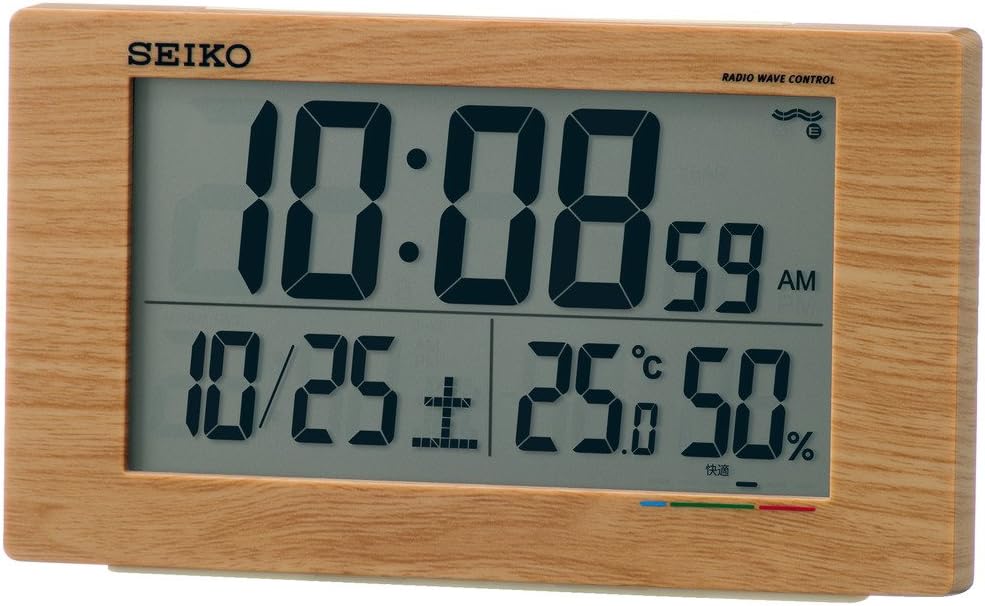
Figure 1 : Face avant view of the Seiko SQ784A Digital Alarm Clock, showing its dimensions (14.8cm width, 8.5cm height, 5.3cm depth) and key features such as electronic sound, snooze, light, full auto calendar, temperature, humidity, and low battery warning. The clock weighs 220g and requires two AA alkaline batteries.
2. Principales caractéristiques
- Radio Wave Time Correction: Automatically receives standard radio waves to correct the display time, ensuring accuracy. Operates with quartz accuracy if radio waves are not received.
- Digital Calendar: Affiche la date actuelle.
- Affichage de la température et de l'humidité : Provides real-time indoor temperature and humidity readings.
- Indicateur de confort : Displays a comfort level in 6 stages, based on temperature and humidity, to help maintain a comfortable environment. This is particularly useful for households with small children or elderly individuals.
- Fonction d'alarme : Includes an alarm with electronic sound and snooze feature.
- Rétroéclairage : Pour faciliter viewdans des conditions de faible luminosité.
- Avertissement de batterie faible : Indique quand les piles doivent être remplacées.

Figure 2 : Détaillé view of the clock's digital display, highlighting the time (10:08), date (10/25), temperature (25.0°C), humidity (50%), and the multi-colored comfort indicator bar at the bottom.
3. Installation
3.1 Installation de la batterie
- Ouvrez le couvercle du compartiment à piles situé à l'arrière de l'horloge.
- Insérez deux piles AA en respectant la polarité (+/-).
- Fermez soigneusement le couvercle du compartiment à piles.
3.2 Initial Time Setting (Radio Wave Reception)
The clock is designed to automatically receive standard radio waves to set the correct time. For optimal reception:
- Place the clock near a window where it can easily receive radio signals.
- Avoid locations that generate strong radio interference, such as:
- À l'intérieur des bâtiments, au fond des pièces ou dans les sous-sols.
- Près de haute voltagpar exemple, des lignes électriques, des tours de télévision ou des voies ferrées.
- Close to electronic appliances like TVs, refrigerators, air conditioners, air purifiers, computers, or fax machines.
- In vehicles (cars, trains, airplanes).
- Au-dessus ou à proximité de meubles métalliques comme des bureaux en acier.
If radio waves are not received, the clock will operate with standard quartz accuracy. Manual time adjustment may be necessary in areas with poor reception.

Figure 3: Illustration of radio wave clock reception, indicating optimal placement for receiving time signals from standard radio wave transmitters. The map shows coverage from Fukushima (40kHz) and Kyushu (60kHz) stations in Japan.
4. Mode d'emploi
4.1 Affichage des informations
L'affichage numérique indique les informations suivantes :
- Temps: Current time in HH:MM format, with AM/PM indicator.
- Date: Mois et jour.
- Température: Indoor temperature in Celsius.
- Humidité: Pourcentage d'humidité relative intérieuretage.
- Indicateur de confort : A visual representation of the "uncomfortable index" in 6 staget.
4.2 Comprendre l'indicateur de confort
The comfort indicator provides a quick reference for indoor environmental comfort. It is divided into 6 stagen:
- Zone verte: Indicates a "comfortable" environment.
- Blue Zone: Indicates a "cold" environment.
- Zone rouge: Indicates a "hot" environment.
Note: Individual perception of comfort may vary. Please use this indicator as a general guide.

Figure 4: Comfort indicator chart showing the relationship between temperature, humidity, and perceived comfort levels. It categorizes conditions from 'Cold' (discomfort index below 60) to 'Very Hot' (above 81), with 'Comfortable' in the 65-70 range.
4.3 Réglage de l'alarme
Specific buttons for alarm setting are typically located on the back or side of the clock. Refer to the button labels for "Alarm Set" or similar functions. Follow these general steps:
- Press the "Alarm Set" button to enter alarm setting mode.
- Use the adjustment buttons (e.g., Up/Down, +/–) to set the desired alarm time.
- Press "Alarm Set" again or wait for the display to exit setting mode.
- Ensure the alarm is activated using the "Alarm ON/OFF" switch or button.
4.4 Utilisation de la fonction Snooze
When the alarm sounds, press the large "Snooze/Light" button (usually located on top of the clock) to temporarily stop the alarm. The alarm will sound again after a few minutes (typically 5-10 minutes).
4.5 Manual Time Adjustment
If the clock fails to receive radio signals or if you are outside a reception area, you can manually set the time. Look for "Time Set" or "Manual Set" buttons on the clock and follow the on-screen prompts to adjust hours, minutes, and date.

Figure 5: Visual guide illustrating how the temperature and humidity display aids in health management and indoor environment control. It highlights benefits such as preventing mold and viruses, avoiding indoor heatstroke, encouraging regular checks of environmental conditions, and promoting comfortable sleep for children.
5. Entretien
5.1 Remplacement de la batterie
When the low battery indicator appears on the display, replace both AA batteries promptly. Old batteries should be disposed of according to local regulations.
5.2 Nettoyage
Essuyez l'horloge avec un chiffon doux et sec. N'utilisez pas de nettoyants abrasifs, de solvants ni de produits chimiques en aérosol, car ils pourraient endommager la finition ou les composants internes.
6. Dépannage
6.1 Absence d'affichage ou affichage faible
- Vérifiez que les piles sont correctement installées et que la polarité est correcte.
- Remplacez les anciennes piles par des neuves.
6.2 Affichage de l'heure incorrect
- Radio Wave Reception: Ensure the clock is placed in an optimal location for radio wave reception (near a window, away from interference). Try moving the clock to a different spot.
- Réglage manuel : If automatic reception consistently fails, manually set the time as described in Section 4.5.
6.3 Alarme non sonore
- Verify that the alarm function is activated (Alarm ON/OFF switch).
- Check if the alarm time is set correctly.
7. Spécifications
| Fonctionnalité | Détail |
|---|---|
| Numéro de modèle | SQ784A |
| Marque | Seiko |
| Type d'affichage | Numérique |
| Couleur | Light brown wood grain |
| Dimensions du produit | 14.8 cm (largeur) x 8.5 cm (hauteur) |
| Poids de l'article | 0.22 kilogrammes |
| Source d'énergie | Alimenté par batterie |
| Piles requises | Oui |
| Type de batterie | AA (x2) |
| Caractéristiques spéciales | Radio Control, Digital Calendar, Temperature, Humidity, Comfort Display, Alarm, Snooze, Backlight |
| Utilisation intérieure/extérieure | Intérieur |
8. Garantie et assistance
8.1 Informations sur la garantie
Your Seiko SQ784A Digital Alarm Clock is covered by a manufacturer's warranty. Please refer to the warranty card included with your product for specific terms, conditions, and duration. Retain your proof of purchase for warranty claims.
8.2 Assistance clientèle
For further assistance, technical support, or inquiries regarding your product, please contact Seiko customer service. Contact details can typically be found on the official Seiko website ou sur l'emballage du produit.


