
Introduction
This manual provides comprehensive instructions for the setup, operation, and maintenance of your MASTER & DYNAMIC MH40 Over-Ear Headphones. Please read this guide thoroughly to ensure optimal performance and longevity of your device.
Contenu du colis
Vérifiez que tous les éléments sont présents dans votre colis :
- MASTER & DYNAMIC MH40 Over-Ear Headphones
- Audio Cable with In-line Microphone
- USB-C Charging Cable (for Bluetooth functionality)
- Canvas Carrying Case
- Manuel de l'utilisateur (ce document)
Produit terminéview
The MH40 headphones are designed with premium materials for durability and comfort. Key components include:
- Carrosserie en aluminium forgé : Provides a robust and lightweight structure.
- Lambskin Ear Pads: Offer comfort for extended listening sessions.
- Custom Neodymium Drivers: Engineered for superior sound reproduction.
- Bandeau réglable : Assure un ajustement sûr et confortable.
- Câbles détachables : For both audio and charging.

Figure 1: MASTER & DYNAMIC MH40 Over-Ear Headphones, showcasing black metal and camo leather design.
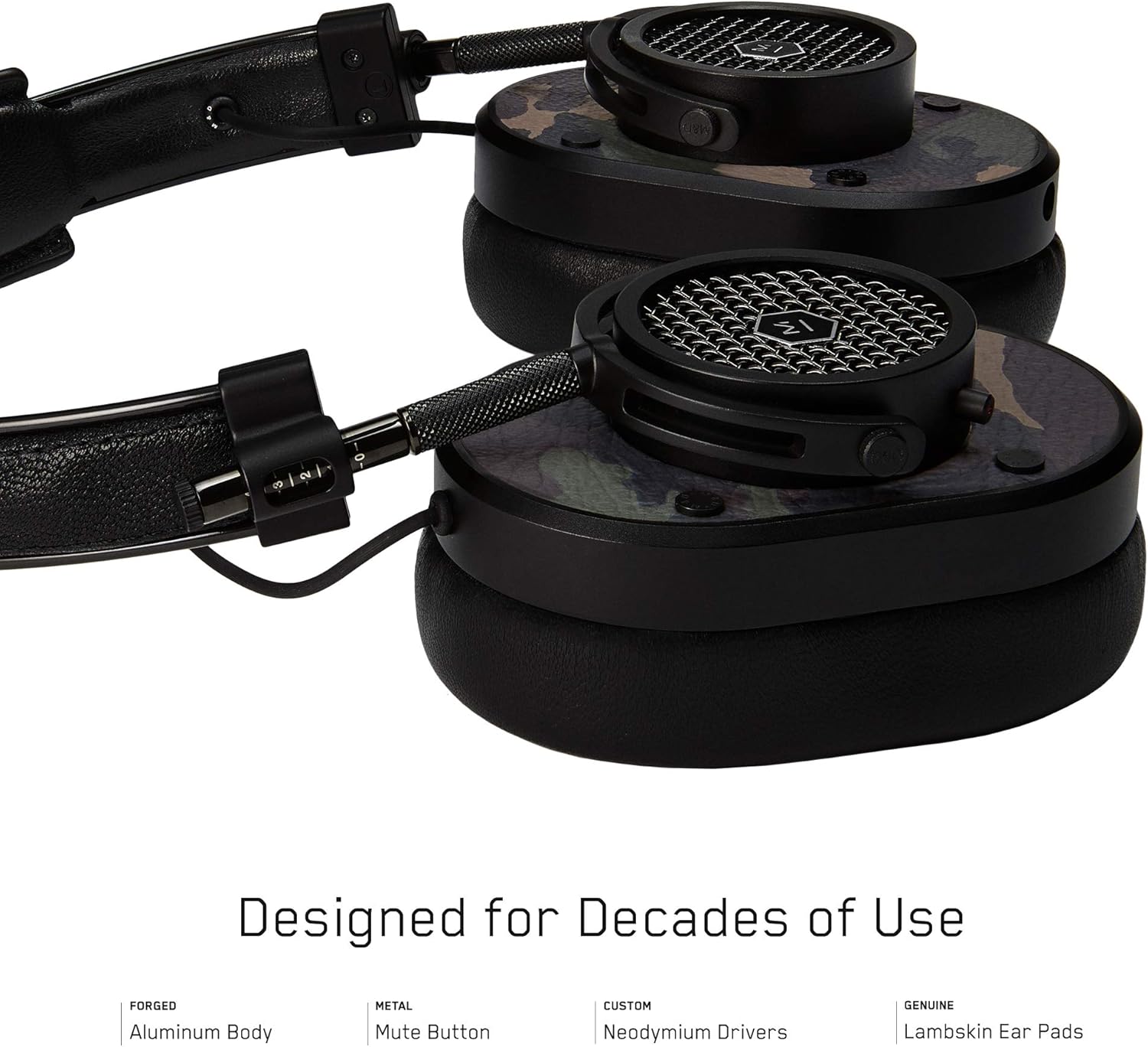
Figure 2 : Détaillé view of the MH40 headphone earcups, highlighting the lambskin ear pads, metal grille, and adjustable hinge.
Installation
1. Ajustement de l'ajustement
- Gently extend or retract the metal arms on each side of the headband to adjust the height.
- Positionnez les oreillettes de manière à ce qu'elles recouvrent entièrement vos oreilles, pour un maintien confortable et sûr.
- The lambskin ear pads are designed to conform to your head shape for optimal sound isolation and comfort.
2. Connexion filaire
- Locate the audio input port on the left earcup.
- Insert one end of the provided audio cable into the headphone's audio input.
- Connect the other end of the audio cable to your audio device's 3.5mm jack.
3. Appairage Bluetooth (connexion sans fil)
The MH40 headphones support Bluetooth connectivity for wireless audio. Ensure the headphones are charged before pairing.
- Mise sous tension : Press and hold the power button (usually located on one of the earcups) until the indicator light flashes.
- Mode d'appariement: Continue holding the power button or press a dedicated Bluetooth pairing button (if available) until the indicator light flashes rapidly, indicating pairing mode.
- Connexion de l'appareil : On your audio device (smartphone, tablet, computer), navigate to Bluetooth settings and select "MH40" from the list of available devices.
- Confirmation: The indicator light on the headphones will turn solid blue or green once successfully paired.
Note: The Bluetooth range is approximately 10 meters (33 feet).
Mode d'emploi
Lecture audio
- Lecture/Pause : Press the multi-function button (often on the in-line microphone or earcup) once.
- Piste suivante : Appuyez deux fois rapidement sur le bouton multifonction.
- Piste précédente: Appuyez rapidement trois fois sur le bouton multifonction.
- Contrôle du volume : Use the volume up/down buttons on the in-line microphone or dedicated earcup controls.
Gestion des appels
- Répondre/Terminer l'appel : Appuyez une fois sur le bouton multifonction.
- Rejeter l'appel : Maintenez le bouton multifonction enfoncé pendant environ 2 secondes.
- Microphone muet : The MH40 features a dedicated mute button, typically located on the earcup or in-line control. Press to mute/unmute during a call.
Entretien
- Nettoyage: Use a soft, dry cloth to wipe the headphones. For leather parts, use a specialized leather cleaner if necessary. Avoid harsh chemicals or abrasive materials.
- Stockage: When not in use, store the headphones in the provided canvas carrying case to protect them from dust and scratches.
- Entretien des câbles : Handle cables gently. Avoid sharp bends or excessive pulling to prevent damage. The retractable cable feature helps manage cable length.
- Coussinets d'oreille : The magnetic ear pads are removable for cleaning or replacement. Gently pull them off and reattach by aligning the magnets.
Dépannage
Pas de son
- Wired: Ensure the audio cable is securely connected to both the headphones and the audio source. Check the volume level on both the headphones and the source device.
- Bluetooth : Verify that the headphones are powered on and successfully paired with your device. Check the volume levels. Try re-pairing the headphones.
Impossible de jumeler via Bluetooth
- Ensure the headphones are in pairing mode (rapidly flashing indicator light).
- Assurez-vous que le Bluetooth est activé sur votre appareil source.
- Rapprochez les écouteurs de votre appareil (à moins de 10 mètres).
- Éteignez puis rallumez le casque et votre appareil, puis réessayez de les appairer.
- Si l'appareil a déjà été jumelé, essayez de le « supprimer » de votre appareil et de le jumeler à nouveau.
Microphone ne fonctionne pas
- Check if the microphone mute button is engaged.
- Ensure the audio cable with the in-line microphone is fully inserted.
- Vérifiez les paramètres d'entrée du microphone sur votre appareil connecté.
Caractéristiques
| Nom du modèle | MH40 |
| Technologie de connectivité | Filaire, Bluetooth |
| Technologie de communication sans fil | Bluetooth |
| Matériel | Copper (components), Lambskin (ear pads), Canvas (carrying case) |
| Type de contrôle | Contrôle des appels, tactile |
| Fonctionnalité du câble | Rétractable |
| Poids de l'article | 0.36 kilogrammes (12.7 onces) |
| Type de pilote audio | Pilote dynamique |
| Portée Bluetooth | 10 mètres |
| Forme de l'écouteur | Sur l'oreille |
| Caractéristiques spéciales | Carrying case included, Lightweight, Microphone Included, Noise Isolation, Wireless |
| Dimensions du produit | 7.48 x 6.3 x 2.76 pouces |
| Fabricant | MASTER & DYNAMIC |
| Couleur | Black Metal / Camo Leather |
| Placement des oreilles | Sur l'oreille |
| Contrôle du bruit | Isolation acoustique |
| Code UPC | 858901007099 |
Garantie et assistance
For detailed warranty information and customer support, please refer to the official MASTER & DYNAMIC webConsultez leur site web ou contactez directement leur service client. Conservez votre preuve d'achat pour toute réclamation au titre de la garantie.
Support en ligne: www.masterdynamic.com/support (Example lien, le lien réel peut varier)


